1. ആമുഖം
This manual provides essential instructions for setting up, operating, and maintaining your Qubo Flip Phone for Seniors. Designed for ease of use, this phone features a large screen, big buttons, and an SOS function for enhanced safety. Please read this manual carefully to ensure proper use and to maximize the phone's capabilities.

Figure 1: The Qubo Flip Phone for Seniors, open and ready for use.
2. പാക്കേജ് ഉള്ളടക്കം
താഴെ പറയുന്ന ഇനങ്ങൾക്കായി ബോക്സ് ചെക്ക് ചെയ്യുക:
- Qubo Flip Phone
- Rechargeable Battery (1000 mAh)
- ചാർജിംഗ് കേബിൾ
- ചാർജിംഗ് ഡോക്ക് (നിങ്ങളുടെ മോഡലിനൊപ്പം ഉൾപ്പെടുത്തിയിട്ടുണ്ടെങ്കിൽ)
- ഉപയോക്തൃ മാനുവൽ
ഏതെങ്കിലും ഇനങ്ങൾ നഷ്ടപ്പെട്ടാലോ കേടുപാടുകൾ സംഭവിച്ചാലോ, ദയവായി നിങ്ങളുടെ റീട്ടെയിലറെ ബന്ധപ്പെടുക.
3. സജ്ജീകരണം
3.1. സിം കാർഡ്(കൾ) ചേർക്കൽ
The Qubo Flip Phone supports dual SIM cards. Ensure the phone is powered off before inserting or removing SIM cards.
- ഫോണിന്റെ പിൻ കവർ പതുക്കെ നീക്കം ചെയ്യുക.
- Locate the SIM card slot(s).
- Insert the SIM card(s) into the designated slot(s) with the gold contacts facing down, ensuring they are correctly seated.
- പുറംചട്ട മാറ്റിസ്ഥാപിക്കുക.
3.2. ബാറ്ററി ചേർക്കുന്നു
Ensure the phone is powered off before inserting the battery.
- With the back cover removed, align the battery contacts with the contacts in the phone's battery compartment.
- Press the battery gently into place.
- പുറംചട്ട മാറ്റിസ്ഥാപിക്കുക.
3.3. ഫോൺ ചാർജ് ചെയ്യുന്നു
ആദ്യ ഉപയോഗത്തിന് മുമ്പ്, ഫോണിന്റെ ബാറ്ററി പൂർണ്ണമായും ചാർജ് ചെയ്യുക.
- Connect the charging cable to the phone's charging port or place the phone in the charging dock.
- Connect the other end of the charging cable to a power adapter and plug it into a wall outlet.
- സ്ക്രീനിലെ ബാറ്ററി ഇൻഡിക്കേറ്റർ ചാർജിംഗ് സ്റ്റാറ്റസ് കാണിക്കും.
- പൂർണ്ണമായി ചാർജ് ചെയ്തുകഴിഞ്ഞാൽ, ചാർജർ വിച്ഛേദിക്കുക.
3.4. പവർ ഓൺ/ഓഫ്
- പവർ ഓൺ ചെയ്യാൻ: അമർത്തിപ്പിടിക്കുക പവർ/എൻഡ് കോൾ സ്ക്രീൻ പ്രകാശിക്കുന്നത് വരെ ബട്ടൺ.
- പവർ ഓഫ് ചെയ്യാൻ: അമർത്തിപ്പിടിക്കുക പവർ/എൻഡ് കോൾ ബട്ടൺ അമർത്തി, ഓപ്ഷനുകളിൽ നിന്ന് "പവർ ഓഫ്" തിരഞ്ഞെടുക്കുക.
4. പ്രവർത്തന നിർദ്ദേശങ്ങൾ
4.1. അടിസ്ഥാന കോൾ പ്രവർത്തനങ്ങൾ
- ഒരു കോൾ ചെയ്യുന്നു: കീപാഡ് ഉപയോഗിച്ച് നമ്പർ ഡയൽ ചെയ്ത് അമർത്തുക ഗ്രീൻ കോൾ ബട്ടൺ.
- ഒരു കോളിന് മറുപടി നൽകുന്നു: When the phone rings, open the flip (if enabled in settings) or press the ഗ്രീൻ കോൾ ബട്ടൺ.
- ഒരു കോൾ അവസാനിപ്പിക്കുന്നു: അമർത്തുക റെഡ് എൻഡ് കോൾ button or close the flip.
- വോളിയം നിയന്ത്രണം: Use the dedicated volume buttons on the side of the phone during a call.
4.2. സന്ദേശങ്ങൾ അയയ്ക്കലും സ്വീകരിക്കലും
- എന്നതിലേക്ക് നാവിഗേറ്റ് ചെയ്യുക സന്ദേശങ്ങൾ മെനു.
- തിരഞ്ഞെടുക്കുക സന്ദേശം എഴുതുക to compose a new SMS.
- Enter the recipient's number or select from the phonebook.
- കീപാഡ് ഉപയോഗിച്ച് നിങ്ങളുടെ സന്ദേശം ടൈപ്പ് ചെയ്യുക.
- അമർത്തുക അയക്കുക.
- New messages will appear in the ഇൻബോക്സ്.
4.3. SOS Emergency Function
The SOS button provides quick access to help in emergencies. It can be configured to call and send messages to up to 5 pre-set family numbers.

Figure 2: Location and function of the SOS button.
- SOS നമ്പറുകൾ സജ്ജീകരിക്കുന്നു: പോകുക ക്രമീകരണങ്ങൾ > SOS ക്രമീകരണങ്ങൾ to add up to 5 emergency contacts.
- SOS സജീവമാക്കുന്നു: അടിയന്തര സാഹചര്യത്തിൽ, അമർത്തിപ്പിടിക്കുക SOS ബട്ടൺ on the back of the phone. The phone will automatically call the pre-set numbers in sequence and send an emergency SMS.
4.4. ഫോൺബുക്ക്
Store frequently used contacts for easy dialing.
- എന്നതിലേക്ക് നാവിഗേറ്റ് ചെയ്യുക ഫോൺബുക്ക് മെനു.
- തിരഞ്ഞെടുക്കുക പുതിയ കോൺടാക്റ്റ് ചേർക്കുക.
- Enter the name and phone number, then സംരക്ഷിക്കുക.
- You can assign direct dial numbers to M1 and M2 buttons for quick access.
4.5. മറ്റ് സവിശേഷതകൾ
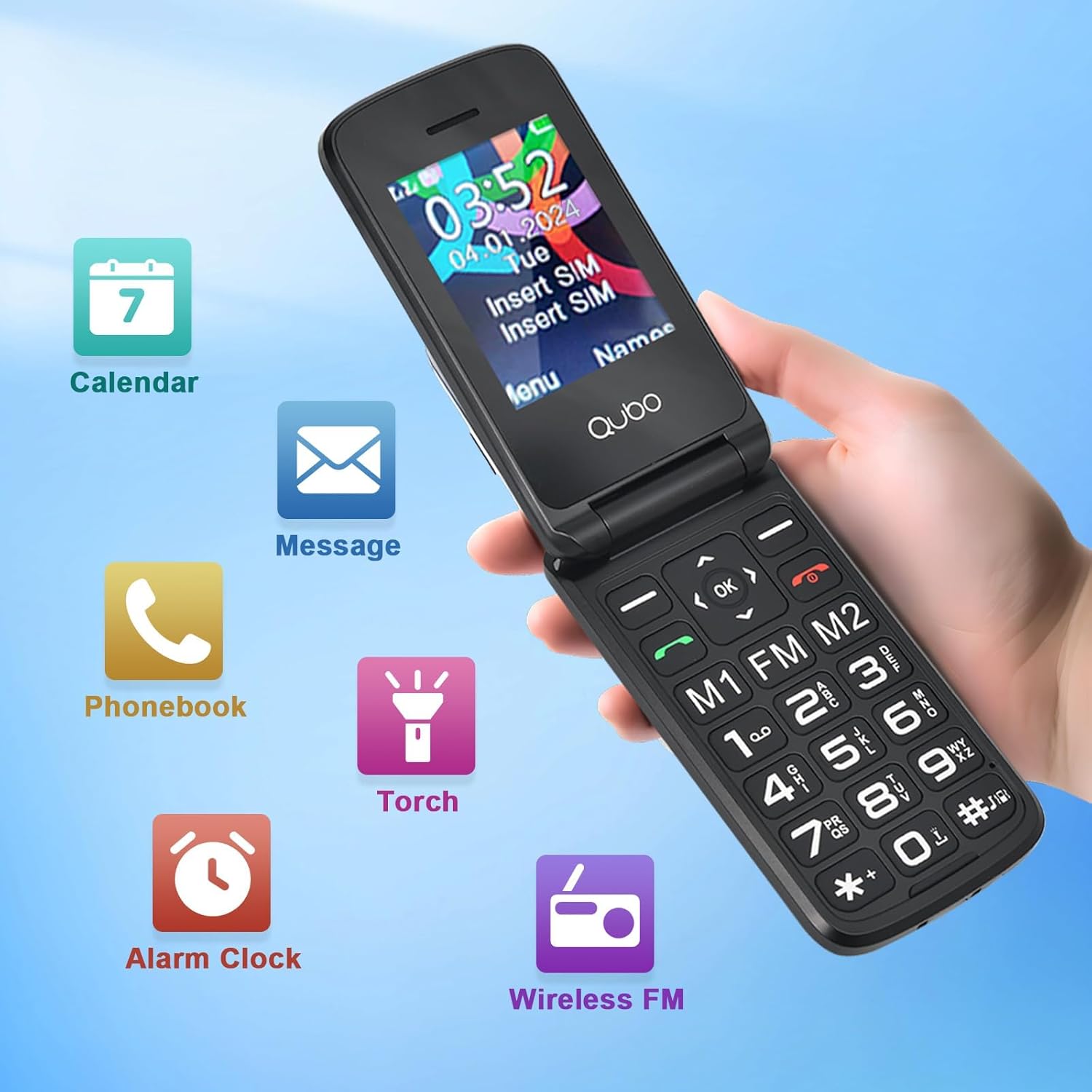
ചിത്രം 3: ഓവർview of phone features including Calendar, Messages, Phonebook, Flashlight, Alarm Clock, and FM Radio.
- എഫ്എം റേഡിയോ: Access the FM Radio from the main menu. A headset may be required for optimal reception (not included).
- ഫ്ലാഷ്ലൈറ്റ്: Activate the flashlight from the menu or via a dedicated shortcut button (if available).
- അലാറം ക്ലോക്ക്: റിമൈൻഡറുകൾക്കോ വേക്ക്-അപ്പ് കോളുകൾക്കോ വേണ്ടി അലാറങ്ങൾ സജ്ജമാക്കുക.
- കലണ്ടർ: View dates and add simple reminders.
- ഡിസ്പ്ലേ ക്രെമീകരണങ്ങൾ: Adjust font size and brightness for better readability.

Figure 4: The Qubo Flip Phone features large buttons, big fonts, and a loud ringtone for enhanced usability.
5. പരിപാലനം
- വൃത്തിയാക്കൽ: Use a soft, dry cloth to clean the phone's screen and body. Avoid liquid cleaners.
- ബാറ്ററി കെയർ: Do not expose the battery to extreme temperatures. Charge regularly, but avoid overcharging or letting the battery completely drain for extended periods.
- സംഭരണം: നേരിട്ട് സൂര്യപ്രകാശം ഏൽക്കാത്തതും ഈർപ്പമുള്ളതുമായ ഒരു തണുത്ത വരണ്ട സ്ഥലത്ത് ഫോൺ സൂക്ഷിക്കുക.
- ജല പ്രതിരോധം: ഈ ഫോൺ വെള്ളത്തെ പ്രതിരോധിക്കുന്നില്ല. ദ്രാവകങ്ങളുമായുള്ള സമ്പർക്കം ഒഴിവാക്കുക.
6. പ്രശ്നപരിഹാരം
| പ്രശ്നം | സാധ്യമായ കാരണം | പരിഹാരം |
|---|---|---|
| ഫോൺ ഓൺ ആകുന്നില്ല. | ബാറ്ററി ചാർജ് കുറവാണ്; ബാറ്ററി ശരിയായി ചേർത്തിട്ടില്ല. | ബാറ്ററി ചാർജ് ചെയ്യുക; ബാറ്ററി ശരിയായി വീണ്ടും ചേർക്കുക. |
| കോളുകൾ വിളിക്കാനോ സ്വീകരിക്കാനോ കഴിയില്ല | സിം കാർഡ് ഇല്ല; സിം കാർഡ് സജീവമാക്കിയിട്ടില്ല; നെറ്റ്വർക്ക് കവറേജിന് പുറത്താണ്. | Insert SIM card; Contact your service provider; Move to an area with better reception. |
| Poor call quality/noise | ദുർബലമായ സിഗ്നൽ; ഇടപെടൽ | മികച്ച സിഗ്നൽ ലഭിക്കുന്ന ഒരു സ്ഥലത്തേക്ക് നീങ്ങുക; തടസ്സങ്ങളുടെ ഉറവിടങ്ങൾ ഒഴിവാക്കുക. |
| "Memory Full" message (for photos/messages) | ആന്തരിക മെമ്മറി നിറഞ്ഞിരിക്കുന്നു | Delete old messages or photos. Consider adding an external memory card (MicroSD, not included) if the phone supports it for additional storage. |
| SOS ബട്ടൺ പ്രവർത്തിക്കുന്നില്ല. | SOS numbers not set up; Feature disabled | Ensure SOS numbers are configured in settings; Verify the feature is enabled. |
പ്രശ്നം നിലനിൽക്കുകയാണെങ്കിൽ, ദയവായി ഉപഭോക്തൃ പിന്തുണയുമായി ബന്ധപ്പെടുക.
7 സ്പെസിഫിക്കേഷനുകൾ
| ഫീച്ചർ | വിശദാംശങ്ങൾ |
|---|---|
| ബ്രാൻഡ് | ഖുബോ |
| മോഡൽ നമ്പർ | 48f44b3a-d6eb-48d1-a82b-391cc9bc3008 |
| നിറം | കറുപ്പ് |
| ഉൽപ്പന്ന തരം | ഫ്ലിപ്പ് ഫോൺ |
| ഓപ്പറേറ്റിംഗ് സിസ്റ്റം | Proprietary OS |
| സ്ക്രീൻ വലിപ്പം | 2.4 ഇഞ്ച് |
| കണക്റ്റിവിറ്റി | 2G (GSM) |
| പ്രത്യേക സവിശേഷതകൾ | Wireless, SOS Button, Large Buttons, FM Radio, Flashlight |
| ബാറ്ററി കോമ്പോസിഷൻ | ലിഥിയം |
| ബാറ്ററി ശേഷി | 1000 mAh (approximate, inferred from feature bullet) |
| സിപിയു മോഡൽ | Mediatek Dimensity 900 (Note: This might be a generic entry, as 2G phones typically have simpler CPUs) |
| റെസലൂഷൻ | 320 x 240 |
| വയർലെസ് കാരിയർ | All carriers (Unlocked) |
8. വാറൻ്റി വിവരങ്ങൾ
Warranty details for your Qubo Flip Phone are typically provided with the product packaging or can be obtained from the point of purchase. Please retain your proof of purchase for warranty claims. For specific warranty terms and conditions, refer to the documentation included in your product box or contact the seller directly.
9. പിന്തുണ
For further assistance, technical support, or inquiries regarding your Qubo Flip Phone, please contact the seller or manufacturer through the contact information provided at the time of purchase. You may also refer to the official Qubo webഅധിക വിഭവങ്ങൾക്കായുള്ള സൈറ്റ്.


