ആമുഖം
This user manual provides comprehensive instructions for the operation, maintenance, and troubleshooting of your Benetech GT1355B Decibel Meter. This device is designed for accurate measurement of sound and noise levels, suitable for various environments including home, classroom, and industrial settings. Please read this manual thoroughly before using the device to ensure proper and safe operation.
ഉൽപ്പന്നം കഴിഞ്ഞുview കൂടാതെ പ്രധാന സവിശേഷതകൾ
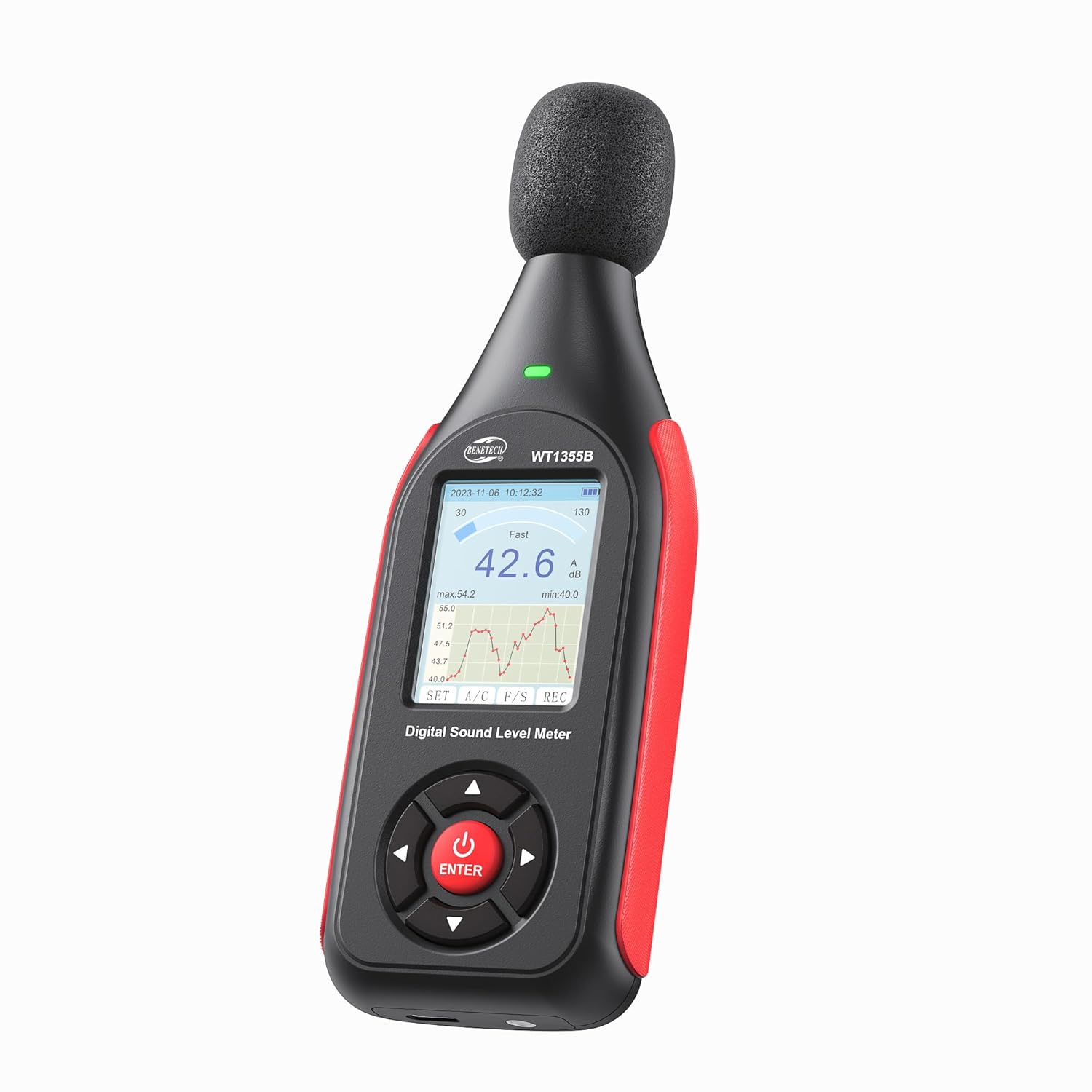
The Benetech GT1355B Decibel Meter, a compact and ergonomic device for sound level measurement.

The GT1355B is designed to be lightweight and portable, making it easy to carry and use in various locations.
- A/C Weighted Measurement: The decibel meter utilizes a condenser microphone to accurately measure sound levels from 30 to 130 dB (A) and 35 to 130 dB (C), with an accuracy of ±1.5 dB. It covers a frequency range from 31.5 Hz to 8,500 Hz.

Illustration of A-weighting for human ear perception and C-weighting for equipment noise measurement.
- വായിക്കാൻ എളുപ്പമുള്ള LCD ഡിസ്പ്ലേ: The backlit LCD screen provides clear visual representation of noise data, including Max value. Users can switch between fast/slow time weighting and freeze current readings. An indicator light and screen color change provide visual alerts when sound levels exceed set alarm values.

വിശദമായി view of the LCD screen showing various indicators like date, time, battery, measurement range, and data graph.
- Real-Time Monitoring & Data Recording: The SPL meter can store up to 43,000 sets of data. Data can be imported to a PC via the USB port for real-time sampling, analysis, downloading, printing charts, and deletion. The device also allows setting date, automatic shutdown time, and features a low battery indicator.

The device supports saving up to 43,000 sets of data, which can be managed via PC connection.
- Long-Lasting Battery & Portability: Equipped with a non-slip rubber grip, the meter is easy to handle. It features 1/4-inch mounting threads for tripod attachment, allowing for extended monitoring. A 1.5-hour charge provides up to 8 hours of standby time.

The decibel meter charges via a USB-C port, offering quick charging and extended duration.

The device can be mounted on a stand for continuous monitoring, as shown with a small tripod.
പാക്കേജ് ഉള്ളടക്കം
The Benetech GT1355B Decibel Meter package includes the following items:
- 1x Benetech GT1355B Decibel Meter
- 1x USB Cable (for charging and data transfer)
- 1x ഉപയോക്തൃ മാനുവൽ
ഉൽപ്പന്ന ഘടകങ്ങൾ
Familiarize yourself with the different parts of your decibel meter:

Diagram illustrating the key components of the Benetech GT1355B Decibel Meter, including the condenser microphone, windproof sponge, alarm indicator light, LCD screen, control buttons, tripod mounting screw holes, calibration knob, and Type-C port.
- കണ്ടൻസർ മൈക്രോഫോൺ: High-precision sensor for sound capture.
- Windproof Sponge: Reduces wind noise interference during measurements.
- അലാറം ഇൻഡിക്കേറ്റർ ലൈറ്റ്: Provides visual alerts for sound level thresholds.
- LCD Backlight Screen: Displays measurement data, graphs, and settings.
- നിയന്ത്രണ ബട്ടണുകൾ:
- Power On/Off / Confirm Key (Red button)
- Move up/Increment/Hold
- Left/Back/Zoom Out Line Chart
- Right/Enter/Enlarge Line Chart
- Shift Down/Decrement
- Tripod Mounting Screw Holes: For attaching the device to a stand.
- Calibration Knob: Used for fine-tuning calibration.
- ടൈപ്പ്-സി പോർട്ട്: For charging and connecting to a PC.
സജ്ജമാക്കുക
1 ഉപകരണം ചാർജ് ചെയ്യുന്നു
Before first use, fully charge the decibel meter. Connect the provided USB cable to the Type-C port on the device and the other end to a standard USB power adapter (not included) or a computer's USB port. The battery indicator on the LCD screen will show charging status. A full charge takes approximately 1.5 hours and provides up to 8 hours of standby time.
2. പ്രാരംഭ പവർ ഓൺ
Press and hold the red power button (usually located at the bottom center of the control panel) for a few seconds until the LCD screen illuminates.
3 തീയതിയും സമയവും ക്രമീകരിക്കുന്നു
Upon first power-on or after a long period of disuse, you may need to set the date and time. Tap the red power button once the device is on to cycle through various settings. Use the navigation buttons (left/right/up/down) to adjust values and the red button to confirm.

The device offers various settings including LCD backlight, low battery indicator, auto power off, and date & time settings.
പ്രവർത്തന നിർദ്ദേശങ്ങൾ
1. പവർ ഓൺ/ഓഫ്
- To turn on: Press and hold the red power button until the screen lights up.
- To turn off: Press and hold the red power button until the screen turns off.
2. Measurement Modes (A/C Weighting & Fast/Slow)
The GT1355B supports both A and C frequency weighting, and Fast and Slow time weighting.
- A-Weighting: Simulates the human ear's response to sound, commonly used for environmental noise measurements.
- C-Weighting: Provides a flatter response, suitable for measuring the true sound level of machinery or peak noise.
- Fast Time Weighting: Responds quickly to changes in sound level, ideal for fluctuating or unsteady noise.
- Slow Time Weighting: Provides an averaged reading, suitable for measuring steady-state noise.
Use the "A/C" button to switch between A and C weighting, and the "F/S" button to switch between Fast and Slow time weighting.

Explanation of Fast and Slow time weighting for different noise measurement scenarios.
3. ഡിസ്പ്ലേ വായിക്കൽ
The LCD screen displays the current decibel reading, along with a real-time graph of sound level changes. It also shows minimum (min) and maximum (max) values recorded during the current measurement session.
4. Visual Alarm Function
The device features a visual alarm system that changes the screen color and activates an indicator light when sound levels exceed predefined thresholds.
- Setting Alarm Thresholds: Navigate to the alarm settings menu using the control buttons. You can set a low alarm value (e.g., yellow alert) and a high alarm value (e.g., red alert). Ensure the high alarm value is greater than the low alarm value.
- അലാറം സൂചന:
- Blue Screen: Sound level is below both alarm thresholds.
- Yellow Screen: Sound level is between the low and high alarm thresholds.
- Red Screen: Sound level exceeds the high alarm threshold.

Visual representation of the three-color alarm system: blue for normal, yellow for low alarm exceeded, and red for high alarm exceeded.

Screenshot showing the interface for customizing yellow and red alarm thresholds.
5. Data Recording and Transfer to PC
The GT1355B can record up to 43,000 data sets. To initiate recording, press the "REC" button. To transfer data to a PC:
- Connect the decibel meter to your PC using the provided USB cable.
- The device should be recognized as a storage device or a serial port.
- Install the dedicated software (typically provided on a mini-CD or available for download from the manufacturer's webസൈറ്റ്).
- Use the software to perform real-time data sampling, download recorded data, analyze charts, print reports, and delete data from the device.
Note: The software is compatible with Windows operating systems. macOS (iOS) is not supported for data transfer and analysis.

The decibel meter supports real-time measuring, data import to PC, storage of lab format files, data saving, saving as Excel, and printing data via dedicated Windows software.
മെയിൻ്റനൻസ്
- വൃത്തിയാക്കൽ: ഉപകരണം വൃത്തിയാക്കാൻ മൃദുവായതും ഉണങ്ങിയതുമായ തുണി ഉപയോഗിക്കുക. അബ്രസീവ് ക്ലീനറുകളോ ലായകങ്ങളോ ഉപയോഗിക്കരുത്.
- സംഭരണം: Store the device in a cool, dry place away from direct sunlight and extreme temperatures. If storing for extended periods, ensure the battery is partially charged (around 50%) to prolong its lifespan.
- മൈക്രോഫോൺ കെയർ: Keep the microphone and windproof sponge clean and free from dust or debris to ensure accurate readings.
ട്രബിൾഷൂട്ടിംഗ്
| പ്രശ്നം | സാധ്യമായ കാരണം | പരിഹാരം |
|---|---|---|
| ഉപകരണം പവർ ഓണാക്കുന്നില്ല. | കുറഞ്ഞ ബാറ്ററി അല്ലെങ്കിൽ ഉപകരണത്തിന്റെ തകരാറ്. | Charge the device fully. If the issue persists, contact customer support. |
| കൃത്യമല്ലാത്ത വായനകൾ. | Microphone obstructed, incorrect weighting/time settings, or calibration needed. | Ensure microphone is clear. Check A/C and Fast/Slow settings. Refer to calibration instructions if available, or contact support for professional calibration. |
| Cannot connect to PC or transfer data. | Incorrect USB cable, driver issues, or software incompatibility. | Ensure you are using the correct USB cable. Verify that the software drivers are correctly installed. Confirm your operating system is Windows, as macOS is not supported. Try a different USB port or PC. |
| Screen display issues (e.g., frozen, dim). | സോഫ്റ്റ്വെയർ തകരാറ് അല്ലെങ്കിൽ കുറഞ്ഞ ബാറ്ററി. | Restart the device. Charge the device. If the problem continues, contact customer support. |
സ്പെസിഫിക്കേഷനുകൾ
| പരാമീറ്റർ | മൂല്യം |
|---|---|
| മോഡൽ നമ്പർ | GT1355B |
| അളക്കൽ ശ്രേണി | 30dB to 130dB(A) / 35dB to 130dB(C) |
| കൃത്യത | ±1.5 ഡിബി |
| ഫ്രീക്വൻസി പ്രതികരണം | 31.5 Hz മുതൽ 8,500 Hz വരെ |
| റെസലൂഷൻ | 0.1 ഡി.ബി |
| ഡാറ്റ സംഭരണ ശേഷി | Up to 43,000 sets of data |
| ബാറ്ററി തരം | 1 ലിഥിയം പോളിമർ ബാറ്ററി (ഉൾപ്പെടുത്തിയിരിക്കുന്നു) |
| ചാർജിംഗ് സമയം | ഏകദേശം 1.5 മണിക്കൂർ |
| സ്റ്റാൻഡ്ബൈ സമയം | 8 മണിക്കൂർ വരെ |
| ഉൽപ്പന്ന അളവുകൾ | 6.1 x 2.16 x 1.18 ഇഞ്ച് |
| ഇനത്തിൻ്റെ ഭാരം | 7.83 ഔൺസ് |

The device is equipped with a 1/2 condenser microphone, offering high precision with ±1.5 dB accuracy and 0.1 dB resolution across a wide frequency range.

A chart illustrating typical noise levels and their potential impact, ranging from very quiet (0-20dB) to extremely deafening (above 120dB).
വാറൻ്റിയും പിന്തുണയും
Your Benetech GT1355B Decibel Meter comes with a 12-month warranty. For any questions, technical assistance, or warranty claims, please contact Benetech customer service. Our support team is available 24/7 to assist you.
Note: The device is factory calibrated to a standard of 94 dB @ 1kHz before shipment.


