1. ആമുഖം
This manual provides detailed instructions for the installation, operation, and maintenance of your Cuifati Wired Video Intercom System. This system enhances home security by allowing visual and audio communication with visitors at your door. It features a 7-inch indoor monitor and an outdoor camera with HD night vision and a 120-degree wide-angle view.
2. പാക്കേജ് ഉള്ളടക്കം
താഴെ ലിസ്റ്റ് ചെയ്തിരിക്കുന്ന എല്ലാ ഇനങ്ങളും നിങ്ങളുടെ പാക്കേജിൽ ഉൾപ്പെടുത്തിയിട്ടുണ്ടെന്ന് ദയവായി പരിശോധിക്കുക. ഏതെങ്കിലും ഇനങ്ങൾ നഷ്ടപ്പെട്ടിട്ടുണ്ടെങ്കിലോ കേടായിട്ടുണ്ടെങ്കിലോ, ദയവായി ഉപഭോക്തൃ പിന്തുണയുമായി ബന്ധപ്പെടുക.
- 1 x Indoor Monitor Unit
- 1 x Outdoor Camera Unit
- 1 x Rain Cover for Outdoor Unit
- 3 x Connection Cables
- 6 x എക്സ്പാൻഷൻ സ്ക്രൂകൾ
- 7 x മെറ്റൽ സ്ക്രൂകൾ
- 1 x സ്ക്രൂ പ്ലഗ്
- 1 x പവർ അഡാപ്റ്റർ
- 1 x Mounting Bracket (for indoor unit)
3. ഉൽപ്പന്നം കഴിഞ്ഞുview
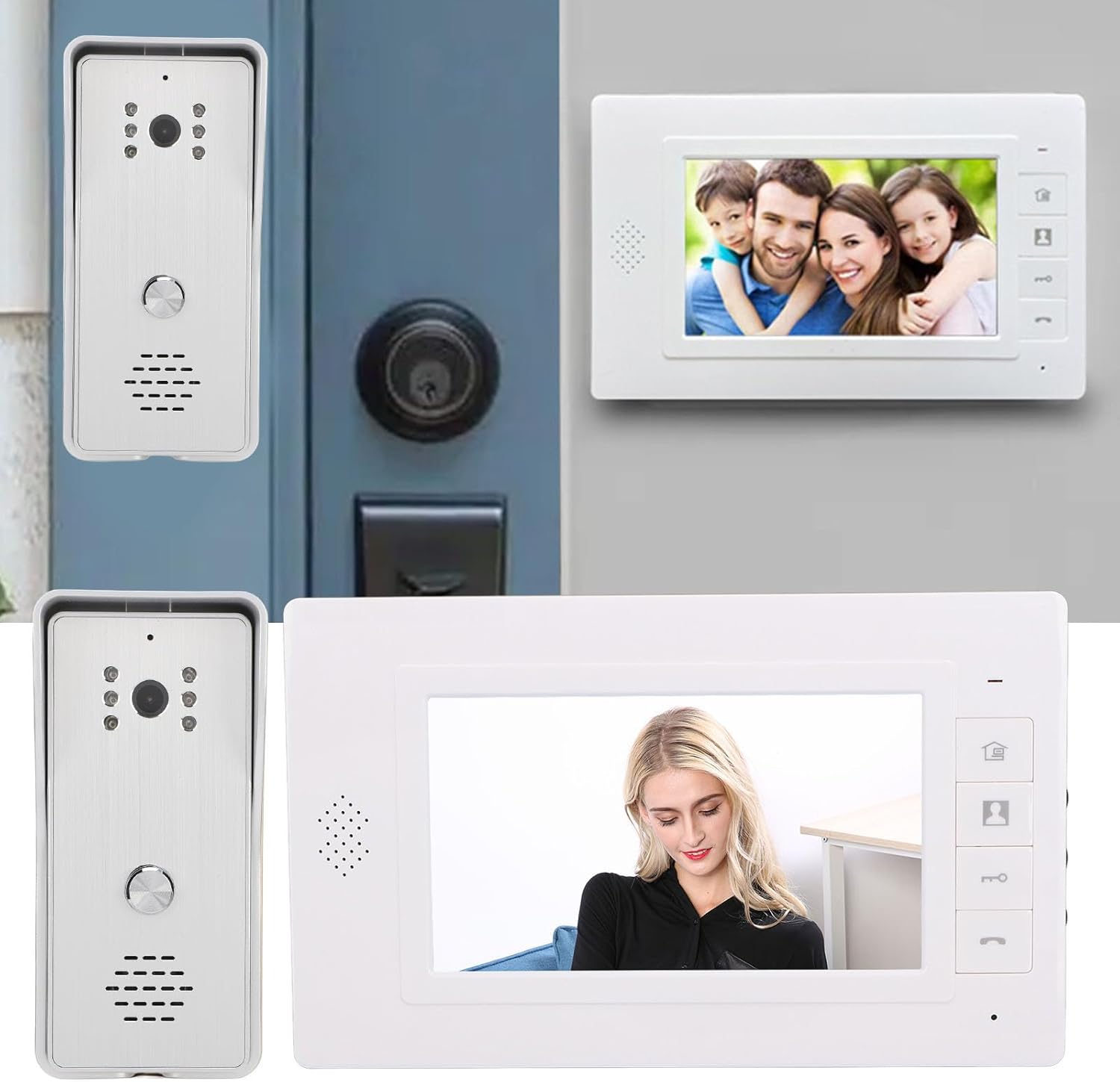
The Cuifati Wired Video Intercom System consists of an indoor monitor and an outdoor camera unit. Familiarize yourself with the components and controls before installation.

ചിത്രം 3.1: ഓവർview of the Indoor Monitor and Outdoor Camera Unit.
Indoor Monitor Unit

Figure 3.2: Indoor Monitor Unit Controls.
- പവർ സൂചകം: യൂണിറ്റ് പവർ ചെയ്യുമ്പോൾ പ്രകാശിക്കുന്നു.
- മെനു കീ: Accesses system settings for brightness, volume, and contrast.
- മോണിറ്റർ കീ: Activates the outdoor camera view.
- Unlock Key: Remotely unlocks an electronic door lock (if connected).
- Answer and Hang Up Keys: Initiates and ends communication with the outdoor unit.
- സ്പീക്കർ: ഓഡിയോ ഔട്ട്പുട്ട് നൽകുന്നു.
- Adjustment Dials (Side): Controls for brightness, color contrast, and sound volume.
ഔട്ട്ഡോർ ക്യാമറ യൂണിറ്റ്

Figure 3.3: Outdoor Camera Unit.
- ക്യാമറ ലെൻസ്: 1/4 HD CMOS camera with 120-degree wide-angle view.
- ഇൻഫ്രാറെഡ് ലൈറ്റുകൾ: 6 IR lights for night vision.
- മൈക്രോഫോൺ: ടു-വേ ഓഡിയോ ആശയവിനിമയത്തിന്.
- സ്പീക്കർ: ഓഡിയോ ഔട്ട്പുട്ടിനായി.
- കോൾ ബട്ടൺ: Initiates a call to the indoor monitor.
- മഴ കവർ: Provides protection against weather elements.
4. സജ്ജീകരണവും ഇൻസ്റ്റാളേഷനും
Proper installation is crucial for optimal performance. This system uses a 4-wire connection method.
ചിത്രം 4.1: ഉദാampലെ ഇൻസ്റ്റലേഷൻ.
4.1 ഔട്ട്ഡോർ യൂണിറ്റ് ഇൻസ്റ്റലേഷൻ
- Choose a suitable location near your entrance, ensuring the camera has a clear view and is protected from direct heavy rain (the included rain cover provides additional protection).
- Mount the rain cover to the wall using the expansion screws.
- Secure the outdoor camera unit inside the rain cover using the metal screws.
- Ensure the unit is at an appropriate height for visitors to easily reach the call button and for the camera to capture faces clearly.
4.2 ഇൻഡോർ യൂണിറ്റ് ഇൻസ്റ്റലേഷൻ
- Select a convenient indoor location, such as a hallway or living room, where the monitor is easily accessible.
- Mount the provided mounting bracket to the wall using screws.
- Hang the indoor monitor unit onto the mounting bracket.
4.3 വയറിംഗ് കണക്ഷൻ
Connect the indoor and outdoor units using the provided 4-wire connection cables. Ensure all connections are secure and follow the wiring diagram provided in the detailed installation guide (not included in this general manual, refer to product packaging for specific diagrams).
- Connect one end of the 4-wire cable to the outdoor unit's wiring terminals.
- Route the cable to the indoor unit's location.
- Connect the other end of the 4-wire cable to the indoor unit's wiring terminals.
- If connecting an electronic door lock, connect the lock's wires to the designated terminals on the indoor unit (refer to specific wiring diagram).
- Plug the power adapter into the indoor monitor unit and then into a standard electrical outlet.
കുറിപ്പ്: Always ensure power is disconnected before making any wiring connections to prevent electrical shock or damage to the system.
5. പ്രവർത്തന നിർദ്ദേശങ്ങൾ
5.1 ഒരു കോളിന് ഉത്തരം നൽകൽ
- When a visitor presses the call button on the outdoor unit, the indoor monitor will ring and display the visitor's image.
- അമർത്തുക ഉത്തരം കീ (phone icon) on the indoor monitor to establish two-way audio communication.
- സംഭാഷണം അവസാനിപ്പിക്കാൻ, അമർത്തുക ഹാംഗ് അപ്പ് കീ (phone icon again).
5.2 Monitoring the Outdoor Area
നിങ്ങൾക്ക് കഴിയും view the outdoor area at any time without a visitor pressing the call button.
- അമർത്തുക മോണിറ്റർ കീ (camera icon) on the indoor monitor.
- The screen will display the live feed from the outdoor camera.
- അമർത്തുക മോണിറ്റർ കീ വീണ്ടും അല്ലെങ്കിൽ ഹാംഗ് അപ്പ് കീ to exit monitoring mode.
5.3 വാതിൽ അൺലോക്കുചെയ്യുന്നു
If an electronic door lock is connected to the system, you can unlock it remotely.
- During a call or while monitoring, press the അൺലോക്ക് കീ (key icon) on the indoor monitor.
- The connected door lock will activate, allowing the visitor entry.
5.4 ക്രമീകരണങ്ങൾ ക്രമീകരിക്കുന്നു
The indoor monitor allows adjustment of display and audio settings.
- അമർത്തുക മെനു കീ (house icon) to access the settings menu.
- Use the side adjustment dials to modify തെളിച്ചം, Color Contrast, ഒപ്പം ശബ്ദ വോളിയം.
- The system also offers different ringtone choices, which can be selected via the menu.
5.5 മൾട്ടി-ഡിവൈസ് കണക്റ്റിവിറ്റി
This system supports multiple indoor monitors. All connected monitors can view, listen, and communicate with the outdoor unit, and unlock the door.
6. പരിപാലനം
Regular maintenance ensures the longevity and optimal performance of your intercom system.
- വൃത്തിയാക്കൽ: Use a soft, dry cloth to clean the indoor monitor screen and outdoor camera lens. Avoid abrasive cleaners or solvents.
- Unട്ട്ഡോർ യൂണിറ്റ്: Periodically check the outdoor unit and its rain cover for any debris, dirt, or spiderwebs that might obstruct the camera view or microphone.
- വയറിംഗ്: Ensure all wiring connections remain secure and free from damage.
- ശക്തി: Do not expose the power adapter to moisture or extreme temperatures.
7. പ്രശ്നപരിഹാരം
If you encounter issues with your intercom system, refer to the following common problems and solutions:
| പ്രശ്നം | സാധ്യമായ കാരണം | പരിഹാരം |
|---|---|---|
| No image on indoor monitor | Loose wiring connection; Power issue; Damaged camera/monitor. | Check all 4-wire connections; Ensure power adapter is plugged in and functional; Contact support if units are damaged. |
| No audio during communication | Volume too low; Loose wiring; Damaged speaker/microphone. | Adjust volume using side dial; Check 4-wire connections; Contact support. |
| Door lock not activating | Incorrect wiring to lock; Lock malfunction; Power issue to lock. | Verify lock wiring according to diagram; Test the lock independently; Ensure adequate power supply to the lock. |
| മോശം രാത്രി കാഴ്ച നിലവാരം | Obstructed IR lights; Dirty camera lens. | Clean the camera lens and ensure IR lights are clear of obstructions. |
ഈ പരിഹാരങ്ങൾ പരീക്ഷിച്ചതിനുശേഷവും പ്രശ്നം നിലനിൽക്കുകയാണെങ്കിൽ, കൂടുതൽ സഹായത്തിനായി ഉപഭോക്തൃ പിന്തുണയുമായി ബന്ധപ്പെടുക.
8 സ്പെസിഫിക്കേഷനുകൾ
Technical specifications for the Cuifati Wired Video Intercom System (Model Cuifatisw45mt1g7g-14):

ചിത്രം 8.1: ഉൽപ്പന്ന അളവുകൾ.
- ഇനത്തിൻ്റെ തരം: സ്മാർട്ട് വീഡിയോ ഇന്റർകോം സിസ്റ്റം
- മെറ്റീരിയൽ: എബിഎസ്
- വയറിംഗ് രീതി: 4-വയർ
ഔട്ട്ഡോർ ക്യാമറ യൂണിറ്റ്
- ക്യാമറ സെൻസർ: 1/4 HD CMOS
- പ്രകാശ സ്രോതസ്സ്: 6 ഇൻഫ്രാറെഡ് ലൈറ്റുകൾ
- റെസലൂഷൻ: 800 x 600 പിക്സലുകൾ
- Viewഇൻ ആംഗിൾ: 120 ഡിഗ്രി
- അളവുകൾ: Approximately 134mm (H) x 59mm (W) x 39mm (D)
Indoor Monitor Unit
- സ്ക്രീൻ: 7 ഇഞ്ച് ടിഎഫ്ടി എൽസിഡി
- റെസലൂഷൻ: 800 x 480 പിക്സലുകൾ
- ക്രമീകരിക്കാവുന്ന ക്രമീകരണങ്ങൾ: Brightness, Volume, Contrast
- അളവുകൾ: Approximately 150mm (H) x 245mm (W) x 23mm (D)
ജനറൽ
- ഉൽപ്പന്ന അളവുകൾ (മൊത്തത്തിൽ): 26 x 16 x 10 സെ.മീ
- ഉൽപ്പന്ന ഭാരം: 874 ഗ്രാം
- നിർമ്മാതാവ്: ക്യൂഫാറ്റി
- ASIN: B0DD1HJCQS
- മാതൃരാജ്യം: ചൈന
9. വാറൻ്റിയും പിന്തുണയും
For warranty information, please refer to the documentation provided at the time of purchase or contact your retailer. For technical support or further assistance, please reach out to Cuifati customer service through the contact information provided with your product or on the official Cuifati webസൈറ്റ്.


