1. ആമുഖം
The Xiegu X6200 is a high-performance HF transceiver designed for amateur radio enthusiasts. It features an advanced DRFS architecture, providing superior receiver sensitivity and low noise. This compact and portable device supports HF/50MHz full mode operation, including WFM broadcast and aviation band reception. Equipped with an automatic antenna tuner, remote control capabilities, and an integrated multi-mode modem, the X6200 offers versatile communication options. This manual provides essential information for setting up, operating, maintaining, and troubleshooting your Xiegu X6200 transceiver.

Figure 1.1: The Xiegu X6200 HF Transceiver with its included microphone, showcasing അതിന്റെ ഒതുക്കമുള്ള രൂപകൽപ്പനയും ഫ്രണ്ട് പാനൽ നിയന്ത്രണങ്ങളും.
2. പാക്കേജ് ഉള്ളടക്കം
Before proceeding with setup, please verify that all items listed below are present in your package:
- 1 x X6200 HF Transceiver
- 1 x ടൈപ്പ്-സി ഡാറ്റ കേബിൾ
- 1 x Multi-function Speaker Microphone
- 1 x Power Adapter (for charging the removable battery)
- 1 x പവർ കേബിൾ
3 പ്രധാന സവിശേഷതകൾ
The Xiegu X6200 incorporates several advanced features for enhanced performance and user experience:
- High-Performance DRFS Architecture: Delivers superior receiver sensitivity and a lower noise coefficient for clear signal reception.
- Versatile Communication Capabilities: Supports HF/50MHz full mode (SSB, CW, AM, NFM, DIGI, WFM) and includes WFM broadcast and aviation band reception.
- ഒതുക്കമുള്ളതും പോർട്ടബിൾ ഡിസൈൻ: Engineered for convenience, allowing easy transport for outdoor or travel use.
- Integrated Automatic Antenna Tuner (ATU): Built-in tuner for efficient antenna matching.
- 4-Inch High-Resolution Display: Provides clear visual feedback and supports remote control.
- Multi-mode Modem: Enables efficient communication through preset messaging and audio automatic calls.
- USB ഇൻ്റർഫേസ്: Supports one-line data transmission, control, and automatic reporting to a computer.
- Convenient Removable Battery: Integrated Lithium Polymer battery for portable operation.

Figure 3.1: The X6200's display showing DRFS architecture and 8W power output, highlighting its full mode capabilities.

Figure 3.2: Close-up of the X6200's 4-inch screen, demonstrating its clear interface and support for remote control.
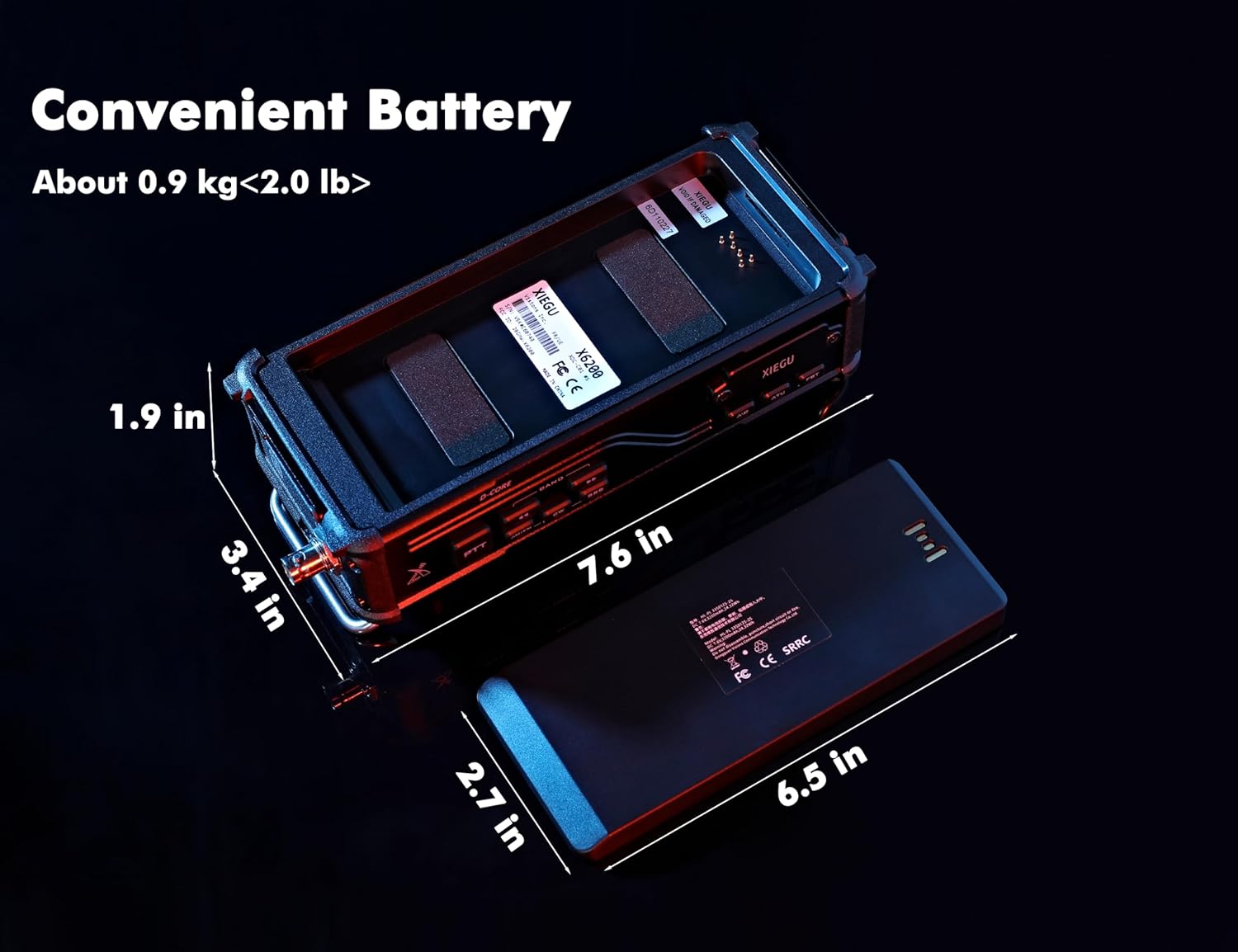
Figure 3.3: The X6200 with its removable battery, illustrating the compact dimensions and portable design.
4. ആരംഭിക്കൽ (സജ്ജീകരണം)
4.1 പ്രാരംഭ പരിശോധന
Upon unboxing, inspect the transceiver and all accessories for any signs of damage. If any components are missing or damaged, contact your vendor immediately.
4.2 ബാറ്ററി ഇൻസ്റ്റാളേഷനും ചാർജിംഗും
The X6200 comes with a pre-installed Lithium Polymer battery. For initial use, it is recommended to fully charge the battery using the provided power adapter. Connect the power adapter to the transceiver's charging port and plug it into a suitable power outlet. The charging indicator on the device will show the charging status.
4.3 ആന്റിന കണക്ഷൻ
Connect your HF antenna to the antenna connector on the rear panel of the X6200. Ensure the connection is secure. For optimal performance, use an antenna suitable for the frequency bands you intend to operate on.
4.4 പവർ ഓൺ/ഓഫ്
To power on the transceiver, press and hold the പവർ button located on the front panel until the display illuminates. To power off, press and hold the പവർ button again until the unit shuts down.
5. ഓപ്പറേഷൻ
5.1 അടിസ്ഥാന നിയന്ത്രണങ്ങൾ
പ്രധാന നിയന്ത്രണങ്ങളുമായി പരിചയപ്പെടുക:
- വോളിയം നോബ്: ഓഡിയോ ഔട്ട്പുട്ട് ലെവൽ ക്രമീകരിക്കുന്നു.
- VFO/TUNE Knob: Primary control for frequency tuning and menu navigation.
- മോഡ് ബട്ടൺ: Cycles through available operating modes (SSB, CW, AM, NFM, DIGI, WFM).
- BAND Buttons: Selects different frequency bands.
- പിടിടി (പുഷ്-ടു-ടോക്ക്) ബട്ടൺ: Located on the microphone, used to transmit.
5.2 ഫ്രീക്വൻസി ട്യൂണിംഗ്
Rotate the VFO/TUNE knob to adjust the operating frequency. The step size can typically be adjusted via menu settings or dedicated buttons for fine-tuning.
5.3 മോഡ് തിരഞ്ഞെടുക്കൽ
അമർത്തുക മോഡ് button to cycle through the available modulation modes. Select the appropriate mode for the signal you wish to receive or transmit (e.g., SSB for voice, CW for Morse code, WFM for broadcast radio).
5.4 Automatic Antenna Tuner (ATU)
The X6200 features a built-in automatic antenna tuner. To activate the ATU, press the dedicated എ.ടി.യു button. The transceiver will automatically adjust to achieve the best possible SWR (Standing Wave Ratio) for your connected antenna on the current frequency. This process typically takes a few seconds.

Figure 5.1: The X6200 highlighting its Automatic Antenna Tuner capability, essential for efficient antenna matching.
5.5 Multi-mode Modem
The integrated multi-mode modem allows for advanced digital communication. Refer to the on-screen menu or a detailed user guide for specific instructions on utilizing preset messaging and audio autocall functions.

Figure 5.2: The X6200's multi-mode modem interface, enabling features like preset messages and audio autocall.
5.6 യുഎസ്ബി ഇന്റർഫേസ്
The Type-C USB port on the X6200 supports one-line data transmission, allowing for computer control (CAT), digital mode operation, and automatic reporting. Connect the provided Type-C data cable to your computer and install any necessary drivers or software as per Xiegu's official webസൈറ്റ്.

Figure 5.3: Close-up of the X6200's USB interface, facilitating data transmission and computer control.
6. പരിചരണവും പരിപാലനവും
Proper care ensures the longevity and optimal performance of your Xiegu X6200.
- വൃത്തിയാക്കൽ: Use a soft, dry cloth to clean the exterior of the transceiver. Avoid using abrasive cleaners or solvents, which can damage the finish.
- ബാറ്ററി കെയർ: To maximize battery life, avoid fully discharging the battery frequently. If storing the transceiver for an extended period, charge the battery to approximately 50% and store it in a cool, dry place.
- പരിസ്ഥിതി വ്യവസ്ഥകൾ: Protect the transceiver from extreme temperatures, direct sunlight, dust, and moisture. The X6200 is not water resistant.
- ഫേംവെയർ അപ്ഡേറ്റുകൾ: ഔദ്യോഗിക Xiegu ഇടയ്ക്കിടെ പരിശോധിക്കുക website for firmware updates. Keeping your transceiver's firmware up-to-date can improve performance and add new features.
7. പ്രശ്നപരിഹാരം
This section addresses common issues you might encounter with your Xiegu X6200. If the problem persists, contact customer support.
| പ്രശ്നം | സാധ്യമായ കാരണം | പരിഹാരം |
|---|---|---|
| ട്രാൻസ്സിവർ പവർ ഓൺ ചെയ്യുന്നില്ല. | Low or depleted battery; power cable not connected properly. | Charge the battery or connect to external power. Ensure all power connections are secure. |
| ഓഡിയോ ഔട്ട്പുട്ട് ഇല്ല. | Volume too low; speaker/microphone not connected; squelch too high; incorrect mode. | Increase volume. Check speaker/microphone connection. Adjust squelch level. Verify correct operating mode. |
| മോശം സിഗ്നൽ സ്വീകരണം. | Antenna not connected or improperly tuned; incorrect frequency/mode; high noise level. | Check antenna connection. Run ATU. Verify frequency and mode. Consider noise reduction features. |
| Cannot connect to Wi-Fi (if applicable). | Incorrect password; network not found; firmware issue. | Double-check Wi-Fi password. Ensure network is visible. Update firmware if a known fix exists. Reset network settings if possible. |
| Screen appears shaky or unstable. | Software glitch; internal issue. | Reboot the transceiver. Check for and apply the latest firmware update. If persistent, contact support. |
8 സാങ്കേതിക സവിശേഷതകൾ
Detailed specifications for the Xiegu X6200 HF Transceiver:
| ഫീച്ചർ | സ്പെസിഫിക്കേഷൻ |
|---|---|
| ഇനത്തിൻ്റെ ഭാരം | 4 പൗണ്ട് (ഏകദേശം 1.8 കിലോഗ്രാം) |
| ഉൽപ്പന്ന അളവുകൾ | 1.9 x 7.6 x 3.4 ഇഞ്ച് (ഏകദേശം 4.8 x 19.3 x 8.6 സെ.മീ) |
| മോഡൽ നമ്പർ | സീഗു എക്സ്6200 |
| ബാറ്ററികൾ | 1 ലിഥിയം പോളിമർ ബാറ്ററി (ഉൾപ്പെടുത്തിയിരിക്കുന്നു) |
| നിർമ്മാതാവ് | സീഗു |
| നിറം | കറുപ്പ് |
| ചാനലുകളുടെ എണ്ണം | 200 |
| പ്രത്യേക ഫീച്ചർ | ശബ്ദം കുറയ്ക്കൽ |
| Frequency Range (Emission) | 1.8~29.7MHz (Amateur Band) / 50.00~54.00MHz |
| Frequency Range (Reception) | 0.5~30MHz / 50.00~54.00MHz / 88.0~136.0MHz |
| പരമാവധി സംസാര ശ്രേണി | 5000 Kilometer (dependent on conditions and antenna) |
| വാല്യംtage | 13.8 വോൾട്ട് (DC) |
| ജല പ്രതിരോധ നില | വാട്ടർ റെസിസ്റ്റൻ്റ് അല്ല |
9. വാറണ്ടിയും ഉപഭോക്തൃ പിന്തുണയും
9.1 വാറൻ്റി വിവരങ്ങൾ
The Xiegu X6200 HF Transceiver comes with an 18-month manufacturer's warranty. This warranty covers defects in materials and workmanship under normal use. Please retain your proof of purchase for warranty claims.
9.2 ഉപഭോക്തൃ പിന്തുണ
For technical assistance, troubleshooting, or warranty inquiries, please contact Ham Club, the authorized provider of Xiegu products. They offer professional technical support and assistance with firmware upgrades.
കൂടുതൽ സംരക്ഷണ പ്ലാനുകൾ വാങ്ങാൻ ലഭ്യമായേക്കാം:
- 2-വർഷ സംരക്ഷണ പദ്ധതി
- 3-വർഷ സംരക്ഷണ പദ്ധതി
- കംപ്ലീറ്റ് പ്രൊട്ടക്റ്റ് (പ്രതിമാസ ബില്ലിംഗ് ഓപ്ഷൻ)
ഈ പ്ലാനുകളെക്കുറിച്ചുള്ള വിശദാംശങ്ങൾക്ക്, ദയവായി നിങ്ങളുടെ വാങ്ങൽ ഡോക്യുമെന്റേഷൻ അല്ലെങ്കിൽ ഉൽപ്പന്ന ലിസ്റ്റിംഗ് പേജ് പരിശോധിക്കുക.


