ആമുഖം
This manual provides essential information for setting up, operating, maintaining, and troubleshooting your Twisted Minds SPACE Gaming PC. Please read this guide thoroughly before using your new computer to ensure optimal performance and longevity.
സുരക്ഷാ വിവരങ്ങൾ
- Always disconnect the power cord from the wall outlet before cleaning or performing any maintenance.
- Do not expose the PC to rain, moisture, or excessive humidity.
- ശരിയായ വായുസഞ്ചാരം ഉറപ്പാക്കുക; ഏതെങ്കിലും വായുസഞ്ചാര ദ്വാരങ്ങൾ തടയരുത്.
- Use only the power supply provided with your PC or an approved replacement.
- Avoid placing the PC on unstable surfaces.
പാക്കേജ് ഉള്ളടക്കം
നിങ്ങളുടെ പാക്കേജിൽ എല്ലാ ഇനങ്ങളും ഉണ്ടെന്ന് ഉറപ്പാക്കുക:
- Twisted Minds SPACE Gaming PC
- പവർ കേബിൾ
- ഡോക്യുമെന്റേഷൻ (ഈ മാനുവൽ)
- (Additional accessories may vary by region or specific bundle)
സജ്ജീകരണ ഗൈഡ്
1. അൺബോക്സിംഗും പ്ലേസ്മെന്റും
Carefully remove the PC from its packaging. Place the computer on a stable, flat surface with adequate space for ventilation around all sides. Avoid placing it directly against a wall or inside an enclosed cabinet.

Image: The Twisted Minds SPACE Gaming PC with its side panel removed, illustrating the internal layout and RGB-lit cooling fans. This view helps in understanding component access.

ചിത്രം: മുൻഭാഗം view of the Twisted Minds SPACE Gaming PC case, highlighting the mesh design for airflow and the illuminated RGB fans visible through the front panel.
2. പെരിഫറലുകൾ ബന്ധിപ്പിക്കുന്നു
- നിരീക്ഷിക്കുക: Connect your monitor to the graphics card's display output ports (HDMI, DisplayPort) located at the rear of the PC. Ensure it's connected to the dedicated graphics card (NVIDIA GeForce RTX 4060), not the motherboard's integrated graphics ports.
- കീബോർഡും മൗസും: ലഭ്യമായ യുഎസ്ബി പോർട്ടുകളിലേക്ക് നിങ്ങളുടെ കീബോർഡും മൗസും ബന്ധിപ്പിക്കുക.
- നെറ്റ്വർക്ക്: For wired internet, connect an Ethernet cable to the LAN port. For wireless, ensure your PC has a Wi-Fi adapter (if included) or install one.
- ഓഡിയോ: ഓഡിയോ ജാക്കുകളിലേക്ക് സ്പീക്കറുകളോ ഹെഡ്ഫോണുകളോ ബന്ധിപ്പിക്കുക.

ചിത്രം: പിൻഭാഗം view of the Twisted Minds SPACE Gaming PC, displaying the array of input/output ports including USB, audio, and network connections, along with the power supply unit and rear exhaust fan.
3. പവർ കണക്ഷൻ
Connect the provided power cable to the power supply unit (PSU) at the rear of the PC, then plug the other end into a grounded electrical outlet. Ensure the power switch on the PSU is in the 'ON' position (usually marked 'I').

Image: An exploded diagram of the Twisted Minds SPACE PC case, showing its modular components such as the front panel, top magnetic dust filter, side glass panel, and internal chassis structure.
4. പ്രാരംഭ പവർ ഓൺ
Press the power button located on the front panel of the PC. The system will boot up. Since this PC comes with FreeDOS, you will need to install an operating system (e.g., Windows, Linux) to use it fully.
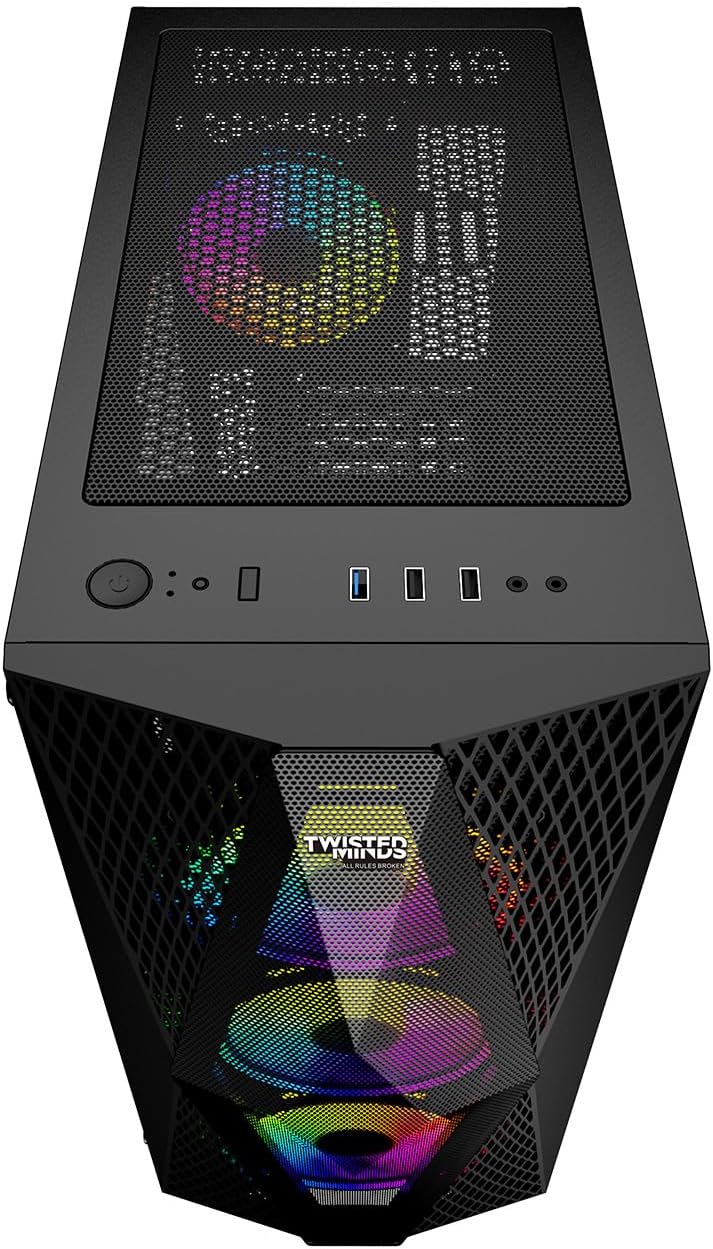
Image: Top-front perspective of the Twisted Minds SPACE PC, highlighting the accessible front panel I/O ports, including USB ports, audio jacks, and the power button.
പ്രവർത്തന നിർദ്ദേശങ്ങൾ
ഓപ്പറേറ്റിംഗ് സിസ്റ്റം ഇൻസ്റ്റലേഷൻ
Your Twisted Minds SPACE PC is shipped with FreeDOS. To utilize the full capabilities of your gaming PC, you must install a compatible operating system. This typically involves:
- Creating a bootable USB drive with your chosen OS (e.g., Windows 10/11, a Linux distribution).
- Accessing the BIOS/UEFI settings during startup (usually by pressing ഡെൽ or F2) to set the boot order to your USB drive.
- Following the on-screen instructions to install the operating system on the 512GB SSD.
- Installing necessary drivers, especially for the NVIDIA GeForce RTX 4060 graphics card, chipset, and network adapters, from the manufacturer's webസൈറ്റുകൾ.
പൊതു ഉപയോഗ ടിപ്പുകൾ
- ഡ്രൈവർ അപ്ഡേറ്റുകൾ: Regularly update your graphics card drivers from the NVIDIA website for optimal gaming performance and stability.
- സിസ്റ്റം അപ്ഡേറ്റുകൾ: Keep your operating system updated to ensure security and performance.
- സോഫ്റ്റ്വെയർ ഇൻസ്റ്റാളേഷൻ: Install gaming platforms (Steam, Epic Games, etc.) and your preferred games.
- പ്രകടന നിരീക്ഷണം: Use system monitoring tools to keep an eye on CPU and GPU temperatures, especially during intensive gaming sessions.
മെയിൻ്റനൻസ്
വൃത്തിയാക്കൽ
- പുറം: ഒരു സോഫ്റ്റ് ഉപയോഗിക്കുക, ഡിamp cloth to clean the exterior of the PC. Avoid harsh chemicals.
- പൊടി ഫിൽട്ടറുകൾ: Periodically remove and clean the dust filters (if present) to maintain optimal airflow.
- ആന്തരിക ഘടകങ്ങൾ: പിസി ഓഫ് ചെയ്ത് പ്ലഗ് ചെയ്ത ശേഷം, ഫാനുകൾ, ഹീറ്റ്സിങ്കുകൾ, മറ്റ് ആന്തരിക ഘടകങ്ങൾ എന്നിവയിൽ നിന്ന് പൊടി നീക്കം ചെയ്യാൻ കംപ്രസ് ചെയ്ത വായു ഉപയോഗിക്കുക. നന്നായി വായുസഞ്ചാരമുള്ള സ്ഥലത്ത് ഇത് ചെയ്യുക.
സോഫ്റ്റ്വെയർ പരിപാലനം
- ആന്റിവൈറസ്: ആന്റിവൈറസ് സോഫ്റ്റ്വെയർ ഇൻസ്റ്റാൾ ചെയ്യുകയും പതിവായി അപ്ഡേറ്റ് ചെയ്യുകയും ചെയ്യുക.
- ഡിസ്ക് ക്ലീനപ്പ്: Periodically run disk cleanup utilities to remove temporary files.
- ബാക്കപ്പ്: പ്രധാനപ്പെട്ട ഡാറ്റ ഒരു ബാഹ്യ ഡ്രൈവിലേക്കോ ക്ലൗഡ് സംഭരണത്തിലേക്കോ പതിവായി ബാക്കപ്പ് ചെയ്യുക.
ട്രബിൾഷൂട്ടിംഗ്
പവർ ഇല്ല
- പവർ കേബിൾ പിസിയിലേക്കും വാൾ ഔട്ട്ലെറ്റിലേക്കും സുരക്ഷിതമായി ബന്ധിപ്പിച്ചിട്ടുണ്ടെന്ന് ഉറപ്പാക്കുക.
- Check the power switch on the PSU at the back of the PC; it should be in the 'ON' position.
- ഔട്ട്ലെറ്റിന് പവർ ഉണ്ടെന്ന് ഉറപ്പാക്കാൻ മറ്റൊരു ഉപകരണം ഉപയോഗിച്ച് അത് പരിശോധിക്കുക.
മോണിറ്ററിൽ ഡിസ്പ്ലേ ഇല്ല
- Verify that the monitor is powered on and the video cable is securely connected to the graphics card (NVIDIA RTX 4060) on the PC and the monitor.
- Ensure the monitor's input source is correctly selected (HDMI, DisplayPort).
- Try a different video cable or monitor if possible.
സിസ്റ്റം പ്രകടന പ്രശ്നങ്ങൾ
- അമിത ചൂടാക്കൽ: Check for proper ventilation. Clean dust from fans and heatsinks. Monitor temperatures using software.
- ഡ്രൈവർമാർ: എല്ലാ ഡ്രൈവറുകളും, പ്രത്യേകിച്ച് ഗ്രാഫിക്സ് ഡ്രൈവറുകൾ, കാലികമാണെന്ന് ഉറപ്പാക്കുക.
- പശ്ചാത്തല പ്രക്രിയകൾ: പശ്ചാത്തലത്തിൽ പ്രവർത്തിക്കുന്ന അനാവശ്യ ആപ്ലിക്കേഷനുകൾ അടയ്ക്കുക.
- Malware: Run a full system scan with updated antivirus software.
സ്പെസിഫിക്കേഷനുകൾ
| ഘടകം | വിശദാംശങ്ങൾ |
|---|---|
| ബ്രാൻഡ് | Twisted Minds |
| മോഡലിൻ്റെ പേര് | TWISTED MINDS SPACE |
| പ്രോസസർ (സിപിയു) | AMD Ryzen 5 5500U |
| സിപിയു വേഗത | 3.5 GHz |
| സിപിയു സോക്കറ്റ് | സോക്കറ്റ് AM4 |
| ഗ്രാഫിക്സ് കാർഡ് (GPU) | NVIDIA GeForce RTX 4060 |
| ഗ്രാഫിക്സ് റാം തരം | GDDR6 |
| ഗ്രാഫിക്സ് റാം വലുപ്പം | 8 ജിബി |
| RAM (Memory) | 16 GB DDR4 |
| സംഭരണം | 512 GB SSD (eSATA interface) |
| ഓപ്പറേറ്റിംഗ് സിസ്റ്റം | ഫ്രീഡോസ് |
| USB 2.0 പോർട്ടുകൾ | 3 |
| USB 3.0 പോർട്ടുകൾ | 1 |
| ഒപ്റ്റിക്കൽ ഡ്രൈവ് | ഒന്നുമില്ല |
| പ്രത്യേക ഉപയോഗം | ഗെയിമിംഗ് |
Note: Specifications are subject to change without notice. Please refer to the product packaging or manufacturer's website for the most current information. There is a discrepancy between the product title (Ryzen 5 5600, RTX 4060TI) and the detailed specifications (Ryzen 5 5500U, RTX 4060). The specifications table uses the detailed specification values.
വാറൻ്റിയും പിന്തുണയും
For warranty information, please refer to the warranty card included with your product or visit the official Twisted Minds website. Technical support may be available through the manufacturer's support channels. Keep your purchase receipt for warranty claims.
Twisted Minds Official Webസൈറ്റ്: www.twistedminds.com (ഇതൊരു പ്ലെയ്സ്ഹോൾഡറാണ് URL as no official website was provided in the data. Users should refer to actual product documentation.)


