1. ഉൽപ്പന്നം കഴിഞ്ഞുview
The FLYINGVOICE FIP15G Plus is an advanced VoIP phone designed for business environments, featuring a 4.3-inch IPS touch screen for intuitive navigation and enhanced user experience. This IP phone supports up to 10 SIP lines, dual-band 2.4GHz and 5GHz Wi-Fi connectivity, and 6-way audio conferencing, making it a versatile communication solution. It integrates seamlessly with various business communication systems and offers robust features for efficient daily operations.

ചിത്രം 1.1: മുൻഭാഗം view of the FLYINGVOICE FIP15G Plus VoIP Phone, showcasing its 4.3-inch IPS touch screen and physical keypad.
പ്രധാന സവിശേഷതകൾ:
- Elegant Touchable Screen: Features a 4.3-inch IPS touchable screen with a wide viewing angle, vivid HD images, and a user-friendly interface. Supports seamless integration with i86V Intercom (sold separately) for one-touch calls and video linkage.
- ഡ്യുവൽ-ബാൻഡ് വൈഫൈ: Built-in dual-band 2.4GHz & 5GHz Wi-Fi for strong and stable wireless connectivity. Supports IPv4 & IPv6 protocols.
- HD Voice Quality & PoE Power Supply: Advanced voice technologies including Wide-band Code G.722, Opus, Acoustic Shield, and Intelligent noise enclosure design ensure crystal clear voice. Supports Power over Ethernet (PoE) for simplified cabling.
- Multiple Expanded Functions: Dual USB 2.0 ports for call recording via USB disks and connecting DECT wireless headsets with EHS10 adapters. Supports 6-way audio conferencing and a 2000-entry phonebook. Built-in Bluetooth 4.2 for wireless headset connectivity.
- Powerful Online Management Systems: Simple deployment and management via Flyingvoice’s online platforms such as FACS and FRPS, and auto-provisioning modes TFTP/HTTP/HTTPS.
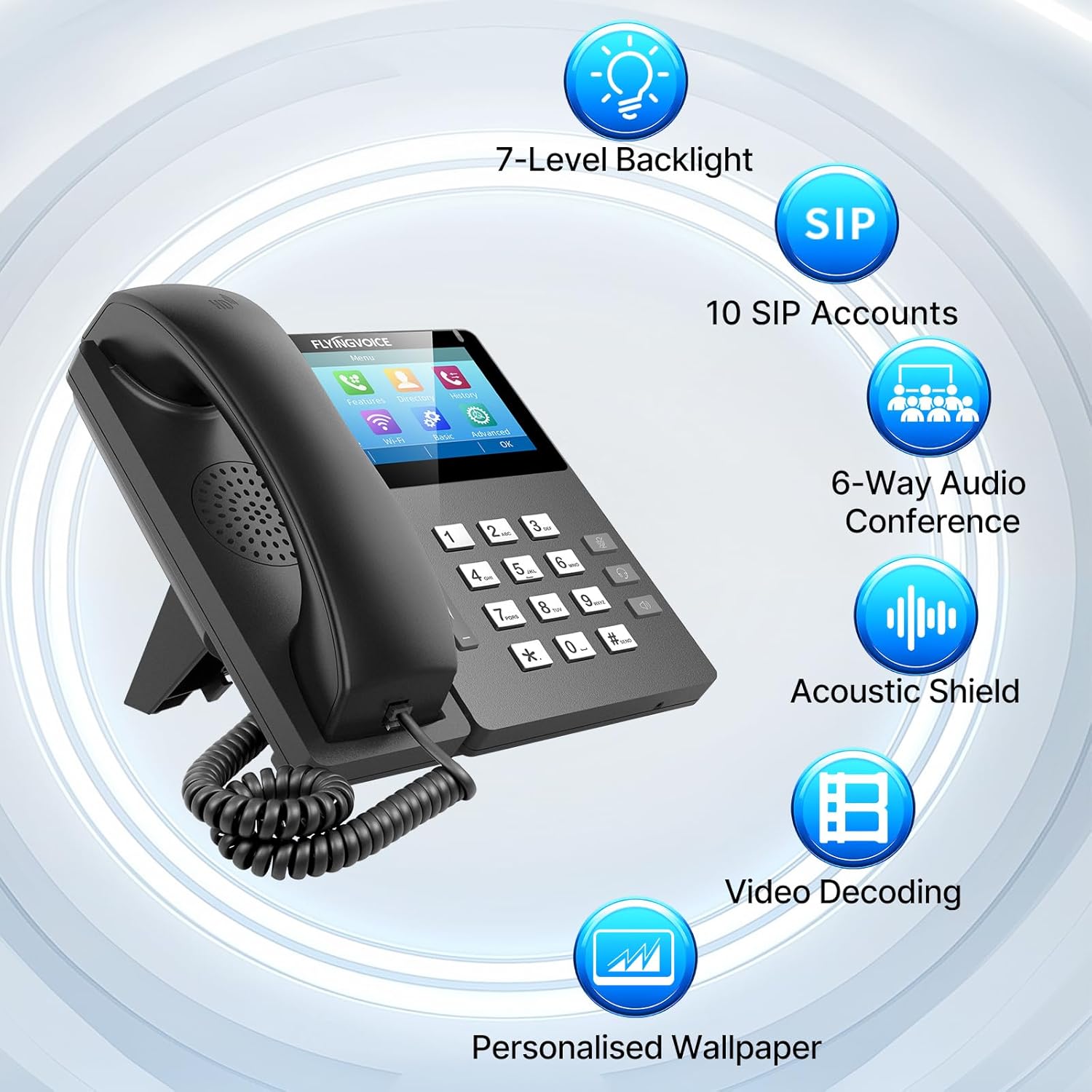
Figure 1.2: Visual representation of key features including 7-level backlight, 10 SIP accounts, 6-way audio conference, Acoustic Shield, Video Decoding, and Personalized Wallpaper.
IP Phone vs. Analog Phone:
Understanding the difference between IP phones and traditional analog phones is crucial for optimal use. The FIP15G Plus is an IP phone, leveraging internet protocol for communication.

Figure 1.3: A comparison table highlighting the differences between IP Phones (Ethernet, multiple SIP accounts, conference, low cost via Internet, complex setup, recommended for IP PBX) and Analog Phones (RJ11, single line, basic call, high cost, plug & play, ideal for home use).
2. സജ്ജീകരണ ഗൈഡ്
This section provides step-by-step instructions for setting up your FLYINGVOICE FIP15G Plus VoIP Phone.
2.1 പാക്കേജ് ഉള്ളടക്കം:
ആരംഭിക്കുന്നതിന് മുമ്പ്, എല്ലാ ഘടകങ്ങളും ഉണ്ടെന്ന് ഉറപ്പാക്കുക:
- FLYINGVOICE FIP15G Plus IP Phone unit
- ഹാൻഡ്സെറ്റ്
- ഹാൻഡ്സെറ്റ് കോർഡ്
- ഇഥർനെറ്റ് കേബിൾ
- പവർ അഡാപ്റ്റർ (PoE ഉപയോഗിക്കുന്നില്ലെങ്കിൽ)
- ഡെസ്ക് സ്റ്റാൻഡ്
2.2 ശാരീരിക ബന്ധം:
- ഡെസ്ക് സ്റ്റാൻഡ് ഘടിപ്പിക്കുക: Securely attach the included desk stand to the back of the phone unit. The phone can be positioned for 45° desktop use or 15° wall-mount (stand included for both).

Figure 2.1: The FIP15G Plus can be set up for 45° desktop use or 15° wall-mount with the included stand.
- ഹാൻഡ്സെറ്റ് ബന്ധിപ്പിക്കുക: Plug one end of the coiled handset cord into the handset and the other end into the handset port on the phone unit.
- നെറ്റ്വർക്കിലേക്ക് കണക്റ്റ് ചെയ്യുക: Connect one end of the Ethernet cable to the LAN port on the phone and the other end to your network switch or router. If using Power over Ethernet (PoE), this single cable will also provide power.
- പവർ ബന്ധിപ്പിക്കുക (PoE ഉപയോഗിക്കുന്നില്ലെങ്കിൽ): If your network does not support PoE, connect the power adapter to the DC IN port on the phone and then plug the adapter into a power outlet.
- Optional USB Devices: If desired, connect USB flash drives for call recording or EHS10 headset adapters to the USB 2.0 ports.
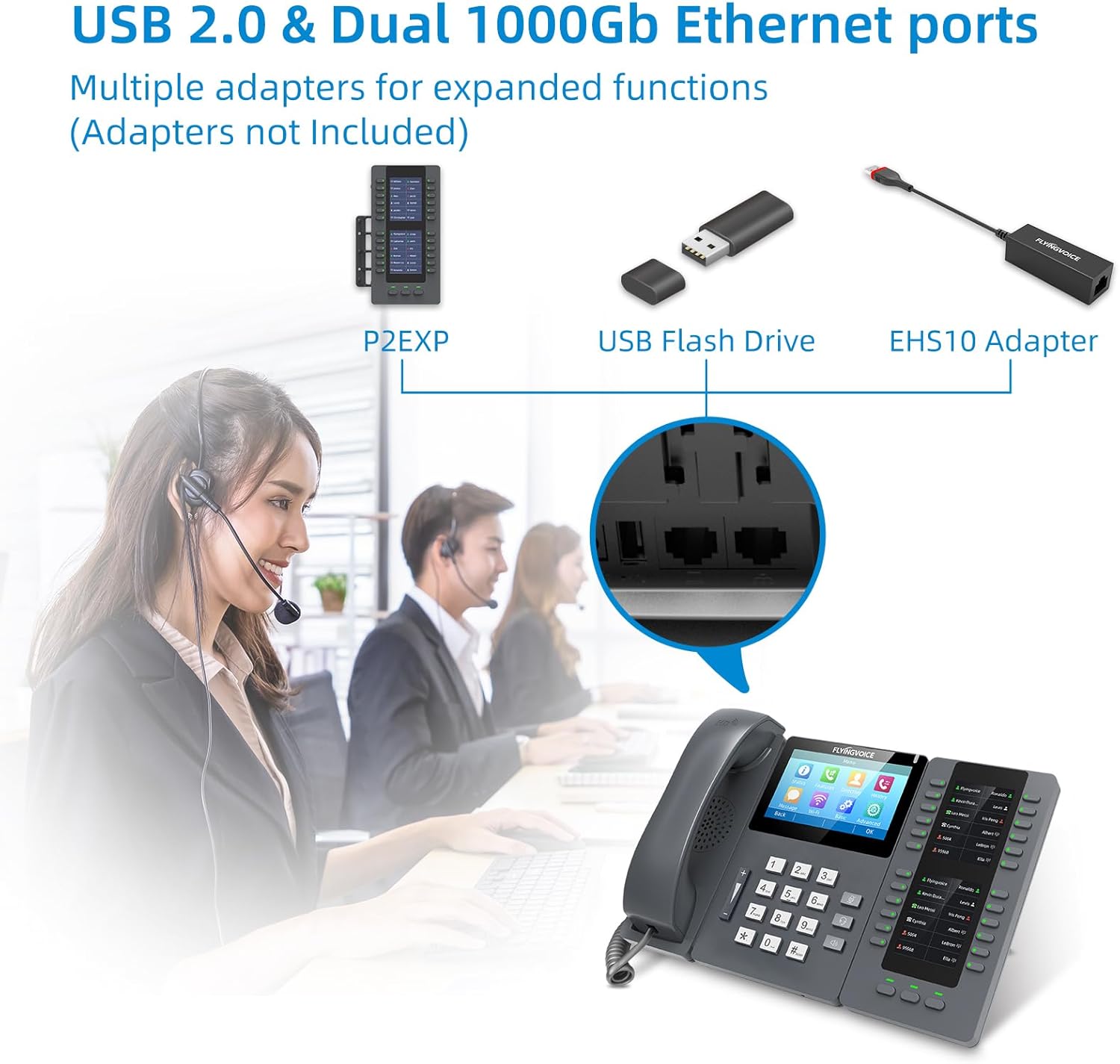
ചിത്രം 2.2: ക്ലോസപ്പ് view of the USB 2.0 and Dual 1000Gb Ethernet ports on the FIP15G Plus, showing connectivity options for P2EXP, USB Flash Drive, and EHS10 Adapter.
2.3 പ്രാരംഭ കോൺഫിഗറേഷൻ:
Once powered on, the phone will boot up. You may need to configure network settings and SIP accounts. This can typically be done via the 4.3-inch IPS touch screen or through a web interface accessible from a computer on the same network.
- നെറ്റ്വർക്ക് ക്രമീകരണങ്ങൾ: The phone will usually obtain an IP address automatically via DHCP. If static IP is required, configure it through the phone's menu (Advanced > Network).
- SIP അക്കൗണ്ട് രജിസ്ട്രേഷൻ: Navigate to the SIP settings on the touch screen (e.g., Advanced > Accounts) to enter your SIP server address, user ID, password, and other required credentials provided by your VoIP service provider or PBX administrator. The FIP15G Plus supports up to 10 SIP lines.
- Wi-Fi കണക്ഷൻ: If using Wi-Fi, navigate to the Wi-Fi settings on the touch screen (e.g., Wi-Fi menu) to scan for available networks and connect to your desired 2.4GHz or 5GHz network.

Figure 2.3: The FIP15G Plus supports dual-band 2.4GHz and 5GHz Wi-Fi for stronger compatibility and more stable connections in an office environment.
3. പ്രവർത്തന നിർദ്ദേശങ്ങൾ
This section details the basic and advanced operations of your FLYINGVOICE FIP15G Plus VoIP Phone.
3.1 Basic Call Functions:
- ഒരു കോൾ ചെയ്യുന്നു: Pick up the handset or press the Speaker button. Dial the desired number using the keypad and press the Dial/Send button or wait for automatic dialing.
- ഒരു കോളിന് മറുപടി നൽകുന്നു: When the phone rings, pick up the handset or press the Speaker button to answer.
- ഒരു കോൾ അവസാനിപ്പിക്കുന്നു: Place the handset back on the cradle or press the Speaker button again.
- വോളിയം ക്രമീകരണം: Use the volume buttons on the side of the phone to adjust the handset, speaker, or headset volume during a call.
3.2 Advanced Features:
- ടച്ച് സ്ക്രീൻ ഉപയോഗിക്കുന്നത്: The 4.3-inch IPS touch screen provides an intuitive interface for accessing phone features, settings, and directories. Tap icons to navigate menus, view call history, manage contacts, and configure advanced options.

Figure 3.1: The elegant touch screen interface of the FIP15G Plus, showing various menu options for Status, Features, Directory, History, Message, Wi-Fi, Basic, and Advanced settings.
- 6-Way Audio Conferencing: Initiate or join a multi-party conference call. Consult your VoIP service provider's instructions for specific steps, typically involving placing calls on hold and adding participants.
- Bluetooth Headset Connectivity: Pair your Bluetooth 4.2 compatible headset with the FIP15G Plus for hands-free communication. Access Bluetooth settings via the touch screen to enable pairing mode.

Figure 3.2: The FIP15G Plus features built-in Bluetooth 4.2, allowing for wireless headset connectivity.
- USB Call Recording: Insert a USB flash drive into one of the USB 2.0 ports. You can then configure the phone to automatically or manually record calls to the USB drive.
- Intercom Integration: The FIP15G Plus supports seamless integration with i86V Intercom (sold separately) for one-touch calls and video linkage, adapting to various industrial usage scenarios. This includes features like one-touch unlock for door access and communication with unattended car park systems.

ചിത്രം 3.3: ഉദാamples of intercom integration, including one-touch unlock for reception areas and one-button call for unattended car parks.
4. പരിപാലനം
Proper maintenance ensures the longevity and optimal performance of your FIP15G Plus VoIP Phone.
4.1 വൃത്തിയാക്കൽ:
- Use a soft, dry cloth to clean the phone's surface and screen.
- കഠിനമായ അടയാളങ്ങൾക്ക്, ചെറുതായി dampവെള്ളം അല്ലെങ്കിൽ മൃദുവായ, ഉരച്ചിലുകളില്ലാത്ത ക്ലീനർ ഉപയോഗിച്ച് തുണിയിൽ വയ്ക്കുക.
- Avoid using harsh chemicals, solvents, or abrasive materials, as these can damage the phone's finish and screen.
4.2 സോഫ്റ്റ്വെയർ അപ്ഡേറ്റുകൾ:
FLYINGVOICE provides powerful online management systems like FACS and FRPS, which can facilitate mass deployment and firmware updates. Regularly check for and apply firmware updates to ensure your phone has the latest features, security patches, and performance improvements. Consult your IT administrator or the FLYINGVOICE support webഅപ്ഡേറ്റ് നടപടിക്രമങ്ങൾക്കായുള്ള സൈറ്റ്.

Figure 4.1: Illustration of remote management tools, indicating the capability for centralized control and monitoring of FIP15G Plus devices.
5. പ്രശ്നപരിഹാരം
This section addresses common issues you might encounter with your FIP15G Plus VoIP Phone.
5.1 No Dial Tone / Cannot Make Calls:
- നെറ്റ്വർക്ക് കണക്ഷൻ പരിശോധിക്കുക: Ensure the Ethernet cable is securely connected to both the phone's LAN port and your network switch/router. Verify network activity lights on the phone and switch.
- പവർ പരിശോധിക്കുക: Confirm the phone is powered on. If using PoE, ensure your network switch provides PoE. If using a power adapter, ensure it's properly connected and the outlet is active.
- SIP Registration Status: On the phone's touch screen, navigate to the SIP account status. If it shows 'Unregistered' or 'Failed', verify your SIP account credentials and server address with your VoIP service provider or IT administrator.
- നെറ്റ്വർക്ക് കോൺഫിഗറേഷൻ: Ensure the phone has a valid IP address. If configured for static IP, double-check the settings.
5.2 Poor Voice Quality (Echo, Static, Choppy Audio):
- നെറ്റ്വർക്ക് തിരക്ക്: High network traffic can affect voice quality. Ensure your network has sufficient bandwidth for VoIP calls.
- Wi-Fi സിഗ്നൽ ശക്തി: If using Wi-Fi, check the signal strength. A weak signal can lead to poor audio. Consider moving closer to the access point or using a wired Ethernet connection.
- Acoustic Environment: The FIP15G Plus features Acoustic Shield and Intelligent noise enclosure design to minimize background noise. Ensure the phone is not placed in an excessively noisy environment that could overwhelm these features.
- ഫേംവെയർ അപ്ഡേറ്റ്: Ensure your phone's firmware is up to date, as updates often include voice quality improvements.

Figure 5.1: The FIP15G Plus is designed to deliver crystal clear voice even in noisy environments, thanks to advanced audio technologies.
5.3 Screen Unresponsive / Frozen:
- Restart the Phone: Disconnect the power cable (or Ethernet cable if using PoE) for a few seconds, then reconnect it to restart the phone.
- അപ്ഡേറ്റുകൾക്കായി പരിശോധിക്കുക: Ensure the phone's firmware is current.
6 സാങ്കേതിക സവിശേഷതകൾ
Detailed technical specifications for the FLYINGVOICE FIP15G Plus VoIP Phone.
| ഫീച്ചർ | വിവരണം |
|---|---|
| ബ്രാൻഡ് | ഫ്ലയിംഗ് വോയ്സ് |
| മോഡൽ | FIP15G പ്ലസ് |
| നിറം | കറുപ്പ് |
| ടെലിഫോൺ തരം | Corded IP Phone (VoIP) |
| പ്രദർശിപ്പിക്കുക | 4.3 ഇഞ്ച് ഐപിഎസ് ടച്ച് സ്ക്രീൻ |
| SIP Lines | 10 SIP ലൈനുകൾ |
| വൈഫൈ | Built-in Dual-Band 2.4GHz & 5GHz Wi-Fi |
| ബ്ലൂടൂത്ത് | ബിൽറ്റ്-ഇൻ ബ്ലൂടൂത്ത് 4.2 |
| ഇഥർനെറ്റ് പോർട്ടുകൾ | Dual 1000Gb Ethernet ports (LAN/PC) |
| USB പോർട്ടുകൾ | ഡ്യുവൽ USB 2.0 പോർട്ടുകൾ |
| പവർ ഉറവിടം | DC Power Supply or PoE (Power over Ethernet) |
| വോയ്സ് കോഡെക്കുകൾ | G.722, Opus (Wide-band Code) |
| ഓഡിയോ സവിശേഷതകൾ | Acoustic Shield, ANC, Intelligent noise enclosure |
| കോൺഫറൻസ് കോൾ ശേഷി | 6-വഴി ഓഡിയോ കോൺഫറൻസ് |
| ഫോൺബുക്ക് ശേഷി | 2000 എൻട്രികൾ |
| അനുയോജ്യമായ ഉപകരണങ്ങൾ | Bluetooth Headsets, DECT Wireless Headsets (with EHS10), USB Devices, Desktop Computers, Laptops, VoIP Systems, Intercom Systems |
7. വാറൻ്റി വിവരങ്ങൾ
For detailed warranty information regarding your FLYINGVOICE FIP15G Plus VoIP Phone, please refer to the warranty card included with your product packaging or visit the official FLYINGVOICE website. Warranty terms and conditions may vary by region and retailer. It is recommended to register your product upon purchase to facilitate any future warranty claims.
8. ഉപഭോക്തൃ പിന്തുണ
FLYINGVOICE is committed to providing excellent customer support for its products. If you encounter any issues or have questions not covered in this manual, please utilize the following resources:
- ഉദ്യോഗസ്ഥൻ Webസൈറ്റ്: Visit the FLYINGVOICE official website for FAQs, updated documentation, and software downloads.
- സാങ്കേതിക സഹായം: Contact FLYINGVOICE technical support for assistance with setup, configuration, or troubleshooting. FLYINGVOICE aims to provide responsive support to ensure smooth operation of your device.
- Online Management Platforms: Utilize FLYINGVOICE's online platforms such as FACS and FRPS for remote management and support, especially for larger deployments.

Figure 8.1: Icon representing dedicated technical support services.


