1. ആമുഖം
The Pelsee P12 Pro Max is an advanced rear view mirror camera system designed to enhance driving safety and provide comprehensive recording capabilities. It features high-resolution front and rear cameras, smart driving assistance systems, and convenient voice control.

Figure 1.1: Pelsee P12 Pro Max Mirror Dash Cam
2. ബോക്സിൽ എന്താണുള്ളത്?
അൺബോക്സിംഗ് ചെയ്യുമ്പോൾ എല്ലാ ഘടകങ്ങളും ഉണ്ടെന്ന് ഉറപ്പാക്കാൻ പാക്കേജ് ഉള്ളടക്കങ്ങൾ പരിശോധിക്കുക:
- 1 x 4K 12" Mirror Dash Cam
- 1 x 2.5K Rear Camera (19.6ft rear camera cable)
- 1 x 11.5ft Car Charger
- 1 x 64GB Memory card
- 1 x ജിപിഎസ് ആന്റിന
- 2 x 3M Adhesive Pads
- 1 x Easy Pry Tool
- 1 x ക്ലീനിംഗ് തുണി
- 1 x ഉപയോക്തൃ മാനുവൽ
- 4 x Rubber Straps

ചിത്രം 2.1: പാക്കേജ് ഉള്ളടക്കം
3. സജ്ജീകരണവും ഇൻസ്റ്റാളേഷനും
3.1 Mounting the Mirror Dash Cam
- Secure the mirror dash cam over your existing rearview mirror using the provided rubber straps. Ensure it is firmly attached and does not obstruct your view.
- Adjust the angle of the front camera lens to capture the desired view മുന്നോട്ടുള്ള പാതയുടെ.
3.2 പിൻ ക്യാമറ ഇൻസ്റ്റാൾ ചെയ്യുന്നു
- Choose a suitable location for the rear camera, typically above the license plate or inside the rear window. Clean the surface thoroughly before mounting.
- Attach the rear camera using the 3M adhesive pad or screws if preferred.
- Route the rear camera cable from the rear of the vehicle to the front, connecting it to the main mirror dash cam unit. Conceal the cable along the vehicle's trim for a neat installation.
- For parking assist functionality, connect the red wire from the rear camera cable to your vehicle's reverse light positive wire.
3.3 Power Connection and GPS Antenna
- Connect the car charger to the mirror dash cam and plug the other end into your vehicle's 12V power outlet (cigarette lighter socket).
- Attach the GPS antenna to the designated port on the dash cam. Position the antenna on the dashboard or windshield where it has a clear view സിഗ്നൽ ലഭിക്കുന്നതിന് ആകാശത്തിന്റെ ഉയരം.
- Insert the included 64GB memory card into the designated slot on the dash cam. Ensure it is inserted correctly.
4. പ്രവർത്തന നിർദ്ദേശങ്ങൾ
4.1 അടിസ്ഥാന പ്രവർത്തനം
- The dash cam will automatically power on and begin recording when your vehicle starts.
- The 12-inch touchscreen display provides a live view from the cameras. Swipe left/right on the screen to switch between front, rear, or dual camera views.
- Swipe up/down on the left side of the screen to adjust the camera lens angle (up/down).
- Swipe up/down on the right side of the screen to adjust screen brightness.
4.2 റെക്കോർഡിംഗ് സവിശേഷതകൾ
4.2.1 4K Front and 2.5K Rear Recording
The P12 Pro Max captures crystal-clear footage with its 4K front camera and 2.5K rear camera. The Sony Starvis sensor ensures clear images with low noise, even in low-light conditions.

Figure 4.1: Dual Camera Recording
4.2.2 Incredible Night Vision
Equipped with a Sony Starvis sensor, the dash cam provides enhanced night vision, capturing clear details in challenging low-light environments.

Figure 4.2: Enhanced Night Vision
4.2.3 Loop Recording & G-Sensor
Loop recording ensures continuous recording by overwriting the oldest files when the memory card is full. The built-in G-sensor automatically detects collisions and locks the corresponding footage to prevent it from being overwritten, securing important event videos.
4.3 സ്മാർട്ട് സവിശേഷതകൾ
4.3.1 5.8GHz WiFi Connectivity
Utilize the 5.8GHz WiFi for seamless, high-speed access to video files via the Pelsee app. This allows for quick downloading, viewing, and sharing of footage directly from your smartphone.
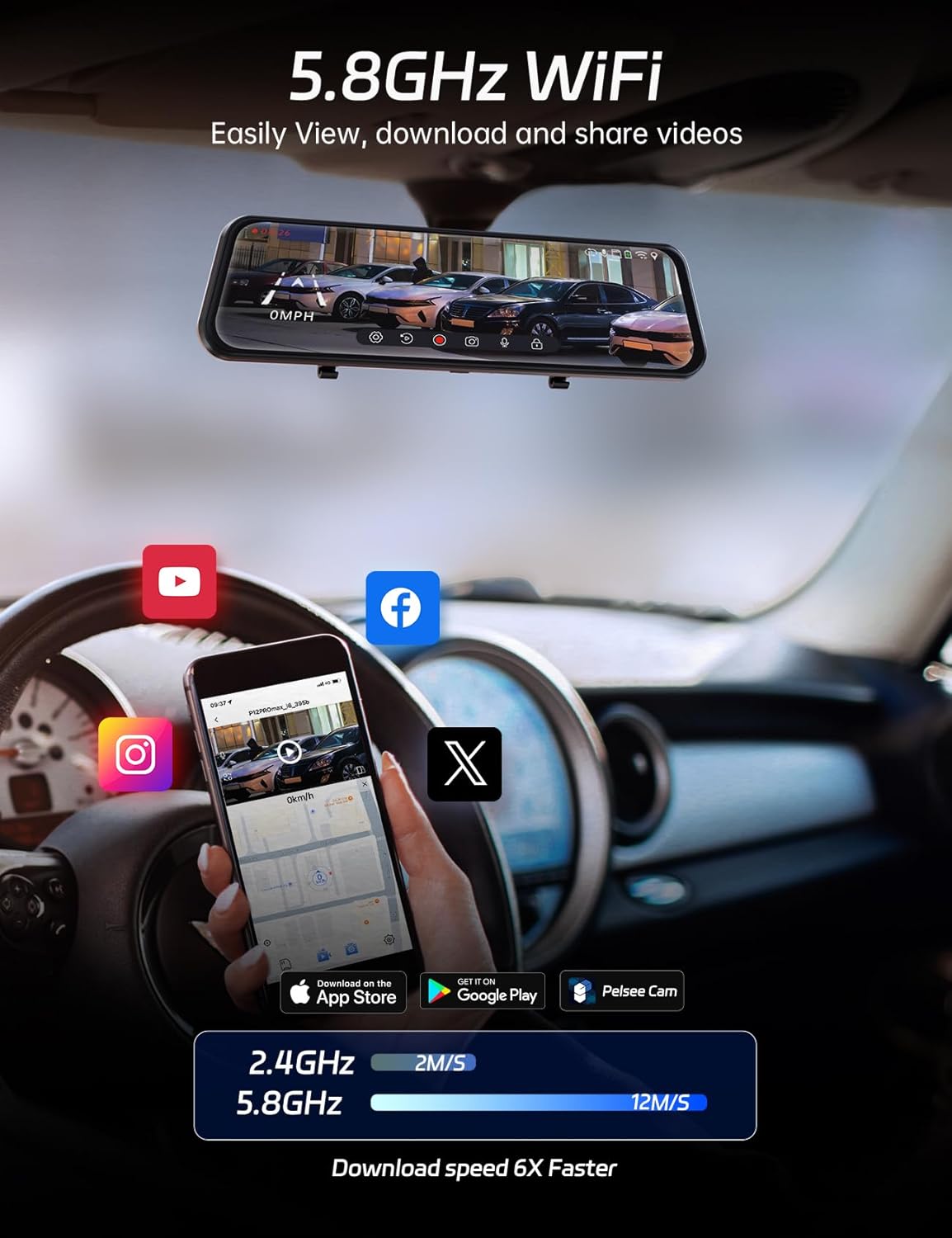
Figure 4.3: High-Speed WiFi Connection
4.3.2 Smart Driving System (ADAS & BSD)
The Advanced Driver Assistance System (ADAS) provides real-time voice alerts for potential hazards such as front vehicle collisions, front vehicle starts, and pedestrian collisions. The Blind Spot Detection (BSD) feature alerts you when a vehicle is detected in your blind spot, enhancing safety during lane changes.

Figure 4.4: ADAS Alerts
4.3.3 ശബ്ദ നിയന്ത്രണം
Operate the dash cam hands-free using simple voice commands to minimize distractions while driving. Available commands include:
- "Turn on screen" / "Turn off screen"
- "Show front camera" / "Show rear camera" / "Show both cameras"
- "Turn on audio" / "Turn off audio"
- "വീഡിയോ ലോക്ക് ചെയ്യുക"
- "ഫോട്ടോ എടുക്കൂ"
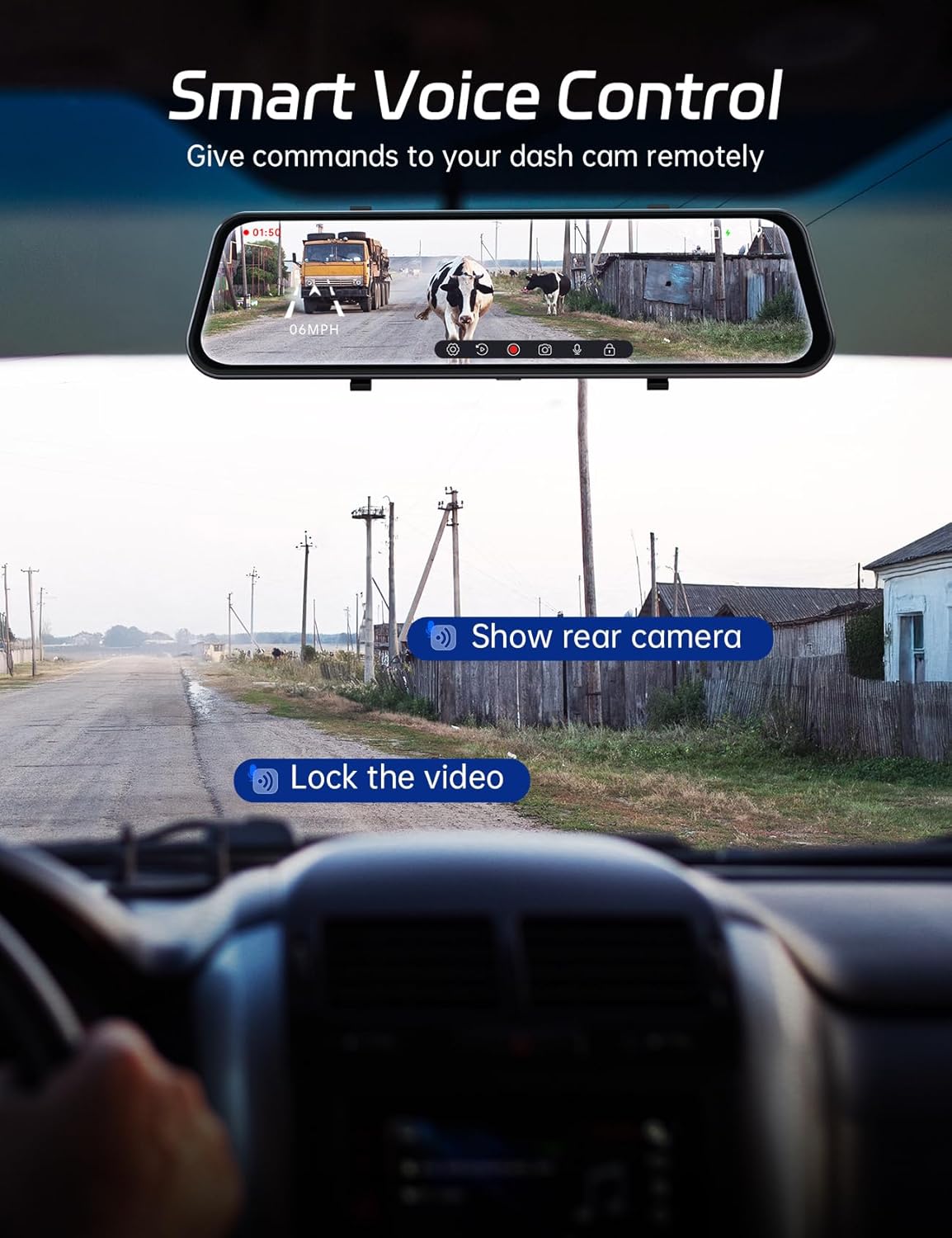
Figure 4.5: Voice Control Interface
4.3.4 Smart GPS Tracking
The built-in GPS antenna tracks your route and speed, providing valuable data that can be viewനിങ്ങളുടെ വീഡിയോ ഫൂവിനൊപ്പം edtage. This feature is crucial for accurate incident reporting and travel logging.

Figure 4.6: GPS Tracking Display
4.3.5 Parking Assist
When reversing, the dash cam automatically displays a live feed from the rear camera on the 12-inch screen, complete with customizable parking guidelines. This assists in precise vehicle positioning and distance measurement, making parking easier and safer.
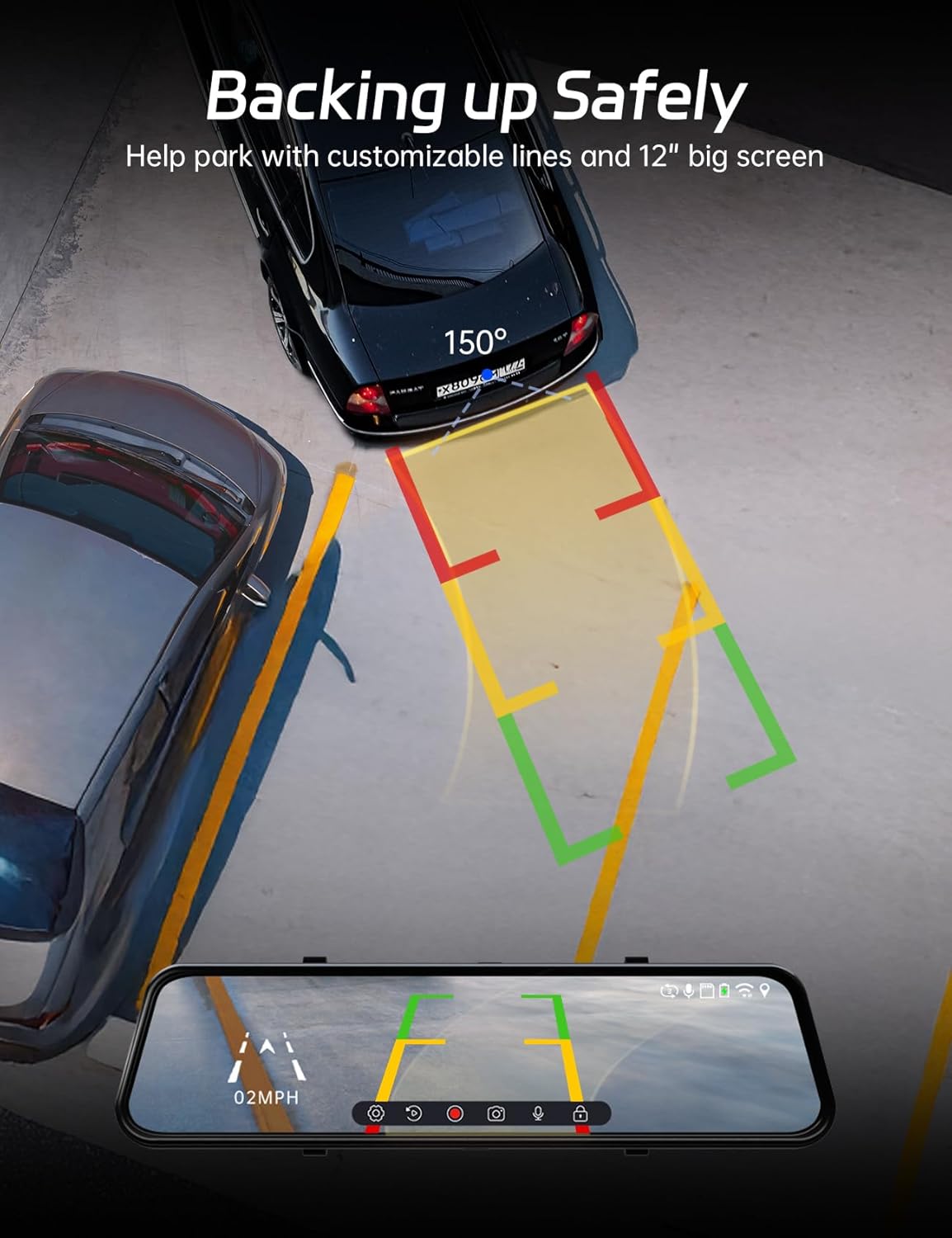
Figure 4.7: Parking Assist View
4.3.6 Optional 24/7 Parking Monitoring
For continuous protection while parked, the P12 Pro Max supports 24/7 parking monitoring when paired with a separate hardware kit (ASIN: B0C7QY4KB9). You can choose between two modes:
- G-sensor Mode: Records automatically if the vehicle experiences a bump or impact.
- ടൈം-ലാപ്സ് മോഡ്: Provides continuous footage at a low frame rate, conserving storage space.

Figure 4.8: Parking Monitoring Options
5. പരിപാലനം
5.1 ഉപകരണം വൃത്തിയാക്കുന്നു
- Use the provided cleaning cloth or a soft, lint-free cloth to gently wipe the screen and camera lenses.
- അബ്രാസീവ് ക്ലീനറുകളോ ലായകങ്ങളോ ഉപയോഗിക്കരുത്, കാരണം അവ ഉപകരണത്തിന് കേടുവരുത്തും.
- വൃത്തിയാക്കുന്നതിനുമുമ്പ് ഉപകരണം ഓഫാക്കിയിട്ടുണ്ടെന്ന് ഉറപ്പാക്കുക.
5.2 മെമ്മറി കാർഡ് മാനേജ്മെന്റ്
- Regularly format the memory card (at least once a month) through the dash cam's settings to ensure optimal performance and prevent data corruption.
- Use a high-quality Class 10 or U3 microSD card for reliable recording.
5.3 പരിസ്ഥിതി പരിഗണനകൾ
The Pelsee P12 Pro Max is designed to operate within a wide temperature range, from -4°F to 158°F (-20°C to 70°C), ensuring reliable performance in various climates.

Figure 5.1: Operating Temperature Range
6. പ്രശ്നപരിഹാരം
If you encounter issues with your Pelsee P12 Pro Max, please refer to the following common solutions:
6.1 Device Not Powering On / Random Shutdowns
- Ensure the car charger is securely connected to both the dash cam and the vehicle's 12V power outlet.
- Check the vehicle's 12V power outlet for power. Try plugging in another device.
- If using a hardwire kit for parking monitoring, ensure it is correctly installed and receiving power.
- Perform a factory reset through the system settings.
6.2 Poor Video Quality / Pixelation
- Ensure the camera lenses are clean and free from dirt or smudges.
- Check that the memory card is a high-speed Class 10 or U3 card. A slow card can cause recording issues.
- Format the memory card regularly.
- Verify that the video resolution settings are appropriate for your needs.
6.3 ശബ്ദ നിയന്ത്രണം പ്രതികരിക്കുന്നില്ല
- Ensure the voice control feature is enabled in the system settings.
- Speak clearly and directly towards the dash cam.
- Minimize background noise in the vehicle.
6.4 ജിപിഎസ് സിഗ്നൽ പ്രശ്നങ്ങൾ
- GPS ആന്റിന സുരക്ഷിതമായി ബന്ധിപ്പിച്ചിട്ടുണ്ടെന്നും വ്യക്തമായ ഒരു സ്ഥലത്ത് സ്ഥാപിച്ചിട്ടുണ്ടെന്നും ഉറപ്പാക്കുക. view of the sky (e.g., dashboard, upper corner of windshield).
- Avoid placing the GPS antenna near other electronic devices that might cause interference.
6.5 വൈഫൈ കണക്ഷൻ പ്രശ്നങ്ങൾ
- Ensure the Pelsee app is installed on your smartphone and updated to the latest version.
- Verify that Wi-Fi is enabled on the dash cam and your smartphone.
- Try restarting both the dash cam and your smartphone.
7 സ്പെസിഫിക്കേഷനുകൾ
| ഫീച്ചർ | വിശദാംശങ്ങൾ |
|---|---|
| മോഡലിൻ്റെ പേര് | P12 Pro Max |
| ഫ്രണ്ട് ക്യാമറ റെസല്യൂഷൻ | 4K (2160p) |
| പിൻ ക്യാമറ റെസല്യൂഷൻ | 2.5K |
| ഡിസ്പ്ലേ വലിപ്പം | 12 ഇഞ്ച് |
| സെൻസർ | സോണി സ്റ്റാർവിസ് |
| വൈഫൈ കണക്റ്റിവിറ്റി | 5.8GHz |
| പ്രത്യേക സവിശേഷതകൾ | ADAS, BSD, Voice Control, Built-In GPS, App Control, 24/7 Parking Monitoring (optional) |
| Included Memory Card | 64 ജിബി |
| പവർ ഉറവിടം | 12 വി കാർ ചാർജർ |
| പ്രവർത്തന താപനില | -4°F മുതൽ 158°F വരെ (-20°C മുതൽ 70°C വരെ) |
| ഉൽപ്പന്ന അളവുകൾ | 3.35 x 12.13 x 1.81 ഇഞ്ച് |
| ഇനത്തിൻ്റെ ഭാരം | 2.59 പൗണ്ട് |
8. വാറണ്ടിയും പിന്തുണയും
Pelsee offers the following assurance for your P12 Pro Max:
- 30 ദിവസത്തെ സൗജന്യ റിട്ടേൺ
- 30 ദിവസത്തെ പണം-ബാക്ക് ഗ്യാരണ്ടി
- 18 മാസ വാറൻ്റി
For technical support, warranty claims, or any inquiries, please contact Pelsee customer service:
ഇമെയിൽ: support@pelsee.com

Figure 8.1: Pelsee Brand Logo


