1. ആമുഖം
The LTC Nimbleback NB841 PRO is a 75% wireless mechanical keyboard designed for versatility and performance. It features a compact layout with 84 keys, a multifunctional display screen, and an intuitive control knob. The keyboard supports triple connectivity modes (2.4GHz wireless, Bluetooth, and USB-C wired) and includes a 3-layer silicone dampening structure for a quiet typing experience. Its hot-swappable PCB allows for easy customization of switches, and comprehensive software support enables personalized settings for lighting, macros, and display content.

Figure 1: LTC Nimbleback NB841 PRO Keyboard
2. പാക്കേജ് ഉള്ളടക്കം
നിങ്ങളുടെ പാക്കേജിൽ എല്ലാ ഇനങ്ങളും ഉണ്ടെന്ന് ഉറപ്പാക്കുക:
- 1 x NB841 Pro Keyboard
- 1 x ഉപയോക്തൃ മാനുവൽ
- 1 x 2-in-1 USB-C Cable
- 1 x 2-ഇൻ-1 കീക്യാപ്പ് & സ്വിച്ച് പുള്ളർ
- 4 x Replaced Switches
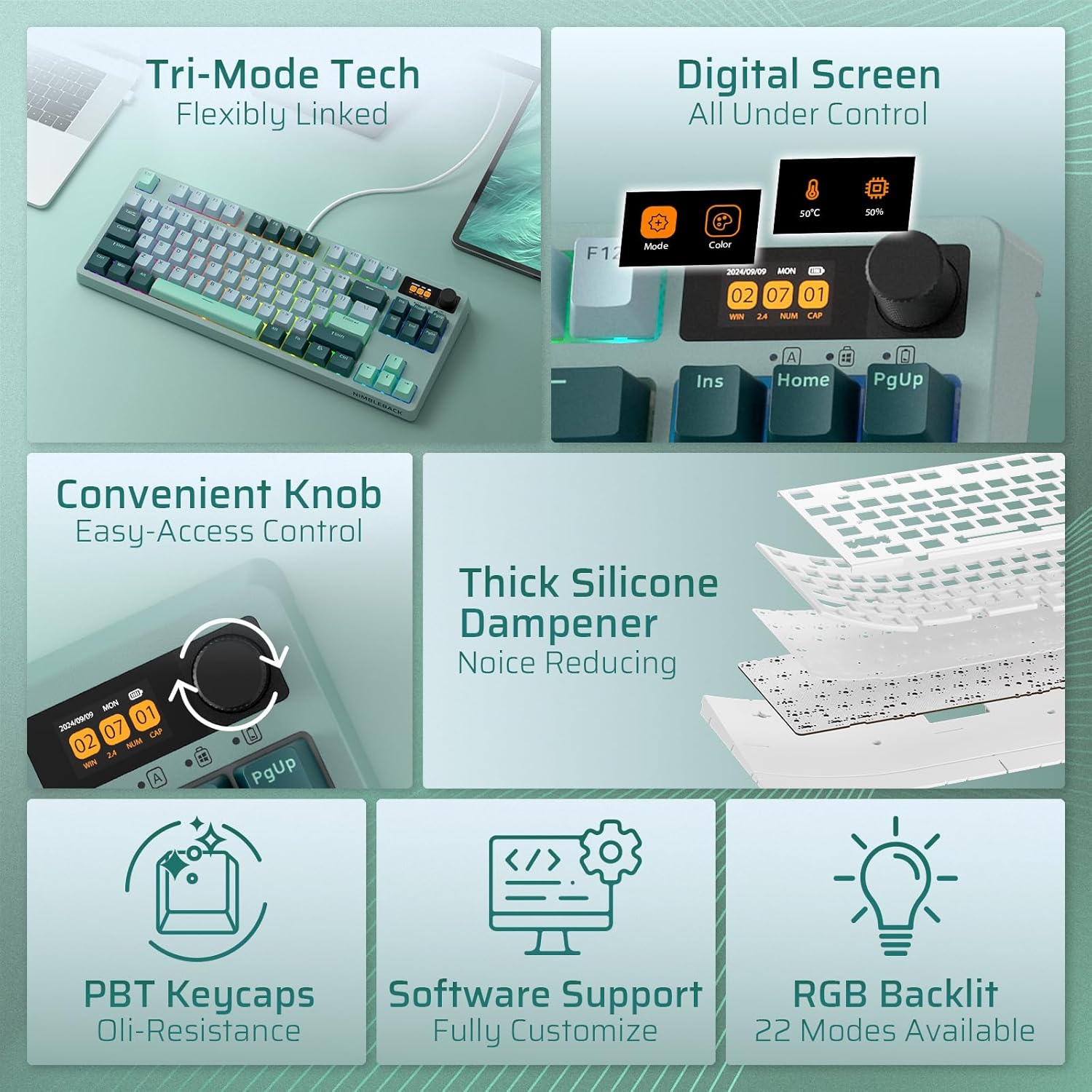
ചിത്രം 2: പ്രധാന സവിശേഷതകൾ കഴിഞ്ഞുview
3. സജ്ജീകരണം
3.1. കണക്റ്റിവിറ്റി മോഡുകൾ
The NB841 PRO supports three connection types: 2.4GHz wireless, Bluetooth 5.0, and USB-C wired. The mode switch is located on the bottom of the keyboard.
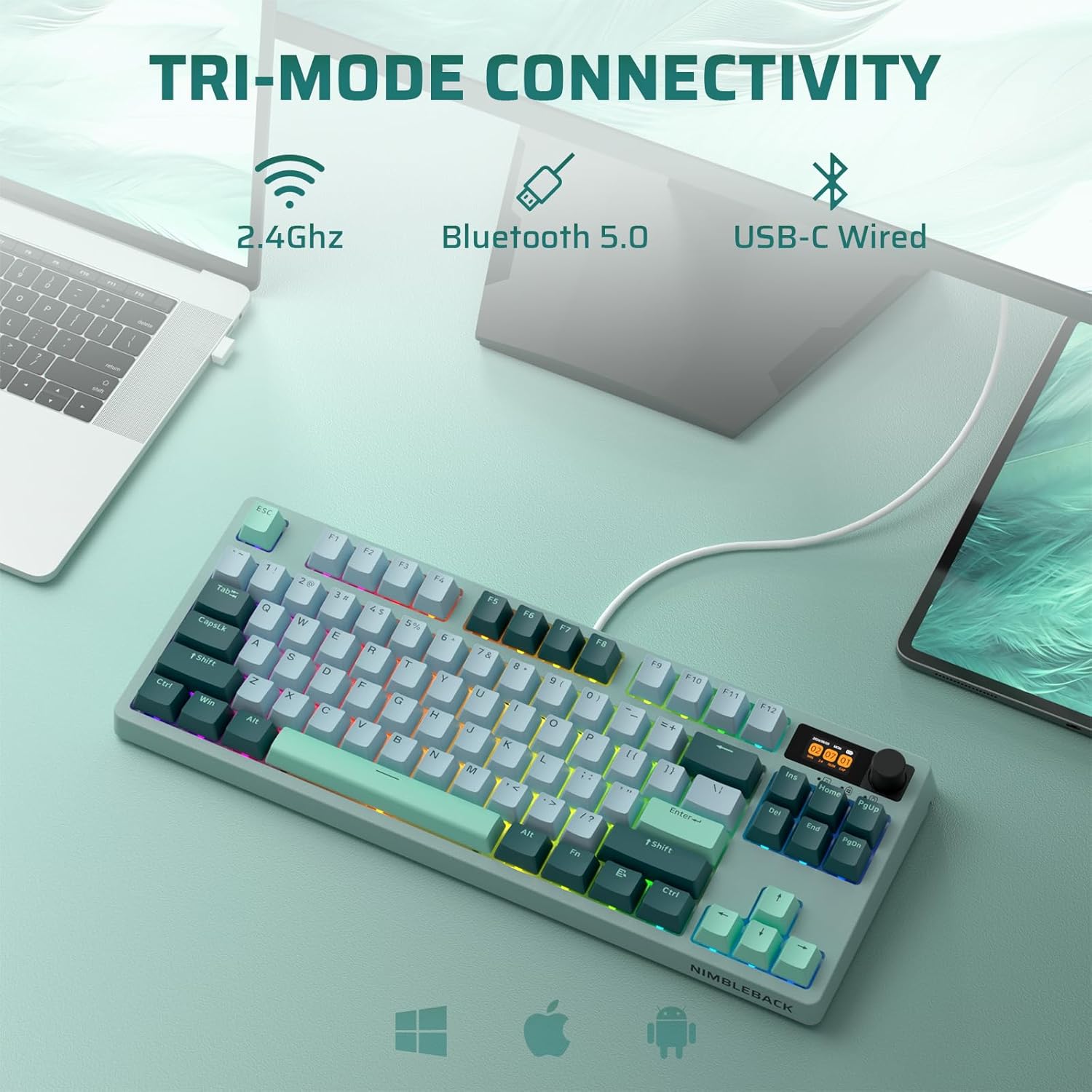
ചിത്രം 3: ട്രൈ-മോഡ് കണക്റ്റിവിറ്റി
3.1.1. 2.4GHz വയർലെസ് കണക്ഷൻ
- Locate the 2.4G USB dongle stored magnetically in the slot on the bottom of the keyboard.
- Slide the mode switch on the keyboard bottom to the '2.4G' position.
- നിങ്ങളുടെ കമ്പ്യൂട്ടറിൽ ലഭ്യമായ ഒരു USB പോർട്ടിലേക്ക് USB ഡോംഗിൾ പ്ലഗ് ചെയ്യുക.
- The keyboard will automatically connect. The display screen will indicate the 2.4G connection status.
3.1.2. ബ്ലൂടൂത്ത് കണക്ഷൻ
- Slide the mode switch on the keyboard bottom to the 'BT' position.
- On your device (PC, Android, iOS, macOS), enable Bluetooth and search for new devices.
- Select 'LTC NB841 Pro' from the list of available devices to pair.
- The display screen will show the Bluetooth connection status.
3.1.3. യുഎസ്ബി-സി വയർഡ് കണക്ഷൻ
- നൽകിയിരിക്കുന്ന USB-C കേബിൾ കീബോർഡിന്റെ USB-C പോർട്ടുമായി ബന്ധിപ്പിക്കുക.
- നിങ്ങളുടെ കമ്പ്യൂട്ടറിൽ ലഭ്യമായ USB പോർട്ടിലേക്ക് കേബിളിന്റെ മറ്റേ അറ്റം ബന്ധിപ്പിക്കുക.
- Slide the mode switch on the keyboard bottom to the 'USB-C' position.
- കീബോർഡ് ഒരു വയർഡ് ഉപകരണമായി പ്രവർത്തിക്കുകയും ഒരേസമയം ചാർജ് ചെയ്യുകയും ചെയ്യും.
4. പ്രവർത്തന നിർദ്ദേശങ്ങൾ
4.1. Multifunctional Display Screen
The integrated display screen provides real-time information and customization options:
- സമയവും തീയതിയും: നിലവിലെ സമയവും തീയതിയും പ്രദർശിപ്പിക്കുന്നു.
- ബാറ്ററി നില: ശേഷിക്കുന്ന ബാറ്ററി ലൈഫ് കാണിക്കുന്നു.
- കണക്റ്റിവിറ്റി മോഡ്: Indicates current connection (WIN/MAC layouts, 2.4G, BT, USB-C).
- ലൈറ്റിംഗ് ഇഫക്റ്റുകൾ: Adjust RGB lighting effects, color, and speed.
- GIF Images: Showcase personalized GIF images.
- CPU Status: Monitor CPU temperature and usage (requires software).

Figure 4: Smart Digital Screen Functions
4.2. Intuitive Knob Control
The knob on the top right corner offers quick adjustments:
- വോളിയം നിയന്ത്രണം: Rotate to adjust system volume. Press to mute/unmute.
- Screen Menu Navigation: അമർത്തുക Fn + Knob to enter the screen menu. Rotate to select options, press to confirm.
- ബാക്ക്ലൈറ്റ് ക്രമീകരണം: Adjust backlit brightness and speed.
- RGB Mode/Color: Cycle through RGB modes and colors.

ചിത്രം 5: നോബ് നിയന്ത്രണ പ്രവർത്തനങ്ങൾ
4.3. RGB ബാക്ക്ലൈറ്റ് നിയന്ത്രണം
The keyboard features 22 modes of RGB lighting. Use the following key combinations for control:
- Fn + \|: Backlight On/Off
- Fn + ↑: Backlight Mode Switch
- Fn + ↓: Backlight Color Switch
- Fn + ←Скачать по видео (എഴുത്തുകാരൻ)/→: Adjust Breathing Speed
- Fn + F5/F6: Backlight Brightness +/-
4.4. ഹോട്ട്-സ്വാപ്പ് പിസിബി
The hot-swappable PCB allows you to change switches without soldering. It supports most 3-pin and 5-pin MX-style mechanical switches.
- Use the provided switch puller to carefully remove the keycap.
- Use the switch puller to gently extract the switch from the PCB.
- പിസിബിയിലെ ദ്വാരങ്ങളുമായി പുതിയ സ്വിച്ചിന്റെ പിന്നുകൾ വിന്യസിക്കുക.
- പുതിയ സ്വിച്ച് അതിന്റെ സ്ഥാനത്ത് ക്ലിക്കായി വരുന്നത് വരെ ദൃഢമായി അമർത്തുക. പിന്നുകൾ വളയുന്നില്ലെന്ന് ഉറപ്പാക്കുക.
- കീക്യാപ്പ് മാറ്റിസ്ഥാപിക്കുക.

Figure 6: Hot-Swap PCB Socket
4.5. സോഫ്റ്റ്വെയർ പിന്തുണ
LTC provides comprehensive software for advanced customization. The software allows you to:
- Personalize GIF images for the display screen.
- കീ കോമ്പിനേഷനുകൾ റീമാപ്പ് ചെയ്യുക.
- Assign macros.
- ബാക്ക്ലൈറ്റ് ക്രമീകരണങ്ങൾ ക്രമീകരിക്കുക.
- Monitor CPU temperature.
The NB841 PRO software is compatible with Windows 7, 8, 10, 11, Android, iOS, and macOS. Please visit the official LTC webസോഫ്റ്റ്വെയർ ഡൗൺലോഡുകൾക്കും നിർദ്ദേശങ്ങൾക്കുമുള്ള സൈറ്റ്.
5. പരിപാലനം
നിങ്ങളുടെ കീബോർഡിന്റെ ദീർഘായുസ്സും ഒപ്റ്റിമൽ പ്രകടനവും ഉറപ്പാക്കാൻ, ഈ പരിപാലന മാർഗ്ഗനിർദ്ദേശങ്ങൾ പാലിക്കുക:
- വൃത്തിയാക്കൽ: Regularly clean the keyboard with a soft, dry cloth. For deeper cleaning, remove keycaps using the provided puller and use compressed air to clear debris.
- ദ്രാവകങ്ങൾ ഒഴിവാക്കുക: Do not expose the keyboard to liquids. In case of spills, immediately disconnect power and allow it to dry completely before use.
- സംഭരണം: നേരിട്ടുള്ള സൂര്യപ്രകാശവും കടുത്ത താപനിലയും ഏൽക്കാത്ത തണുത്തതും വരണ്ടതുമായ സ്ഥലത്ത് കീബോർഡ് സൂക്ഷിക്കുക.
- ബാറ്ററി കെയർ: For wireless modes, charge the keyboard regularly to maintain battery health. Avoid fully depleting the battery frequently.
6. പ്രശ്നപരിഹാരം
നിങ്ങളുടെ കീബോർഡിൽ പ്രശ്നങ്ങൾ നേരിടുകയാണെങ്കിൽ, ഇനിപ്പറയുന്ന പൊതുവായ പരിഹാരങ്ങൾ പരിശോധിക്കുക:
- കീബോർഡ് പ്രതികരിക്കുന്നില്ല:
- കീബോർഡ് ചാർജ് ചെയ്തിട്ടുണ്ടോ അല്ലെങ്കിൽ USB-C വഴി ബന്ധിപ്പിച്ചിട്ടുണ്ടോ എന്ന് ഉറപ്പാക്കുക.
- Check the mode switch on the bottom of the keyboard to ensure it's set to the correct connection type (2.4G, BT, or USB-C).
- 2.4G-ക്ക്, ഡോംഗിൾ സുരക്ഷിതമായി പ്ലഗ് ഇൻ ചെയ്തിട്ടുണ്ടെന്ന് ഉറപ്പാക്കുക. ബ്ലൂടൂത്തിന്, ഉപകരണം വീണ്ടും പെയർ ചെയ്യുക.
- Keys Not Registering or Repeating:
- ബാധിച്ച താക്കോലിന്റെ ചുറ്റും അവശിഷ്ടങ്ങൾ നീക്കം ചെയ്യാൻ വൃത്തിയാക്കുക.
- If using hot-swappable switches, try removing and re-inserting the switch, or replace it with one of the spare switches.
- ബ്ലൂടൂത്ത് കണക്ഷൻ പ്രശ്നങ്ങൾ:
- കീബോർഡ് ബ്ലൂടൂത്ത് ജോടിയാക്കൽ മോഡിൽ ആണെന്ന് ഉറപ്പാക്കുക.
- നിങ്ങളുടെ ഉപകരണത്തിന്റെ ബ്ലൂടൂത്ത് ലിസ്റ്റിൽ നിന്ന് കീബോർഡ് നീക്കം ചെയ്ത് വീണ്ടും ജോടിയാക്കാൻ ശ്രമിക്കുക.
- നിങ്ങളുടെ ഉപകരണത്തിന്റെ ബ്ലൂടൂത്ത് പ്രവർത്തനക്ഷമമാക്കിയിട്ടുണ്ടെന്നും ശരിയായി പ്രവർത്തിക്കുന്നുണ്ടെന്നും ഉറപ്പാക്കുക.
- Display Screen Not Working:
- ബാറ്ററി നില പരിശോധിക്കുക.
- കീബോർഡ് ഓണാണെന്ന് ഉറപ്പാക്കുക.
- If issues persist, try resetting the keyboard (refer to software or manufacturer's webനിർദ്ദിഷ്ട പുനഃസജ്ജീകരണ നിർദ്ദേശങ്ങൾക്കുള്ള സൈറ്റ്).
- സോഫ്റ്റ്വെയർ കണക്റ്റിവിറ്റി പ്രശ്നങ്ങൾ:
- Ensure the keyboard is connected via USB-C for software configuration.
- Download the latest software version from the official LTC webസൈറ്റ്.
- Check for firewall or antivirus software blocking the application.
7 സ്പെസിഫിക്കേഷനുകൾ
| ഫീച്ചർ | വിശദാംശങ്ങൾ |
|---|---|
| ഉൽപ്പന്ന അളവുകൾ | 12.64 x 5.24 x 1.65 ഇഞ്ച് (32.1 x 13.3 x 4.2 സെ.മീ) |
| ഇനത്തിൻ്റെ ഭാരം | 2.6 പൗണ്ട് (1.18 കി.ഗ്രാം) |
| ഇനം മോഡൽ നമ്പർ | NB841 പ്രോ |
| കണക്റ്റിവിറ്റി ടെക്നോളജി | ബ്ലൂടൂത്ത്, RF (2.4GHz), USB-C |
| കീബോർഡ് വിവരണം | Mechanical, 75% Layout (84 Keys) |
| ബാക്ക്ലൈറ്റിംഗ് | RGB (22 modes), South-Facing LED |
| പ്രത്യേക സവിശേഷതകൾ | Programmable Keys, Rechargeable, Volume Roller, Display Screen, Hot-Swappable PCB, 3-Layer Dampener, Double-Shot PBT Keycaps, 2-Stagഇ ക്രമീകരിക്കാവുന്ന അടി |
| അനുയോജ്യമായ ഉപകരണങ്ങൾ | PC (Win7/8/10/11), Android, iOS, macOS |
| ബാറ്ററികൾ | 1 ലിഥിയം പോളിമർ ബാറ്ററി (ഉൾപ്പെടുത്തിയിരിക്കുന്നു) |

Figure 7: 3-Layer Silicone Sound Dampഊർജ്ജസ്വലമായ

Figure 8: Physical Features
8. വാറൻ്റിയും പിന്തുണയും
LTC products come with a manufacturer's warranty. For detailed warranty information, technical support, or service inquiries, please visit the official LTC webസൈറ്റിൽ ബന്ധപ്പെടുക അല്ലെങ്കിൽ അവരുടെ ഉപഭോക്തൃ പിന്തുണയുമായി ബന്ധപ്പെടുക. വാറന്റി ക്ലെയിമുകൾക്കായി നിങ്ങളുടെ വാങ്ങൽ രസീത് സൂക്ഷിക്കുക.


