ZKTeco TF1700 ഫിംഗർപ്രിന്റ് ടൈം അറ്റൻഡൻസ് യൂസർ മാനുവൽ
മോഡൽ: TF1700
ആമുഖം
This manual provides comprehensive instructions for the installation, operation, and maintenance of the ZKTeco TF1700 Fingerprint Time Attendance system. The TF1700 is designed for precise and secure biometric authentication, utilizing an advanced infrared detection fingerprint sensor and the zK Finger V10.0 algorithm for reliable recognition. It offers versatile connectivity options including TCP/IP, RS485, and USB Host for seamless integration into various environments.
ഉൽപ്പന്നം കഴിഞ്ഞുview
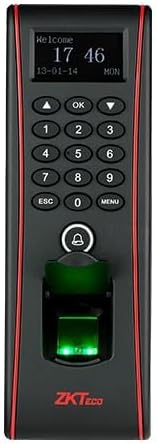
ചിത്രം 1: മുൻഭാഗം view of the TF1700 device, displaying the screen, numeric keypad, and the illuminated fingerprint sensor.

ചിത്രം 2: വശം view of the TF1700, illustrating the protective cover of the fingerprint scanner in an open position.
The ZKTeco TF1700 features a compact design with a clear display, a numeric keypad for user input, and a highly responsive fingerprint sensor. It is designed for wall-mounting and includes various ports for connectivity.
സജ്ജീകരണവും ഇൻസ്റ്റാളേഷനും
1 അൺപാക്ക് ചെയ്യുന്നു
Carefully remove all components from the packaging. Verify that all items listed in the packing list are present. Retain the original packaging for future transport or storage.
2. ഉപകരണം മൌണ്ട് ചെയ്യുന്നു
- Choose a suitable wall location, ensuring it is dry, stable, and within reach of power and network connections.
- Use the provided mounting template to mark the drilling points on the wall.
- ആവശ്യമെങ്കിൽ ദ്വാരങ്ങൾ തുരന്ന് വാൾ ആങ്കറുകൾ ഘടിപ്പിക്കുക.
- സ്ക്രൂകൾ ഉപയോഗിച്ച് മതിലിലേക്ക് മൗണ്ടിംഗ് ബ്രാക്കറ്റ് സുരക്ഷിതമാക്കുക.
- Attach the TF1700 device to the mounting bracket.
3. വയറിംഗും കണക്ഷനുകളും
- പവർ കണക്ഷൻ: Connect the DC 12V power adapter to the device's power input port.
- നെറ്റ്വർക്ക് കണക്ഷൻ (TCP/IP): Connect an Ethernet cable from the device's RJ45 port to your network switch or router.
- Serial Connection (RS485): For RS485 communication, connect the appropriate wires to the RS485+ and RS485- terminals.
- USB ഹോസ്റ്റ്: The USB Host port can be used for data transfer (e.g., firmware upgrades, data download/upload) via a USB flash drive.
ഉപകരണം ഓണാക്കുന്നതിന് മുമ്പ് എല്ലാ കണക്ഷനുകളും സുരക്ഷിതമാണെന്ന് ഉറപ്പാക്കുക.
പ്രവർത്തന നിർദ്ദേശങ്ങൾ
1. പ്രാരംഭ പവർ-ഓണും സജ്ജീകരണവും
After connecting power, the device will boot up. Follow the on-screen prompts for initial configuration, including setting date, time, and network parameters.
2. ഉപയോക്തൃ എൻറോൾമെന്റ്
ഒരു പുതിയ ഉപയോക്താവിനെ ചേർക്കാൻ:
- അമർത്തുക മെനു പ്രധാന മെനുവിൽ പ്രവേശിക്കുന്നതിനുള്ള ബട്ടൺ.
- നാവിഗേറ്റ് ചെയ്യുക ഉപയോക്തൃ മാനേജ്മെൻ്റ് തിരഞ്ഞെടുക്കുക പുതിയ ഉപയോക്താവ്.
- യൂസർ ഐഡിയും പേരും നൽകുക.
- തിരഞ്ഞെടുക്കുക വിരലടയാളം എൻറോൾ ചെയ്യുക. Place the finger firmly on the sensor three times as prompted.
- Optionally, enroll a password or RFID card.
- ഉപയോക്തൃ വിവരങ്ങൾ സംരക്ഷിക്കുക.
3. Time Attendance Operation
Users can clock in or out by placing their enrolled finger on the sensor. A successful verification will be indicated by a visual and audible prompt on the device.
4. ഡാറ്റ മാനേജ്മെൻ്റ്
Attendance records and user data can be downloaded via USB Host or through the network connection using compatible ZKTeco software.
മെയിൻ്റനൻസ്
- വൃത്തിയാക്കൽ: Regularly clean the fingerprint sensor surface with a soft, dry, lint-free cloth. Avoid using abrasive cleaners or solvents.
- ഫേംവെയർ അപ്ഡേറ്റുകൾ: Check the official ZKTeco website periodically for firmware updates to ensure optimal performance and security. Follow the provided instructions for updating.
- ഡാറ്റ ബാക്കപ്പ്: Periodically back up attendance records and user data to prevent data loss.
- പരിസ്ഥിതി വ്യവസ്ഥകൾ: ഉപകരണത്തിന്റെ ആയുസ്സ് വർദ്ധിപ്പിക്കുന്നതിന്, അത് നിശ്ചിത താപനിലയിലും ഈർപ്പത്തിലും പ്രവർത്തിക്കുന്നുണ്ടെന്ന് ഉറപ്പാക്കുക.
ട്രബിൾഷൂട്ടിംഗ്
| പ്രശ്നം | സാധ്യമായ കാരണം | പരിഹാരം |
|---|---|---|
| ഉപകരണം പവർ ഓണാക്കുന്നില്ല. | No power supply; faulty adapter; loose connection. | Check power adapter and cable connections. Ensure power outlet is functional. |
| വിരലടയാളം തിരിച്ചറിഞ്ഞില്ല. | Finger not placed correctly; dirty sensor; un-enrolled finger; damaged fingerprint. | Ensure finger is clean and dry. Place finger firmly and completely on the sensor. Re-enroll fingerprint if necessary. Clean sensor. |
| നെറ്റ്വർക്ക് കണക്ഷൻ പരാജയപ്പെട്ടു. | Incorrect IP settings; faulty Ethernet cable; network issue. | Verify IP address, subnet mask, and gateway settings. Check Ethernet cable. Test network connectivity. |
| Data transfer via USB failed. | Incompatible USB drive; corrupted data; full USB drive. | Use a FAT32 formatted USB drive. Ensure sufficient space. Try a different USB drive. |
സ്പെസിഫിക്കേഷനുകൾ
- മോഡൽ: TF1700
- ഫിംഗർപ്രിന്റ് സെൻസർ: Infrared Detection Fingerprint Sensor
- അൽഗോരിതം പതിപ്പ്: zK Finger V10.0
- ആശയവിനിമയം: TCP/IP, RS485, USB Host
- വിരലടയാള ശേഷി: Up to 3,000 (expandable to 8,000)
- കാർഡ് ശേഷി: 10,000 കാർഡുകൾ
- നിർമ്മാതാവ്: ZKTeco Co., Ltd
- ഉൽപ്പന്ന അളവുകൾ: 4.15 x 6.25 x 18.5 സെ.മീ
- ഇനത്തിൻ്റെ ഭാരം: 90 ഗ്രാം
- നിറം: വെള്ളി/കറുപ്പ്
വാറൻ്റി വിവരങ്ങൾ
ZKTeco products typically come with a standard manufacturer's warranty. For specific warranty terms and conditions, please refer to the warranty card included with your product or visit the official ZKTeco webവാറന്റി ക്ലെയിമുകൾക്കുള്ള വാങ്ങലിന്റെ തെളിവായി നിങ്ങളുടെ വാങ്ങൽ രസീത് സൂക്ഷിക്കുക.
ഉപഭോക്തൃ പിന്തുണ
For technical assistance, product inquiries, or support, please contact ZKTeco customer service through their official website or the contact information provided in your product documentation. When contacting support, please have your product model number (TF1700) and serial number ready.
Official ZKTeco Webസൈറ്റ്: www.zkteco.com


