1. ആമുഖം
Thank you for choosing the EDYELL A1 Truly Wireless Bluetooth Earbuds. This manual provides essential information for setting up, operating, and maintaining your earbuds to ensure optimal performance and longevity. Please read this manual thoroughly before use.

Image 1.1: EDYELL A1 Earbuds and Charging Case
2. പാക്കേജ് ഉള്ളടക്കം
നിങ്ങളുടെ പാക്കേജിൽ എല്ലാ ഇനങ്ങളും ഉണ്ടെന്ന് ഉറപ്പാക്കുക:
- 1 Pair of EDYELL A1 Earbuds
- 1 ചാർജിംഗ് കേസ്
- 1 ടൈപ്പ്-സി ചാർജിംഗ് കേബിൾ
- 2 Pairs of Earplugs (different sizes)
- 1 ഉപയോക്തൃ മാനുവൽ
3. സജ്ജീകരണം
3.1. ഇയർബഡുകളും കേസും ചാർജ് ചെയ്യുന്നു
Before first use, fully charge the earbuds and charging case. Connect the provided Type-C charging cable to the charging port on the case and a compatible USB power source. The LED indicators on the case will show charging status. A full charge provides up to 48 hours of total music playback with the charging case.

Image 3.1: Charging and Battery Life Overview
3.2. ബ്ലൂടൂത്ത് ഉപകരണവുമായി ജോടിയാക്കുന്നു
- ഇയർബഡുകൾ ചാർജ്ജ് ചെയ്തിട്ടുണ്ടെന്ന് ഉറപ്പാക്കുക.
- ചാർജിംഗ് കേസ് തുറക്കുക. ഇയർബഡുകൾ സ്വയമേവ ജോടിയാക്കൽ മോഡിലേക്ക് പ്രവേശിക്കും.
- നിങ്ങളുടെ ഉപകരണത്തിൽ (സ്മാർട്ട്ഫോൺ, ടാബ്ലെറ്റ് മുതലായവ), ബ്ലൂടൂത്ത് പ്രവർത്തനക്ഷമമാക്കുക.
- ഇതിനായി തിരയുക available Bluetooth devices and select "A1" from the list.
- Once connected, the earbuds will automatically pair with the last connected device when removed from the case.

Image 3.2: Fast Automatic Pairing Technology
3.3. ഇയർബഡുകൾ ഘടിപ്പിക്കൽ
For optimal sound quality and comfort, choose the correct size earplugs and ensure a secure fit.
- Select the earplug size that best fits your ear canal.
- ഇയർബഡ് പതുക്കെ ചെവിയിൽ തിരുകുക.
- Rotate and adjust the earbud until it feels comfortable and snug, creating a good seal.

Image 3.3: Comfortable Fit with 4 Sizes
4. പ്രവർത്തന നിർദ്ദേശങ്ങൾ
4.1. ടച്ച് നിയന്ത്രണങ്ങൾ
The EDYELL A1 earbuds feature touch controls for various functions. Specific touch gestures may vary; refer to the quick start guide included in your package for detailed control mapping.
- പ്ലേ/താൽക്കാലികമായി നിർത്തുക: ഇയർബഡുകളിൽ ഏതെങ്കിലുമൊന്നിൽ ഒറ്റ ടാപ്പ് ചെയ്യുക.
- അടുത്ത ട്രാക്ക്: വലതുവശത്തെ ഇയർബഡിൽ രണ്ടുതവണ ടാപ്പ് ചെയ്യുക.
- മുമ്പത്തെ ട്രാക്ക്: ഇടതുവശത്തെ ഇയർബഡിൽ രണ്ടുതവണ ടാപ്പ് ചെയ്യുക.
- ഉത്തരം/അവസാന കോൾ: ഇയർബഡുകളിൽ ഏതെങ്കിലുമൊന്നിൽ ഒറ്റ ടാപ്പ് ചെയ്യുക.
- കോൾ നിരസിക്കുക: ഇയർബഡുകളിൽ ഏതെങ്കിലുമൊന്ന് അമർത്തിപ്പിടിക്കുക.
- വോയ്സ് അസിസ്റ്റന്റിനെ സജീവമാക്കുക: ഇയർബഡുകളിൽ ഏതെങ്കിലുമൊന്നിൽ മൂന്ന് തവണ ടാപ്പ് ചെയ്യുക.
- ANC/സുതാര്യത മോഡ്: Press and hold the left earbud (typically 2 seconds) to cycle through modes.
4.2. ആക്ടീവ് നോയ്സ് റദ്ദാക്കൽ (ANC)
The earbuds feature up to 35dB Active Noise Cancellation to reduce ambient sound. Activate or deactivate ANC using the touch controls as described above. This feature is designed to enhance your listening experience in noisy environments.

Image 4.1: Active Noise Cancellation in Use
4.3. കോൾ പ്രവർത്തനങ്ങൾ
Equipped with 4 built-in microphones and CVC8.0 technology, the earbuds provide clear call quality by reducing background noise and enhancing your voice.
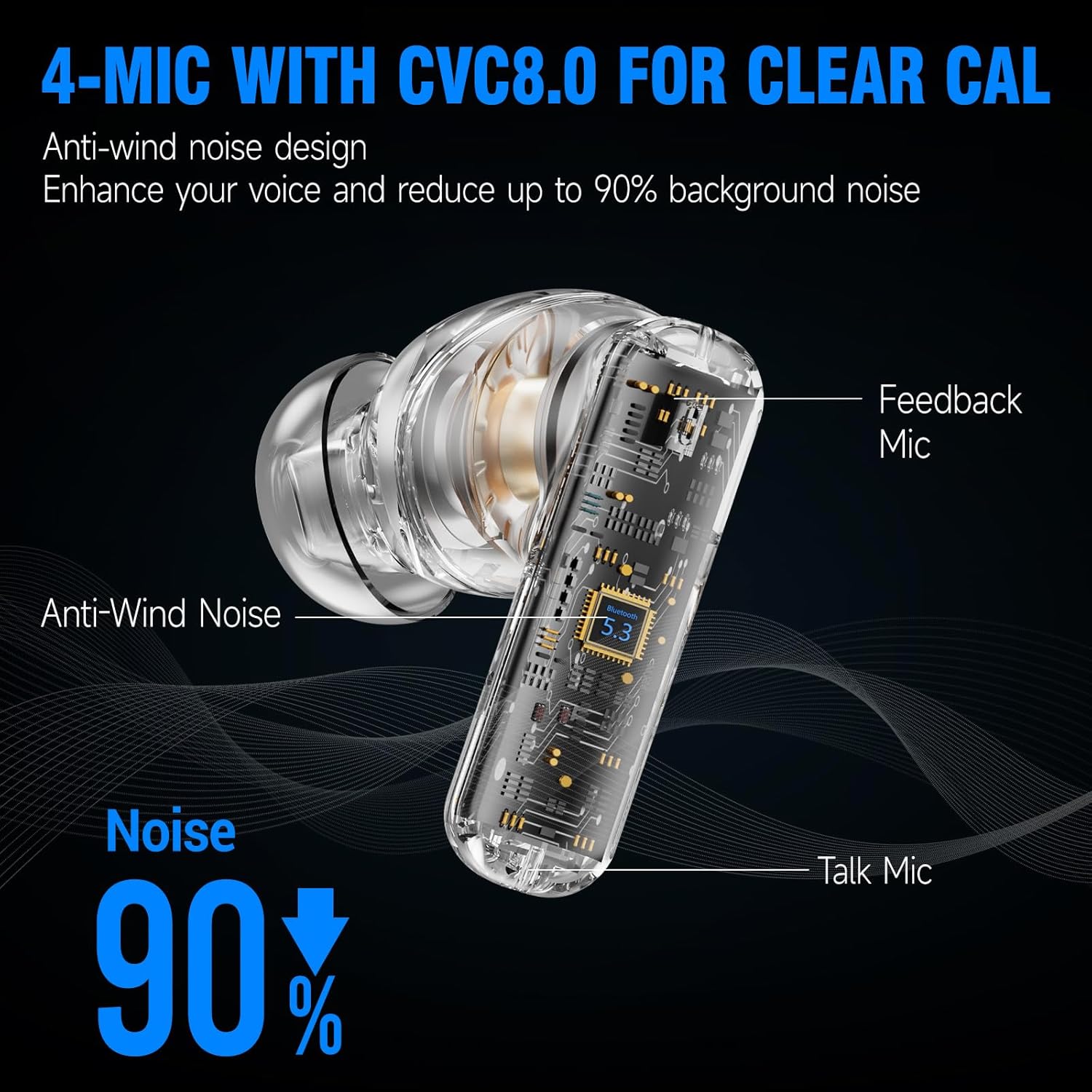
Image 4.2: 4-Mic with CVC8.0 for Clear Calls
4.4. Sound Experience
The EDYELL A1 earbuds feature 13mm Titanized Diaphragm Dynamic Drivers, designed to deliver HiFi stereo sound with deep bass and clear treble.

Image 4.3: 13mm Driver Delivers HiFi Stereo Sound
5. പരിപാലനം
5.1. വൃത്തിയാക്കൽ
Regularly clean your earbuds and charging case to maintain performance and hygiene. Use a soft, dry, lint-free cloth. Do not use abrasive cleaners or solvents. For earplugs, remove them and clean with mild soap and water, then dry thoroughly before reattaching.
5.2. ജല പ്രതിരോധം
The earbuds are IPX5 water-resistant, meaning they can withstand splashes and sweat. They are not designed for submersion in water. Avoid exposing them to heavy rain or swimming.

Image 5.1: IPX5 Water Resistance
6. പ്രശ്നപരിഹാരം
| ഇഷ്യൂ | സാധ്യമായ പരിഹാരം |
|---|---|
| ഇയർബഡുകൾ ജോടിയാക്കുന്നില്ല | ഇയർബഡുകൾ ചാർജ് ചെയ്തിട്ടുണ്ടെന്ന് ഉറപ്പാക്കുക. നിങ്ങളുടെ ഉപകരണത്തിൽ ബ്ലൂടൂത്ത് ഓഫാക്കി ഓണാക്കുക. ബ്ലൂടൂത്ത് ക്രമീകരണങ്ങളിൽ ഉപകരണം മറന്ന് വീണ്ടും ജോടിയാക്കുക. |
| ശബ്ദമോ കുറഞ്ഞ വോളിയമോ ഇല്ല | Check device volume. Ensure earbuds are properly connected. Clean earbud mesh if blocked. |
| ഇടവിട്ടുള്ള കണക്ഷൻ | Ensure no obstructions between earbuds and device. Keep device within Bluetooth range (approx. 10 meters). Avoid strong electromagnetic interference. |
| മൈക്രോഫോൺ പ്രവർത്തിക്കുന്നില്ല | Ensure earbuds are selected as the audio input device. Clean microphone ports. |
| ANC ഫലപ്രദമല്ല. | Ensure earbuds are properly seated in your ears with a good seal. Verify ANC is activated. |
7 സ്പെസിഫിക്കേഷനുകൾ
| ഫീച്ചർ | വിശദാംശങ്ങൾ |
|---|---|
| മോഡലിൻ്റെ പേര് | FM-Earbuds-A1 |
| ശബ്ദ നിയന്ത്രണം | ആക്ടീവ് നോയ്സ് റദ്ദാക്കൽ (35dB വരെ) |
| കണക്റ്റിവിറ്റി ടെക്നോളജി | ബ്ലൂടൂത്ത് 5.3 |
| ഓഡിയോ ഡ്രൈവർ തരം | 13 എംഎം ഡൈനാമിക് ഡ്രൈവർ |
| ബാറ്ററി ലൈഫ് | 48 മണിക്കൂർ വരെ (ചാർജിംഗ് കേസിനൊപ്പം) |
| ചാർജിംഗ് പോർട്ട് | ടൈപ്പ്-സി |
| മൈക്രോഫോണുകൾ | 4-built-in microphones with CVC8.0 |
| ജല പ്രതിരോധ നില | IPX5 |
| നിയന്ത്രണ തരം | ടച്ച് നിയന്ത്രണം |
| മെറ്റീരിയൽ | പ്ലാസ്റ്റിക് |
| ഇനത്തിൻ്റെ ഭാരം | 100 ഗ്രാം |
| ഉൽപ്പന്ന അളവുകൾ | 11 x 11 x 4 സെ.മീ |
| ബാറ്ററി സെൽ കോമ്പോസിഷൻ | ലിഥിയം അയോൺ |
| മാതൃരാജ്യം | ചൈന |
8. വാറൻ്റിയും പിന്തുണയും
The EDYELL A1 Earbuds come with a 12-month EDYELL India Warranty. For any quality problems or warranty claims, please contact customer support via Amazon or directly using the contact information below.
കസ്റ്റമർ കെയർ:
- ഇമെയിൽ: support@fenman.in
- ഫോൺ: +91 8882786235


