1. ആമുഖം
This manual provides detailed instructions for the safe and efficient operation of your Mesqool Emergency Radio 12000mAh. Designed for reliability in various situations, this multi-functional device offers radio reception, multiple power sources, and essential emergency features. Please read this manual thoroughly before use and retain it for future reference.
2. പാക്കേജ് ഉള്ളടക്കം
താഴെ ലിസ്റ്റ് ചെയ്തിരിക്കുന്ന എല്ലാ ഇനങ്ങളും നിങ്ങളുടെ പാക്കേജിൽ ഉൾപ്പെടുത്തിയിട്ടുണ്ടെന്ന് ഉറപ്പാക്കുക:
- കാലാവസ്ഥ റേഡിയോ
- ചാർജിംഗ് കേബിൾ
- പവർ അഡാപ്റ്റർ
- Hand Strip, Clip
- ഉടമയുടെ മാനുവൽ
3. ഉൽപ്പന്നം കഴിഞ്ഞുview
The Mesqool Emergency Radio is a compact and robust device, featuring a digital display, integrated flashlight, and a top-mounted reading lamp. Its camo green finish provides a rugged aesthetic suitable for outdoor and emergency use. The radio is equipped with various controls for tuning, volume, and emergency functions, along with multiple charging ports.

Figure 1: Mesqool Emergency Radio 12000mAh in Camo Green, displaying its digital screen, flashlight, and a smartphone connected for charging.
4. ഉപകരണം പവർ ചെയ്യുന്നു
Your Mesqool Emergency Radio offers five versatile ways to ensure continuous power:
4.1. Internal Rechargeable Battery (12000mAh)
The radio is equipped with a high-capacity 12000mAh Li-ion rechargeable battery, providing extended operation and power bank functionality.
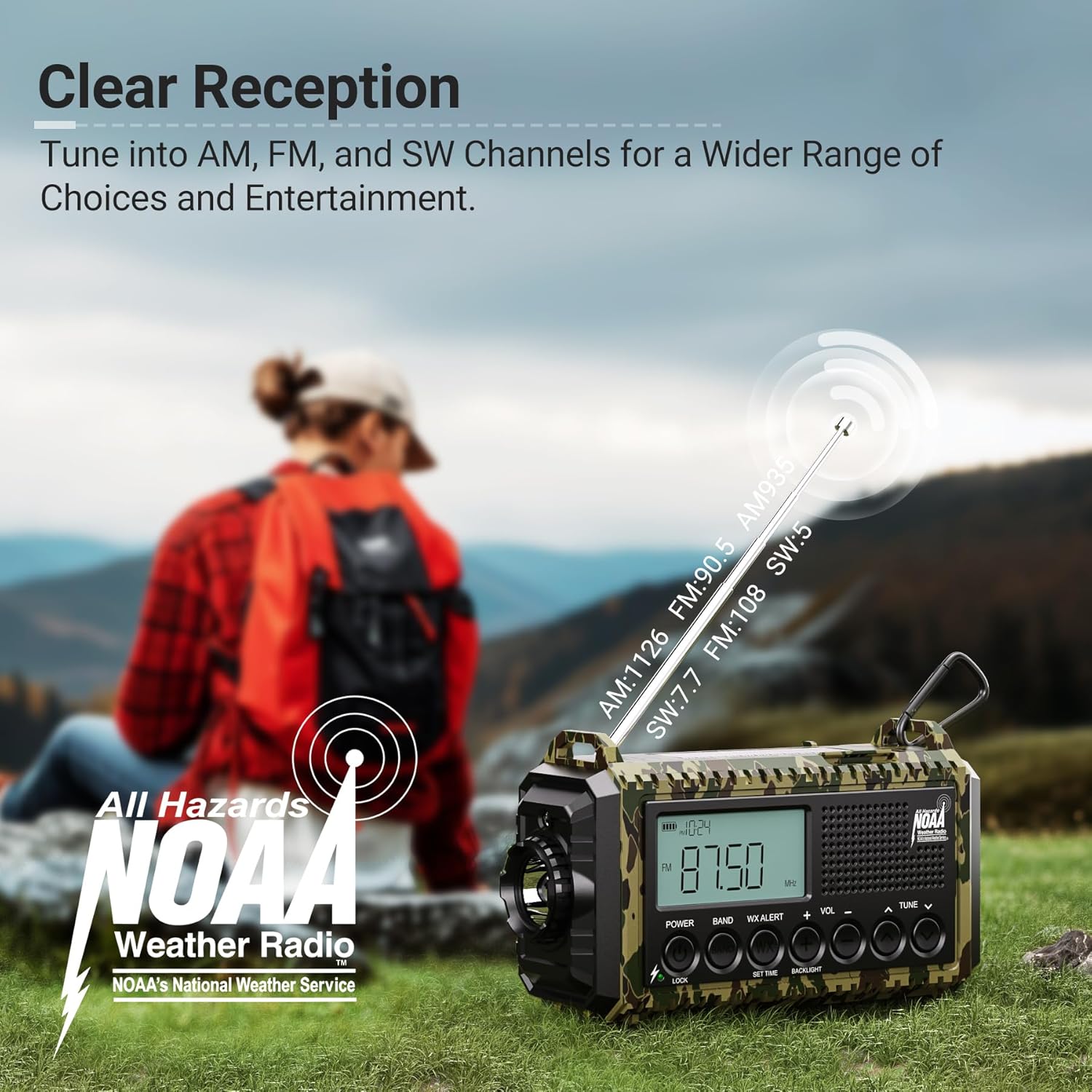
Figure 2: The emergency radio connected to a smartphone via a USB-C cable, demonstrating its capability to act as a power bank for external devices.
4.2. ടൈപ്പ്-സി ചാർജിംഗ്
Connect the provided Type-C charging cable to the radio's Type-C input port and a compatible power adapter (included) to charge the internal battery.
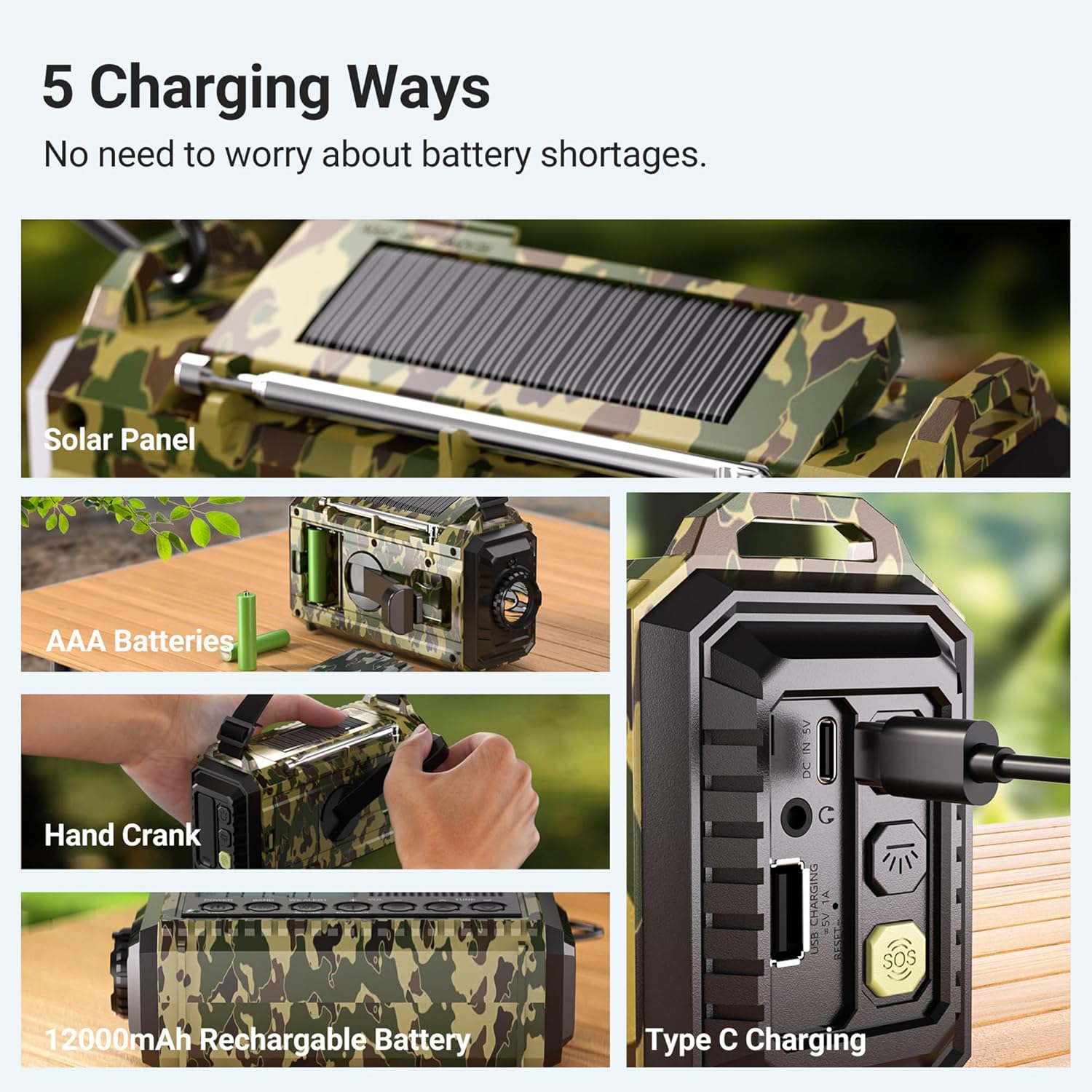
Figure 3: A visual representation detailing the five versatile charging options for the emergency radio, including Type-C input.
4.3. AAA Batteries
For an additional backup power source, the radio can operate using 3 AAA batteries (not included). Open the battery compartment and insert the batteries with correct polarity.

Figure 4: The emergency radio with its AAA battery compartment open, showing where to insert the batteries.
4.4. ഹാൻഡ് ക്രാങ്ക്
In situations without external power or sunlight, manually crank the handle located on the back of the radio to generate power. Continuous cranking will charge the internal battery.

Figure 5: The emergency radio with its hand crank extended and being turned, demonstrating manual power generation.
4.5. സോളാർ പാനൽ
Place the radio in direct sunlight to utilize the integrated solar panel for passive charging. This method is ideal for maintaining battery levels during prolonged outdoor exposure.

Figure 6: The emergency radio with its solar panel exposed to sunlight, indicating solar charging capability.
5. റേഡിയോ ഓപ്പറേഷൻ
Your radio supports AM, FM, SW, and NOAA weather bands.
5.1. ബാൻഡ് തിരഞ്ഞെടുക്കൽ
Use the 'BAND' button to cycle through available radio bands: SW (Shortwave), AM (Amplitude Modulation), FM (Frequency Modulation), and WB (Weather Band - NOAA).
5.2. ട്യൂണിംഗ്
Utilize the 'TUNE' buttons (up/down arrows) to manually search for stations within the selected band. The digital display will show the current frequency.
5.3. NOAA കാലാവസ്ഥാ മുന്നറിയിപ്പ്
The radio is equipped with an automatic NOAA weather alert function. When activated, it will emit a loud siren and flash a red light upon receiving critical weather updates from the National Weather Service, even if the radio is off. You can set a countdown for the alert duration (2H, 4H, 6H, 8H, 12H, 16H, 20H, 24H).
Video: This video demonstrates the NOAA weather alert function and battery backup of the Mesqool Emergency Radio. It shows how the radio receives critical weather updates and highlights its 12000mAh battery backup, ensuring power during emergencies.
6. Emergency Features
6.1. LED ഫ്ലാഷ്ലൈറ്റ്
The radio includes a powerful 3W LED flashlight with two brightness settings (300LM/150LM) for illumination in dark environments. Activate it using the dedicated button.
6.2. വായന എൽamp
A 2.5W reading lamp with two brightness settings (250LM/120LM) is integrated into the top handle, providing soft, ambient light for reading or general illumination.
6.3. SOS അലാറം
In an emergency, press the SOS button to activate a loud 105dB alarm and flashing red light, designed to attract attention and signal for help.
Figure 7: The emergency radio activated with its 105dB SOS alarm, accompanied by a flashing red light, designed to attract attention during critical situations.
6.4. Cell Phone Charger (Power Bank Function)
Utilize the USB-A output port to charge your mobile devices during power outages or emergencies. The 12000mAh internal battery provides sufficient power for multiple charges.
7 സ്പെസിഫിക്കേഷനുകൾ
| ഫീച്ചർ | സ്പെസിഫിക്കേഷൻ |
|---|---|
| ഉൽപ്പന്ന അളവുകൾ | 6.8 x 2.48 x 3.7 ഇഞ്ച് |
| ഇനത്തിൻ്റെ ഭാരം | 1.43 പൗണ്ട് |
| ബാറ്ററികൾ | 1 ലിഥിയം അയോൺ ബാറ്ററി ആവശ്യമാണ് (ഉൾപ്പെടുത്തിയിരിക്കുന്നു) |
| ട്യൂണർ ടെക്നോളജി | എൻഒഎഎ/എഎം/എഫ്എം/എസ്ഡബ്ല്യു |
| പവർ ഉറവിടം | Battery Powered | Type-C Input 5V/2A | AAA Batteries | Solar Panel | Hand Crank |
| പ്രത്യേക സവിശേഷതകൾ | Digital Weather Radio, LED Flashlight & Reading Lamp, Lock Function, Rechargeable Battery 12000mAh, SOS Alarm |
| കണക്റ്റിവിറ്റി ടെക്നോളജി | USB |
8. പ്രശ്നപരിഹാരം
If you encounter any issues with your Mesqool Emergency Radio, please consider the following:
- ശക്തിയില്ല: Ensure the internal battery is charged, or try using AAA batteries, hand crank, or solar panel. Check the power source selector switch.
- മോശം റേഡിയോ സ്വീകരണം: Extend the telescopic antenna fully. Try repositioning the radio to find a clearer signal.
- Flashlight/Reading Lamp പ്രവർത്തിക്കുന്നില്ല: Check battery level. Ensure the correct light mode button is pressed.
- ഫോൺ ചാർജ് ചെയ്യുന്നില്ല: Verify the charging cable is securely connected to both the radio's USB-A output and your device. Ensure the radio has sufficient power.
9. വാറൻ്റിയും പിന്തുണയും
Mesqool products are designed for quality and reliability. For warranty information, technical support, or any questions regarding your product, please refer to the contact information provided in the original product packaging or visit the official Mesqool webസൈറ്റ്. വാറൻ്റി ക്ലെയിമുകൾക്കായി നിങ്ങളുടെ വാങ്ങൽ രസീത് സൂക്ഷിക്കുക.


