Mesqool Emergency Radio Instruction Manual
Model: e5a70cca-01be-4e29-bb91-9cfc7e32344
ബ്രാൻഡ്: മെസ്കൂൾ
1. ആമുഖം
This manual provides detailed instructions for the Mesqool Emergency Radio, a versatile device designed for emergency preparedness and outdoor activities. It features multiple power sources, including a large-capacity rechargeable battery, hand crank, and solar panel, along with AM/FM/SW radio reception, NOAA weather alerts, a powerful flashlight, a reading lamp, and a cell phone charging function.

Figure 1: Mesqool Emergency Radio in Gray Camo, demonstrating phone charging capability.
2. പാക്കേജ് ഉള്ളടക്കം
താഴെ പറയുന്ന ഇനങ്ങൾക്കായി ബോക്സ് ചെക്ക് ചെയ്യുക:
- Emergency radio
- 5V 2A Adapter and Type C Cord
- മെറ്റൽ ഹുക്ക്
- Portable Belt
- ഉടമയുടെ മാനുവൽ
3 പ്രധാന സവിശേഷതകൾ
- NOAA Weather Alert Radio: Receives 7 pre-programmed NOAA weather channels with automatic alert function for severe weather events.
- മൾട്ടി-ബാൻഡ് റേഡിയോ: Supports AM, FM, and Shortwave (SW) frequencies for broad reception.
- ഉയർന്ന ശേഷിയുള്ള ബാറ്ററി: Equipped with a 12000mAh rechargeable Li-ion battery for extended operation and device charging.
- Five Power Sources: Rechargeable battery, USB-C input, hand crank, solar panel, and 3 AAA batteries (not included).
- എമർജൻസി ലൈറ്റിംഗ്: Features a bright flashlight (150-300 Lumens) and a 2-level brightness reading lamp (120-250 Lumens).
- SOS അലാറം: Activates a loud 116dB alarm with flashing red light for emergency signaling.
- Cell Phone Charger: Functions as a power bank to charge mobile devices via USB output.
- LCD സ്ക്രീൻ: Large, backlit LCD displays radio station, time, and weather channels.
- ഈട്: IPX-3 waterproof and dust-proof rating.
4. നിയന്ത്രണങ്ങളും ഘടകങ്ങളും
Familiarize yourself with the radio's controls and ports:

ചിത്രം 2: മുൻഭാഗം view of the radio highlighting the large LCD display and control buttons.
- പവർ ബട്ടൺ: Press to turn the radio on or off.
- ബാൻഡ് ബട്ടൺ: Cycles through AM, FM, SW, and Weather Band (WB) modes.
- WX Alert Button: Activates or deactivates the NOAA weather alert function.
- വോളിയം +/- ബട്ടണുകൾ: ഓഡിയോ ഔട്ട്പുട്ട് വോളിയം ക്രമീകരിക്കുന്നു.
- Tune +/- Buttons: Adjusts the radio frequency.
- ലോക്ക് ബട്ടൺ: ആകസ്മികമായ ബട്ടൺ അമർത്തലുകൾ തടയുന്നു.
- Set Time Button: Used to set the current time displayed on the LCD.
- ബാക്ക്ലൈറ്റ് ബട്ടൺ: Toggles the LCD screen backlight.
- ഫ്ലാഷ്ലൈറ്റ്: Located on the left side of the radio. Activated via a dedicated button.
- SOS Control Button: Activates the emergency SOS alarm.
- USB Output Charging Port: ബാഹ്യ ഉപകരണങ്ങൾ ചാർജ് ചെയ്യുന്നതിന്.
- Type-C Input Charging Port: റേഡിയോയുടെ ആന്തരിക ബാറ്ററി ചാർജ് ചെയ്യുന്നതിന്.
- 3.5 എംഎം ഹെഡ്ഫോൺ ജാക്ക്: സ്വകാര്യ ശ്രവണത്തിനായി.
- ടെലിസ്കോപ്പിക് ആന്റിന: മികച്ച റേഡിയോ സ്വീകരണത്തിനായി നീട്ടുക.
- സോളാർ പാനൽ: Located on the top, used for trickle charging.
- ഹാൻഡ് ക്രാങ്ക്: Foldable crank on the back for manual power generation.
- എൽ വായിക്കുന്നുamp: Located under the solar panel, flips up for illumination.
- AAA ബാറ്ററി കമ്പാർട്ട്മെന്റ്: Located on the bottom, for optional AAA battery power.
- കോമ്പസ്: Integrated into the portable strap for navigation.

ചിത്രം 3: വശം view illustrating the SOS alarm and headphone jack.
5. Power Sources and Charging
The Mesqool Emergency Radio offers five flexible ways to ensure you always have power:
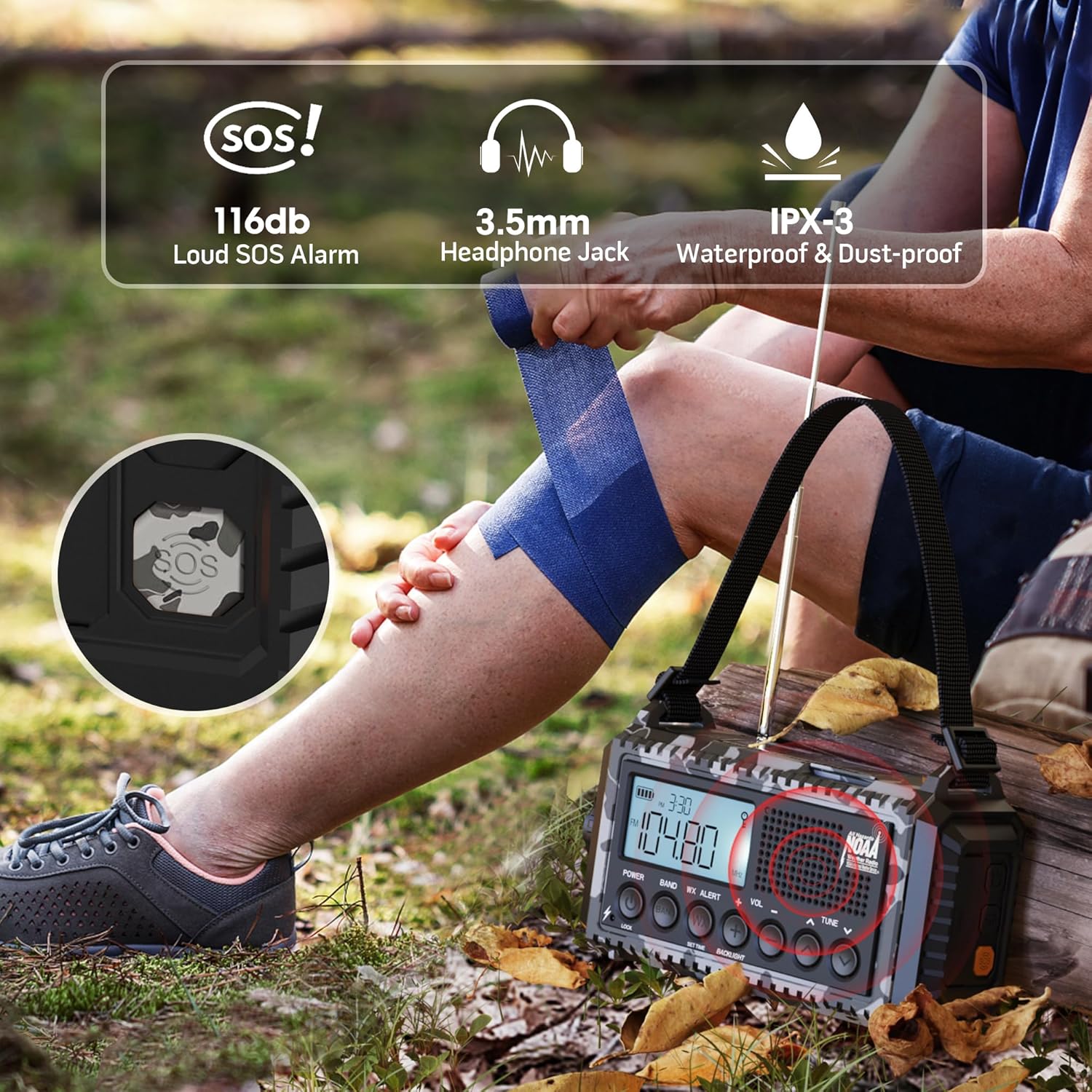
Figure 4: Visual representation of the five power options for the radio.
- 12000mAh ബിൽറ്റ്-ഇൻ ലി-അയൺ ബാറ്ററി: The primary power source. Ensure it is fully charged before extended use.
- Type-C Input (5V/2A): Connect the provided Type-C cable to a compatible USB adapter (not included) for the most efficient charging. The charging indicator lights will show progress.
- ഹാൻഡ് ക്രാങ്ക്: Rotate the hand crank clockwise or counter-clockwise at a steady pace (approx. 130-150 RPM) for 3-5 minutes to generate enough power for short-term use or to initiate charging.
- സോളാർ പാനൽ: Place the radio in direct sunlight. The solar panel provides trickle charging to maintain the battery level or extend playtime. It is not intended for full charging from a depleted state.
- 3 AAA Batteries (Not Included): Open the battery compartment on the bottom and insert 3 AAA batteries. This serves as a backup power source when the internal Li-ion battery is low or depleted.
The battery indicator on the LCD screen will show the current charge level. A flashing indicator typically means the battery is low and requires charging.
6. റേഡിയോ ഓപ്പറേഷൻ
The radio supports AM, FM, SW, and NOAA Weather Bands.

Figure 5: The radio displaying NOAA Weather Alert functionality.
- ഓൺ/ഓഫ് ചെയ്യുന്നു: അമർത്തുക പവർ റേഡിയോ ഓണാക്കാനോ ഓഫാക്കാനോ ഉള്ള ബട്ടൺ.
- ബാൻഡ് തിരഞ്ഞെടുക്കൽ: അമർത്തുക ബാൻഡ് button repeatedly to cycle through AM, FM, SW, and WB (Weather Band).
- ട്യൂണിംഗ് സ്റ്റേഷനുകൾ: ഉപയോഗിക്കുക ട്യൂൺ +/- buttons to manually adjust the frequency. For automatic scanning, press and hold the ട്യൂൺ +/- button for 2 seconds. The radio will stop on the next available station.
- വോളിയം നിയന്ത്രണം: ഉപയോഗിക്കുക വോൾ +/- ശ്രവണ ശബ്ദം ക്രമീകരിക്കാൻ ബട്ടണുകൾ.
- NOAA കാലാവസ്ഥാ മുന്നറിയിപ്പ്:
- പ്രവർത്തനക്ഷമമാക്കാൻ, അമർത്തുക WX അലേർട്ട് button. The 'WX' icon will appear on the LCD.
- The radio will automatically scan 7 NOAA weather channels. When an alert is received, an audible alarm will sound, and the red alert light will flash.
- To disable, press the WX അലേർട്ട് വീണ്ടും ബട്ടൺ.
7. Flashlight and Reading Lamp ഓപ്പറേഷൻ
The radio includes integrated lighting features for various situations.

Figure 6: The radio's reading lamp and flashlight in use.
- ഫ്ലാഷ്ലൈറ്റ്: Press the dedicated flashlight button on the side of the radio to turn it on. Press again to cycle through brightness levels (if applicable) or turn off.
- എൽ വായിക്കുന്നുamp: Flip up the solar panel to reveal the reading lamp. റീഡിംഗ് l അമർത്തുകamp button (often located near the flashlight button) to turn it on. Press again to adjust brightness levels or turn off.
8. SOS Alarm Function
In an emergency, the SOS alarm can be activated to attract attention.
- To activate the SOS alarm, press the SOS button (often a distinct yellow or red button, or integrated with a light button). A loud siren will sound, and a red flashing light will activate.
- നിർജ്ജീവമാക്കാൻ, അമർത്തുക SOS വീണ്ടും ബട്ടൺ.
9. Cell Phone Charging
The radio can serve as an emergency power bank for your mobile devices.
- Connect your mobile device to the USB output charging port on the side of the radio using your device's charging cable.
- The radio's internal 12000mAh battery will provide power to your device.
- If the radio's battery is low, you may need to use the hand crank to generate initial power for charging.

Figure 7: The radio connected to a smartphone for charging.
10 സ്പെസിഫിക്കേഷനുകൾ
| ഫീച്ചർ | വിശദാംശങ്ങൾ |
|---|---|
| ഉൽപ്പന്ന അളവുകൾ | 3.7 x 2.48 x 6.8 ഇഞ്ച് |
| ഇനത്തിൻ്റെ ഭാരം | 1.46 പൗണ്ട് |
| ബാറ്ററി തരം | 1 ലിഥിയം അയോൺ ബാറ്ററി (ഉൾപ്പെടുത്തിയിരിക്കുന്നു) |
| പവർ ഉറവിടം | Rechargeable Battery | Solar Panel | Hand Crank | Type-C Input 5V/2A |
| റേഡിയോ ബാൻഡുകൾ പിന്തുണയ്ക്കുന്നു | AM/FM/7 Pre-Configured NOAA Stations |
| കണക്റ്റിവിറ്റി ടെക്നോളജി | NOAA RADIO |
| പ്രത്യേക സവിശേഷതകൾ | Cellphone USB Charger, Flashlight, Reading Lamp, Strap, Lightweight, SOS Alarm, NOAA Weather Alert |
11. പ്രശ്നപരിഹാരം
- ശക്തിയില്ല: Ensure the internal battery is charged. Try hand cranking for a few minutes or connecting to a USB power source. Check if AAA batteries are inserted correctly and have charge.
- മോശം റേഡിയോ സ്വീകരണം: Extend the telescopic antenna fully. Try repositioning the radio. For AM/SW, rotate the radio for optimal signal.
- NOAA Alert Not Working: Ensure the WX Alert function is enabled. Check if you are within range of a NOAA broadcast.
- ഫോൺ ചാർജ് ചെയ്യുന്നില്ല: Ensure the radio has sufficient power. Check the USB cable connection. Some devices may require more power than the radio can provide for rapid charging.
- ബട്ടണുകൾ പ്രതികരിക്കുന്നില്ല: Check if the Lock function is activated. Deactivate it if necessary.
12. പരിപാലനം
- വൃത്തിയാക്കൽ: ഒരു സോഫ്റ്റ് ഉപയോഗിച്ച് റേഡിയോ തുടയ്ക്കുക, ഡിamp തുണി. കഠിനമായ രാസവസ്തുക്കളോ ഉരച്ചിലുകളുള്ള ക്ലീനറുകളോ ഉപയോഗിക്കരുത്.
- സംഭരണം: നേരിട്ടുള്ള സൂര്യപ്രകാശത്തിൽ നിന്നും കടുത്ത താപനിലയിൽ നിന്നും അകലെ തണുത്തതും വരണ്ടതുമായ സ്ഥലത്ത് റേഡിയോ സൂക്ഷിക്കുക.
- ബാറ്ററി കെയർ: For optimal battery life, fully charge the internal Li-ion battery at least once every three months, even if not in use.
- ജല പ്രതിരോധം: While IPX-3 rated (splash-proof), avoid submerging the radio in water. Ensure all port covers are securely closed when exposed to moisture.
13. വാറൻ്റിയും പിന്തുണയും
For warranty information, technical support, or service inquiries, please refer to the contact details provided on the product packaging or the official Mesqool webസൈറ്റ്. വാങ്ങിയതിന്റെ തെളിവായി നിങ്ങളുടെ വാങ്ങൽ രസീത് സൂക്ഷിക്കുക.


