1. ആമുഖം
This manual provides comprehensive instructions for the safe and effective use of the HORIBA LAQUA EC-2000 conductivity meter. The EC-2000 is a compact and powerful benchtop instrument designed for precise water quality analysis, offering simplicity and excellent usability for daily laboratory tasks. Please read this manual thoroughly before operating the device and keep it for future reference.
2 സുരക്ഷാ വിവരങ്ങൾ
To ensure safe operation and prevent damage to the instrument, observe the following precautions:
- Always use the instrument in a stable, level environment, away from direct sunlight, extreme temperatures, and high humidity.
- Avoid exposing the instrument to strong vibrations or impacts.
- ഉപകരണം ഡിസ്അസംബ്ലിംഗ് ചെയ്യുകയോ പരിഷ്കരിക്കുകയോ ചെയ്യരുത്. എല്ലാ സേവനങ്ങളും യോഗ്യതയുള്ള ഉദ്യോഗസ്ഥരെ ഏൽപ്പിക്കുക.
- Ensure that the power supply used matches the specifications required by the instrument.
- Keep the instrument and its accessories out of reach of children.
- Handle electrodes and calibration solutions with care, following their respective safety data sheets.
3. ഉൽപ്പന്നം കഴിഞ്ഞുview
The HORIBA LAQUA EC-2000 is a benchtop conductivity meter designed for accurate measurements. Familiarize yourself with its components and controls.
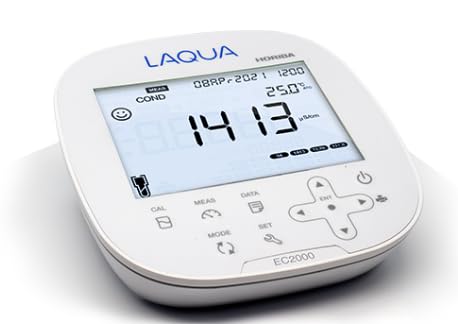
Figure 3.1: HORIBA LAQUA EC-2000 Conductivity Meter
This image displays the HORIBA LAQUA EC-2000 benchtop meter. It features a large digital display showing a conductivity reading of "1413 µS/cm" and a temperature of "25.0°C". Below the display are several control buttons: "CAL" for calibration, "MEAS" for measurement, "DATA" for data functions, "SET" for settings, and "MODE" for changing modes. A directional pad with an "ENT" (Enter) button is located on the right, alongside a power button. The device is white with blue "LAQUA" branding and "HORIBA" in smaller text.
3.1. Key Components and Controls
- ഡിസ്പ്ലേ: Large LCD showing measurement values (e.g., conductivity, temperature), battery status, and operational icons.
- CAL ബട്ടൺ: കാലിബ്രേഷൻ പ്രക്രിയ ആരംഭിക്കുന്നു.
- MEAS ബട്ടൺ: Starts or stops a measurement.
- DATA Button: Accesses stored data or data logging functions. The meter has a built-in data memory for 2000 items.
- SET ബട്ടൺ: Enters the system settings menu for configuration.
- മോഡ് ബട്ടൺ: Switches between different measurement modes or display options.
- Directional Pad (Up, Down, Left, Right) with ENT Button: Used for navigation within menus and confirming selections.
- പവർ ബട്ടൺ: ഉപകരണം ഓൺ അല്ലെങ്കിൽ ഓഫ് ചെയ്യുന്നു.
- ഇൻപുട്ട് പോർട്ടുകൾ: (Not visible in image, but implied) For connecting electrodes and power adapter.
4. സജ്ജീകരണം
4.1. അൺപാക്ക് ചെയ്യലും പരിശോധനയും
- Carefully remove the EC-2000 meter and all accessories from the packaging.
- Verify that all items listed in the packing list are present. The product includes the meter.
- Inspect the instrument for any visible damage that may have occurred during shipping. If damage is found, contact your supplier immediately.
4.2. പവർ കണക്ഷൻ
Connect the provided AC adapter to the power input port on the rear of the meter, then plug it into a suitable power outlet. Ensure the connection is secure.
4.3. ഇലക്ട്രോഡ് കണക്ഷൻ
Connect the conductivity electrode to the designated input port on the meter. Ensure the connector is fully inserted and secured.
5. പ്രവർത്തന നിർദ്ദേശങ്ങൾ
5.1. പവർ ഓൺ/ഓഫ്
- പവർ ഓണാക്കാൻ: അമർത്തിപ്പിടിക്കുക ശക്തി ഡിസ്പ്ലേ പ്രകാശിക്കുന്നത് വരെ ബട്ടൺ അമർത്തുക.
- പവർ ഓഫ് ചെയ്യാൻ: അമർത്തിപ്പിടിക്കുക ശക്തി ഡിസ്പ്ലേ ഓഫാക്കുന്നതുവരെ ബട്ടൺ.
5.2. കാലിബ്രേഷൻ
Regular calibration is essential for accurate measurements. Refer to the specific instructions for your conductivity electrode and calibration solutions.
- Prepare the appropriate conductivity calibration standards.
- Rinse the electrode thoroughly with deionized water and blot dry.
- Immerse the electrode in the first calibration standard.
- അമർത്തുക CAL button. Follow the on-screen prompts to complete the calibration.
- Repeat for additional calibration points as required.
5.3. അളവ്
- മീറ്റർ കാലിബ്രേറ്റ് ചെയ്തിട്ടുണ്ടെന്ന് ഉറപ്പാക്കുക.
- Rinse the electrode with deionized water and blot dry.
- ഇലക്ട്രോഡ് s-ൽ മുക്കുക.ample solution. Ensure the sensor part of the electrode is fully submerged.
- അമർത്തുക MEAS button. The display will show the conductivity reading (e.g., "COND" and "1413 µS/cm") and temperature.
- Wait for the reading to stabilize before recording the value.
5.4. Data Handling
The EC-2000 features a built-in data memory capable of storing up to 2000 measurement items.
- Storing Data: After a stable measurement, press the ഡാറ്റ button to save the current reading. Follow any on-screen prompts.
- ഡാറ്റ തിരിച്ചുവിളിക്കൽ: അമർത്തുക ഡാറ്റ button and use the directional pad to navigate through stored records.
- ഒരു കമ്പ്യൂട്ടറിലേക്ക് ബന്ധിപ്പിക്കുന്നു: The meter can be connected to a computer to collect measurement data. Refer to the separate software manual (if applicable) for detailed instructions on data transfer.
5.5. സിസ്റ്റം ക്രമീകരണങ്ങൾ
അമർത്തുക സെറ്റ് button to access system settings. Use the directional pad and ഇഎൻടി button to adjust parameters such as temperature compensation, units, date/time, and other instrument configurations.
6. പരിപാലനം
6.1. മീറ്റർ വൃത്തിയാക്കൽ
Wipe the exterior of the meter with a soft, damp cloth. Do not use abrasive cleaners or solvents. Ensure no liquid enters the instrument.
6.2. ഇലക്ട്രോഡ് പരിചരണം
Proper electrode maintenance is crucial for accuracy and longevity. Always rinse the electrode with deionized water after each use. Store the electrode according to the manufacturer's instructions, typically in a storage solution or wet cap.
6.3. സംഭരണം
When not in use for extended periods, store the EC-2000 in a dry, cool place, away from direct sunlight and extreme temperatures. Disconnect the power adapter and ensure the electrode is properly stored.
7. പ്രശ്നപരിഹാരം
This section addresses common issues you may encounter. If the problem persists, contact HORIBA technical support.
| പ്രശ്നം | സാധ്യമായ കാരണം | പരിഹാരം |
|---|---|---|
| മീറ്റർ പവർ ഓൺ ആകുന്നില്ല. | No power supply or faulty connection. | Check power adapter connection and power outlet. Ensure the power button is pressed correctly. |
| Unstable or inaccurate readings. | Electrode dirty, damaged, or not calibrated. | Clean the electrode. Perform a fresh calibration. Check electrode for damage and replace if necessary. |
| Cannot save data. | Memory full or incorrect operation. | Check available memory. Follow data saving instructions carefully. Consider transferring data to a computer to free up space. |
8 സ്പെസിഫിക്കേഷനുകൾ
Key specifications for the HORIBA LAQUA EC-2000 meter:
- മോഡൽ: EC-2000
- നിർമ്മാതാവ്: ഹോറിബ
- പ്രവർത്തനം: കണ്ടക്ടിവിറ്റി മീറ്റർ
- ഡാറ്റ മെമ്മറി: Built-in, stores up to 2000 items.
- കണക്റ്റിവിറ്റി: Allows connection to a computer for data collection.
- ASIN: B0DFHNG91Q
- ആദ്യം ലഭ്യമായത്: ഓഗസ്റ്റ് 28, 2024
9. വാറൻ്റിയും പിന്തുണയും
For warranty information, technical support, or service inquiries, please contact your local HORIBA representative or visit the official HORIBA webസൈറ്റ്. പിന്തുണയുമായി ബന്ധപ്പെടുമ്പോൾ നിങ്ങളുടെ വാങ്ങൽ രസീതും ഉൽപ്പന്ന സീരിയൽ നമ്പറും കൈവശം വയ്ക്കുക.
ഹോറിബ Webസൈറ്റ്: www.horiba.com


