ആമുഖം
Thank you for choosing the Severin FILKA Automatic Filter Coffee Machine, Model KA 4852. This innovative appliance combines the convenience of a fully automatic machine with the enjoyment of classic filter coffee. It is designed to deliver freshly ground filter coffee in your desired quantity, suitable for carafes, cups, and travel mugs.
This manual provides essential information for the safe and efficient operation, maintenance, and troubleshooting of your new coffee machine. Please read it thoroughly before first use and keep it for future reference.
പ്രധാനപ്പെട്ട സുരക്ഷാ നിർദ്ദേശങ്ങൾ
അപകടങ്ങളും ഉപകരണത്തിന് കേടുപാടുകളും ഉണ്ടാകാതിരിക്കാൻ ഇനിപ്പറയുന്ന സുരക്ഷാ മുൻകരുതലുകൾ എപ്പോഴും പാലിക്കുക:
- ഉപകരണം പ്രവർത്തിപ്പിക്കുന്നതിന് മുമ്പ് എല്ലാ നിർദ്ദേശങ്ങളും ശ്രദ്ധാപൂർവ്വം വായിക്കുക.
- ഉപകരണം, ചരട്, അല്ലെങ്കിൽ പ്ലഗ് എന്നിവ വെള്ളത്തിലോ മറ്റേതെങ്കിലും ദ്രാവകത്തിലോ മുക്കരുത്.
- ഉപകരണം കുട്ടികൾക്ക് ലഭ്യമാകാതെ സൂക്ഷിക്കുക.
- വോളിയം ഉറപ്പാക്കുകtage indicated on the rating plate matches your mains supply.
- Unplug the appliance from the mains socket when not in use, before cleaning, and in case of malfunction.
- കേടായ ഒരു കോർഡ് അല്ലെങ്കിൽ പ്ലഗ് ഉപയോഗിച്ച് ഉപകരണം പ്രവർത്തിപ്പിക്കരുത്, അല്ലെങ്കിൽ ഉപകരണം തകരാറിലായതിന് ശേഷം അല്ലെങ്കിൽ ഏതെങ്കിലും വിധത്തിൽ കേടായി.
- ഉപകരണം സ്ഥിരതയുള്ള, ലെവൽ, ചൂട് പ്രതിരോധശേഷിയുള്ള പ്രതലത്തിൽ സ്ഥാപിക്കുക.
- ചൂടുള്ള പ്രതലങ്ങളുമായുള്ള സമ്പർക്കം ഒഴിവാക്കുക. ഹാൻഡിലുകൾ അല്ലെങ്കിൽ നോബുകൾ ഉപയോഗിക്കുക.
- നിർമ്മാതാവ് ശുപാർശ ചെയ്യുന്ന ആക്സസറികൾ മാത്രം ഉപയോഗിക്കുക.
ഉൽപ്പന്ന ഘടകങ്ങൾ
Familiarize yourself with the parts of your Severin FILKA coffee machine:

ചിത്രം 1: പ്രധാനം view of the Severin FILKA Automatic Filter Coffee Machine with coffee beans in the grinder and brewed coffee in the carafe.
- ഇന്റഗ്രേറ്റഡ് കോഫി ഗ്രൈൻഡർ: For freshly ground coffee beans.
- ബീൻ കണ്ടെയ്നർ: Removable for easy filling and cleaning.
- വാട്ടർ ടാങ്ക്: Removable for convenient filling and cleaning.
- ഡിജിറ്റൽ ടച്ച്സ്ക്രീൻ ഡിസ്പ്ലേ: For intuitive control and settings adjustment.
- ബ്രൂയിംഗ് യൂണിറ്റ്: Houses the permanent filter.
- Permanent Gold-Tone Filter: Reusable and dishwasher-safe.
- ഡ്രിപ്പ് ട്രേ: Collects any drips.
- ഗ്ലാസ് കരാഫ്: Included for brewing larger quantities of coffee.
സജ്ജമാക്കുക
നിങ്ങളുടെ കോഫി മെഷീൻ ആദ്യമായി സജ്ജീകരിക്കാൻ ഈ ഘട്ടങ്ങൾ പാലിക്കുക:
- അൺപാക്ക് ചെയ്യുന്നു: Carefully remove all packaging materials and check for any damage. Keep packaging for potential future transport.
- പ്രാരംഭ ക്ലീനിംഗ്: Before first use, clean all removable parts (water tank, bean container, permanent filter, glass carafe) with warm soapy water. Rinse thoroughly and dry. Wipe the exterior of the machine with a damp തുണി.
- സ്ഥാനനിർണ്ണയം: Place the coffee machine on a stable, level, and heat-resistant surface, away from water sources and direct heat. Ensure adequate ventilation.
- വാട്ടർ ടാങ്ക് നിറയ്ക്കുക: Remove the water tank (ചിത്രം 2 കാണുക) and fill it with fresh, cold water up to the MAX mark. Reinsert the tank securely.
- ബീൻ കണ്ടെയ്നർ നിറയ്ക്കുക: Open the lid of the bean container and fill it with whole coffee beans (ചിത്രം 3 കാണുക). Close the lid firmly.
- ആദ്യത്തെ ബ്രൂ സൈക്കിൾ (കാപ്പി ചേർക്കാതെ): To clean the internal system, perform a brewing cycle with only water. Place the glass carafe under the coffee outlet. Select the maximum water quantity on the display and start the brewing process. Discard the water after completion. Repeat this process once or twice.

Figure 2: A hand removing the transparent water tank from the side of the Severin FILKA coffee machine.
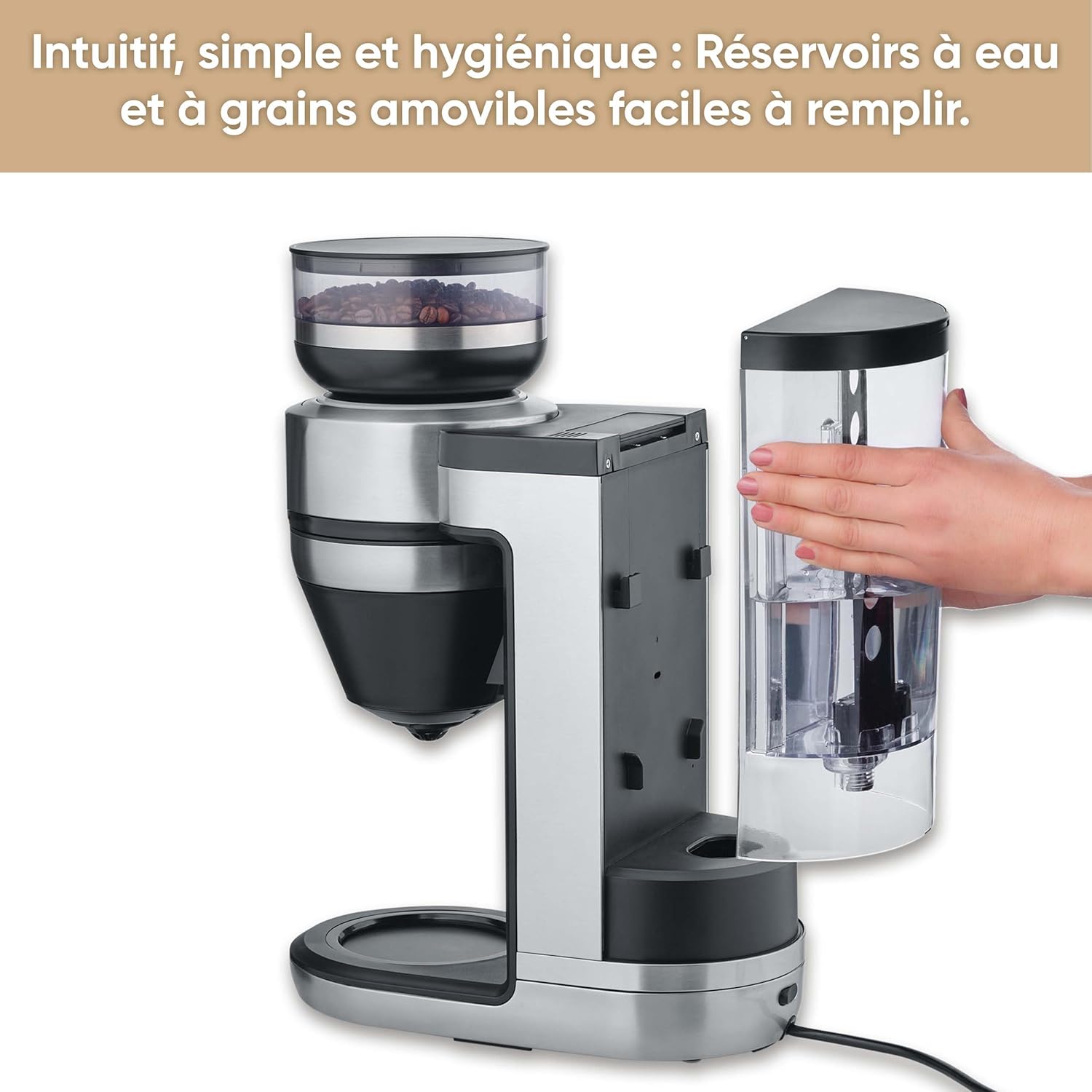
Figure 3: A hand holding the removable coffee bean container, lifted from the top of the Severin FILKA coffee machine.
പ്രവർത്തന നിർദ്ദേശങ്ങൾ
Basic Brewing
- പവർ ഓൺ: Plug the machine into a suitable power outlet. The display will illuminate.
- Fill Water and Beans: Ensure the water tank is filled with fresh water and the bean container has enough coffee beans.
- പ്ലേസ് കണ്ടെയ്നർ: Place your desired container (small cup, large cup, travel mug, or glass carafe) under the coffee outlet. The machine offers 5-in-1 compatibility.
- അളവ് തിരഞ്ഞെടുക്കുക: Use the digital touchscreen display (ചിത്രം 4 കാണുക) to select the desired coffee quantity. The machine's "Cup Control" feature automatically draws the necessary water for quantities between 100 ml and 350 ml.
- ബ്രൂവിംഗ് ആരംഭിക്കുക: Press the 'Start/Stop' button on the display to begin the brewing process. The machine will grind the beans and brew the coffee.

Figure 4: Close-up of the digital touchscreen display on the Severin FILKA coffee machine, showing quantity and strength settings.

Figure 5: The Severin FILKA coffee machine brewing into a single cup, demonstrating the "Cup Control" feature.
Customizing Your Coffee
- കാപ്പിയുടെ ശക്തി: Adjust the coffee strength using the options on the touchscreen display. There are 5 adjustable intensity levels, from mild to strong, to suit individual preferences.
- Pre-infusion Function: Activate the pre-infusion function via the display for a more intense and aromatic coffee flavor. This feature ensures optimal extraction.
- Brewing Temperature: The machine brews at an optimal temperature of up to 96°C, ensuring a hot and full-bodied coffee.
- ടൈമർ പ്രവർത്തനം: Utilize the integrated timer function to program your coffee machine to start brewing at a specific time.

Figure 6: Display showing brewing temperature and pre-infusion options for personalized coffee.
പരിപാലനവും ശുചീകരണവും
Regular cleaning and maintenance ensure the longevity and optimal performance of your Severin FILKA coffee machine.
പ്രതിദിന ക്ലീനിംഗ്
- ഗ്ലാസ് കരാഫ്: Wash the glass carafe and its lid with warm soapy water after each use.
- സ്ഥിരമായ ഫിൽട്ടർ: Remove the gold-tone permanent filter (ചിത്രം 7 കാണുക) and rinse it under running water to remove all coffee grounds. It is also dishwasher-safe.
- ഡ്രിപ്പ് ട്രേ: ഡ്രിപ്പ് ട്രേ പതിവായി ശൂന്യമാക്കുകയും വൃത്തിയാക്കുകയും ചെയ്യുക.
- പുറം: ഒരു സോഫ്റ്റ്, ഡി ഉപയോഗിച്ച് മെഷീൻ്റെ പുറംഭാഗം തുടയ്ക്കുകamp തുണി. ഉരച്ചിലുകൾ ഉള്ള ക്ലീനറുകൾ ഉപയോഗിക്കരുത്.

ചിത്രം 7: ക്ലോസപ്പ് view of the gold-tone permanent filter inside the Severin FILKA coffee machine.
റെഗുലർ മെയിൻ്റനൻസ്
- ബീൻ കണ്ടെയ്നർ: For thorough cleaning or changing bean types, the bean container can be easily removed by turning it. Clean it with a damp cloth and ensure it is completely dry before reattaching.
- വാട്ടർ ടാങ്ക്: The removable water tank facilitates easy refilling and cleaning. Clean it periodically to prevent mineral buildup.
- നിരസിക്കൽ: The machine features an integrated descaling function. Follow the instructions on the display or in the full manual for the descaling process. Regular descaling is crucial, especially in areas with hard water, to maintain performance and extend the appliance's lifespan.
ട്രബിൾഷൂട്ടിംഗ്
If you encounter issues with your coffee machine, refer to the table below for common problems and solutions:
| പ്രശ്നം | സാധ്യമായ കാരണം | പരിഹാരം |
|---|---|---|
| മെഷീൻ ഓണാക്കുന്നില്ല. | വൈദ്യുതി വിതരണം ഇല്ല. | പവർ കോർഡ് ഔട്ട്ലെറ്റിലേക്കും മെഷീനിലേക്കും സുരക്ഷിതമായി പ്ലഗ് ചെയ്തിട്ടുണ്ടോയെന്ന് പരിശോധിക്കുക. മറ്റൊരു ഉപകരണം ഉപയോഗിച്ച് ഔട്ട്ലെറ്റ് പരിശോധിക്കുക. |
| കാപ്പി ഉണ്ടാക്കുന്നില്ല. | Water tank empty; Bean container empty; Brewing unit clogged. | Fill water tank; Fill bean container; Clean the permanent filter and brewing unit. |
| കാപ്പിയുടെ രുചി ദുർബലമാണ്. | Incorrect coffee strength setting; Insufficient coffee beans. | Increase coffee strength setting on the display; Ensure adequate coffee beans are in the container. |
| വെള്ളം ചോർച്ച. | Water tank not properly seated; Internal component issue. | Ensure the water tank is correctly and firmly inserted. If leakage persists, contact customer support. |
| ഡിസ്പ്ലേയിൽ പിശക് സന്ദേശം. | നിർദ്ദിഷ്ട തകരാറ്. | Refer to the full product manual for specific error codes or contact customer support. Try unplugging and re-plugging the machine. |
സാങ്കേതിക സവിശേഷതകൾ
Here are the technical specifications for the Severin FILKA Automatic Filter Coffee Machine:
| ഫീച്ചർ | സ്പെസിഫിക്കേഷൻ |
|---|---|
| ബ്രാൻഡ് | സെവെറിൻ |
| മോഡൽ നമ്പർ | കെഎ 4852 |
| നിറം | ബ്രഷ് ചെയ്തു |
| അളവുകൾ (L x W x H) | 382 x 170 x 460 സെ.മീ |
| വാല്യംtage | 230 വോൾട്ട് |
| ഭാരം | 5750 കിലോഗ്രാം |
| ശേഷി | 2 ലിറ്റർ |
| മെറ്റീരിയൽ | സ്റ്റെയിൻലെസ്സ് സ്റ്റീൽ |
| പ്രത്യേക സവിശേഷതകൾ | Integrated stainless steel grinder, adjustable coffee intensity, timer, LED touchscreen display, pre-infusion function, 5-in-1 compatibility. |
വാറൻ്റിയും ഉപഭോക്തൃ പിന്തുണയും
For information regarding warranty coverage, please refer to the warranty card included with your product or visit the official Severin website. If you require technical assistance, spare parts, or have any questions not covered in this manual, please contact Severin customer support. Contact details can typically be found on the Severin webസൈറ്റ് അല്ലെങ്കിൽ ഉൽപ്പന്ന പാക്കേജിംഗിൽ.


