1 പ്രധാനപ്പെട്ട സുരക്ഷാ വിവരങ്ങൾ
Please read all instructions carefully before using the Inventum Mini Oven. Retain this manual for future reference.
- ശരിയായ വായുസഞ്ചാരം ഉറപ്പാക്കാൻ, ഉപകരണം എല്ലായ്പ്പോഴും ഒരു സ്ഥിരതയുള്ള, ചൂട് പ്രതിരോധശേഷിയുള്ള പ്രതലത്തിൽ വയ്ക്കുക, ചുവരുകളിൽ നിന്നും മറ്റ് ഉപകരണങ്ങളിൽ നിന്നും അകറ്റി നിർത്തുക.
- Do not touch hot surfaces. Use oven mitts or gloves when handling hot components or food.
- പവർ കോർഡിന് കേടുപാടുകൾ സംഭവിച്ചിട്ടില്ലെന്നും ചൂടുള്ള പ്രതലങ്ങളിൽ നിന്ന് അകറ്റി നിർത്തിയിട്ടുണ്ടെന്നും ഉറപ്പാക്കുക.
- അപ്ലയൻസ്, ചരട്, പ്ലഗ് എന്നിവ വെള്ളത്തിലോ മറ്റ് ദ്രാവകങ്ങളിലോ മുക്കരുത്.
- കുട്ടികളോ സമീപത്തോ ഏതെങ്കിലും ഉപകരണം ഉപയോഗിക്കുമ്പോൾ സൂക്ഷ്മ മേൽനോട്ടം ആവശ്യമാണ്.
- ഉപയോഗത്തിലില്ലാത്തപ്പോഴും വൃത്തിയാക്കുന്നതിന് മുമ്പും ഔട്ട്ലെറ്റിൽ നിന്ന് അൺപ്ലഗ് ചെയ്യുക. ഭാഗങ്ങൾ ധരിക്കുന്നതിനോ എടുക്കുന്നതിനോ മുമ്പ് തണുപ്പിക്കാൻ അനുവദിക്കുക.
- കേടായ കോർഡോ പ്ലഗോ ഉപയോഗിച്ച് ഒരു ഉപകരണവും പ്രവർത്തിപ്പിക്കരുത്, അല്ലെങ്കിൽ ഉപകരണത്തിൻ്റെ തകരാറുകൾ അല്ലെങ്കിൽ ഏതെങ്കിലും വിധത്തിൽ കേടുപാടുകൾ സംഭവിച്ചതിന് ശേഷം.
- Do not use accessories or attachments not recommended by the manufacturer, as this may cause injuries.
- Do not place any of the following materials in the oven: paper, cardboard, plastic, or similar flammable materials.
- Exercise extreme caution when removing trays or disposing of hot grease.
2. ഉൽപ്പന്നം കഴിഞ്ഞുview ഘടകങ്ങളും
The Inventum Mini Oven is designed for versatile cooking, including baking, frying, and roasting. Familiarize yourself with its components for optimal use.

ചിത്രം 2.1: The Inventum Mini Oven with its door open, displaying chicken pieces, sliced vegetables, and french fries on its internal trays.

ചിത്രം 2.2: ഫ്രണ്ട് view of the Inventum Mini Oven, showcasing its compact design and the food items arranged on the internal racks.
ഉൾപ്പെടുത്തിയ ഘടകങ്ങൾ:
- പ്രധാന യൂണിറ്റ്: The primary oven body with a 12-liter capacity, touch control panel, and viewഇൻ വിൻഡോ.

ചിത്രം 2.3: വശം view of the Inventum Mini Oven, highlighting its sleek black and stainless steel exterior.
- നിയന്ത്രണ പാനൽ: Touch-sensitive interface for setting temperature, time, and selecting cooking programs.
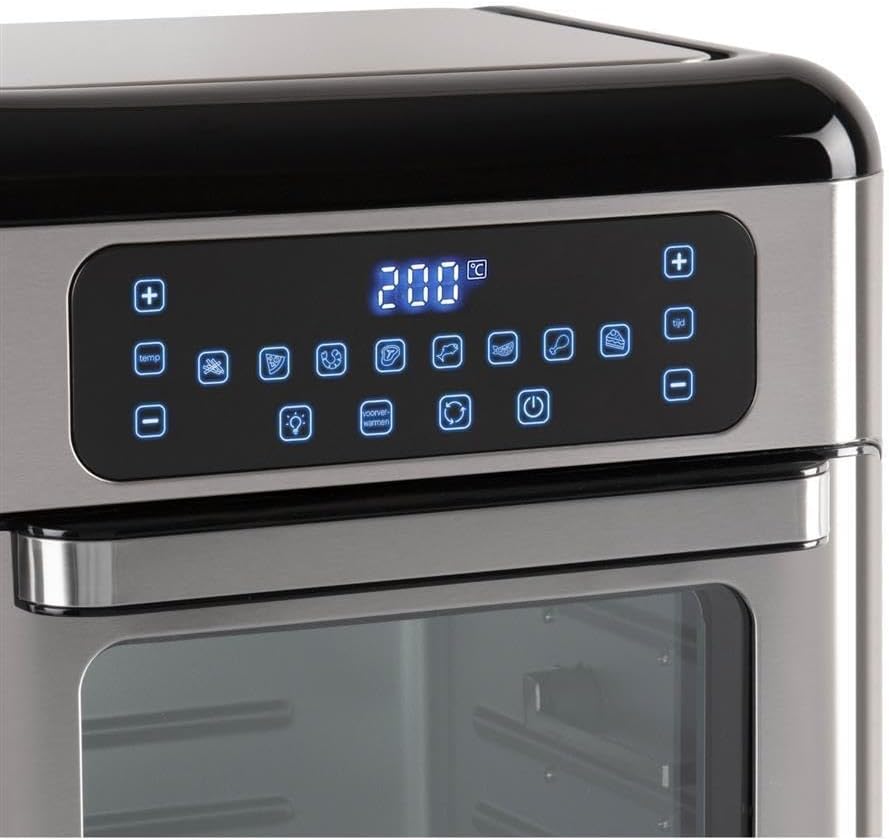
ചിത്രം 2.4: വിശദമായി view of the touch control panel with digital display and various function icons.
- Baking Shelves (Perforated Trays): Two perforated trays for air frying and baking, allowing for even heat circulation.

ചിത്രം 2.5: Two perforated baking trays, ideal for air frying and ensuring crispy results.
- Crumb Tray (Solid Baking Tray): A solid tray designed to catch crumbs and drips, also suitable for baking.

ചിത്രം 2.6: A solid baking tray, which also functions as a crumb tray to collect food debris.
- Rotisserie Basket: A mesh basket for tumbling smaller items like fries or nuts during rotisserie cooking.

ചിത്രം 2.7: The rotisserie mesh basket, designed for even cooking of smaller food items.
- Rotisserie Spit and Handle: മുഴുവൻ കോഴികളെയും അല്ലെങ്കിൽ വലിയ മാംസക്കഷണങ്ങളെയും വറുക്കാൻ.

ചിത്രം 2.8: The rotisserie spit with forks and the removal handle for safe handling.
- ഉപയോക്തൃ മാനുവൽ: ഈ പ്രമാണം.
3. സജ്ജീകരണവും ആദ്യ ഉപയോഗവും
3.1 അൺപാക്കിംഗ്
- ഉപകരണത്തിൽ നിന്ന് എല്ലാ പാക്കേജിംഗ് മെറ്റീരിയലുകളും സ്റ്റിക്കറുകളും ലേബലുകളും നീക്കം ചെയ്യുക.
- Check that all listed components are present and undamaged.
3.2 പ്ലേസ്മെൻ്റ്
- Place the mini oven on a flat, stable, and heat-resistant surface.
- Ensure there is at least 10 cm (4 inches) of clear space on all sides of the oven for proper ventilation.
- Do not place the oven near flammable materials or under wall cabinets.
3.3 ആദ്യ ഉപയോഗത്തിന് മുമ്പ് വൃത്തിയാക്കൽ
- ഡി ഉപയോഗിച്ച് അടുപ്പിന്റെ പുറംഭാഗം തുടയ്ക്കുകamp തുണി.
- Wash all removable accessories (baking shelves, crumb tray, rotisserie basket, spit) in warm, soapy water. Rinse thoroughly and dry completely.
- Insert the crumb tray at the very bottom of the oven.
3.4 പ്രാരംഭ ബേൺ-ഓഫ്
Before cooking food, it is recommended to run the oven empty for approximately 15 minutes to burn off any manufacturing residues.
- ഗ്രൗണ്ടഡ് ഇലക്ട്രിക്കൽ ഔട്ട്ലെറ്റിലേക്ക് പവർ കോർഡ് പ്ലഗ് ചെയ്യുക.
- താപനില 200°C (390°F) ആയും ടൈമർ 15 മിനിറ്റായും സജ്ജമാക്കുക.
- ഈ പ്രാരംഭ ഉപയോഗത്തിൽ നേരിയ ദുർഗന്ധമോ പുകയോ ഉണ്ടായേക്കാം; ഇത് സാധാരണമാണ്. പ്രദേശം നന്നായി വായുസഞ്ചാരമുള്ളതാണെന്ന് ഉറപ്പാക്കുക.
- 15 മിനിറ്റിനു ശേഷം, ഓവൻ ഓഫ് ചെയ്ത് പ്ലഗ് അൺപ്ലഗ് ചെയ്യുക. തുടരുന്നതിന് മുമ്പ് പൂർണ്ണമായും തണുക്കാൻ അനുവദിക്കുക.
4. പ്രവർത്തന നിർദ്ദേശങ്ങൾ
4.1 കൺട്രോൾ പാനൽ ഓവർview
The Inventum Mini Oven features an intuitive touch control panel. Refer to Figure 2.4 for a visual guide.
- പവർ ബട്ടൺ: ഓവൻ ഓൺ/ഓഫ് ചെയ്യുന്നു.
- താപനില നിയന്ത്രണം (+/-): പാചക താപനില ക്രമീകരിക്കുന്നു.
- സമയ നിയന്ത്രണം (+/-): Adjusts the cooking duration.
- പ്രോഗ്രാം തിരഞ്ഞെടുക്കൽ: Icons representing 8 pre-set cooking programs (e.g., fries, chicken, fish, steak, cake, pizza, toast, dehydrate).
- ലൈറ്റ് ബട്ടൺ: Turns the internal oven light on/off.
- Convection Fan Button: Activates/deactivates the convection fan for even cooking.
- Rotisserie Button: Activates/deactivates the rotisserie function.
4.2 അടിസ്ഥാന പ്രവർത്തനം
- ഭക്ഷണം ഉണ്ടാക്കുക: Place your food on the appropriate accessory (baking shelf, crumb tray, rotisserie basket, or spit).
- ആക്സസറി ചേർക്കുക: Carefully slide the accessory with food into the desired rack position inside the oven. Ensure the crumb tray is always at the bottom.
- വാതിൽ അടയ്ക്കുക: അടുപ്പിൻ്റെ വാതിൽ സുരക്ഷിതമായി അടയ്ക്കുക.
- പവർ ഓൺ: പവർ ബട്ടൺ അമർത്തുക. ഡിസ്പ്ലേ പ്രകാശിക്കും.
- പ്രോഗ്രാം അല്ലെങ്കിൽ മാനുവൽ ക്രമീകരണങ്ങൾ തിരഞ്ഞെടുക്കുക:
- Pre-set Program: Touch one of the 8 program icons. The oven will automatically set a recommended temperature and time.
- മാനുവൽ ക്രമീകരണം: Use the Temperature (+/-) buttons to set the desired temperature and the Time (+/-) buttons to set the cooking duration.
- പാചകം ആരംഭിക്കുക: The oven will typically start automatically after a few seconds of setting the time/temperature or selecting a program. Some models may require pressing the Power button again to start.
- പാചകം നിരീക്ഷിക്കുക: Use the internal light button to check on your food without opening the door.
- പാചകത്തിന്റെ അവസാനം: The oven will beep when the timer expires and automatically turn off the heating elements.
- ഭക്ഷണം നീക്കം ചെയ്യുക: Carefully open the oven door. Using oven mitts, remove the cooked food and accessories. Be aware of hot steam.
- പവർ ഓഫ്: Press the Power button to turn off the oven completely, then unplug it from the wall outlet.
4.3 റൊട്ടിസെറി ഫംഗ്ഷൻ ഉപയോഗിക്കുന്നു
The rotisserie function is ideal for even cooking of whole chickens or other roasts using the rotisserie spit, or for items like fries using the rotisserie basket.
- ഭക്ഷണം ഉണ്ടാക്കുക:
- For Spit: Skewer the food (e.g., whole chicken) onto the rotisserie spit, securing it with the forks. Ensure the food is centered and balanced.
- For Basket: Place smaller items like fries or vegetables into the rotisserie basket and secure the lid.
- റൊട്ടിസെറി ചേർക്കുക: Carefully insert the rotisserie spit or basket into the designated rotisserie slots inside the oven. Ensure it is properly seated and can rotate freely.
- Set Cooking Parameters: നിയന്ത്രണ പാനൽ ഉപയോഗിച്ച് ആവശ്യമുള്ള താപനിലയും സമയവും സജ്ജമാക്കുക.
- Activate Rotisserie: Press the Rotisserie button on the control panel. The rotisserie mechanism will begin to rotate.
- പാചകം ആരംഭിക്കുക: Begin the cooking cycle as described in "4.2 Basic Operation".
- ഭക്ഷണം നീക്കം ചെയ്യുക: Once cooking is complete, use the rotisserie handle (Figure 2.8) to carefully lift and remove the hot rotisserie assembly from the oven. Place it on a heat-resistant surface before removing the food.
5. പരിപാലനവും ശുചീകരണവും
Regular cleaning and maintenance will ensure the longevity and optimal performance of your Inventum Mini Oven.
5.1 പൊതുവായ ശുചീകരണം
- വൃത്തിയാക്കുന്നതിന് മുമ്പ് എപ്പോഴും ഓവൻ പ്ലഗ് അൺപ്ലഗ് ചെയ്ത് പൂർണ്ണമായും തണുക്കാൻ അനുവദിക്കുക.
- Do not use abrasive cleaners, scouring pads, or harsh chemicals, as these can damage surfaces.
5.2 ഇന്റീരിയർ വൃത്തിയാക്കൽ
- The oven features a stainless steel interior, which is durable and easy to clean.
- Remove the crumb tray and all other accessories. Wash them in warm, soapy water, rinse, and dry.
- പരസ്യം ഉപയോഗിച്ച് ഇന്റീരിയർ ഭിത്തികൾ തുടയ്ക്കുകamp cloth and a mild detergent. For stubborn stains, a non-abrasive oven cleaner designed for stainless steel can be used, following the product instructions.
- വൃത്തിയുള്ള തുണി ഉപയോഗിച്ച് ഉണക്കുക.
5.3 പുറംഭാഗം വൃത്തിയാക്കൽ
- ഒരു മൃദുവായ, ഡി ഉപയോഗിച്ച് ബാഹ്യ പ്രതലങ്ങൾ തുടയ്ക്കുകamp തുണി.
- For the control panel, use a slightly damp cloth and wipe gently. Do not spray water directly onto the control panel.
- നന്നായി ഉണക്കുക.
5.4 ക്രംബ് ട്രേ
- ഗ്രീസ് അടിഞ്ഞുകൂടുന്നതും തീപിടുത്ത സാധ്യതയും തടയുന്നതിന് ക്രംബ് ട്രേ പതിവായി കാലിയാക്കുകയും വൃത്തിയാക്കുകയും വേണം.
- Slide out the crumb tray from the bottom of the oven, discard crumbs, and wash as described above.
6. പ്രശ്നപരിഹാരം
If you encounter issues with your Inventum Mini Oven, consult the following table before contacting customer support.
| പ്രശ്നം | സാധ്യമായ കാരണം | പരിഹാരം |
|---|---|---|
| ഓവൻ ഓണാക്കുന്നില്ല. | പ്ലഗ് ഇൻ ചെയ്തിട്ടില്ല; പവർ അല്ലെങ്കിൽtage; തകരാറുള്ള ഔട്ട്ലെറ്റ്. | പവർ കോർഡ് പ്രവർത്തിക്കുന്ന ഒരു ഔട്ട്ലെറ്റിൽ സുരക്ഷിതമായി പ്ലഗ് ചെയ്തിട്ടുണ്ടെന്ന് ഉറപ്പാക്കുക. നിങ്ങളുടെ സർക്യൂട്ട് ബ്രേക്കർ പരിശോധിക്കുക. |
| ഭക്ഷണം തുല്യമായി പാചകം ചെയ്യുന്നില്ല. | Overcrowding; incorrect temperature/time; convection fan off. | Do not overcrowd the oven. Adjust temperature and time as needed. Ensure the convection fan is active for even cooking. Rotate food halfway through cooking. |
| പ്രവർത്തന സമയത്ത് പുകയുടെയോ കത്തുന്നതോ ആയ ഗന്ധം. | Food residue on heating elements; crumb tray not cleaned; excessive grease. | Unplug and allow to cool. Clean the interior and crumb tray thoroughly. Ensure food is not touching heating elements. |
| റൊട്ടിസറി ഫംഗ്ഷൻ പ്രവർത്തിക്കുന്നില്ല. | Rotisserie not properly seated; function not activated. | Ensure the rotisserie spit/basket is correctly inserted into the drive slots. Press the Rotisserie button on the control panel to activate. |
| നിയന്ത്രണ പാനൽ പ്രതികരിക്കുന്നില്ല. | താൽക്കാലിക ഇലക്ട്രോണിക് തകരാർ; വൈദ്യുതി പ്രശ്നം. | Unplug the oven for 5 minutes, then plug it back in. If the issue persists, contact customer support. |
7. ഉൽപ്പന്ന സവിശേഷതകൾ
| ഫീച്ചർ | വിശദാംശങ്ങൾ |
|---|---|
| ബ്രാൻഡ് | ഇൻവെൻ്റം |
| മോഡലിൻ്റെ പേര് | GF1200HLD |
| പ്രത്യേക ഫീച്ചർ | കോംപാക്റ്റ് വലുപ്പം |
| നിയന്ത്രണ തരം | ടച്ച് നിയന്ത്രണം |
| ഉൾപ്പെടുത്തിയ ഘടകങ്ങൾ | Baking shelves, crumb tray, user manual |
| പവർ ഉറവിടം | ഇലക്ട്രിക് |
| പവർ ഔട്ട്പുട്ട് | 1500W |
| ശേഷി | 12 ലിറ്റർ |
| ഇൻ്റീരിയർ മെറ്റീരിയൽ | സ്റ്റെയിൻലെസ്സ് സ്റ്റീൽ |
| ഇനത്തിൻ്റെ ഭാരം | 2.2 പൗണ്ട് |
| GTIN | 08712876094305 |
8. വാറണ്ടിയും ഉപഭോക്തൃ പിന്തുണയും
8.1 വാറൻ്റി വിവരങ്ങൾ
Inventum products are manufactured to high-quality standards. For specific warranty details regarding your Inventum Mini Oven (Model GF1200HLD), please refer to the warranty card included with your purchase or visit the official Inventum webസൈറ്റ്. വാറന്റി ക്ലെയിമുകൾക്കായി നിങ്ങളുടെ വാങ്ങലിന്റെ തെളിവ് സൂക്ഷിക്കുക.
8.2 ഉപഭോക്തൃ പിന്തുണ
If you have any questions, require technical assistance, or need to report a problem with your appliance, please contact Inventum customer support. Contact information can typically be found on the official Inventum webസൈറ്റ് അല്ലെങ്കിൽ ഉൽപ്പന്ന പാക്കേജിംഗിൽ.
When contacting support, please have your product model number (GF1200HLD) and purchase date available.


