ആമുഖം
The GOBOULT K10 Truly Wireless Bluetooth Earbuds are designed to provide a superior audio experience with advanced features for daily use, gaming, and communication. Key features include an extended 50-hour playtime, crystal-clear calls with Zen Quad Mic ENC, ultra-low 45ms latency for gaming, powerful 10mm audio drivers, and convenient Type-C fast charging. These earbuds are also built for comfort and durability with an IPX5 water-resistant rating.

Image: The GOBOULT K10 earbuds in Ice Blue, shown with their compact charging case. The earbuds feature a sleek design with light blue ear tips, and the case is a matching light blue inside a white shell.
ബോക്സിൽ എന്താണുള്ളത്
- GOBOULT K10 Truly Wireless Earbuds
- വയർലെസ് ചാർജിംഗ് കേസ്
- ടൈപ്പ്-സി ഫാസ്റ്റ് ചാർജിംഗ് കേബിൾ
- അധിക ജോടി ഇയർടിപ്പുകൾ
- ഉപയോക്തൃ മാനുവൽ
- വാറൻ്റി കാർഡ്
സജ്ജമാക്കുക
1. ഇയർബഡുകളും കേസും ചാർജ് ചെയ്യുന്നു
Before first use, fully charge the GOBOULT K10 earbuds and their charging case. Use the provided Type-C cable to connect the charging case to a power source.
- ചാർജിംഗ് സമയം: Earbuds take approximately 60 minutes to fully charge. The charging case takes about 100 minutes.
- ഫാസ്റ്റ് ചാർജിംഗ്: 10 മിനിറ്റ് വേഗത്തിൽ ചാർജ് ചെയ്താൽ 120 മിനിറ്റ് വരെ പ്ലേടൈം ലഭിക്കും.
- ബാറ്ററി സൂചകം: Refer to the LED indicator on the charging case for battery status.
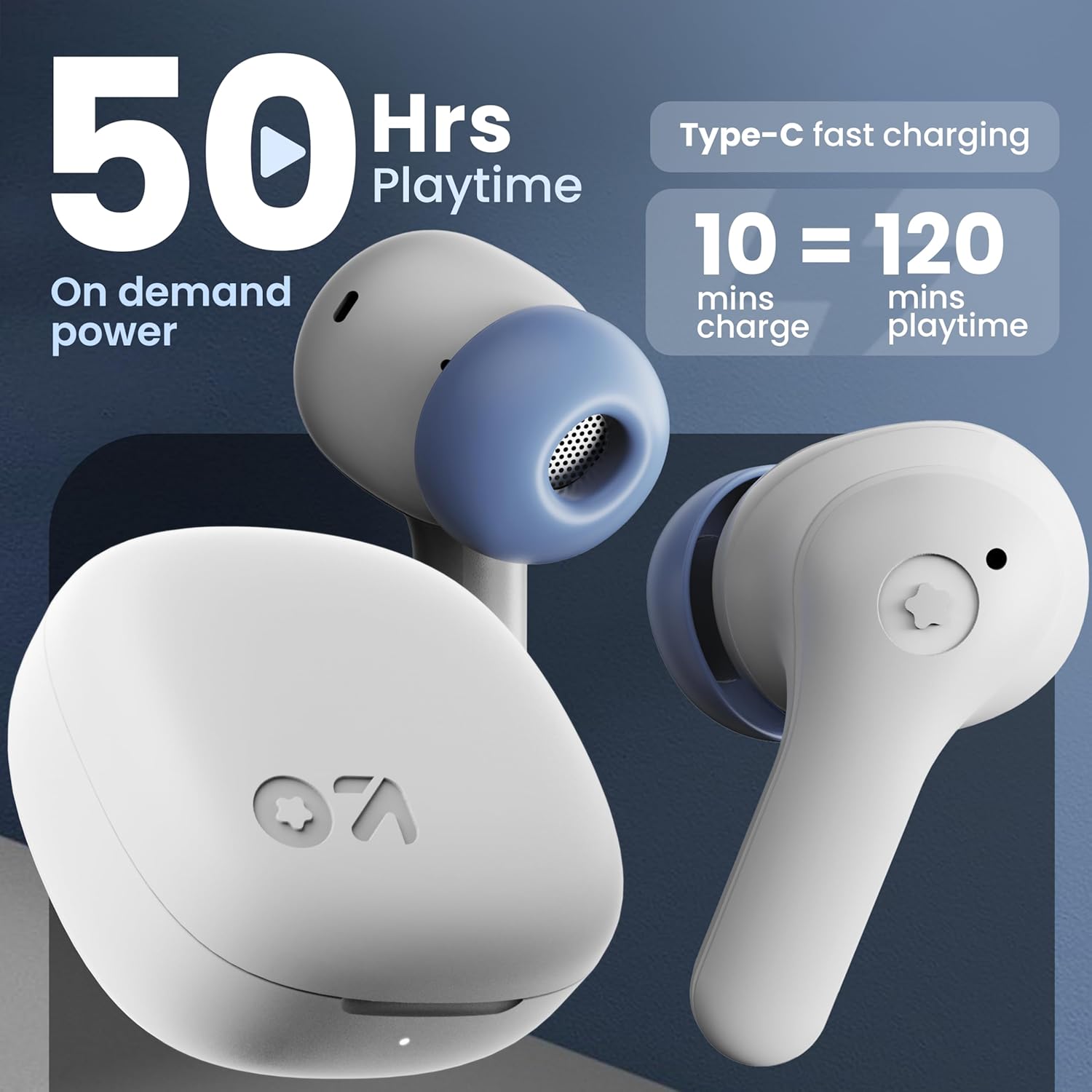
Image: A close-up of the GOBOULT K10 earbuds highlighting their 50-hour playtime capability and the Type-C fast charging feature, which provides 120 minutes of playtime from a 10-minute charge.
2. നിങ്ങളുടെ ഉപകരണവുമായി ജോടിയാക്കുന്നു
- ഇയർബഡുകൾ ചാർജ് ചെയ്തിട്ടുണ്ടെന്നും ചാർജിംഗ് കെയ്സിനുള്ളിലാണെന്നും ഉറപ്പാക്കുക.
- Open the charging case lid. The earbuds will automatically enter pairing mode (indicated by flashing LED lights on the earbuds).
- നിങ്ങളുടെ ഉപകരണത്തിൽ (സ്മാർട്ട്ഫോൺ, ടാബ്ലെറ്റ്, ലാപ്ടോപ്പ്), ബ്ലൂടൂത്ത് പ്രവർത്തനക്ഷമമാക്കുക.
- ഇതിനായി തിരയുക "GOBOULT K10" in the list of available Bluetooth devices.
- Select "GOBOULT K10" to connect. Once connected, the earbud LEDs will stop flashing.
- The earbuds feature Blink & Pair™ Bluetooth 5.4 for fast and stable connectivity.

Image: The GOBOULT K10 earbuds and open charging case next to a smartphone, illustrating the Bluetooth 5.4 connectivity and the "Blink & Pair" feature for quick and stable pairing.
പ്രവർത്തന നിർദ്ദേശങ്ങൾ
ടച്ച് നിയന്ത്രണങ്ങൾ
The GOBOULT K10 earbuds feature intuitive touch controls on both earbuds. The following actions can be performed:
| ആക്ഷൻ | ഫംഗ്ഷൻ |
|---|---|
| 1 Tap (L/R) | Music Play/Pause, Call Receive |
| 2 Tap (L) | മുമ്പത്തെ ട്രാക്ക് |
| 2 Tap (R) | അടുത്ത ട്രാക്ക് |
| 3 Tap (L) | വ്യാപ്തം - |
| 3 Tap (R) | വോളിയം + |
| 4 Tap (L/R) | Activate Gaming Mode |
| ലോംഗ് പ്രസ്സ് (L/R) | കോൾ നിരസിക്കുക |

Image: This visual guide details the touch controls for the GOBOULT K10 earbuds, including actions for music, calls, and gaming mode. It also highlights the IPX5 water resistance and support for voice assistants like Siri and Google Assistant.
ഗെയിമിംഗ് മോഡ് (45ms കുറഞ്ഞ ലേറ്റൻസി)
For an immersive gaming experience with synchronized audio and visuals, activate the ultra-low latency gaming mode. This mode reduces audio delay to just 45 milliseconds.
- സജീവമാക്കൽ: ഒന്നുകിൽ ഇയർബഡിൽ 4 തവണ ടാപ്പ് ചെയ്യുക.
- പ്രയോജനം: Provides a competitive advantage in gaming by ensuring real-time audio feedback.

Image: The GOBOULT K10 earbuds are displayed with a graphic indicating their 45ms ultra-low latency gaming mode, emphasizing the absence of audio lag during gameplay.
Clear Calling with Zen Quad Mic ENC
The GOBOULT K10 earbuds are equipped with Zen Quad Mic Environmental Noise Cancellation (ENC) technology. This system uses four microphones to filter out ambient noise, ensuring your voice is transmitted clearly during calls, even in noisy environments.
- പ്രയോജനം: Enhances call clarity for both the user and the recipient.
- സാങ്കേതികവിദ്യ: Utilizes AES for echo-free calls.

ചിത്രം: വിശദമായ ഒരു ചിത്രം view of the GOBOULT K10 earbud highlighting the Zen Quad Mic ENC technology, which ensures crystal-clear and echo-free calls by using four microphones to suppress external noise.
Audio Quality (10mm Drivers)
Experience rich and dynamic sound with the K10's powerful 10mm audio drivers. These drivers are engineered to deliver deep bass and clear highs, providing an immersive listening experience for music, podcasts, and calls.

ചിത്രം: ഒരു എക്സ്-റേ view of the GOBOULT K10 earbud showcasing its internal 10mm audio driver, emphasizing the "Boomx technology" for supreme bass and stereo sound effects, with AAC SBC codec support.
മെയിൻ്റനൻസ്
- വൃത്തിയാക്കൽ: Regularly clean the ear tips and mesh filters of the earbuds with a soft, dry, lint-free cloth. Avoid using harsh chemicals or abrasive materials.
- ജല പ്രതിരോധം: The earbuds are IPX5 water-resistant, meaning they can withstand sweat and light splashes. Do not submerge them in water or expose them to heavy rain. Ensure they are dry before placing them back in the charging case.
- സംഭരണം: ഇയർബഡുകൾ ഉപയോഗിക്കാത്തപ്പോൾ, പൊടി, കേടുപാടുകൾ എന്നിവയിൽ നിന്ന് സംരക്ഷിക്കുന്നതിനും ചാർജ്ജ് ചെയ്ത് നിലനിർത്തുന്നതിനും എല്ലായ്പ്പോഴും ചാർജിംഗ് കേസിൽ സൂക്ഷിക്കുക.
- താപനില: ഇയർബഡുകൾ കടുത്ത താപനിലയിലോ (ചൂടോ തണുപ്പോ) ഉയർന്ന ആർദ്രതയിലോ തുറന്നുകാട്ടുന്നത് ഒഴിവാക്കുക.
ട്രബിൾഷൂട്ടിംഗ്
If you encounter issues with your GOBOULT K10 earbuds, please refer to the following common solutions:
- ഇയർബഡുകൾ ജോടിയാക്കുന്നില്ല:
- രണ്ട് ഇയർബഡുകളും ചാർജ്ജ് ചെയ്തിട്ടുണ്ടെന്ന് ഉറപ്പാക്കുക.
- രണ്ട് ഇയർബഡുകളും ചാർജിംഗ് കെയ്സിലേക്ക് തിരികെ വയ്ക്കുക, ലിഡ് അടയ്ക്കുക, കുറച്ച് നിമിഷങ്ങൾ കാത്തിരിക്കുക, തുടർന്ന് ജോടിയാക്കൽ മോഡ് പുനരാരംഭിക്കുന്നതിന് അത് വീണ്ടും തുറക്കുക.
- Delete "GOBOULT K10" from your device's Bluetooth history and try pairing again.
- നിങ്ങളുടെ ഉപകരണത്തിന്റെ ബ്ലൂടൂത്ത് പ്രവർത്തനക്ഷമമാക്കിയിട്ടുണ്ടെന്നും പരിധിക്കുള്ളിൽ (10 മീറ്റർ) ഉണ്ടെന്നും ഉറപ്പാക്കുക.
- Only One Earbud Working:
- രണ്ട് ഇയർബഡുകളും ചാർജ് ചെയ്തിട്ടുണ്ടോയെന്ന് പരിശോധിക്കുക.
- Try placing both earbuds back in the case, closing the lid, and then taking them out simultaneously.
- Perform a factory reset if available (refer to specific instructions in the full user manual if provided by manufacturer).
- ശബ്ദമോ കുറഞ്ഞ ശബ്ദമോ ഇല്ല:
- Adjust the volume on both your device and the earbuds (using touch controls).
- ഇയർബഡുകൾ നിങ്ങളുടെ ഉപകരണവുമായി ശരിയായി ബന്ധിപ്പിച്ചിട്ടുണ്ടെന്ന് ഉറപ്പാക്കുക.
- Clean any debris from the earbud mesh filters.
- ചാർജിംഗ് പ്രശ്നങ്ങൾ:
- ടൈപ്പ്-സി കേബിൾ കേസിലേക്കും പവർ സ്രോതസ്സിലേക്കും സുരക്ഷിതമായി ബന്ധിപ്പിച്ചിട്ടുണ്ടെന്ന് ഉറപ്പാക്കുക.
- മറ്റൊരു ചാർജിംഗ് കേബിളോ പവർ അഡാപ്റ്ററോ പരീക്ഷിച്ചുനോക്കൂ.
- ഇയർബഡുകളിലെയും കേസിനുള്ളിലെയും ചാർജിംഗ് കോൺടാക്റ്റുകൾ വൃത്തിയാക്കുക.
സ്പെസിഫിക്കേഷനുകൾ
| ഫീച്ചർ | വിശദാംശങ്ങൾ |
|---|---|
| മോഡലിൻ്റെ പേര് | Airbass Earbuds (K10) |
| കണക്റ്റിവിറ്റി ടെക്നോളജി | ബ്ലൂടൂത്ത്, വയർലെസ് |
| ബ്ലൂടൂത്ത് പതിപ്പ് | 5.4 |
| ബ്ലൂടൂത്ത് ശ്രേണി | 10 മീറ്റർ |
| കളിസമയം | 50 മണിക്കൂർ വരെ (ചാർജിംഗ് കേസിനൊപ്പം) |
| ഫാസ്റ്റ് ചാർജിംഗ് | 10 min charge = 120 min playtime |
| ചാർജിംഗ് സമയം (ഇയർബഡുകൾ) | 60 മിനിറ്റ് |
| ചാർജിംഗ് സമയം (കേസ്) | 100 മിനിറ്റ് |
| മൈക്രോഫോൺ | Zen Quad Mic ENC |
| കുറഞ്ഞ ലേറ്റൻസി | 45 മില്ലിസെക്കൻഡ് (ഗെയിമിംഗ് മോഡ്) |
| ഓഡിയോ ഡ്രൈവർ വലിപ്പം | 10 മില്ലിമീറ്റർ |
| ജല പ്രതിരോധ നില | IPX5 (വാട്ടർ റെസിസ്റ്റൻ്റ്) |
| നിയന്ത്രണ തരം | Touch, Voice (Google Assistant, Siri) |
| ഹെഡ്ഫോണുകൾ ജാക്ക് | Type-C Fast Charging Jack |
| ഇനത്തിൻ്റെ ഭാരം | 44.5 ഗ്രാം |
| അളവുകൾ (കേസ്) | 5.5 x 5.5 x 3.1 സെ.മീ |
| മെറ്റീരിയൽ | പ്ലാസ്റ്റിക് |
| മാതൃരാജ്യം | ചൈന |
വാറൻ്റിയും പിന്തുണയും
The GOBOULT K10 earbuds come with a Warranty Card included in the box. Please refer to the card for specific warranty terms and conditions.
For technical support, service, or warranty claims, please contact Boult customer service. Contact details can typically be found on the Warranty Card or the official Boult webസൈറ്റ്.
നിർമ്മാതാവ്: BoultExotic Mile Pvt. Ltd.
വിലാസം: B67 Wazirpur Industrial Area, New Delhi 110052


