1. ആമുഖം
This user manual provides detailed instructions for the safe and efficient operation, maintenance, and troubleshooting of your DuroFort Cordless Electric Screwdriver Set. Please read this manual thoroughly before using the product to ensure optimal performance and longevity.
The DuroFort Cordless Electric Screwdriver Set is designed for various home repairs and DIY projects, offering powerful electric torque, a long-lasting battery, and versatile accessories for a wide range of applications.
2. ഉൽപ്പന്നം കഴിഞ്ഞുview ഘടകങ്ങളും
Familiarize yourself with the main components of your electric screwdriver:

ചിത്രം 2.1: Main components of the DuroFort Cordless Electric Screwdriver, including the magnetic chuck, battery indicator light, built-in LED light, forward/reverse button, 2-position toggle button, and charging port.
- Magnetic Chuck: Securely holds screwdriver bits.
- ബാറ്ററി ഇൻഡിക്കേറ്റർ ലൈറ്റ്: ശേഷിക്കുന്ന ബാറ്ററി ചാർജ് പ്രദർശിപ്പിക്കുന്നു.
- ബിൽറ്റ്-ഇൻ LED ലൈറ്റ്: മെച്ചപ്പെട്ട ദൃശ്യപരതയ്ക്കായി ജോലിസ്ഥലം പ്രകാശിപ്പിക്കുന്നു.
- ഫോർവേഡ്/റിവേഴ്സ് ബട്ടൺ: Controls the rotation direction of the chuck.
- 2-Position Toggle Button: Allows adjustment of the handle angle (90° or 180°).
- ചാർജിംഗ് പോർട്ട്: For connecting the charger to recharge the battery.
- ടോർക്ക് അഡ്ജസ്റ്റ്മെന്റ് റിംഗ്: Selects the desired torque setting (10+1 settings).
2.1 ഉൾപ്പെടുത്തിയ ആക്സസറികൾ
Your DuroFort Cordless Electric Screwdriver Set comes with a comprehensive collection of accessories to meet various needs:

ചിത്രം 2.2: കഴിഞ്ഞുview of the 89-piece accessory set.
- സ്ക്രൂഡ്രൈവർ ബിറ്റുകൾ: A wide variety of Phillips, Slotted, Hex, Torx, and other common bit types.
- Flexible Shaft: For accessing screws in tight or awkward spaces.
- Socket Wrench Set: Various sizes (5mm-12mm) for nuts and bolts.
- വിപുലീകരണ വടി: Extends the reach of screwdriver bits.
- അഡാപ്റ്റർ: For connecting sockets to the screwdriver.
- ചാർജർ: For recharging the screwdriver's battery.
- പോർട്ടബിൾ സ്റ്റോറേജ് ബോക്സ്: A durable cloth bag for organizing and transporting the set.
3 സാങ്കേതിക സവിശേഷതകൾ
| ഫീച്ചർ | സ്പെസിഫിക്കേഷൻ |
|---|---|
| വാല്യംtage | 8V |
| ബാറ്ററി തരം | ലിഥിയം-അയൺ |
| ബാറ്ററി ശേഷി | 2000 mAh |
| ചാർജിംഗ് സമയം | ഏകദേശം 1 മണിക്കൂർ |
| നോ-ലോഡ് സ്പീഡ് | 320 ആർപിഎം |
| Max Electric Torque | 5.5 എൻഎം |
| മാനുവൽ ടോർക്ക് | 10 എൻഎം |
| ടോർക്ക് ക്രമീകരണങ്ങൾ | 10+1 |
| സ്ഥാനങ്ങൾ കൈകാര്യം ചെയ്യുക | 90° (Pistol) and 180° (In-line) |
| ഇനത്തിൻ്റെ ഭാരം | 1.62 കി.ഗ്രാം (3.56 പൗണ്ട്) |
| ഉൽപ്പന്ന അളവുകൾ | 7.01 x 5.71 x 2.01 ഇഞ്ച് |
4. സജ്ജീകരണം
4.1 ബാറ്ററി ചാർജ് ചെയ്യുന്നു
Before first use, fully charge the screwdriver's battery. The battery indicator lights will show the charging status.
- Connect the charger to the charging port on the screwdriver.
- ഒരു സാധാരണ ഇലക്ട്രിക്കൽ ഔട്ട്ലെറ്റിലേക്ക് ചാർജർ പ്ലഗ് ചെയ്യുക.
- The battery indicator lights will illuminate to show charging progress. A full charge typically takes about 1 hour.
- പൂർണ്ണമായി ചാർജ് ചെയ്തുകഴിഞ്ഞാൽ, ചാർജർ വിച്ഛേദിക്കുക.

ചിത്രം 4.1: Charging the 2000mAh battery. A full charge is indicated by the battery indicator lights.
The battery indicator lights provide real-time power status:
- ചുവപ്പ്: Low battery (approx. 30% remaining)
- ഓറഞ്ച്: Medium battery (approx. 50% remaining)
- പച്ച: High battery (approx. 100% remaining)

ചിത്രം 4.2: Battery indicator light states.
4.2 സ്ക്രൂഡ്രൈവർ ബിറ്റുകൾ ചേർക്കലും നീക്കം ചെയ്യലും
The screwdriver features a magnetic chuck for easy bit changes.
- നിങ്ങളുടെ ടാസ്ക്കിന് അനുയോജ്യമായ സ്ക്രൂഡ്രൈവർ ബിറ്റ് തിരഞ്ഞെടുക്കുക.
- Insert the bit firmly into the magnetic chuck until it clicks into place.
- To remove, simply pull the bit straight out from the chuck.

ചിത്രം 4.3: Inserting a screwdriver bit.

ചിത്രം 4.4: Magnetic chuck in action.
5. പ്രവർത്തന നിർദ്ദേശങ്ങൾ
5.1 Adjusting Handle Position
The screwdriver features a dual-position handle, allowing you to switch between a 90° pistol grip and a 180° in-line grip for optimal comfort and access in different situations.
- Locate the 2-position toggle button on the handle.
- Press the button and rotate the handle to your desired position (90° or 180°).
- ഹാൻഡിൽ ലോക്ക് ചെയ്യാൻ ബട്ടൺ റിലീസ് ചെയ്യുക.
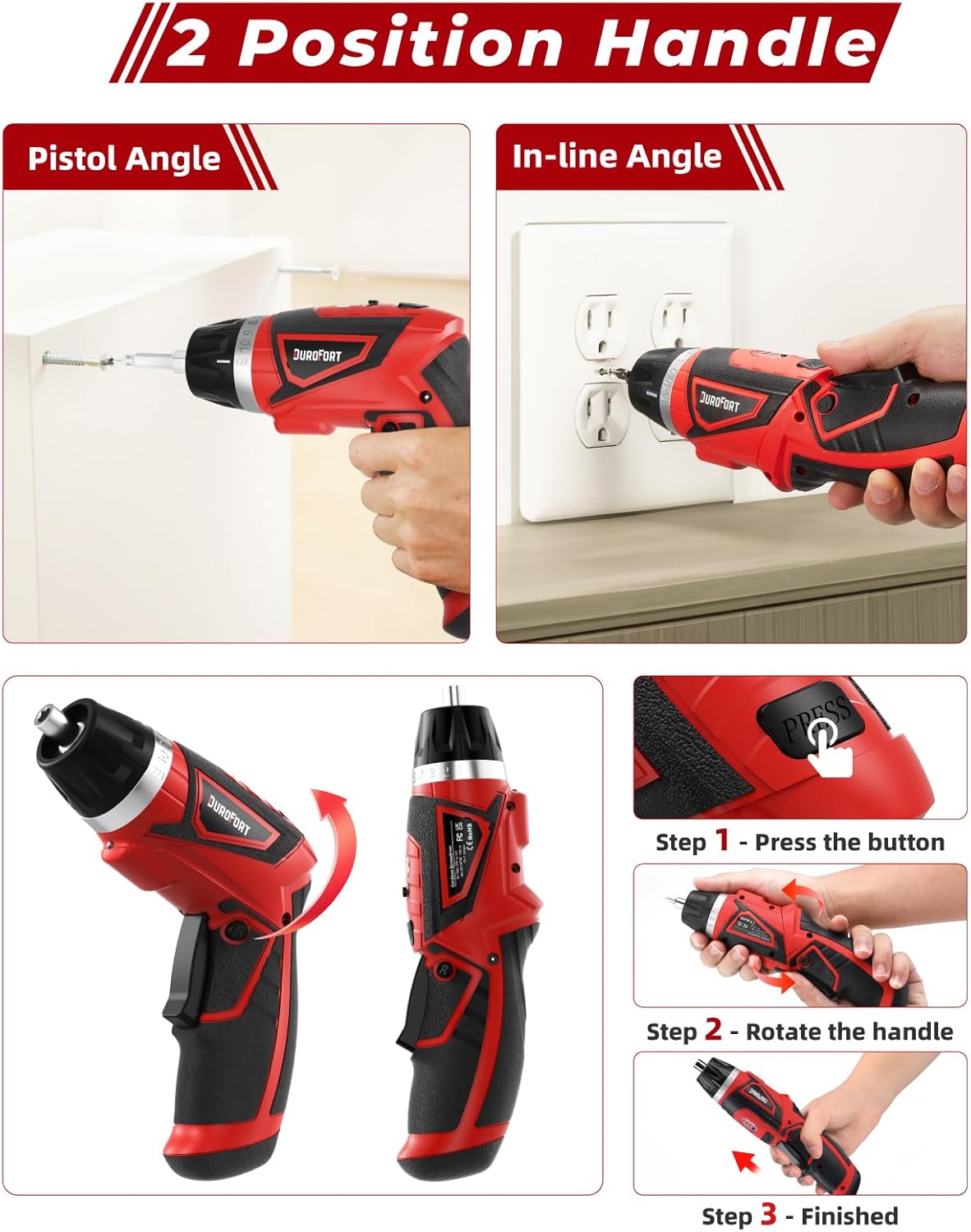
ചിത്രം 5.1: Adjusting the handle between Pistol Angle (90°) and In-line Angle (180°).
5.2 Setting Torque
The screwdriver offers 10+1 torque settings, allowing you to adjust the power output to prevent over-tightening or stripping screws. The '1' setting is for drilling or maximum torque.
- Rotate the torque adjustment ring located near the chuck.
- Align the desired torque number with the indicator mark on the screwdriver body.
- Start with a lower torque setting and increase if more power is needed.

ചിത്രം 5.2: Adjusting the 10+1 torque settings.
5.3 Forward, Reverse, and Lock Operation
The forward/reverse button controls the direction of rotation and also acts as a lock mechanism.
- ഫോർവേഡ് (F): Push the button to the left for clockwise rotation (tightening screws).
- വിപരീതം (R): Push the button to the right for counter-clockwise rotation (loosening screws).
- ലോക്ക്: Position the button in the center to lock the trigger and prevent accidental operation. This also allows for manual tightening/loosening.

ചിത്രം 5.3: Forward, Reverse, and Lock mechanism.
5.4 Using the Built-in LED Light
ട്രിഗർ അമർത്തുമ്പോൾ ഇന്റഗ്രേറ്റഡ് എൽഇഡി ലൈറ്റ് യാന്ത്രികമായി പ്രകാശിക്കുന്നു, മങ്ങിയ വെളിച്ചമുള്ള ജോലിസ്ഥലങ്ങളിൽ ദൃശ്യപരത നൽകുന്നു.

ചിത്രം 5.4: LED light illuminating the work area.
5.5 Applications and Versatility
The DuroFort screwdriver set is versatile for various tasks:
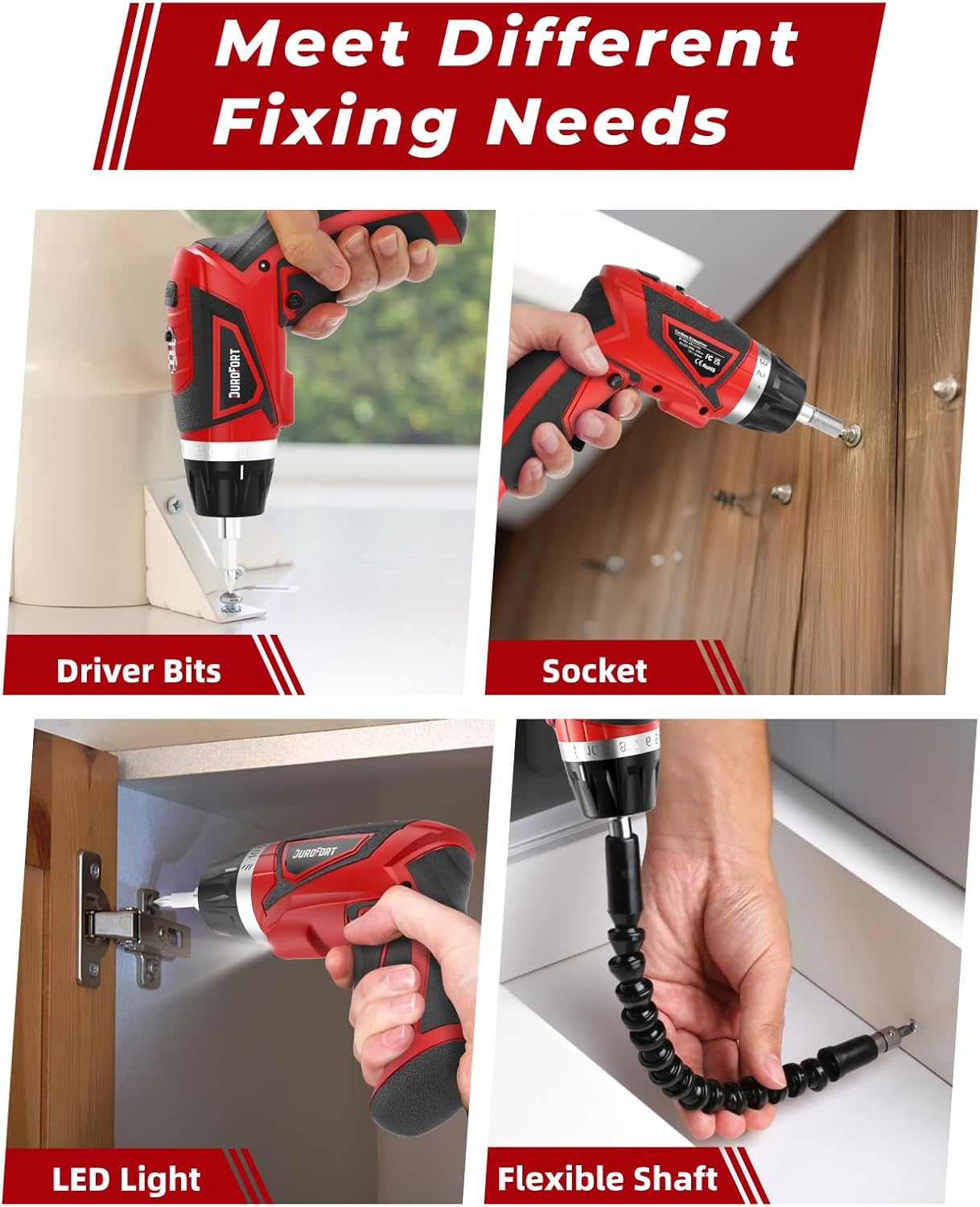
ചിത്രം 5.5: Examples of use with driver bits, sockets, LED light, and flexible shaft.
- Driver Bits: Ideal for assembling furniture, installing shelves, or general household repairs.
- സോക്കറ്റുകൾ: Use with the adapter and extension rod for tightening or loosening nuts and bolts.
- Flexible Shaft: Perfect for reaching screws in confined or hard-to-reach areas, such as inside cabinets or behind appliances.
6. പരിപാലനം
Proper maintenance ensures the longevity and optimal performance of your screwdriver.
- വൃത്തിയാക്കൽ: Regularly wipe down the tool with a clean, damp cloth. Do not use harsh chemicals or abrasive cleaners. Ensure no moisture enters the motor or battery compartments.
- സംഭരണം: Store the screwdriver and its accessories in the provided portable cloth bag in a dry, cool place, away from direct sunlight and extreme temperatures.
- ബാറ്ററി കെയർ:
- ബാറ്ററി ഇടയ്ക്കിടെ പൂർണ്ണമായും ഡിസ്ചാർജ് ചെയ്യുന്നത് ഒഴിവാക്കുക.
- Recharge the battery before it is completely depleted.
- If storing for extended periods, charge the battery to approximately 50% every 3-6 months to maintain battery health.
- Do not expose the battery to water or extreme heat.
- ബിറ്റ് പരിപാലനം: Keep screwdriver bits clean and free of debris. Replace worn or damaged bits to ensure proper screw engagement and prevent stripping.
7. പ്രശ്നപരിഹാരം
പൊതുവായ പ്രശ്നങ്ങളും അവയുടെ പരിഹാരങ്ങളും അറിയാൻ താഴെ കൊടുത്തിരിക്കുന്ന പട്ടിക കാണുക:
| പ്രശ്നം | സാധ്യമായ കാരണം | പരിഹാരം |
|---|---|---|
| സ്ക്രൂഡ്രൈവർ ഓണാക്കുന്നില്ല. | ബാറ്ററി തീർന്നു. Forward/Reverse switch is in the locked (center) position. | ബാറ്ററി പൂർണ്ണമായും ചാർജ് ചെയ്യുക. Move the switch to the Forward (F) or Reverse (R) position. |
| Screwdriver lacks power or stops during use. | കുറഞ്ഞ ബാറ്ററി ചാർജ്. Torque setting is too low. ഓവർലോഡ് സംരക്ഷണം സജീവമാക്കി. | ബാറ്ററി റീചാർജ് ചെയ്യുക. ടോർക്ക് ക്രമീകരണം വർദ്ധിപ്പിക്കുക. Reduce pressure on the tool; allow it to cool down if overheated. |
| Screwdriver bit slips or strips screw head. | Incorrect bit size/type. Worn or damaged bit. Torque setting too high or too low. | Use the correct bit for the screw type. ബിറ്റ് മാറ്റിസ്ഥാപിക്കുക. Adjust torque setting appropriately. |
| Handle does not lock in position. | Toggle button not fully released. അവശിഷ്ടങ്ങൾ തടസ്സപ്പെടുത്തുന്ന സംവിധാനം. | Ensure the toggle button is fully released after adjusting. Clean the area around the pivot mechanism. |
8. വാറൻ്റിയും പിന്തുണയും
For warranty information, technical support, or service inquiries, please contact DuroFort customer service. Refer to your purchase documentation for specific warranty terms and conditions.
നിർമ്മാതാവ്: DuroFort
മോഡൽ നമ്പർ: 8V Magnetic Electric Screwdriver
For further assistance, please visit the official DuroFort website or contact their customer support channels as provided with your product packaging.


