1. ആമുഖം
Thank you for choosing the FL ESPORTS MK870 Wireless Mechanical Gaming Keyboard. This manual provides detailed instructions for setting up, operating, and maintaining your new keyboard. Designed for both work and gaming, the MK870 offers a compact 80% layout, customizable RGB lighting, and versatile connectivity options.

Image: The MK870 Wireless Mechanical Gaming Keyboard, showcasing its purple keycaps and RGB lighting.
2. പാക്കേജ് ഉള്ളടക്കം
പാക്കേജിൽ എല്ലാ ഇനങ്ങളും ഉണ്ടെന്ന് ദയവായി പരിശോധിക്കുക:
- MK870 വയർലെസ് മെക്കാനിക്കൽ ഗെയിമിംഗ് കീബോർഡ്
- കീക്യാപ് പുള്ളർ
- പൊടി കവർ
- 3 x റീപ്ലേസ്മെന്റ് സ്വിച്ചുകൾ
- 2.4GHz റിസീവർ
- USB-C Cable (1.8m nylon)
3 പ്രധാന സവിശേഷതകൾ
- Dipped PBT Keycaps: High-purity PBT keycaps with clear, side-printed legends for durability and light transmission.
- 80% കോംപാക്റ്റ് ലേഔട്ട്: Efficient TKL (Tenkeyless) design retaining essential keys for gaming and productivity.
- Creamy Linear Switches: Factory-lubed switches with gasket mount for soft keystrokes and distinct feedback.
- 22 RGB Modes: Vivid RGB backlighting with south-facing LEDs and customizable effects.
- ഹോട്ട്-സ്വാപ്പബിൾ: 3-പിൻ, 5-പിൻ മെക്കാനിക്കൽ സ്വിച്ചുകളുമായി പൊരുത്തപ്പെടുന്നു, ഇത് സോൾഡറിംഗ് ഇല്ലാതെ എളുപ്പത്തിൽ ഇഷ്ടാനുസൃതമാക്കാൻ അനുവദിക്കുന്നു.
- Triple Connection Modes: Seamless switching between 2.4GHz wireless, Bluetooth 5.0, and USB-C wired connections.
- എർഗണോമിക് ഡിസൈൻ: OEM-profile keycaps and stable large-key tuning for comfortable use.
- ശബ്ദം കുറയ്ക്കൽ: Built-in silicone sound deadening layer to reduce cavity noise.

Image: Visual representation of the MK870's key features, including three-mode connection, hot-swappable switches, gasket structure, and RGB lighting.
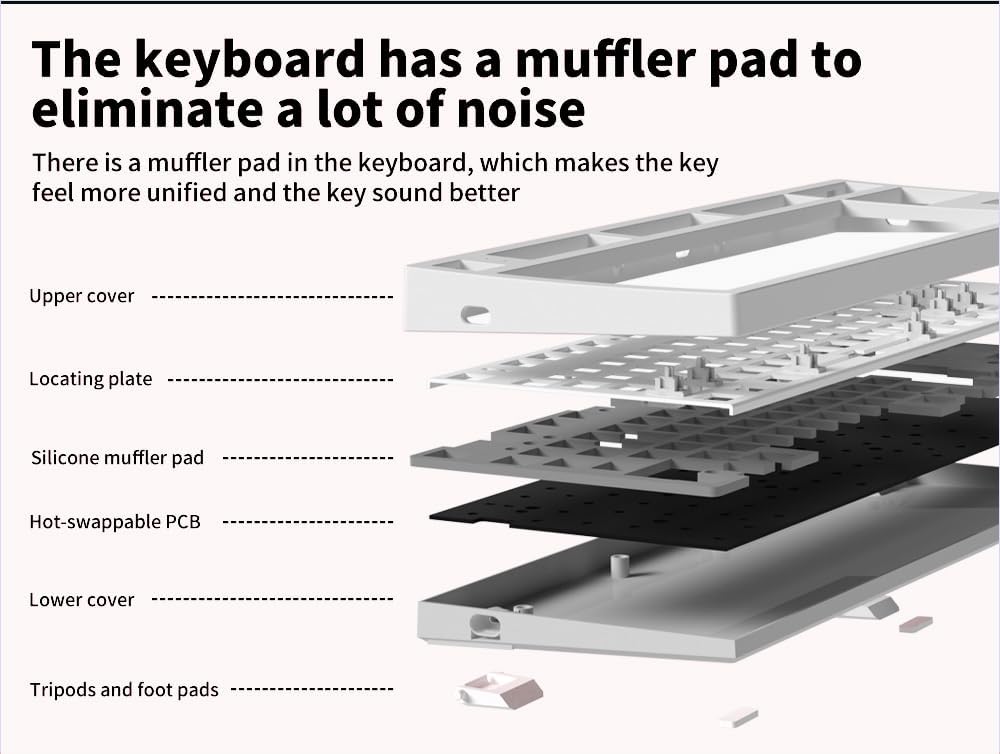
ചിത്രം: പൊട്ടിത്തെറിച്ചു view of the keyboard's internal layers, highlighting the silicone muffler pad for noise reduction.
4. സജ്ജീകരണവും കണക്റ്റിവിറ്റിയും
4.1 Triple Connection Modes
The MK870 keyboard supports three connection methods: 2.4GHz wireless, Bluetooth 5.0, and USB-C wired. You can connect up to 5 devices simultaneously (1 via 2.4GHz, 3 via Bluetooth, 1 via USB-C).

Image: The MK870 keyboard displayed with icons representing Bluetooth, 2.4GHz Wireless, and USB-C Wired connection options.
4.2 വയേർഡ് മോഡ് (USB-C)
- നൽകിയിരിക്കുന്ന USB-C കേബിൾ കീബോർഡിന്റെ USB-C പോർട്ടുമായി ബന്ധിപ്പിക്കുക.
- നിങ്ങളുടെ കമ്പ്യൂട്ടറിൽ ലഭ്യമായ USB പോർട്ടിലേക്ക് കേബിളിന്റെ മറ്റേ അറ്റം ബന്ധിപ്പിക്കുക.
- കീബോർഡ് യാന്ത്രികമായി തിരിച്ചറിയപ്പെടുകയും ഉപയോഗത്തിന് തയ്യാറാകുകയും ചെയ്യും.
4.3 2.4GHz വയർലെസ് മോഡ്
- 2.4GHz യുഎസ്ബി റിസീവർ കണ്ടെത്തുക (സാധാരണയായി കീബോർഡിലെ ഒരു കമ്പാർട്ടുമെന്റിൽ സൂക്ഷിക്കുന്നു).
- നിങ്ങളുടെ കമ്പ്യൂട്ടറിൽ ലഭ്യമായ ഒരു USB പോർട്ടിലേക്ക് 2.4GHz റിസീവർ പ്ലഗ് ചെയ്യുക.
- Switch the keyboard's mode switch (located on the back or side) to the 2.4GHz position.
- The keyboard should connect automatically. If not, press and hold Fn + 4 (for 2.4G pairing) until the indicator light flashes, then release.
4.4 ബ്ലൂടൂത്ത് 5.0 മോഡ്
- Switch the keyboard's mode switch to the Bluetooth position.
- To enter pairing mode, press and hold Fn + 1, Fn + 2, or Fn + 3 for 3-5 seconds until the corresponding indicator light flashes rapidly. This indicates it's ready to pair.
- നിങ്ങളുടെ ഉപകരണത്തിൽ (കമ്പ്യൂട്ടർ, ടാബ്ലെറ്റ്, സ്മാർട്ട്ഫോൺ), ബ്ലൂടൂത്ത് ക്രമീകരണങ്ങൾ തുറക്കുക.
- ഇതിനായി തിരയുക "MK870" or a similar device name and select it to pair.
- കണക്റ്റ് ചെയ്തുകഴിഞ്ഞാൽ, ഇൻഡിക്കേറ്റർ ലൈറ്റ് മിന്നുന്നത് നിർത്തുകയും സോളിഡ് ആയി തുടരുകയും ചെയ്യും.
- Repeat for up to three different Bluetooth devices using Fn + 1, Fn + 2, and Fn + 3.
- ജോടിയാക്കിയ ബ്ലൂടൂത്ത് ഉപകരണങ്ങൾക്കിടയിൽ മാറാൻ, Fn + 1, Fn + 2, അല്ലെങ്കിൽ Fn + 3 അമർത്തുക.
5. പ്രവർത്തന നിർദ്ദേശങ്ങൾ
5.1 RGB ബാക്ക്ലൈറ്റ് കസ്റ്റമൈസേഷൻ
The MK870 features 22 preset RGB lighting effects. Use the following key combinations to control the backlight:
- എഫ്എൻ + \ |: വ്യത്യസ്ത RGB ലൈറ്റിംഗ് മോഡുകളിലൂടെ കടന്നുപോകുക.
- എഫ്എൻ + ↑: ബാക്ക്ലൈറ്റ് തെളിച്ചം വർദ്ധിപ്പിക്കുക.
- എഫ്എൻ + ↓: ബാക്ക്ലൈറ്റ് തെളിച്ചം കുറയ്ക്കുക.
- Fn + ←: Slow down lighting effect speed.
- എഫ്എൻ + →: Speed up lighting effect speed.
- Fn + Del: Change backlight color (for modes that support color cycling).
Video: A short demonstration of the MK870 keyboard's RGB lighting effects and sound profile. This video is provided by the seller, Flesports.

Image: The MK870 keyboard set up in a workspace, illustrating its suitability for both efficient workflow and gaming experiences.
5.2 Hot-Swappable Functionality
The MK870 supports hot-swapping of both 3-pin and 5-pin mechanical switches. This allows you to easily change switches without soldering.

ചിത്രം: ഒരു ക്ലോസ്-അപ്പ് view demonstrating the hot-swappable feature of the MK870 keyboard, showing a switch being removed from its socket.
Changing Switches:
- കീബോർഡ് ഓഫ് ചെയ്യുക അല്ലെങ്കിൽ കമ്പ്യൂട്ടറിൽ നിന്ന് വിച്ഛേദിക്കുക.
- ആവശ്യമുള്ള കീക്യാപ്പ് ശ്രദ്ധാപൂർവ്വം നീക്കം ചെയ്യാൻ നൽകിയിരിക്കുന്ന കീക്യാപ്പ് പുള്ളർ ഉപയോഗിക്കുക.
- Use the provided switch puller to gently grip the switch and pull it straight up.
- പുതിയ സ്വിച്ചിന്റെ പിന്നുകൾ പിസിബിയിലെ ദ്വാരങ്ങളുമായി വിന്യസിക്കുക. പിന്നുകൾ നേരെയാണെന്ന് ഉറപ്പാക്കുക.
- സുരക്ഷിതമായി ക്ലിക്ക് ചെയ്യുന്നത് വരെ പുതിയ സ്വിച്ച് പതുക്കെ സ്ഥാനത്ത് അമർത്തുക. നിർബന്ധിച്ച് അമർത്തരുത്.
- കീക്യാപ്പ് മാറ്റിസ്ഥാപിക്കുക.
Note: Be careful not to bend the switch pins during installation.
5.3 Driver Support and Macros
For advanced customization, including key remapping, macro creation, and personalized lighting modes, download the official driver software from the FL ESPORTS website. The software supports both Windows and macOS.
6. പരിപാലനം
6.1 കീബോർഡ് വൃത്തിയാക്കൽ
- വൃത്തിയാക്കുന്നതിനുമുമ്പ് നിങ്ങളുടെ കമ്പ്യൂട്ടറിൽ നിന്ന് കീബോർഡ് വിച്ഛേദിക്കുക.
- കീക്യാപ്പുകൾക്കിടയിൽ നിന്ന് പൊടിയും അവശിഷ്ടങ്ങളും നീക്കം ചെയ്യാൻ മൃദുവായ ബ്രഷ് അല്ലെങ്കിൽ കംപ്രസ് ചെയ്ത വായു ഉപയോഗിക്കുക.
- For stubborn dirt, gently remove keycaps using the keycap puller and clean the exposed areas with a damp cloth (ensure it's not dripping wet) or an alcohol wipe.
- Wipe the keycaps with a soft, lint-free cloth.
- Ensure all parts are completely dry before reattaching keycaps and reconnecting the keyboard.
6.2 കീക്യാപ്പും സ്വിച്ചും മാറ്റിസ്ഥാപിക്കൽ
As detailed in Section 5.2, the hot-swappable design allows for easy replacement of keycaps and switches. Use the provided tools for safe removal and installation.

Image: A close-up of the MK870's side-engraved PBT keycaps, demonstrating their light transmission properties and durable construction.
7. പ്രശ്നപരിഹാരം
- കീബോർഡ് പ്രതികരിക്കുന്നില്ല:
- Check the connection: Ensure the USB cable is securely plugged in, or the 2.4GHz receiver is properly inserted, or Bluetooth is paired.
- Verify the mode switch: Make sure the keyboard is set to the correct connection mode (Wired, 2.4G, or BT).
- Charge the battery: If in wireless mode, the battery might be low. Connect the USB-C cable to charge.
- മറ്റൊരു USB പോർട്ടോ ഉപകരണമോ പരീക്ഷിക്കുക.
- RGB lights not working/flickering:
- Adjust brightness using Fn + ↑/↓.
- Fn + \ | ഉപയോഗിച്ച് മോഡുകളിലൂടെ സൈക്കിൾ ചെയ്യുക.
- Ensure the keyboard firmware is up to date (check FL ESPORTS webസൈറ്റ്).
- രജിസ്റ്റർ ചെയ്യാത്തതോ ഇരട്ട ടൈപ്പ് ചെയ്യാത്തതോ ആയ കീകൾ:
- This might indicate a faulty switch. Use the hot-swappable feature to replace the affected switch (refer to Section 5.2).
- കീക്യാപ്പിന്റെ അടിഭാഗം വൃത്തിയാക്കി അവശിഷ്ടങ്ങൾ നീക്കം ചെയ്യുക.
- ബ്ലൂടൂത്ത് കണക്ഷൻ പ്രശ്നങ്ങൾ:
- Ensure the keyboard is in Bluetooth pairing mode (Fn + 1/2/3, flashing light).
- Forget the device on your computer/device and re-pair.
- Ensure your device's Bluetooth is enabled and drivers are up to date.
- ഇടപെടൽ കുറയ്ക്കുന്നതിന് ഉപകരണത്തിന് അടുത്തേക്ക് നീങ്ങുക.
8 സ്പെസിഫിക്കേഷനുകൾ
| മോഡൽ നമ്പർ | MK870 |
| ലേഔട്ട് | 80% (87 കീകൾ) |
| കീക്യാപ് മെറ്റീരിയൽ | Dipped PBT |
| സ്വിച്ച് തരം | പ്രീ-ലൂബ്ഡ് ലീനിയർ സ്വിച്ചുകൾ (ഹോട്ട്-സ്വാപ്പബിൾ 3/5-പിൻ) |
| ബാക്ക്ലൈറ്റ് | RGB (22 Modes, South-Facing LEDs) |
| കണക്റ്റിവിറ്റി | 2.4GHz വയർലെസ്, ബ്ലൂടൂത്ത് 5.0, യുഎസ്ബി-സി വയേർഡ് |
| അനുയോജ്യമായ ഉപകരണങ്ങൾ | Gaming Console, Laptop, PC, Smart TV, Tablet |
| ബാറ്ററി | 1 ലിഥിയം പോളിമർ ബാറ്ററി (ഉൾപ്പെടുത്തിയിരിക്കുന്നു) |
| അളവുകൾ (L x W x H) | 14.34 x 5.65 x 1.42 ഇഞ്ച് |
| ഇനത്തിൻ്റെ ഭാരം | 3.39 പൗണ്ട് |
| നിർമ്മാതാവ് | FL ESPORT |

Image: Diagram illustrating the 87-key compact layout of the MK870 keyboard, including its dimensions.
9. വാറൻ്റിയും പിന്തുണയും
The FL ESPORTS MK870 Wireless Mechanical Gaming Keyboard is backed by a 2 വർഷത്തെ വാറൻ്റി from the date of purchase. This warranty covers manufacturing defects and ensures reliable support.
For warranty claims, technical assistance, or further inquiries, please contact FL ESPORTS customer support through their official webനിങ്ങൾ ഉൽപ്പന്നം വാങ്ങിയ സൈറ്റ് അല്ലെങ്കിൽ റീട്ടെയിലർ.
വാറന്റി സാധൂകരണത്തിനായി നിങ്ങളുടെ വാങ്ങിയതിന്റെ തെളിവ് സൂക്ഷിക്കുക.


