1. ആമുഖം
The Xiaomi 5-in-1 Type-C Hub is designed to expand the connectivity of your USB-C enabled devices. It converts a single Type-C port into multiple essential ports, including three USB 3.0 ports, one Type-C port with Power Delivery (PD100W) for charging, and one HDMI port supporting 4K UHD resolution. This hub provides a versatile solution for connecting various peripherals, external displays, and charging your device simultaneously.
2. പാക്കേജ് ഉള്ളടക്കം
പാക്കേജിൽ എല്ലാ ഇനങ്ങളും ഉണ്ടെന്ന് ദയവായി പരിശോധിക്കുക:
- Xiaomi 5-in-1 Type-C Hub (Model BHR8804GL)
- സംയോജിത USB-C കേബിൾ
- ഉപയോക്തൃ മാനുവൽ (ഈ പ്രമാണം)
3. ഉൽപ്പന്നം കഴിഞ്ഞുview
Familiarize yourself with the ports and features of your Xiaomi 5-in-1 Type-C Hub.

ചിത്രം 3.1: ഫ്രണ്ട് view of the Xiaomi 5-in-1 Type-C Hub, highlighting the HDMI port, three USB 3.0 ports, and the USB-C Power Delivery port.
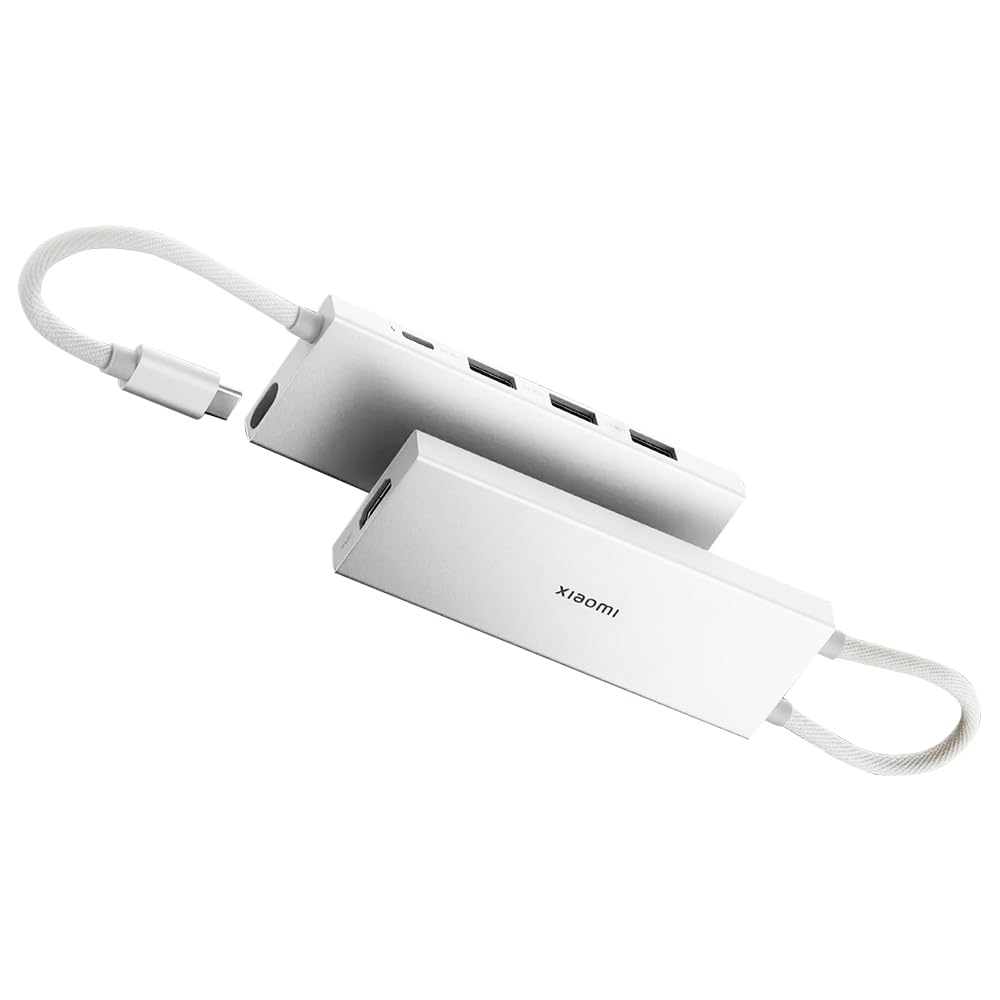
ചിത്രം 3.2: The Xiaomi 5-in-1 Type-C Hub with its physical dimensions: 112.5mm length, 10.4mm height, and 39mm width.
പോർട്ട് വിവരണങ്ങൾ:
- USB-C Input Cable: Connects the hub to your host device (laptop, tablet, smartphone).
- എച്ച്ഡിഎംഐ പോർട്ട്: Connects to an external display, monitor, or TV for video and audio output. Supports up to 4K@60Hz resolution.
- USB 3.0 പോർട്ടുകൾ (x3): കീബോർഡുകൾ, മൗസുകൾ, ഫ്ലാഷ് ഡ്രൈവുകൾ അല്ലെങ്കിൽ ബാഹ്യ ഹാർഡ് ഡ്രൈവുകൾ പോലുള്ള യുഎസ്ബി പെരിഫറലുകൾ ബന്ധിപ്പിക്കുക. 5 ജിബിപിഎസ് വരെ ഡാറ്റാ ട്രാൻസ്ഫർ വേഗത പിന്തുണയ്ക്കുന്നു.
- ടൈപ്പ്-സി പിഡി പോർട്ട്: Connect a USB-C power adapter to charge your host device through the hub. Supports Power Delivery up to 100W.
4. സജ്ജീകരണ നിർദ്ദേശങ്ങൾ
Follow these steps to set up your Xiaomi 5-in-1 Type-C Hub:
- നിങ്ങളുടെ ഉപകരണത്തിലേക്ക് ഹബ് ബന്ധിപ്പിക്കുക: Plug the integrated USB-C cable of the hub into an available USB-C port on your laptop, tablet, or smartphone. Ensure the USB-C port on your device supports video output (DisplayPort Alternate Mode) for HDMI functionality and Power Delivery for charging.
- പെരിഫറലുകൾ ബന്ധിപ്പിക്കുക:
- For external displays, connect an HDMI cable from the hub's HDMI port to your monitor or TV.
- For USB devices, plug your USB 3.0 or USB 2.0 peripherals (e.g., mouse, keyboard, USB drive) into the USB 3.0 ports on the hub.
- പവർ ബന്ധിപ്പിക്കുക (ഓപ്ഷണൽ): If your host device requires charging, connect a USB-C power adapter (not included) to the Type-C PD port on the hub. The hub will pass through power to charge your device.

ചിത്രം 4.1: The Xiaomi 5-in-1 Type-C Hub connected to a laptop, demonstrating its compact design and ease of integration with portable devices.
5. പ്രവർത്തന നിർദ്ദേശങ്ങൾ
5.1. Data Transfer via USB 3.0 Ports
The three USB 3.0 ports support high-speed data transfer up to 5 Gbps. This allows for quick transfer of large files, such as 1 GB of data in approximately 3 seconds, when connected to compatible USB 3.0 devices.

ചിത്രം 5.1: The hub connected to various USB devices, including a USB flash drive and a wireless receiver, demonstrating its expandability.
5.2. Power Delivery (PD100W) Charging
The dedicated Type-C PD port allows you to charge your host device while using the hub. Connect a USB-C power adapter to this port to provide up to 100W of power to your laptop or other compatible device. This enables simultaneous data transfer and rapid charging.

ചിത്രം 5.2: A visual representation indicating the simultaneous data transfer and charging capabilities of the Type-C port on the hub.
5.3. 4K UHD HDMI Video Output
Connect an HDMI-enabled display to the hub's HDMI port to extend or mirror your device's screen. The hub supports video output resolutions up to 4K Ultra High Definition (3840x2160) at 60Hz, providing clear visuals for presentations, movies, or gaming.

ചിത്രം 5.3: The hub connected to an external monitor, demonstrating its capability to extend display functionality.
5.4. സിസ്റ്റം അനുയോജ്യത
The Xiaomi 5-in-1 Type-C Hub is compatible with a wide range of operating systems, including:
- വിൻഡോസ് ഒഎസ്
- ആൻഡ്രോയിഡ് ഒഎസ്
- macOS
- ലിനക്സ് ഒഎസ്
It supports hot-swap connection, allowing you to plug and unplug devices without needing to restart your system.
6. പരിപാലനം
To ensure the longevity and optimal performance of your Xiaomi 5-in-1 Type-C Hub, follow these maintenance guidelines:
- വൃത്തിയാക്കൽ: Use a soft, dry cloth to wipe the surface of the hub. Avoid using liquid cleaners, aerosols, or solvents.
- സംഭരണം: നേരിട്ടുള്ള സൂര്യപ്രകാശവും കടുത്ത താപനിലയും ഏൽക്കാത്ത തണുത്തതും വരണ്ടതുമായ സ്ഥലത്ത് ഹബ് സൂക്ഷിക്കുക.
- കൈകാര്യം ചെയ്യൽ: Avoid dropping the hub or subjecting it to strong impacts. Do not bend or pull the integrated USB-C cable excessively.
- ഈർപ്പം: Keep the hub away from water and other liquids.
7. പ്രശ്നപരിഹാരം
If you encounter issues with your Xiaomi 5-in-1 Type-C Hub, refer to the following common problems and solutions:
| പ്രശ്നം | സാധ്യമായ പരിഹാരം |
|---|---|
| HDMI വഴി വീഡിയോ ഔട്ട്പുട്ട് ഇല്ല. |
|
| USB ഉപകരണങ്ങൾ തിരിച്ചറിഞ്ഞില്ല. |
|
| Host device is not charging or charging slowly. |
|
| ഹബ് പ്രവർത്തിക്കുമ്പോൾ ചൂട് അനുഭവപ്പെടുന്നു. | It is normal for the hub to become warm during heavy use, especially when charging or outputting video at high resolutions. If it becomes excessively hot, disconnect it and allow it to cool down. |
8 സ്പെസിഫിക്കേഷനുകൾ
| ഫീച്ചർ | വിശദാംശങ്ങൾ |
|---|---|
| മോഡൽ നമ്പർ | BHR8804GL |
| തുറമുഖങ്ങൾ | 3 x USB 3.0, 1 x HDMI, 1 x USB Type-C (PD) |
| HDMI റെസല്യൂഷൻ | Up to 4K UHD (3840x2160) @ 60Hz |
| USB 3.0 ഡാറ്റാ ട്രാൻസ്ഫർ വേഗത | 5 Gbps വരെ |
| യുഎസ്ബി ടൈപ്പ്-സി പവർ ഡെലിവറി | 100W വരെ |
| അനുയോജ്യമായ ഓപ്പറേറ്റിംഗ് സിസ്റ്റങ്ങൾ | Windows, Android, macOS, Linux |
| അളവുകൾ (LxWxH) | 4.43 x 1.54 x 0.41 ഇഞ്ച് (112.5 x 39 x 10.4 മിമി) |
| ഭാരം | 3.52 ഔൺസ് (100 ഗ്രാം) |
| ഹാർഡ്വെയർ ഇന്റർഫേസ് | HDMI, USB 3.0, USB Type C |
| അനുയോജ്യമായ ഉപകരണങ്ങൾ | Smartphones, Tablets, TVs, Desktop PCs, Monitors, Laptop PCs |
9. വാറൻ്റിയും പിന്തുണയും
വാറന്റി വിവരങ്ങൾക്കും സാങ്കേതിക പിന്തുണയ്ക്കും, ദയവായി ഔദ്യോഗിക Xiaomi വെബ്സൈറ്റ് സന്ദർശിക്കുക. webസൈറ്റിൽ ബന്ധപ്പെടുക അല്ലെങ്കിൽ അവരുടെ ഉപഭോക്തൃ സേവനവുമായി ബന്ധപ്പെടുക. വാറന്റി ക്ലെയിമുകൾക്കായി നിങ്ങളുടെ വാങ്ങൽ രസീത് സൂക്ഷിക്കുക.
ഔദ്യോഗിക Xiaomi Webസൈറ്റ്: www.mi.com


