1. ആമുഖം
Welcome to the Bigme HiBreak E-Ink Smartphone user manual. This document provides essential information for setting up, operating, maintaining, and troubleshooting your device. The Bigme HiBreak is designed to offer a unique, eye-friendly mobile experience with its E-Ink display, combining smartphone functionality with the comfort of an e-reader.
2. ബോക്സിൽ എന്താണുള്ളത്?
Please verify that all items are present in your Bigme HiBreak package:
- Bigme HiBreak Cell Phone
- USB Type-C Charging Cable (not explicitly listed but standard)
- SIM Ejector Tool (not explicitly listed but standard)
- Quick Start Guide (not explicitly listed but standard)
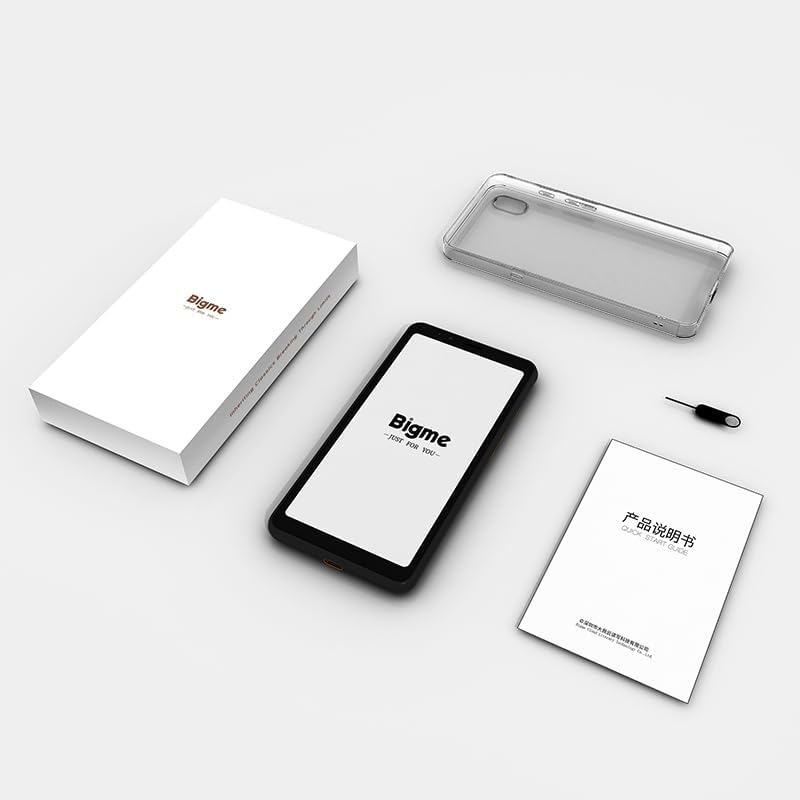
ചിത്രം 2.1: Contents of the Bigme HiBreak retail box. The image displays the Bigme HiBreak smartphone, a clear protective case, a small instruction manual, and a SIM ejector tool, all neatly arranged next to the product box.
3. ഉൽപ്പന്നം കഴിഞ്ഞുview
The Bigme HiBreak features a minimalist design with a focus on its E-Ink display. Familiarize yourself with the device's physical components.

ചിത്രം 3.1: മുന്നിലും പിന്നിലും view of the Bigme HiBreak smartphone. The front shows the E-Ink display with a beach scene, while the back reveals the textured finish and single camera lens.

ചിത്രം 3.2: കഴിഞ്ഞുview of Bigme HiBreak's core features. This image highlights the AI Assistant for intelligent Q&A and creative writing, the Android 11 operating system allowing third-party app installation, and the high-performance octa-core processor with 6GB RAM and 128GB ROM, expandable up to 1TB.
3.1 ഉപകരണ ഘടകങ്ങൾ

ചിത്രം 3.3: Detailed diagram of the Bigme HiBreak components. This illustration points out the Front 5MP camera, Speaker, Customizable Function Button, microSD Card / SIM Card Slot, Paperlike E-Ink Screen, Volume / Page-Turn Buttons, Power Button, Rear 13MP camera, LED Flash, Microphone, and Type-C Port.
- E-Ink Screen: 5.84-inch HD E-Ink display (720x1440 pixels) for a paper-like viewഅനുഭവം.
- മുൻ ക്യാമറ: 5MP camera, located at the top front.
- പിൻ ക്യാമറ: 13MP camera with LED flash, located on the back.
- പവർ ബട്ടൺ: On the right side, used to power on/off and wake/sleep the device.
- Volume/Page-Turn Buttons: On the right side, controls volume and can be customized for page-turning in reading apps.
- യുഎസ്ബി ടൈപ്പ്-സി പോർട്ട്: താഴെ, ചാർജ് ചെയ്യുന്നതിനും ഡാറ്റ കൈമാറ്റത്തിനുമായി.
- സിം/മൈക്രോ എസ്ഡി കാർഡ് സ്ലോട്ട്: On the left side, for inserting SIM cards and expandable storage.
- സ്പീക്കറും മൈക്രോഫോണും: ഓഡിയോ ഔട്ട്പുട്ടിനും ഇൻപുട്ടിനും.
4. സജ്ജീകരണം
4.1 സിം, മൈക്രോ എസ്ഡി കാർഡുകൾ ചേർക്കൽ
- Locate the SIM/microSD card slot on the left side of the device.
- Insert the SIM ejector tool into the small hole next to the slot to open the tray.
- Place your Nano-SIM card(s) and/or microSD card (up to 1TB, if desired) into the tray, ensuring correct orientation.
- ട്രേ അതിന്റെ സ്ഥാനത്ത് ക്ലിക്ക് ആകുന്നതുവരെ സ്ലോട്ടിലേക്ക് പതുക്കെ തിരികെ തള്ളുക.
4.2 പ്രാരംഭ പവർ ഓൺ
- Press and hold the Power Button on the right side of the device until the Bigme logo appears on the screen.
- Follow the on-screen prompts to complete the initial Android 11 setup, including language selection, Wi-Fi connection, Google account login, and security settings.
5. പ്രവർത്തന നിർദ്ദേശങ്ങൾ
5.1 E-Ink Display Features
The E-Ink display is designed for comfortable viewing, especially for reading. It features a 36-level adjustable front light and Bigme Super Refresh technology.
- ക്രമീകരിക്കാവുന്ന ഫ്രണ്ട് ലൈറ്റ്: Swipe down from the top of the screen to access the quick settings panel. Adjust the brightness slider to your preferred level for optimal viewവിവിധ ലൈറ്റിംഗ് അവസ്ഥകളിൽ ing.
- Bigme Super Refresh: This technology minimizes ghosting (residual images) on the E-Ink screen, providing a smoother experience for dynamic content like web browsing or video playback. The device automatically manages refresh rates.

ചിത്രം 5.1: Bigme Super Refresh technology in action. The image shows the E-Ink screen displaying text with a clear indication of 'Auto ghosting elimination technology', demonstrating improved display performance.
5.2 Basic Navigation and App Management
The Bigme HiBreak runs on Android 11, offering a familiar smartphone interface.
- സ്പർശന ആംഗ്യങ്ങൾ: Navigate the interface using standard Android touch gestures (tap, swipe, pinch-to-zoom).
- ആപ്പുകൾ ഇൻസ്റ്റാൾ ചെയ്യുന്നു: Access the Google Play Store to download and install a wide variety of third-party applications.

ചിത്രം 5.2: User interacting with the Bigme HiBreak, showcasing various popular and educational apps on the E-Ink display, demonstrating the 'flowable interaction' and app compatibility.
5.3 Camera Usage and OCR
The HiBreak is equipped with 5MP front and 13MP rear HD cameras.
- ഫോട്ടോകൾ/വീഡിയോകൾ എടുക്കൽ: Open the Camera app to capture images and record videos.
- Document Scanning (Offline OCR): Utilize the cameras for scanning documents. The built-in OCR (Optical Character Recognition) functionality supports formulas, graphics, and 54 languages, allowing for quick digitization and sharing of documents. The flash can improve clarity in low-light conditions.

ചിത്രം 5.3: Bigme HiBreak's camera capabilities. This image highlights the 5MP front and 13MP rear cameras, emphasizing their utility for document scanning with improved clarity in low-light conditions due to the built-in flash.
5.4 സ്മാർട്ട് സവിശേഷതകൾ
- Smart Voice-to-Text: Equipped with dual-microphone array technology for clear recordings and efficient transcription. Cloud synchronization to the Bigme cloud allows for easy multi-device access.
- AI അസിസ്റ്റന്റ്: The built-in AI Assistant can help generate speeches, articles, and creative content, boosting productivity.
- Office Assistant: Features full recording review and intelligent transcription for meetings, capturing crucial details.

ചിത്രം 5.4: Bigme HiBreak's versatile capabilities. This image illustrates the device's use as a smart office tool for meetings with recording and transcription, an AI Assistant for content generation, a tool for information retrieval (web browsing, news, apps), and a device for a paper-like reading experience with audiobooks.
5.5 വായനാനുഭവം
The E-Ink screen provides a comfortable, paper-like reading experience, reducing eye strain.

ചിത്രം 5.5: User enjoying a paper-like reading experience on the Bigme HiBreak. The image shows a person holding the smartphone, displaying an e-book with text-to-speech playback settings, emphasizing the customizable reading environment.
6. കണക്റ്റിവിറ്റി
6.1 Mobile Network Bands
The Bigme HiBreak supports various mobile network bands. Please check compatibility with your local carrier.

ചിത്രം 6.1: Table detailing the mobile network bands supported by the Bigme HiBreak. The table lists various 3GPP bands (B1, B2, B3, B5, B7, B8, B20, B28, B34, B38, B39, B40, B41), their major operators, regions, and system types (UMTS, CDMA, GSM, FDD-LTE, TD-SCDMA).
6.2 വൈ-ഫൈയും ബ്ലൂടൂത്തും
The device supports standard Wi-Fi and Bluetooth connectivity for internet access and pairing with accessories.
- വൈഫൈ: Connect to available Wi-Fi networks via Settings > Network & internet > Wi-Fi.
- ബ്ലൂടൂത്ത്: Pair with Bluetooth headphones, speakers, or other devices via Settings > Connected devices > Connection preferences > Bluetooth.
6.3 ജിപിഎസ് നാവിഗേഷൻ
The Bigme HiBreak includes GPS for precise navigation, making it suitable for mapping and location-based services.
7. പരിപാലനവും പരിചരണവും
7.1 ഉപകരണം വൃത്തിയാക്കുന്നു
- ഉപകരണത്തിൻ്റെ സ്ക്രീനും ബോഡിയും വൃത്തിയാക്കാൻ മൃദുവായ ലിൻ്റ് രഹിത തുണി ഉപയോഗിക്കുക.
- കഠിനമായ രാസവസ്തുക്കൾ, അബ്രസീവ് ക്ലീനറുകൾ, അല്ലെങ്കിൽ എയറോസോൾ സ്പ്രേകൾ എന്നിവ ഉപയോഗിക്കുന്നത് ഒഴിവാക്കുക.
- ഉപകരണം അമിതമായ ഈർപ്പം കാണിക്കരുത്.
7.2 ബാറ്ററി കെയർ
- The device is equipped with a 3300mAh Lithium-Polymer battery.
- Charge the device using the provided USB Type-C cable and a compatible power adapter.
- Avoid extreme temperatures, as they can affect battery life and performance.
- ബാറ്ററിയുടെ പരമാവധി ആയുസ്സ് ഉറപ്പാക്കാൻ, ഇടയ്ക്കിടെ പൂർണ്ണമായും ഡിസ്ചാർജ് ചെയ്യുന്നത് ഒഴിവാക്കുക.
7.3 സംരക്ഷണ കേസ്
The Bigme HiBreak comes with a high-quality TPU protective case, offering translucent softness and durability to protect your device from daily wear and tear.
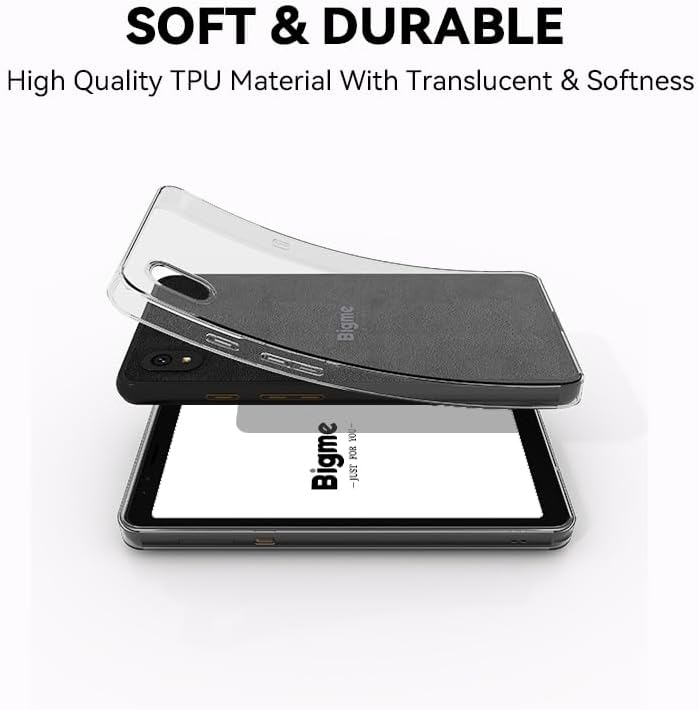
ചിത്രം 7.1: Bigme HiBreak with its included soft and durable TPU protective case. The image shows the clear, flexible case being placed over the smartphone, highlighting its translucent quality and protective design.
8. പ്രശ്നപരിഹാരം
If you encounter issues with your Bigme HiBreak, refer to the following common solutions:
| ഇഷ്യൂ | സാധ്യമായ കാരണം / പരിഹാരം |
|---|---|
| ഉപകരണം പവർ ഓണാക്കുന്നില്ല | Ensure the battery is charged. Connect to a charger for at least 30 minutes. If still unresponsive, press and hold the power button for 10-15 seconds for a forced restart. |
| Poor call quality / Missing calls/texts | Check SIM card insertion. Verify mobile network signal strength. Ensure cellular bands are supported by your carrier (refer to Section 6.1). Disable advanced calling features in network settings if experiencing issues with specific carriers (e.g., T-Mobile). Restart the device. |
| Screen ghosting / artifacts | This is normal for E-Ink displays but should be minimal with Bigme Super Refresh. If persistent, try adjusting refresh settings in display options or restart the device. |
| Apps crashing / Device slow | Close background apps. Clear app cache (Settings > Apps > [App Name] > Storage & cache > Clear cache). Ensure sufficient storage space. Restart the device. |
| Wi-Fi / Bluetooth connectivity issues | Toggle Wi-Fi/Bluetooth off and on. Restart your router/paired device. Forget the network/device and reconnect. |
| Device unresponsive / Frozen | Press and hold the Power Button for 10-15 seconds to force a restart. |
8.1 ഫാക്ടറി റീസെറ്റ്
പ്രശ്നങ്ങൾ നിലനിൽക്കുകയാണെങ്കിൽ, ഒരു ഫാക്ടറി റീസെറ്റ് ആവശ്യമായി വന്നേക്കാം. മുന്നറിയിപ്പ്: ഇത് നിങ്ങളുടെ ഉപകരണത്തിലെ എല്ലാ ഡാറ്റയും മായ്ക്കും. തുടരുന്നതിന് മുമ്പ് പ്രധാനപ്പെട്ട ഡാറ്റയുടെ ബാക്കപ്പ് എടുക്കുക.
- ക്രമീകരണങ്ങൾ > സിസ്റ്റം > റീസെറ്റ് ഓപ്ഷനുകൾ എന്നതിലേക്ക് പോകുക.
- 'എല്ലാ ഡാറ്റയും മായ്ക്കുക (ഫാക്ടറി റീസെറ്റ്)' തിരഞ്ഞെടുക്കുക.
- Confirm your decision and follow the on-screen prompts.
9 സ്പെസിഫിക്കേഷനുകൾ
Key technical specifications for the Bigme HiBreak E-Ink Smartphone:
| ഫീച്ചർ | സ്പെസിഫിക്കേഷൻ |
|---|---|
| പ്രദർശിപ്പിക്കുക | 5.84 Inches E-Ink, 720x1440 Pixels Resolution |
| ഫ്രണ്ട് ലൈറ്റ് | 36-ലെവൽ ക്രമീകരിക്കാവുന്ന |
| ഓപ്പറേറ്റിംഗ് സിസ്റ്റം | ആൻഡ്രോയിഡ് 11 |
| പ്രോസസ്സർ | Octa-core (specific model not provided, but 2.3GHz mentioned in image) |
| റാം | 6 ജിബി |
| ആന്തരിക സംഭരണം | 128 ജിബി |
| വികസിപ്പിക്കാവുന്ന സംഭരണം | microSD up to 1 TB |
| പിൻ ക്യാമറ | 13 എം.പി |
| മുൻ ക്യാമറ | 5 എം.പി |
| ബാറ്ററി | 3300mAh Lithium-Polymer (included) |
| കണക്റ്റിവിറ്റി | 4G LTE, Wi-Fi, Bluetooth, GPS |
| തുറമുഖങ്ങൾ | യുഎസ്ബി ടൈപ്പ്-സി |
| ഇനത്തിൻ്റെ ഭാരം | 6 ഔൺസ് |
| നിറം | കറുപ്പ് |

ചിത്രം 9.1: Key specifications and features of the Bigme HiBreak. This infographic highlights the HD dual camera, Android 11 OS, Octa-core 2.3GHz CPU, 6GB RAM, 128GB ROM, 4G LTE SIM/microSD card slot, and the eye-friendly 5.84-inch ePaper display with Bigme super refresh auto ghosting elimination technology.
10. വാറൻ്റിയും പിന്തുണയും
For warranty information and customer support, please refer to the documentation included with your purchase or visit the official Bigme website. If you require assistance with your Bigme HiBreak, please contact Bigme customer service directly.
11. പ്രധാന കുറിപ്പുകൾ
വീഡിയോ ഉള്ളടക്കം: Please note that no official product videos with 'Seller' creator type were available in the provided data for embedding in this manual.


