1. ഉൽപ്പന്നം കഴിഞ്ഞുview
The JVC HA-A4TW True Wireless Earbuds are designed for clear audio and comfortable use. Featuring 12mm driver units and Bluetooth 5.1 connectivity, these earbuds offer a reliable listening experience. They are IPX4 rated for splash resistance and provide up to 30 hours of total playback time with the included charging case.
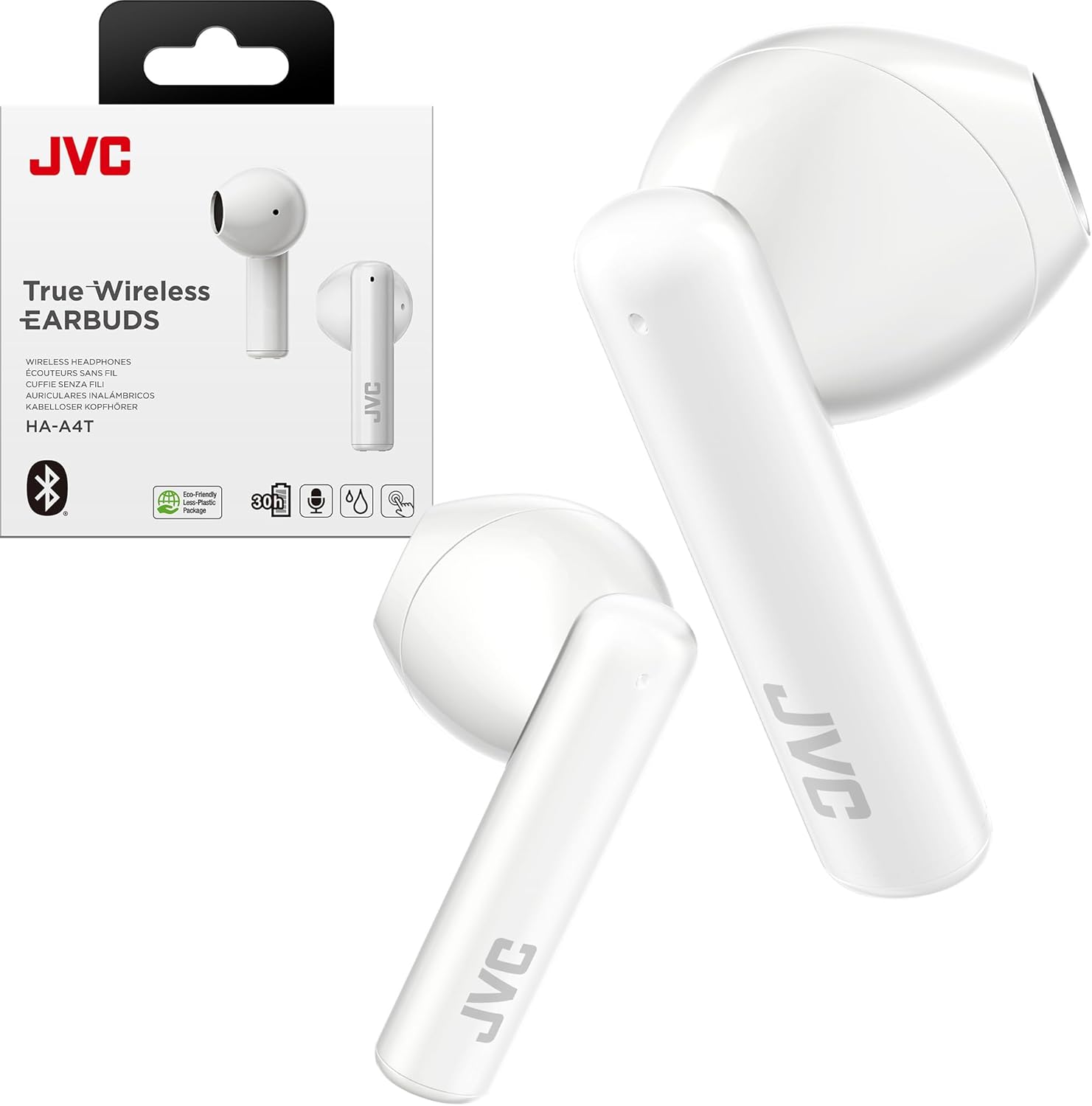
Image 1.1: JVC HA-A4TW True Wireless Earbuds and their retail packaging.
പ്രധാന സവിശേഷതകൾ:
- 12mm Diameter Diaphragm Driver Units: For clear and powerful sound.
- നീണ്ട ബാറ്ററി ലൈഫ്: ചാർജിംഗ് കേസ് ഉപയോഗിച്ച് മൊത്തം 30 മണിക്കൂർ വരെ പ്ലേബാക്ക്.
- ശബ്ദ മോഡുകൾ: Three customizable sound modes: Normal, Bass, and Clear.
- ഭാരം കുറഞ്ഞ ഡിസൈൻ: ഒതുക്കമുള്ളതും കൊണ്ടുപോകാൻ എളുപ്പവുമാണ്.
- IPX4 ജല പ്രതിരോധം: Splash-proof for everyday use.
- Effortless Touch Control: Intuitive controls for music and calls.
- Single-Ear Use: Compatible for use with either earbud independently.

Image 1.2: A person wearing the JVC HA-A4TW earbuds, showcasing their sleek and glossy design.
2. സജ്ജീകരണം
2.1 ബോക്സിൽ എന്താണുള്ളത്
- JVC HA-A4TW True Wireless Earbuds
- വയർലെസ് ചാർജിംഗ് കേസ്
- ചാർജിംഗ് കേബിൾ
- ഉപയോക്തൃ മാനുവൽ
2.2 ഇയർബഡുകളും കേസും ചാർജ് ചെയ്യുന്നു
ആദ്യമായി ഉപയോഗിക്കുന്നതിന് മുമ്പ്, ഇയർബഡുകളും ചാർജിംഗ് കേസും പൂർണ്ണമായും ചാർജ് ചെയ്യുക.
- ഇയർബഡുകൾ ചാർജിംഗ് കേസിൽ വയ്ക്കുക. അവ ശരിയായി സ്ഥാപിച്ചിട്ടുണ്ടെന്ന് ഉറപ്പാക്കുക.
- ചാർജിംഗ് കേബിളിനെ ചാർജിംഗ് കേസിലേക്കും ഒരു യുഎസ്ബി പവർ സ്രോതസ്സിലേക്കും ബന്ധിപ്പിക്കുക.
- ഫുൾ ചാർജിനുള്ള ചാർജിംഗ് സമയം ഏകദേശം 2 മണിക്കൂറാണ്.
A 10-minute quick charge provides approximately 75 minutes of playback.

Image 2.1: The slim and easy-to-carry charging case, providing up to 30 hours of total playtime.
2.3 ബ്ലൂടൂത്ത് ജോടിയാക്കൽ
The earbuds utilize Bluetooth 5.1 for a stable connection.
- ഇയർബഡുകൾ ചാർജ്ജ് ചെയ്തിട്ടുണ്ടെന്ന് ഉറപ്പാക്കുക.
- ചാർജിംഗ് കേസ് തുറക്കുക. ഇയർബഡുകൾ സ്വയമേവ ഓണാകുകയും ജോടിയാക്കൽ മോഡിലേക്ക് പ്രവേശിക്കുകയും ചെയ്യും.
- നിങ്ങളുടെ ഉപകരണത്തിൽ (സ്മാർട്ട്ഫോൺ, ടാബ്ലെറ്റ് മുതലായവ), ബ്ലൂടൂത്ത് പ്രവർത്തനക്ഷമമാക്കി ലഭ്യമായ ഉപകരണങ്ങൾക്കായി തിരയുക.
- Select "JVC HA-A4TW" from the list of devices to connect.
- Once connected, a confirmation sound will be heard, and the indicator light on the earbuds will change.

Image 2.2: The earbuds automatically power on and connect when taken out of the case.
3. പ്രവർത്തന നിർദ്ദേശങ്ങൾ
3.1 പവർ ഓൺ/ഓഫ്
- പവർ ഓൺ: ചാർജിംഗ് കേസിൽ നിന്ന് നീക്കം ചെയ്യുമ്പോൾ ഇയർബഡുകൾ യാന്ത്രികമായി ഓണാകും.
- പവർ ഓഫ്: ഇയർബഡുകൾ സ്വയമേവ ഓഫാക്കി ചാർജ് ചെയ്യാൻ തുടങ്ങുന്നതിന് അവ ചാർജിംഗ് കെയ്സിലേക്ക് തിരികെ വയ്ക്കുക.
3.2 ടച്ച് നിയന്ത്രണങ്ങൾ
The HA-A4TW earbuds feature intuitive touch controls on each earbud for various functions.

Image 3.1: The earbuds feature effortless touch control, even with their IPX4 splash-proof design.
Refer to the quick start guide or the full manual for specific touch gestures for:
- സംഗീതം പ്ലേ ചെയ്യുക/താൽക്കാലികമായി നിർത്തുക
- ട്രാക്കുകൾ ഒഴിവാക്കുക (അടുത്തത്/മുമ്പത്തേത്)
- കോളുകൾക്ക് ഉത്തരം / അവസാനിപ്പിക്കുക
- വോയിസ് അസിസ്റ്റൻ്റ് സജീവമാക്കുക
- വോളിയം ക്രമീകരിക്കുക
3.3 സൗണ്ട് മോഡുകൾ
Customize your listening experience with three distinct sound modes:
- സാധാരണ: ദൈനംദിന ശ്രവണത്തിനായി സമതുലിതമായ ഓഡിയോ.
- ബാസ്: Enhanced low frequencies for a richer sound.
- മായ്ക്കുക: Optimized for vocal clarity.
Switch between modes using the touch controls (refer to the quick start guide for specific gestures).

Image 3.2: Tailor your sound with Normal, Bass, and Clear modes.
3.4 Single-Ear Use
Either earbud can be used independently. Simply remove one earbud from the case, and it will connect to your device. This allows you to stay aware of your surroundings while enjoying audio.

Image 3.3: The earbuds are ready for convenient single-ear use.
4. പരിപാലനം
4.1 വൃത്തിയാക്കൽ
മികച്ച പ്രകടനവും ശുചിത്വവും ഉറപ്പാക്കാൻ നിങ്ങളുടെ ഇയർബഡുകളും ചാർജിംഗ് കേസും പതിവായി വൃത്തിയാക്കുക.
- ഇയർബഡുകളും ചാർജിംഗ് കെയ്സും തുടയ്ക്കാൻ മൃദുവായതും ഉണങ്ങിയതും ലിന്റ് രഹിതവുമായ ഒരു തുണി ഉപയോഗിക്കുക.
- അബ്രാസീവ് ക്ലീനറുകൾ, ലായകങ്ങൾ, എയറോസോൾ സ്പ്രേകൾ എന്നിവ ഉപയോഗിക്കരുത്.
- ഇയർബഡ് നുറുങ്ങുകളിൽ നിന്നും സ്പീക്കർ മെഷിൽ നിന്നും ഇയർവാക്സ് അല്ലെങ്കിൽ അവശിഷ്ടങ്ങൾ ഉണ്ടെങ്കിൽ, ചെറുതും മൃദുവായതുമായ ഒരു ബ്രഷ് അല്ലെങ്കിൽ കോട്ടൺ സ്വാബ് ഉപയോഗിച്ച് സൌമ്യമായി നീക്കം ചെയ്യുക.
4.2 ജല പ്രതിരോധം (IPX4)
The earbuds are rated IPX4, meaning they are resistant to splashing water from any direction. This makes them suitable for workouts and light rain.
- ഇയർബഡുകൾ വെള്ളത്തിൽ മുക്കരുത്.
- കേടുപാടുകൾ സംഭവിക്കാതിരിക്കാൻ ചാർജിംഗ് കെയ്സിലേക്ക് തിരികെ വയ്ക്കുന്നതിന് മുമ്പ് ഇയർബഡുകൾ ഉണങ്ങിയെന്ന് ഉറപ്പാക്കുക.
- ചാർജിംഗ് കേസ് വെള്ളം പ്രതിരോധിക്കുന്നില്ല.
5. പ്രശ്നപരിഹാരം
If you encounter issues with your JVC HA-A4TW earbuds, try the following solutions:
5.1 No Sound or Connection Issues
- റീചാർജ്: ഇയർബഡുകളും ചാർജിംഗ് കേസും പൂർണ്ണമായും ചാർജ് ചെയ്തിട്ടുണ്ടെന്ന് ഉറപ്പാക്കുക.
- വീണ്ടും ജോടി: Disconnect the earbuds from your device's Bluetooth settings and attempt to pair them again.
- ഉപകരണ വോളിയം: നിങ്ങളുടെ കണക്റ്റ് ചെയ്ത ഉപകരണത്തിലെ വോളിയം ലെവൽ പരിശോധിക്കുക.
- ദൂരം: Ensure the earbuds are within the Bluetooth range (approximately 10 meters) of your device.
5.2 Touch Control Unresponsive
- ടച്ച് കൺട്രോളുകൾ ഉപയോഗിക്കുമ്പോൾ നിങ്ങളുടെ വിരലുകൾ വൃത്തിയുള്ളതും വരണ്ടതുമാണെന്ന് ഉറപ്പാക്കുക.
- Try restarting the earbuds by placing them back in the case and then removing them.
5.3 ചാർജിംഗ് പ്രശ്നങ്ങൾ
- ചാർജിംഗ് കേബിൾ കേസിലേക്കും പവർ സ്രോതസ്സിലേക്കും സുരക്ഷിതമായി ബന്ധിപ്പിച്ചിട്ടുണ്ടെന്ന് ഉറപ്പാക്കുക.
- Try using a different charging cable or USB power adapter.
- ഇയർബഡുകളിലെയും കേസിനുള്ളിലെയും ചാർജിംഗ് കോൺടാക്റ്റുകൾ വൃത്തിയുള്ളതും അവശിഷ്ടങ്ങളില്ലാത്തതുമാണെന്ന് ഉറപ്പാക്കുക.
6 സ്പെസിഫിക്കേഷനുകൾ
| ഫീച്ചർ | സ്പെസിഫിക്കേഷൻ |
|---|---|
| മോഡലിൻ്റെ പേര് | HAA4T True Wireless |
| കണക്റ്റിവിറ്റി ടെക്നോളജി | ബ്ലൂടൂത്ത്, വയർലെസ് |
| ബ്ലൂടൂത്ത് പതിപ്പ് | 5.1 |
| ബ്ലൂടൂത്ത് ശ്രേണി | 10 മീറ്റർ |
| ഓഡിയോ ഡ്രൈവർ വലിപ്പം | 12 മില്ലിമീറ്റർ |
| ഫ്രീക്വൻസി പ്രതികരണം | 20000 Hz |
| പ്രതിരോധം | 16 ഓം |
| ബാറ്ററി ലൈഫ് (ഇയർബഡുകൾ) | 7.5 മണിക്കൂർ |
| ബാറ്ററി ലൈഫ് (കേസിനൊപ്പം ആകെ) | 30 മണിക്കൂർ |
| ചാർജിംഗ് സമയം | 2 മണിക്കൂർ |
| ജല പ്രതിരോധ നില | IPX4 (സ്പ്ലാഷ് പ്രൂഫ്) |
| നിയന്ത്രണ തരം | ടച്ച് നിയന്ത്രണം |
| ഇനത്തിൻ്റെ ഭാരം | 3.04 ഔൺസ് (ഇയർബഡുകളും കെയ്സും) |
| മെറ്റീരിയൽ | പ്ലാസ്റ്റിക് |
| നിറം | വെള്ള |
7. ഔദ്യോഗിക ഉൽപ്പന്ന വീഡിയോ
Video 7.1: An official JVC product video showcasing the HA-A4TW earbuds' features, including sleek design, long battery life, touch control, sound modes, and water resistance.
8. വാറൻ്റിയും പിന്തുണയും
For warranty information, technical support, or further assistance, please refer to the warranty card included with your product or visit the official JVC website. Contact details for customer service can typically be found on the manufacturer's support pages.


