ആമുഖം
The CHUWI Hipen H7 Stylus Pen is an active stylus designed for precise input on compatible devices. Featuring 4096 levels of pressure sensitivity and MPP 2.0 protocol support, it offers a natural writing and drawing experience. This manual provides instructions for setup, operation, maintenance, and troubleshooting to ensure optimal performance of your Hipen H7.
പാക്കേജ് ഉള്ളടക്കം
പാക്കേജിൽ ഇനിപ്പറയുന്ന ഇനങ്ങൾ ഉണ്ടോ എന്ന് പരിശോധിക്കുക:
- CHUWI Hipen H7 Stylus Pen
- AAAA Battery (pre-installed or separate)
- Replacement Pen Tip (if included)
സജ്ജമാക്കുക
1. ബാറ്ററി ഇൻസ്റ്റാളേഷൻ
The Hipen H7 is powered by an AAAA battery. If the battery is not pre-installed, follow these steps:
- ബാറ്ററി കമ്പാർട്ട്മെന്റ് തുറക്കാൻ സ്റ്റൈലസിന്റെ മുകളിലെ തൊപ്പി എതിർ ഘടികാരദിശയിൽ പതുക്കെ തിരിക്കുക.
- Insert one AAAA battery with the positive (+) end facing towards the pen tip.
- Twist the top cap clockwise to securely close the battery compartment.
 This image illustrates the components of the Hipen H7, including the AAAA battery location.
2. ഉപകരണ അനുയോജ്യത
The Hipen H7 stylus supports the MPP (Microsoft Pen Protocol) protocol. It is compatible with:
- CHUWI Hi10 Max
- CHUWI FreeBook
- Other devices that support the MPP protocol.
Models not supported: Hipad Xpro, Hipad 11, Minibook X, Hi10 XPro.
 This image demonstrates the stylus's compatibility with Microsoft Surface PC series and other MPP-enabled devices.
3. ജോടിയാക്കൽ
The Hipen H7 stylus does not require Bluetooth pairing. It works with Windows Ink and is ready to use once the battery is installed and the device supports MPP.
പ്രവർത്തന നിർദ്ദേശങ്ങൾ
1. അടിസ്ഥാന ഉപയോഗം
Simply touch the pen tip to the screen of your compatible device to begin writing, drawing, or navigating. The stylus offers 4096 levels of pressure sensitivity for varied line thickness and shading.
 This image illustrates the Hipen H7 in use for various creative and productivity tasks on different devices.
2. Side Buttons
The Hipen H7 features two side buttons:
- വലത്-ക്ലിക്ക് ബട്ടൺ: Press and hold this button while touching the screen to activate the right-click function, similar to a mouse.
- Eraser Button: Press and hold this button while touching the screen to activate the eraser function. Note: The eraser function is only available for Intel devices.
This diagram highlights the physical features of the Hipen H7, including the side buttons.
3. കൈപ്പത്തി നിരസിക്കൽ
The stylus supports palm rejection, allowing you to rest your hand naturally on the screen while writing or drawing without interfering with the stylus input.
4. Automatic Sleep Function
To conserve battery life, the Hipen H7 will automatically enter a sleep state after 60 seconds of inactivity. It will reactivate automatically when you touch the tip to the screen again.
 This image visually represents the automatic sleep function, which helps extend battery life.
മെയിൻ്റനൻസ്
1. വൃത്തിയാക്കൽ
Wipe the stylus body with a soft, dry cloth. Do not use harsh chemicals or abrasive materials, as they may damage the finish or internal components.
2. Pen Tip Replacement
If the pen tip becomes worn or damaged, it can be replaced. Gently pull out the old tip and insert a new one firmly until it clicks into place. (Replacement tips may be sold separately or included in the package).
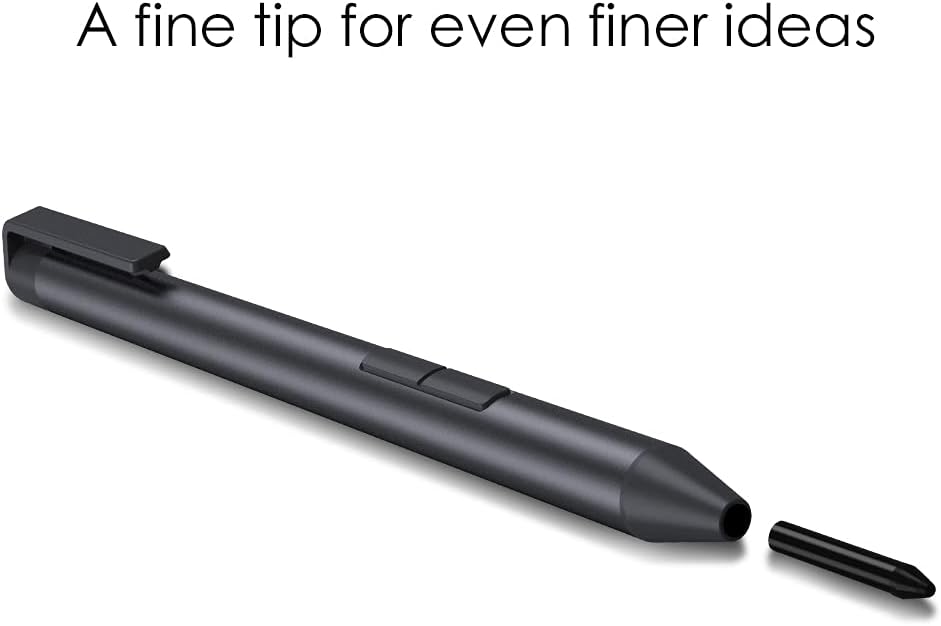 This image demonstrates the replaceable fine tip of the Hipen H7 stylus.
3. ബാറ്ററി മാറ്റിസ്ഥാപിക്കൽ
When the stylus performance degrades or it stops responding, replace the AAAA battery following the instructions in the "Battery Installation" section.
ട്രബിൾഷൂട്ടിംഗ്
- സ്റ്റൈലസ് പ്രതികരിക്കുന്നില്ല:
- Ensure the AAAA battery is correctly installed and has sufficient charge. Replace the battery if necessary.
- Verify that your device supports the MPP protocol.
- നിങ്ങളുടെ ഉപകരണം പുനരാരംഭിക്കുക.
- Inaccurate input or jitter:
- Ensure the pen tip is clean and not damaged. Replace if necessary.
- Check for any magnetic interference near your device.
- Ensure your device's screen is clean.
- Side buttons not working:
- Confirm that the eraser function is only supported on Intel devices.
- Ensure the stylus is properly connected (no pairing needed, but ensure battery is good).
സ്പെസിഫിക്കേഷനുകൾ
| ഫീച്ചർ | വിശദാംശങ്ങൾ |
|---|---|
| മോഡൽ | CHUWI H7 Stylus Pen (Hipen H7) |
| പ്രഷർ സെൻസിറ്റിവിറ്റി | 4096 ലെവലുകൾ |
| പ്രോട്ടോക്കോൾ | MPP 2.0 |
| Pen Tip Size | 1.0mm (fine tip) |
| ബാറ്ററി തരം | AAAA Battery |
| ബാറ്ററി ലൈഫ് | Up to 180 days (approximate, based on usage) |
| യാന്ത്രിക ഉറക്കം | 60 സെക്കൻഡ് നിഷ്ക്രിയത്വത്തിന് ശേഷം |
| അളവുകൾ | Length: 144mm, Diameter: 9.5mm |
| ഭാരം | 16g (stylus only) / 45g (with battery) |
| മെറ്റീരിയൽ | പ്ലാസ്റ്റിക് |
| അനുയോജ്യമായ ഉപകരണങ്ങൾ | CHUWI Hi10 Max, FreeBook, and other MPP-enabled devices |
 This image provides a visual overview of the stylus's key features and specifications.
വാറൻ്റിയും പിന്തുണയും
വാറൻ്റി വിവരങ്ങൾ
CHUWI products typically come with a limited warranty. Please refer to the warranty card included with your purchase or visit the official CHUWI webനിങ്ങളുടെ പ്രദേശത്തിന് പ്രത്യേകമായുള്ള വിശദമായ വാറന്റി നിബന്ധനകൾക്കും വ്യവസ്ഥകൾക്കും സൈറ്റ് സന്ദർശിക്കുക.
ഉപഭോക്തൃ പിന്തുണ
For technical assistance, troubleshooting, or further inquiries, please contact CHUWI customer support through their official webസൈറ്റ് അല്ലെങ്കിൽ നിങ്ങളുടെ ഉൽപ്പന്ന പാക്കേജിംഗിൽ നൽകിയിരിക്കുന്ന ബന്ധപ്പെടാനുള്ള വിവരങ്ങൾ.


