ആമുഖം
Thank you for choosing the Spigen SA-TW S10 True Wireless Earbuds. These earbuds are designed to provide a superior audio experience with features such as Active Noise Cancellation (ANC), Transparency Mode, customizable EQ via the Spigen Audio App, and a low-latency Gaming Mode. This manual provides detailed instructions for setup, operation, maintenance, and troubleshooting to ensure optimal performance and longevity of your device.
പാക്കേജ് ഉള്ളടക്കം
നിങ്ങളുടെ പാക്കേജിൽ എല്ലാ ഇനങ്ങളും ഉണ്ടെന്ന് ദയവായി പരിശോധിക്കുക:
- 1 x Spigen SA-TW S10 True Wireless Earbuds (TWS)
- 1 x ചാർജിംഗ് കേബിൾ
- 1 x Eartips set (S/M - installed/L)

ഉൽപ്പന്നം കഴിഞ്ഞുview
The Spigen SA-TW S10 earbuds feature a sleek design and advanced audio technology. Key components include the earbuds with integrated microphones and touch control surfaces, and a compact charging case.
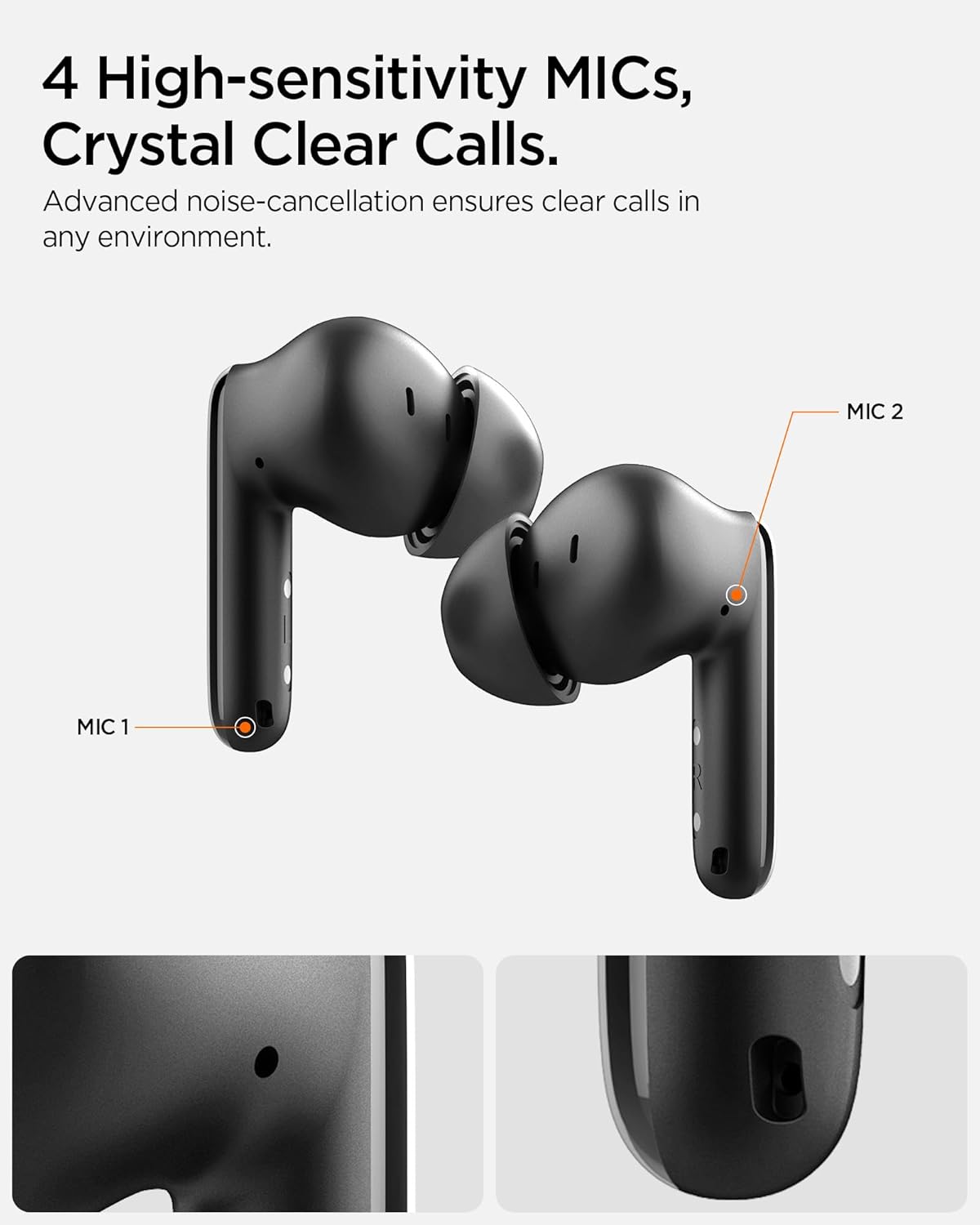
The earbuds are equipped with 10mm Bio-Diaphragm Dynamic Drivers for balanced sound and 4 high-sensitivity microphones for clear calls. They also feature intuitive touch controls on the outer surface of each earbud.
സജ്ജമാക്കുക
1. ഇയർബഡുകളും കേസും ചാർജ് ചെയ്യുന്നു
Before first use, fully charge the earbuds and the charging case. Place the earbuds into the charging case. Connect the provided charging cable to the case's charging port and a USB power source. The indicator light on the case will show charging status. A full charge provides up to 6 hours of playtime for the earbuds and extends to a total of 30 hours with the charging case.

2. പ്രാരംഭ ജോടിയാക്കൽ
- ഇയർബഡുകൾ ചാർജ് ചെയ്തിട്ടുണ്ടെന്നും ചാർജിംഗ് കെയ്സിനുള്ളിലാണെന്നും ഉറപ്പാക്കുക.
- Open the charging case lid. The earbuds will automatically enter pairing mode, indicated by a flashing LED on the earbuds.
- നിങ്ങളുടെ ഉപകരണത്തിൽ (സ്മാർട്ട്ഫോൺ, ടാബ്ലെറ്റ്, ലാപ്ടോപ്പ്), ബ്ലൂടൂത്ത് പ്രവർത്തനക്ഷമമാക്കുക.
- ഇതിനായി തിരയുക "Spigen SA-TW S10" in the list of available Bluetooth devices and select it to connect.
- കണക്റ്റുചെയ്തുകഴിഞ്ഞാൽ, ഒരു വോയ്സ് പ്രോംപ്റ്റ് വിജയകരമായ ജോടിയാക്കൽ സ്ഥിരീകരിക്കും.
The earbuds utilize Bluetooth 5.3 for seamless and stable connections.
പ്രവർത്തന നിർദ്ദേശങ്ങൾ
ടച്ച് നിയന്ത്രണങ്ങൾ
The Spigen SA-TW S10 earbuds feature intuitive touch controls for managing audio playback, calls, and modes. The specific functions can be customized via the Spigen Audio App.

ആക്ടീവ് നോയ്സ് റദ്ദാക്കൽ (ANC) & ട്രാൻസ്പരൻസി മോഡ്
The earbuds offer up to 28dB of Active Noise Cancellation to reduce ambient sounds, providing an immersive listening experience. Transparency Mode allows you to hear your surroundings without removing the earbuds, enhancing situational awareness. Switch between these modes using the touch controls or the Spigen Audio App.

ഗെയിമിംഗ് മോഡ്
Activate Gaming Mode for ultra-low latency audio transmission, ensuring synchronized sound effects and dialogue during gaming sessions. This mode minimizes audio delay for a more responsive gaming experience.

മൾട്ടി-ഡിവൈസ് കണക്റ്റിവിറ്റി
The earbuds support multi-device connectivity, allowing seamless switching between two paired devices, such as a smartphone and a laptop, without needing to re-pair.

Spigen Audio App
Enhance your listening experience by downloading the Spigen Audio App, available for both iOS and Android devices. The app allows you to:
- സൗണ്ട് പ്രോ ഇഷ്ടാനുസൃതമാക്കുകfiles with 5 preset EQ options or a customizable equalizer.
- Adjust noise control modes (ANC, Transparency, Normal).
- Remap touch controls to suit your preferences.
- View ബാറ്ററി നില.

മെയിൻ്റനൻസ്
വൃത്തിയാക്കൽ
Regularly clean your earbuds and charging case to maintain optimal performance and hygiene. Use a soft, dry, lint-free cloth. For earwax or debris in the eartips or speaker mesh, use a small, soft brush or cotton swab. Do not use abrasive cleaners or immerse the earbuds or case in water.
ജല പ്രതിരോധം
The Spigen SA-TW S10 earbuds are IPX5 water resistant, meaning they are protected against low-pressure water jets from any direction. This makes them suitable for workouts and light rain. They are not designed for submersion in water. Ensure earbuds are dry before placing them back into the charging case to prevent damage.
ട്രബിൾഷൂട്ടിംഗ്
| പ്രശ്നം | സാധ്യമായ കാരണം | പരിഹാരം |
|---|---|---|
| ഇയർബഡുകൾ ജോടിയാക്കുന്നില്ല/കണക്റ്റ് ചെയ്യുന്നില്ല. | Low battery; out of range; pairing mode not active; previous connection interference. | Ensure earbuds are charged. Place earbuds closer to the device. Open case lid to activate pairing. Turn off Bluetooth on other devices. Forget/delete "Spigen SA-TW S10" from your device's Bluetooth list and re-pair. |
| ശബ്ദമില്ല അല്ലെങ്കിൽ കുറഞ്ഞ ശബ്ദമില്ല. | Volume too low on device/earbuds; improper fit; debris in speaker. | Increase volume on both earbuds and connected device. Adjust earbuds for a secure fit. Clean speaker mesh and eartips. |
| ANC ഫലപ്രദമല്ല. | Improper fit; mode not activated. | Ensure a snug fit with the correct eartip size. Verify ANC is enabled via touch control or Spigen Audio App. |
| കോളുകൾക്കിടയിൽ മൈക്രോഫോൺ പ്രശ്നങ്ങൾ. | Microphone blocked; environmental noise. | Ensure microphones are not covered. Move to a quieter environment. |
| ചാർജിംഗ് കേസ് ചാർജ് ചെയ്യുന്നില്ല. | കേബിൾ/അഡാപ്റ്റർ തകരാറാണ്; വൃത്തികെട്ട ചാർജിംഗ് പോർട്ട്. | Try a different charging cable and USB adapter. Clean the charging port gently. |
സ്പെസിഫിക്കേഷനുകൾ
| ഫീച്ചർ | വിശദാംശങ്ങൾ |
|---|---|
| മോഡലിൻ്റെ പേര് | SA-TW S10 - Black |
| മോഡൽ നമ്പർ | ASD07886 |
| ശബ്ദ നിയന്ത്രണം | ആക്ടീവ് നോയ്സ് റദ്ദാക്കൽ (28dB വരെ) |
| കണക്റ്റിവിറ്റി ടെക്നോളജി | വയർലെസ്സ് (ബ്ലൂടൂത്ത് 5.3) |
| ഓഡിയോ ഡ്രൈവർ തരം | 10mm Dynamic Driver (Bio-Diaphragm) |
| ബാറ്ററി ലൈഫ് (ഇയർബഡുകൾ) | 6 മണിക്കൂർ (ഒറ്റ ചാർജ്) |
| ആകെ പ്ലേടൈം (കേസിനൊപ്പം) | 30 മണിക്കൂർ വരെ |
| മൈക്രോഫോൺ | 4 High-sensitivity Mics |
| നിയന്ത്രണ രീതി | സ്പർശിക്കുക |
| ജല പ്രതിരോധ നില | IPX5 (വിയർപ്പിനെയും വെള്ളത്തെയും പ്രതിരോധിക്കും) |
| ഇനത്തിൻ്റെ ഭാരം | 43.2 ഗ്രാം |
| ഉൽപ്പന്ന അളവുകൾ | 5.26 x 5.75 x 2.88 സെ.മീ |
| അനുയോജ്യമായ ഉപകരണങ്ങൾ | സ്മാർട്ട്ഫോണുകൾ, ടാബ്ലെറ്റുകൾ, ലാപ്ടോപ്പുകൾ, ഡെസ്ക്ടോപ്പുകൾ, സ്മാർട്ട് സ്പീക്കറുകൾ |
| നിർമ്മാതാവ് | Spigen Korea Co.,Ltd. |
| മാതൃരാജ്യം | ചൈന |
വാറൻ്റിയും പിന്തുണയും
Spigen products are manufactured with quality and care. For warranty information or technical support, please contact Spigen customer service. Keep your proof of purchase for warranty claims.
Manufacturer Contact: Spigen Korea Co.,Ltd., spigen.support@spigen.com
Please note: Refunds or exchanges are not allowed after shrink wrap removal. For products with shrink wrapping already removed, request an immediate exchange if there are issues upon receipt.


