ആമുഖം
This manual provides detailed instructions for the setup, operation, and maintenance of your TECWARE Spectre 75% RGB Mechanical Gaming Keyboard. Designed for performance and customization, the Spectre 75 features a compact layout, customizable LCD screen, multi-function knob, gasket mount design, and hot-swappable switches. Please read this manual thoroughly to ensure proper use and to maximize your keyboard's potential.

Image: The TECWARE Spectre 75 mechanical gaming keyboard, showcasing അതിന്റെ ഒതുക്കമുള്ള 75% ലേഔട്ടും ഊർജ്ജസ്വലമായ RGB ബാക്ക്ലൈറ്റിംഗും.
സജ്ജമാക്കുക
പാക്കേജ് ഉള്ളടക്കം
- TECWARE Spectre 75 Mechanical Gaming Keyboard
- USB-C മുതൽ USB-A കേബിൾ വരെ
- 2.4GHz വയർലെസ് ഡോംഗിൾ
- കീക്യാപ്പ്/സ്വിച്ച് പുള്ളർ ടൂൾ
- ഉപയോക്തൃ മാനുവൽ (ഈ പ്രമാണം)
കണക്റ്റിവിറ്റി ഓപ്ഷനുകൾ
The TECWARE Spectre 75 keyboard offers three modes of connectivity:
- 2.4GHz വയർലെസ്: For a stable, low-latency wireless connection.
- ബ്ലൂടൂത്ത് 5.0: For wireless connection to multiple devices.
- USB-C വയേർഡ്: For a direct, reliable connection and charging.

Image: The keyboard's connectivity options, including the 2.4GHz wireless dongle, USB-C port, and Bluetooth indicator.
പ്രാരംഭ കണക്ഷൻ
- വയർഡ് കണക്ഷൻ: Connect the provided USB-C cable to the keyboard's USB-C port and the other end to an available USB port on your computer. The keyboard will be recognized automatically.
- 2.4GHz വയർലെസ് കണക്ഷൻ:
- Locate the 2.4GHz wireless dongle.
- നിങ്ങളുടെ കമ്പ്യൂട്ടറിൽ ലഭ്യമായ USB പോർട്ടിലേക്ക് ഡോംഗിൾ പ്ലഗ് ചെയ്യുക.
- കീബോർഡിന്റെ മോഡ് സ്വിച്ച് (സാധാരണയായി പുറകിലോ വശത്തോ) 2.4G ആയി സജ്ജീകരിച്ചിട്ടുണ്ടെന്ന് ഉറപ്പാക്കുക.
- കീബോർഡ് യാന്ത്രികമായി കണക്ട് ചെയ്യണം.
- ബ്ലൂടൂത്ത് കണക്ഷൻ:
- കീബോർഡിന്റെ മോഡ് സ്വിച്ച് BT ആയി സജ്ജീകരിച്ചിട്ടുണ്ടെന്ന് ഉറപ്പാക്കുക.
- നിങ്ങളുടെ കമ്പ്യൂട്ടറിലോ ഉപകരണത്തിലോ, Bluetooth ക്രമീകരണങ്ങളിലേക്ക് നാവിഗേറ്റ് ചെയ്യുക.
- ഇതിനായി തിരയുക new devices and select "TECWARE Spectre 75" (or similar) from the list.
- ജോടിയാക്കൽ പൂർത്തിയാക്കാൻ ഏതെങ്കിലും ഓൺ-സ്ക്രീൻ നിർദ്ദേശങ്ങൾ പാലിക്കുക.
The keyboard is equipped with a 4000mAh battery, providing up to 400 hours of continuous usage on a single charge. Charge the keyboard using the USB-C cable.
ഓപ്പറേഷൻ
ഇഷ്ടാനുസൃതമാക്കാവുന്ന LCD സ്ക്രീൻ
The 1.14" TFT-LCD smart screen can display various information and custom content.
- വിവര പ്രദർശനം: View time, date, battery level, connection mode, and system information (e.g., CPU/GPU usage).
- ഇഷ്ടാനുസൃത ഉള്ളടക്കം: Upload your own GIFs or static images for a personalized display. This feature is managed via the TECWARE software.

ചിത്രം: ഉദാamples of content displayed on the customizable LCD screen, including animated GIFs, time and date, and system performance metrics.
മൾട്ടി-ഫംഗ്ഷൻ നോബ്
The dedicated knob provides dual functionality for media control and LCD screen navigation.
- സ്വിച്ചിംഗ് മോഡുകൾ: അമർത്തിപ്പിടിക്കുക FN key and rotate the knob for 3 seconds to switch between LCD Mode and Volume Mode.
- LCD മോഡ്:
- Rotate Left/Right: Navigate through the LCD menu.
- Press Down: Confirm selection.
- വോളിയം മോഡ്:
- Turn: Adjust system volume.
- Press: Mute/Unmute audio.

Image: A user's hand adjusting the multi-function knob, which controls volume and LCD screen navigation.
RGB പ്രകാശം
The keyboard features 16.8 million color RGB illumination with per-key customization and an RGB LED side underglow.
- Preset Lighting Modes: Access 18 preset lighting modes directly from the keyboard or customize further using the TECWARE software.
- 3-Zone RGB Illumination: Lighting can be customized for keys, underglow, and the volume wheel.

Image: The TECWARE Spectre 75 keyboard displaying its extensive RGB lighting capabilities, including per-key customization and underglow effects.
സോഫ്റ്റ്വെയർ പിന്തുണ
Download the official TECWARE software from the TECWARE website to unlock advanced customization options:
- മാക്രോ റെക്കോർഡിംഗ്: Create and assign complex macros to keys.
- മാക്രോ അസൈൻമെന്റ്: Easily assign recorded macros to any key.
- കസ്റ്റം യൂസർ പ്രോfiles: Save and switch between different key layouts and lighting configurations.
- LCD Screen Customization: Upload GIFs and images to the LCD screen.
- Advanced RGB Control: Fine-tune lighting effects and colors.

Image: The TECWARE Spectre 75 keyboard, highlighting its compatibility with software for advanced customization features like macros and user profiles.
മെയിൻ്റനൻസ്
കീബോർഡ് വൃത്തിയാക്കുന്നു
- മൃദുവായ, ലിൻ്റ് രഹിത തുണി ഉപയോഗിക്കുകampകീക്യാപ്പുകളും ഷാസികളും തുടയ്ക്കാൻ വെള്ളമോ നേരിയ ക്ലീനിംഗ് ലായനിയോ ഉപയോഗിച്ച് നനയ്ക്കുക.
- കീക്യാപ്പുകൾക്കിടയിലുള്ള പൊടിയും അവശിഷ്ടങ്ങളും ഉണ്ടെങ്കിൽ, കംപ്രസ് ചെയ്ത വായു ഉപയോഗിക്കുക.
- കീബോർഡിലേക്ക് നേരിട്ട് ദ്രാവകങ്ങൾ സ്പ്രേ ചെയ്യുന്നത് ഒഴിവാക്കുക.
- കഠിനമായ രാസവസ്തുക്കളോ ഉരച്ചിലുകളോ ഉപയോഗിക്കരുത്.
ഹോട്ട്-സ്വാപ്പ് ചെയ്യാവുന്ന സ്വിച്ചുകൾ
The TECWARE Spectre 75 features 5-pin universal hot-swappable sockets, allowing for easy replacement of switches without soldering.
- സ്വിച്ചുകൾ നീക്കംചെയ്യുന്നു: Use the provided switch puller tool. Gently grip the switch from the top and bottom, then pull upwards with even pressure until the switch detaches from the PCB.
- സ്വിച്ചുകൾ ഇൻസ്റ്റാൾ ചെയ്യുന്നു: Align the pins of the new switch with the holes on the PCB. Press down firmly until the switch clicks into place. Ensure the pins are not bent before insertion.
- അനുയോജ്യത: South-facing LEDs ensure compatibility with most aftermarket switches.
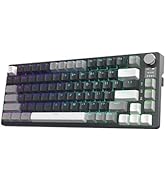
Image: The TECWARE Spectre 75 keyboard with keycaps and switches removed, showing the hot-swappable sockets and the tools required for switch replacement.
ട്രബിൾഷൂട്ടിംഗ്
കീബോർഡ് പ്രതികരിക്കുന്നില്ല
- വയർ: USB-C കേബിൾ കീബോർഡിലേക്കും കമ്പ്യൂട്ടറിലേക്കും സുരക്ഷിതമായി ബന്ധിപ്പിച്ചിട്ടുണ്ടെന്ന് ഉറപ്പാക്കുക. മറ്റൊരു USB പോർട്ട് അല്ലെങ്കിൽ കേബിൾ പരീക്ഷിക്കുക.
- 2.4GHz വയർലെസ്:
- Verify the dongle is properly inserted into a USB port.
- Check that the keyboard's mode switch is set to 2.4G.
- കീബോർഡ് ബാറ്ററി ചാർജ്ജ് ചെയ്തിട്ടുണ്ടെന്ന് ഉറപ്പാക്കുക.
- ബ്ലൂടൂത്ത്:
- Confirm the keyboard's mode switch is set to BT.
- Check your device's Bluetooth settings to ensure the keyboard is paired and connected.
- Try unpairing and re-pairing the keyboard.
- കീബോർഡ് ബാറ്ററി ചാർജ്ജ് ചെയ്തിട്ടുണ്ടെന്ന് ഉറപ്പാക്കുക.
RGB ലൈറ്റിംഗ് പ്രശ്നങ്ങൾ
- If RGB lighting is not working or displaying incorrectly, check the TECWARE software for lighting settings.
- കീബോർഡ് ഫേംവെയർ കാലികമാണെന്ന് ഉറപ്പാക്കുക.
LCD സ്ക്രീൻ പ്രദർശിപ്പിക്കുന്നില്ല
- കീബോർഡ് ഓണാക്കിയിട്ടുണ്ടെന്നും കണക്റ്റ് ചെയ്തിട്ടുണ്ടെന്നും ഉറപ്പാക്കുക.
- Check LCD settings within the TECWARE software.
- Try resetting the keyboard (refer to software or manufacturer web(നിർദ്ദിഷ്ട നിർദ്ദേശങ്ങൾക്കുള്ള സൈറ്റ് കാണുക).
കീകൾ രജിസ്റ്റർ ചെയ്യുന്നില്ല അല്ലെങ്കിൽ ഇരട്ട-ടൈപ്പിംഗ് ചെയ്യുന്നില്ല.
- ഇത് ഒരു തകരാറുള്ള സ്വിച്ചിനെ സൂചിപ്പിക്കാം. പ്രശ്നമുള്ള സ്വിച്ച് മാറ്റിസ്ഥാപിക്കാൻ ഹോട്ട്-സ്വാപ്പ് ചെയ്യാവുന്ന സവിശേഷത ഉപയോഗിക്കുക.
- സ്വിച്ച് അതിന്റെ സോക്കറ്റിൽ പൂർണ്ണമായും സ്ഥാപിച്ചിട്ടുണ്ടെന്ന് ഉറപ്പാക്കുക.
സ്പെസിഫിക്കേഷനുകൾ
| ഫീച്ചർ | വിശദാംശങ്ങൾ |
|---|---|
| ഉൽപ്പന്ന അളവുകൾ | 13.04 x 5.74 x 1.51 ഇഞ്ച് |
| ഇനത്തിൻ്റെ ഭാരം | 2.03 പൗണ്ട് |
| നിർമ്മാതാവ് | ടെക്വെയർ |
| ബാറ്ററികൾ | 1 9V ബാറ്ററി (ഉൾപ്പെടുത്തിയിരിക്കുന്നു) |
| ബ്രാൻഡ് | TECWARE |
| അനുയോജ്യമായ ഉപകരണങ്ങൾ | പിസി, മാക് |
| കണക്റ്റിവിറ്റി ടെക്നോളജി | Bluetooth (BT 5.0), USB-C, 2.4 GHz Wireless |
| കീബോർഡ് വിവരണം | RGB മെക്കാനിക്കൽ ഗെയിമിംഗ് കീബോർഡ് |
| ശുപാർശ ചെയ്യുന്ന ഉപയോഗങ്ങൾ | ഗെയിമിംഗ് |
| പ്രത്യേക ഫീച്ചർ | ബാക്ക്ലിറ്റ്, ഇഷ്ടാനുസൃതമാക്കാവുന്ന LCD സ്ക്രീൻ, മൾട്ടി-ഫംഗ്ഷൻ നോബ്, ഗാസ്കറ്റ് മൗണ്ട്, ഹോട്ട്-സ്വാപ്പബിൾ സോക്കറ്റുകൾ |
| നിറം | Black, Candy Red Switch (Linear) |
| ശൈലി | സ്പെക്ടർ 75 |
| തീം | മഴവില്ല് |
| പവർ ഉറവിടം | ബാറ്ററി പവർ |
Switch Specifications (Candy Red Linear)
| സ്വഭാവം | മൂല്യം |
|---|---|
| ആക്ച്വേഷൻ ഫോഴ്സ് | 45 ± 5gf |
| Bottom Out Force | 48 ± 5gf |
| മൊത്തം യാത്രാ ദൂരം | 3.5 ± 0.3 മിമി |
| ടൈപ്പ് ചെയ്യുക | ലീനിയർ |
ശ്രദ്ധിക്കുക: മുൻകൂർ അറിയിപ്പ് കൂടാതെ സ്പെസിഫിക്കേഷനുകൾ മാറ്റത്തിന് വിധേയമാണ്.
വാറൻ്റി വിവരങ്ങൾ
TECWARE products typically come with a limited manufacturer's warranty. For specific warranty terms, duration, and conditions applicable to your region and product, please refer to the warranty card included with your product or visit the official TECWARE webസൈറ്റ്.
വാറൻ്റി ക്ലെയിമുകൾക്കായി നിങ്ങളുടെ വാങ്ങിയതിൻ്റെ തെളിവ് സൂക്ഷിക്കുക.
പിന്തുണ
For technical assistance, driver downloads, firmware updates, or further inquiries, please visit the official TECWARE support page:
You may also contact TECWARE customer service through the contact information provided on their webസൈറ്റ്.