1. ആമുഖം
The Optoma UHZ35 is a high-brightness 4K UHD HDR Home Theater and Gaming Laser Projector. It features DuraCore laser technology, delivering 3500 lumens of brightness and a 500,000:1 contrast ratio. With HDR10 support, eARC, 1.6x zoom, and an Enhanced Game Mode offering a 4K UHD input lag of 17ms, the UHZ35 provides an immersive experience for movies and gaming. This projector is also WiSA certified for wireless audio integration.
2. ബോക്സിൽ എന്താണുള്ളത്?
- Optoma UHZ35 Projector
- പവർ കോർഡ്
- റിമോട്ട് കൺട്രോൾ
- ഉപയോക്തൃ മാനുവൽ
3. ഉൽപ്പന്നം കഴിഞ്ഞുview
3.1 ശാരീരിക സവിശേഷതകൾ
The Optoma UHZ35 features a sleek design with its lens prominently positioned on the front. Ventilation grilles are located on the sides to ensure optimal cooling during operation.

ചിത്രം 3.1: മുൻഭാഗം view of the Optoma UHZ35 Projector.
The top panel includes intuitive controls for power, menu navigation, and image adjustments. The focus and zoom rings are located around the lens for precise image tuning.
ചിത്രം 3.2: മുകളിൽ view of the Optoma UHZ35 Projector showing control panel.
3.2 അളവുകൾ
The projector has compact dimensions, making it suitable for various installation environments.
- ഉൽപ്പന്ന അളവുകൾ: 10.79 x 8.5 x 4.49 ഇഞ്ച്
- ഇനത്തിൻ്റെ ഭാരം: 10.1 പൗണ്ട്
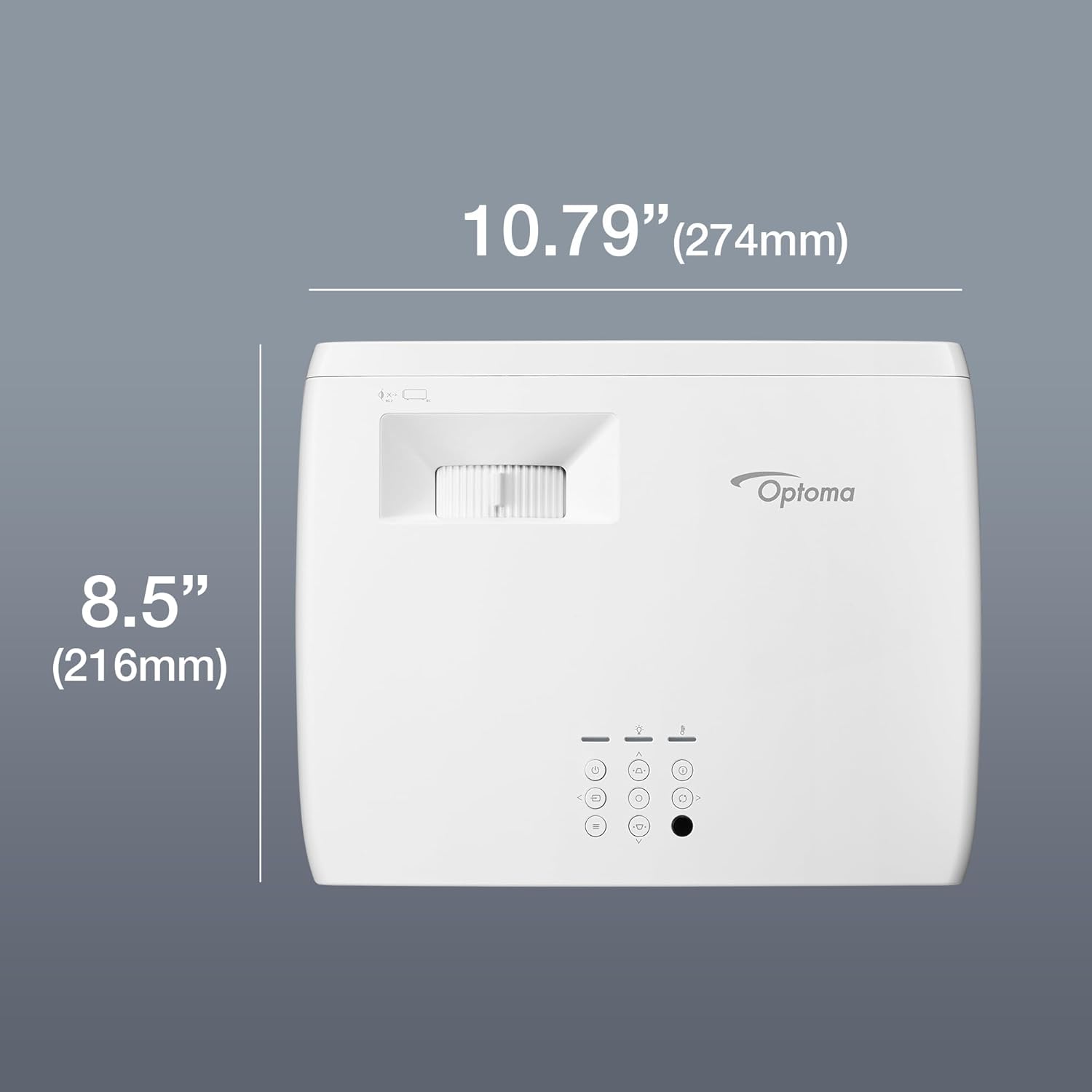
Figure 3.3: Optoma UHZ35 Projector with labeled dimensions.
3.3 കണക്റ്റിവിറ്റി പോർട്ടുകൾ
The rear panel of the UHZ35 offers a variety of ports for connecting external devices.

ചിത്രം 3.4: പിൻഭാഗം view of the Optoma UHZ35 Projector with labeled connectivity ports.
- HDMI 1 (HDCP2.2 / 4K 60Hz compatible): ഹൈ-ഡെഫനിഷൻ വീഡിയോ, ഓഡിയോ ഇൻപുട്ടിനായി.
- HDMI 2 (HDCP2.2 / 4K 60Hz compatible, eARC): For high-definition video and audio input, with Enhanced Audio Return Channel support.
- ആർഎസ് -232: For projector control via serial communication.
- യുഎസ്ബി പവർ ഔട്ട് (5V/1.5A): സ്ട്രീമിംഗ് സ്റ്റിക്കുകൾ പോലുള്ള ബാഹ്യ ഉപകരണങ്ങൾക്ക് പവർ നൽകുന്നതിന്.
- Audio Out (stereo, 3.5mm jack): ബാഹ്യ ഓഡിയോ സിസ്റ്റങ്ങൾ ബന്ധിപ്പിക്കുന്നതിന്.
- ഡിസി പവർ: Power input for the projector.
- RJ-45: Ethernet port for network connectivity and control.
- കെൻസിംഗ്ടൺ ലോക്ക്: Security slot to deter theft.
4. സജ്ജീകരണം
4.1 പ്ലേസ്മെൻ്റ്
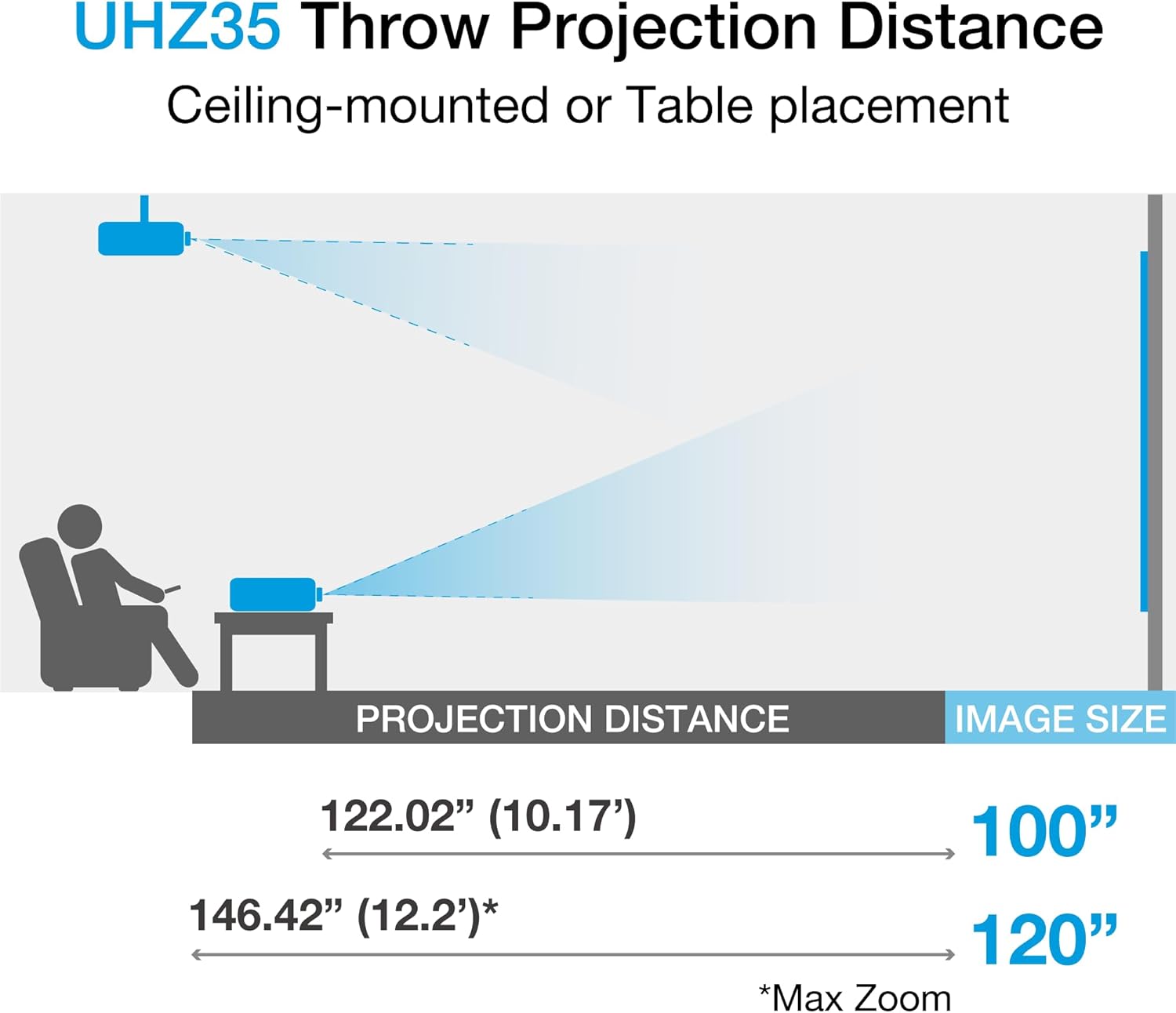
The Optoma UHZ35 can be placed on a table or ceiling-mounted. Ensure the projector is positioned at an appropriate distance from the screen to achieve the desired image size.
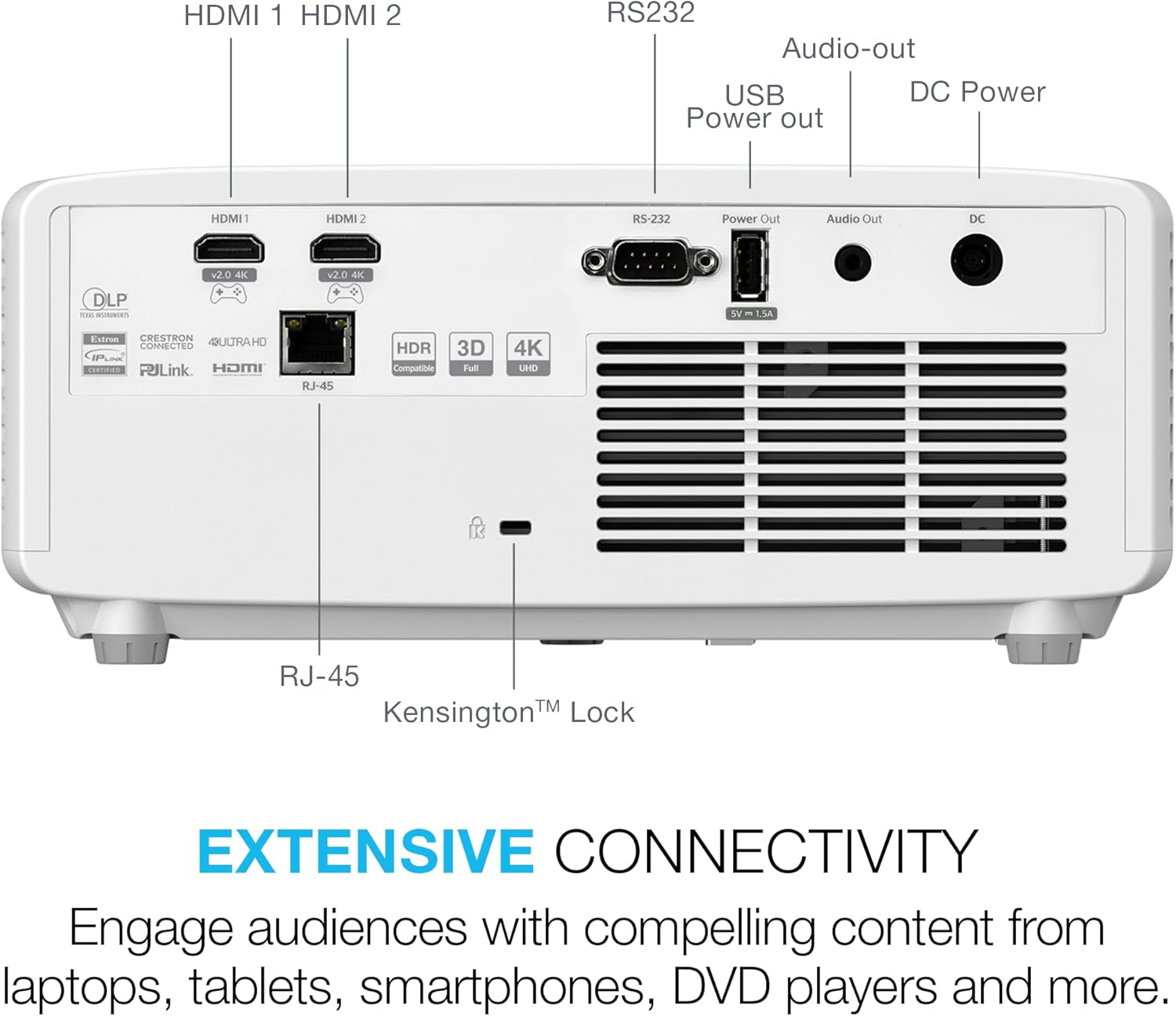
Figure 4.1: Throw projection distance guide for the Optoma UHZ35.
- For a 100-inch image, the projection distance is approximately 122.02 inches (10.17 feet).
- For a 120-inch image, the maximum projection distance is approximately 146.42 inches (12.2 feet).
4.2 ഉപകരണങ്ങൾ ബന്ധിപ്പിക്കുന്നു
- Connect the power cord to the projector's DC Power input and then to a power outlet.
- Connect your video source (e.g., Blu-ray player, gaming console, streaming device) to one of the HDMI inputs using an HDMI cable.
- If using external audio, connect your audio system to the Audio Out port or utilize the HDMI 2 eARC feature with a compatible sound system.
- For network control or updates, connect an Ethernet cable to the RJ-45 port.
4.3 ഇമേജ് അഡ്ജസ്റ്റ്മെന്റ്
- ഫോക്കസ്: Rotate the focus ring around the lens until the image appears sharp and clear.
- സൂം: Adjust the zoom ring around the lens to change the image size without moving the projector.
- കീസ്റ്റോൺ തിരുത്തൽ: Use the keystone correction feature (accessible via the remote or top panel controls) to correct trapezoidal distortion if the projector is not perfectly perpendicular to the screen.
5. പ്രവർത്തന നിർദ്ദേശങ്ങൾ
5.1 പവർ ഓൺ/ഓഫ്
- To power on, press the Power button on the projector's top panel or the remote control.
- To power off, press the Power button again. The projector will enter a cooling down cycle before completely shutting down.
5.2 ഇൻപുട്ട് ഉറവിട തിരഞ്ഞെടുപ്പ്
Press the 'Source' button on the remote control or the projector's top panel to cycle through available input sources (e.g., HDMI 1, HDMI 2).
5.3 അടിസ്ഥാന ക്രമീകരണങ്ങൾ
Access the projector's on-screen display (OSD) menu by pressing the 'Menu' button on the remote or top panel. Use the arrow keys to navigate and 'Enter' to select options. Adjust settings such as:
- ചിത്ര മോഡ്: Select predefined modes (e.g., Cinema, Game, Bright) or customize settings.
- തെളിച്ചം/തീവ്രത: Fine-tune image luminance and distinction.
- വർണ്ണ ക്രമീകരണങ്ങൾ: Adjust color temperature, tint, and saturation.
- വീക്ഷണ അനുപാതം: Select the appropriate aspect ratio for your content (e.g., 16:9, 4:3).
5.4 ഔദ്യോഗിക ഉൽപ്പന്ന വീഡിയോ
ഒരു വിഷ്വൽ ഓവറിനായി ഔദ്യോഗിക ഉൽപ്പന്ന വീഡിയോ കാണുകview of the Optoma UHZ35 projector's features and capabilities.
Video 5.1: Optoma UHZ35 Projector - 4K UHD Laser Projector. This video provides an overview of the projector's key features and benefits.
6. പരിപാലനം
6.1 ലെൻസ് വൃത്തിയാക്കൽ
Use a soft, lint-free cloth specifically designed for optical lenses to gently wipe the projector lens. Avoid using abrasive cleaners or excessive force, as this can damage the lens coating.
6.2 പൊതു പരിചരണം
- Keep the projector in a well-ventilated area to prevent overheating.
- Avoid blocking the ventilation openings.
- Protect the projector from dust and moisture.
- When not in use, cover the lens with its cap and store the projector in a safe place.
7. പ്രശ്നപരിഹാരം
- ചിത്രമില്ല: Ensure all cables are securely connected and the correct input source is selected. Check power connections.
- മങ്ങിയ ചിത്രം: Adjust the focus ring on the lens. Ensure the projector is placed at the correct distance from the screen.
- ശബ്ദമില്ല: Verify audio cables are connected correctly. Check the volume settings on both the projector and the audio source. If using eARC, ensure your audio system is compatible and configured correctly.
- റിമോട്ട് കൺട്രോൾ പ്രവർത്തിക്കുന്നില്ല: Check the batteries in the remote. Ensure there are no obstructions between the remote and the projector's IR receiver.
8 സ്പെസിഫിക്കേഷനുകൾ
| ഫീച്ചർ | മൂല്യം |
|---|---|
| ഉൽപ്പന്ന അളവുകൾ | 10.79 x 8.5 x 4.49 ഇഞ്ച് |
| ഇനത്തിൻ്റെ ഭാരം | 10.1 പൗണ്ട് |
| ASIN | B0DGZ2FTJR |
| ഇനത്തിൻ്റെ മോഡൽ നമ്പർ | UHZ35 |
| നിർമ്മാതാവ് | ഒപ്റ്റോമ |
| ബ്രാൻഡ് | ഒപ്റ്റോമ |
| ഉൽപ്പന്നത്തിനുള്ള ശുപാർശിത ഉപയോഗങ്ങൾ | ഗെയിമിംഗ് |
| പ്രത്യേക ഫീച്ചർ | 3d-Ready, Built-In Speaker, Lightweight, Portable |
| കണക്റ്റിവിറ്റി ടെക്നോളജി | ഇതർനെറ്റ്, HDMI |
| ഡിസ്പ്ലേ റെസലൂഷൻ | 3840 x 2160 |
9. വാറൻ്റിയും പിന്തുണയും
For warranty information, please refer to the documentation included with your product or visit the official Optoma website. For technical assistance or support, please contact Optoma customer service.
Extended protection plans are available for purchase separately:
- 3-വർഷ സംരക്ഷണ പദ്ധതി
- കംപ്ലീറ്റ് പ്രൊട്ടക്റ്റ്: ഒരു പ്ലാൻ എല്ലാ യോഗ്യമായ മുൻകാല, ഭാവി വാങ്ങലുകളും ഉൾക്കൊള്ളുന്നു.


