1. ആമുഖം
The ShiftCam SnapPocket Light is a versatile LED selfie ring light designed to enhance your mobile photography and videography. Featuring adjustable brightness, a built-in mirror, and a magnetic mount, it provides optimal illumination for various scenarios. This manual will guide you through the setup, operation, and maintenance of your SnapPocket Light.
2. പാക്കേജ് ഉള്ളടക്കം
- SnapPocket Light (LED ring light with mirror)
- USB-A മുതൽ USB-C വരെ ചാർജിംഗ് കേബിൾ
- Magnetic Sticker (for non-MagSafe compatible devices)
3. സവിശേഷതകൾ
- Adjustable LED Selfie Light: Four brightness settings for perfect illumination.
- സംയോജിത ബാറ്ററി: Provides up to 2 hours of continuous light.
- Flexible Flippable Hinge: Ensures light always focuses on you, no matter the angle.
- Built-in Mirror: Positioned at the center of the LED ring for quick touch-ups.
- ആയാസരഹിതമായ കാന്തിക അറ്റാച്ച്മെന്റ്: Snaps onto any smartphone, MagSafe compatible or with a MagSafe-compatible case.
- SnapGrip Ecosystem Compatibility: Works seamlessly with SnapGrip and SnapPod for enhanced creative possibilities.
4. സജ്ജീകരണം
4.1 പ്രാരംഭ ചാർജിംഗ്
Before first use, fully charge your SnapPocket Light using the provided USB-A to USB-C charging cable. The USB-C port is located on the side of the device when the hinge is opened. A charging indicator light will illuminate during charging.
4.2 Attaching to your Smartphone
The SnapPocket Light features a magnetic mount. If your smartphone is MagSafe compatible or uses a MagSafe-compatible case, simply align the light with the back of your phone until it snaps securely into place.
For non-MagSafe compatible phones, use the included magnetic sticker. Peel off the adhesive backing and firmly attach the sticker to the center of your phone's back or case. Once attached, the SnapPocket Light can be magnetically mounted.

Image: The SnapPocket Light magnetically attached to the back of a smartphone.
5. പ്രവർത്തന നിർദ്ദേശങ്ങൾ
5.1 പവർ ഓൺ/ഓഫ്, തെളിച്ച ക്രമീകരണം
Locate the power button on the side of the SnapPocket Light. Press and hold the button for a few seconds to turn the light on or off. Once on, short press the button to cycle through the four available brightness settings.
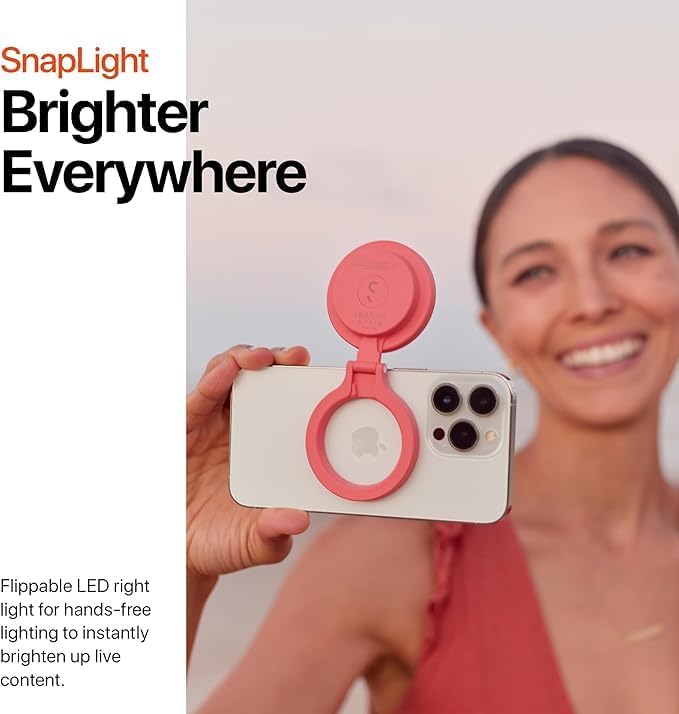
Image: The SnapPocket Light illuminating at various brightness levels.
5.2 Using the Flippable Hinge and Mirror
The SnapPocket Light features a flippable hinge that allows you to adjust the angle of the light. This is ideal for directing light towards your face during selfies, video calls, or live streams. The built-in mirror, located in the center of the LED ring, provides a convenient way to check your appearance before capturing content.

Image: The SnapPocket Light's flippable hinge allows for flexible positioning, and the central mirror aids in framing.
5.3 Ecosystem Integration
The SnapPocket Light is part of the SnapGrip ecosystem. It can be used independently or attached to other ShiftCam SnapGrip accessories like the SnapGrip camera handle or SnapPod for an enhanced mobile creative setup.
Video: Official ShiftCam SnapGrip Product Promo showcasing the SnapPocket Light's integration with other SnapGrip accessories.
6 സ്പെസിഫിക്കേഷനുകൾ
| മോഡൽ നമ്പർ | SG001 |
| പാക്കേജ് അളവുകൾ | 8.5 x 3.5 x 0.94 ഇഞ്ച് |
| ഇനത്തിൻ്റെ ഭാരം | 4.2 ഔൺസ് |
| കണക്റ്റിവിറ്റി | USB (ചാർജ്ജുചെയ്യുന്നതിന്) |
| നിറം | BlueJay |
| ബോക്സിൽ എന്താണുള്ളത് | Light ring, mirror |

Image: Detailed technical specifications for the SnapPocket Light.
7. പരിപാലനം
To ensure the longevity of your SnapPocket Light, keep it clean and dry. Use a soft, dry cloth to wipe the surface. Avoid exposing the device to extreme temperatures or moisture. Store it in a safe place when not in use to prevent scratches or damage.
8. പ്രശ്നപരിഹാരം
If the SnapPocket Light does not turn on, ensure it is fully charged. If the magnetic attachment feels weak, ensure your phone or case is MagSafe compatible, or that the magnetic sticker is properly applied and aligned.
9. വാറണ്ടിയും പിന്തുണയും
For warranty information and customer support, please refer to the official ShiftCam webസൈറ്റിൽ ബന്ധപ്പെടുകയോ അവരുടെ ഉപഭോക്തൃ സേവനവുമായി നേരിട്ട് ബന്ധപ്പെടുകയോ ചെയ്യുക. ഏതെങ്കിലും വാറന്റി ക്ലെയിമുകൾക്കായി നിങ്ങളുടെ വാങ്ങലിന്റെ തെളിവ് സൂക്ഷിക്കുക.


