ആമുഖം
This manual provides detailed instructions for the Car Keys Express Simple Key Fob and Key Programmer kit. This kit is designed to replace or add a new key fob for compatible Chrysler, Dodge, Jeep, Ram, and Volkswagen vehicles. Please read all instructions carefully before beginning the programming process.

Image: The Simple Key Fob and Key Programmer kit, including the programmer device, a key fob, and an interchangeable button pad.
വാഹന അനുയോജ്യത
The Simple Key kit is compatible with various models from Chrysler, Dodge, Jeep, Ram, and Volkswagen. It is crucial to verify your vehicle's year, make, and model against the compatibility list to ensure proper function. Only original remote features will work; this kit will not add new functions to your vehicle.

Image: A chart detailing compatible vehicle makes and models, including Dodge (Challenger, Charger, Dart, Durango, Grand Caravan, Journey, Magnum), Chrysler (300, Town & Country), Jeep (Commander, Grand Cherokee), RAM (Ram Trucks), and Volkswagen (Routan).
കുറിപ്പ്: A few vehicles have push-button start and proximity key fob functions. These specific functions will not work with the key fob included in this kit.
പാക്കേജ് ഉള്ളടക്കം
- Simple Key Programmer Device
- Simple Key Fob (with pre-installed 3-button keypad)
- Interchangeable 4-button keypad
- Instruction Guide (refer to this manual)

Image: Illustration showing the included key fob with a 3-button pad and an additional 4-button pad, highlighting their interchangeability.
സജ്ജീകരണവും പ്രോഗ്രാമിംഗ് നിർദ്ദേശങ്ങളും
To program your new Simple Key Fob, you will need one existing, working key that starts your vehicle. The programming process is designed to be a straightforward DIY solution.

Image: A person holding the Simple Key programmer and a key fob, demonstrating the "Do-It-Yourself" nature of the product.
മുൻവ്യവസ്ഥകൾ:
- One currently working key that can start your vehicle.
- Your vehicle's ignition must be in good working order.

Image: The Simple Key programmer and key fob, emphasizing the requirement of having one working key to initiate the programming process.
പ്രോഗ്രാമിംഗ് ഘട്ടങ്ങൾ:
- Prepare the Programmer: Locate your vehicle's OBD-II port, typically found under the dashboard on the driver's side. Plug the Simple Key Programmer device into this port.
- Insert Working Key: Insert your existing, working key into the ignition and turn it to the "ON" position (do not start the engine).
- Follow Programmer Prompts: The programmer device will guide you through the steps. This usually involves turning the ignition on and off with the working key, then inserting the new Simple Key Fob.
- Program New Fob: Insert the new Simple Key Fob into the ignition when prompted by the programmer. Follow any additional instructions displayed by the programmer or indicated by its lights.
- പ്രോഗ്രാമിംഗ് സ്ഥിരീകരിക്കുക: Once the programming sequence is complete, the programmer will indicate success. Test the new key fob's functions (lock, unlock, panic, remote start if applicable) to ensure it is working correctly.
- Remove Programmer: Unplug the Simple Key Programmer from the OBD-II port.
- Cut Emergency Blade: After successful programming, if your key fob includes an emergency blade, have it cut by a qualified locksmith.
പ്രധാനപ്പെട്ടത്: If the programmer device does not light up or behave as expected, refer to the Troubleshooting section.
Operating the Key Fob
The Simple Key Fob is designed to perform the same functions as your vehicle's original equipment. These functions typically include:
- പൂട്ടുന്ന വാതിലുകൾ
- വാതിലുകൾ തുറക്കുന്നു
- Panic alarm activation
- Remote start (if your vehicle was originally equipped with this feature)

Image: A hand holding the Simple Key Fob with a car in the background, illustrating the remote functions such as locking and unlocking doors.
Ensure you are within range of your vehicle for the remote functions to operate effectively.
മെയിൻ്റനൻസ്
To ensure the longevity and proper function of your Simple Key Fob:
- ബാറ്ററി മാറ്റിസ്ഥാപിക്കൽ: The key fob uses a standard coin cell battery. When the remote range decreases or buttons become unresponsive, it may be time to replace the battery. Refer to the fob's casing for instructions on how to open it and the battery type required.
- വൃത്തിയാക്കൽ: Keep the key fob clean and free from dirt or debris. Use a soft, dry cloth for cleaning. Avoid harsh chemicals or excessive moisture.
- സംരക്ഷണം: Avoid dropping the key fob or exposing it to extreme temperatures or water, as this can damage internal components.
- Keypad Interchangeability: If you wish to switch between the 3-button and 4-button keypads, carefully open the fob casing and replace the rubber keypad. Ensure it is seated correctly before reassembling.
ട്രബിൾഷൂട്ടിംഗ്
| പ്രശ്നം | സാധ്യമായ കാരണം | പരിഹാരം |
|---|---|---|
| Programmer device does not light up or respond. | Improper connection to OBD-II port, vehicle ignition not in "ON" position, or a manufacturing error. | Ensure the programmer is securely plugged into the OBD-II port. Verify the vehicle's ignition is in the "ON" position. If the issue persists, contact customer support. |
| New key fob does not work after programming. | Programming error, incorrect vehicle compatibility, or a faulty fob battery. | Re-attempt the programming process carefully following all steps. Double-check vehicle compatibility. Replace the fob battery if necessary. |
| Remote range is poor or inconsistent. | Low key fob battery, environmental interference, or distance from vehicle. | Replace the key fob battery. Ensure no large obstructions are between the fob and the vehicle. Try operating closer to the vehicle. |
| Security seal on programmer is voided or missing. | Product may have been tampered with or is a manufacturing error. | Do not use the device. Contact customer service immediately for assistance. |
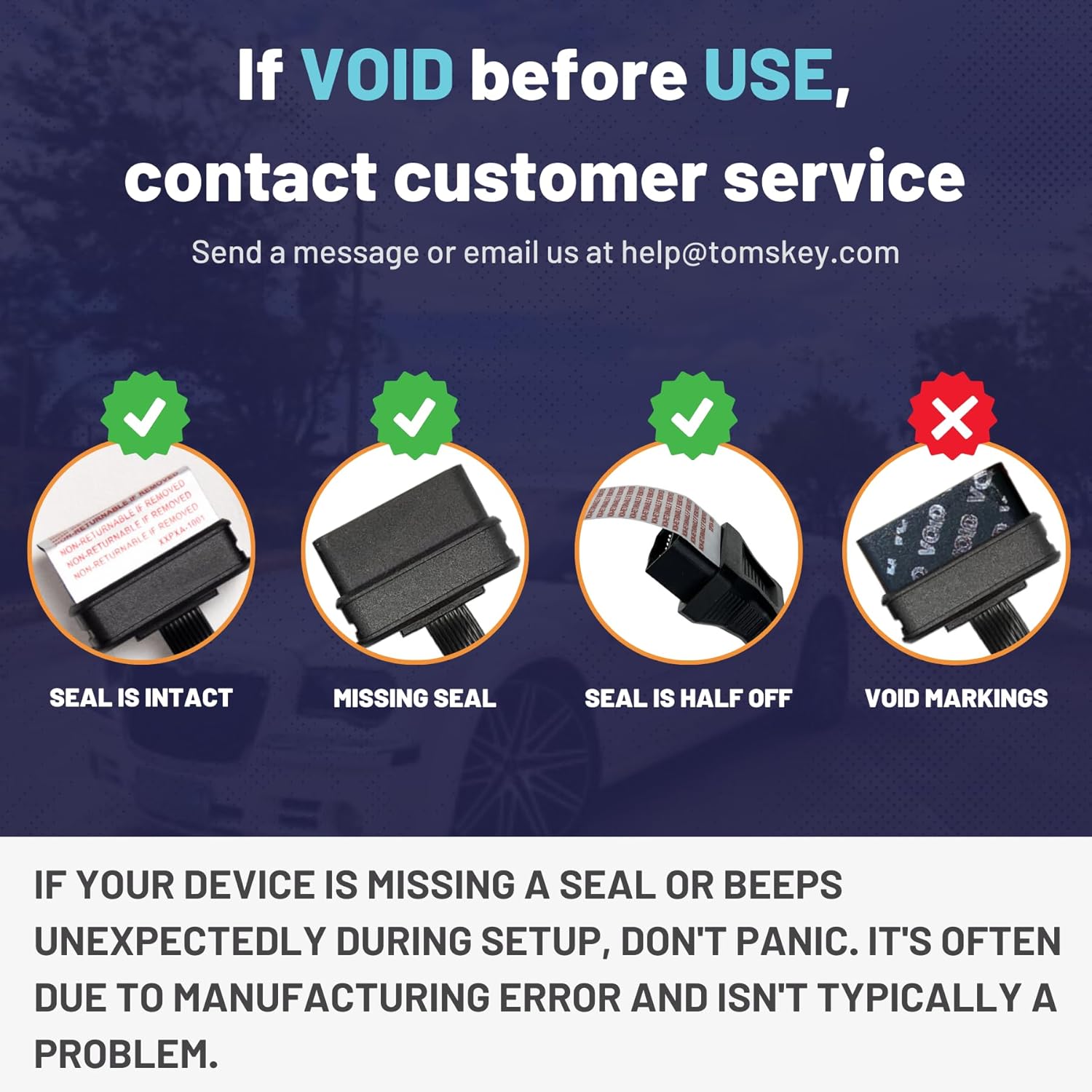
ചിത്രം: വിഷ്വൽ എക്സ്amples of security seals: intact (correct), missing, half-off, and voided (incorrect). If the seal is voided or missing, contact customer service.
If your device is missing a seal or beeps unexpectedly during setup, it is often due to a manufacturing error and isn't typically a problem. However, for voided seals, contact customer service.
സ്പെസിഫിക്കേഷനുകൾ
- മോഡലിൻ്റെ പേര്: ലളിതമായ കീ
- നിർമ്മാതാവ്: കാർ കീസ് എക്സ്പ്രസ്
- നിർമ്മാതാവിൻ്റെ ഭാഗം നമ്പർ: CDFO-E3-Z0SK-KIT
- ഇനത്തിൻ്റെ ഭാരം: 7.4 ഔൺസ് (0.46 പൗണ്ട്)
- പാക്കേജ് അളവുകൾ: 6.34 x 3.9 x 2.13 ഇഞ്ച്
- ബട്ടണുകളുടെ എണ്ണം: 3 (interchangeable with 4-button pad)
- വാഹന സേവന തരം: കാർ
- ഓട്ടോമോട്ടീവ് ഫിറ്റ് തരം: വാഹനത്തിൻ്റെ പ്രത്യേക ഫിറ്റ്
- ASIN: B0DHD4FM66
- ആദ്യം ലഭ്യമായ തീയതി: സെപ്റ്റംബർ 18, 2024
ഉപഭോക്തൃ പിന്തുണ
For further assistance, technical support, or inquiries regarding your Simple Key Fob and Programmer, please contact Car Keys Express customer service.
- ഇമെയിൽ: help@tomskey.com
- ഫോൺ: Refer to product packaging or the official Car Keys Express website for a contact number.
Please have your product model number (CDFO-E3-Z0SK-KIT) and purchase details ready when contacting support.


