ആമുഖം
This manual provides detailed instructions for the installation, operation, and maintenance of your TECKNET TK-WA151 Wireless Window and Door Alarm System. This compact security solution is designed to enhance the safety of your home, shop, pool area, or RV by alerting you to unauthorized openings of doors and windows.
The system features a loud alarm, remote control operation, and multiple function modes to suit various security needs. Please read this manual thoroughly before use to ensure proper setup and functionality.
പാക്കേജ് ഉള്ളടക്കം
The TECKNET TK-WA151 system typically includes the following components:
- Alarm Unit (main sensor with siren)
- Magnetic Sensor (for door/window frame)
- Remote Control (keychain style)
- Double-sided adhesive tape for installation
- ഉപയോക്തൃ മാനുവൽ (ഈ പ്രമാണം)

Image: Two TECKNET TK-WA151 alarm units and two remote controls. Each alarm unit consists of a main sensor with a siren and a smaller magnetic sensor. The remote controls feature buttons for SOS, Arm, Disarm, and Alarm/Chime functions.
സജ്ജീകരണവും ഇൻസ്റ്റാളേഷനും
Follow these steps for proper installation of your TECKNET TK-WA151 alarm system:
- ബാറ്ററി ഇൻസ്റ്റാളേഷൻ:
The alarm unit requires 2 AAA batteries (not included). Open the battery compartment on the back of the main alarm unit and insert the batteries, ensuring correct polarity. Close the compartment securely.

ചിത്രം: പൊട്ടിത്തെറിച്ചു view of the TECKNET alarm unit showing the siren, LED sensor light, magnetic sensor, remote control, and the battery compartment for 2xAAA batteries (not included).
- ഉപരിതല തയ്യാറാക്കൽ:
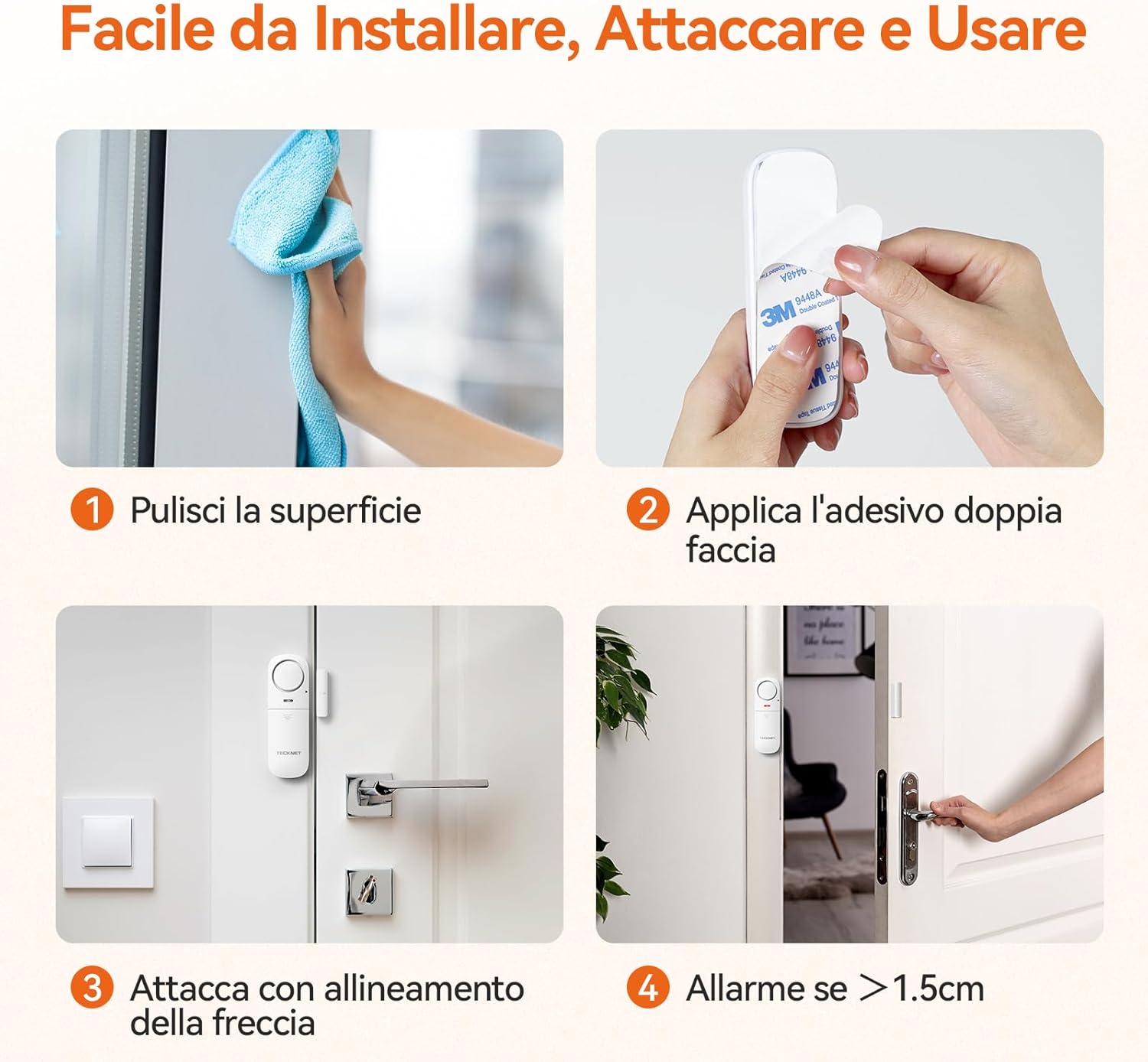
Clean the surface where you intend to install the alarm unit and magnetic sensor. Ensure the surface is dry and free from dust or grease for optimal adhesive performance.
- Applying Adhesive:
Peel off the protective film from one side of the double-sided adhesive tape and apply it firmly to the back of both the main alarm unit and the magnetic sensor.
- Mounting the Alarm Unit:
Attach the main alarm unit to the door or window frame. Ensure the arrow on the alarm unit points towards the magnetic sensor's intended position.
- Mounting the Magnetic Sensor:
Attach the magnetic sensor to the moving part of the door or window (the door/window itself), aligning it with the main alarm unit. The maximum distance between the alarm unit and the magnetic sensor should not exceed 1.5 cm when the door/window is closed.
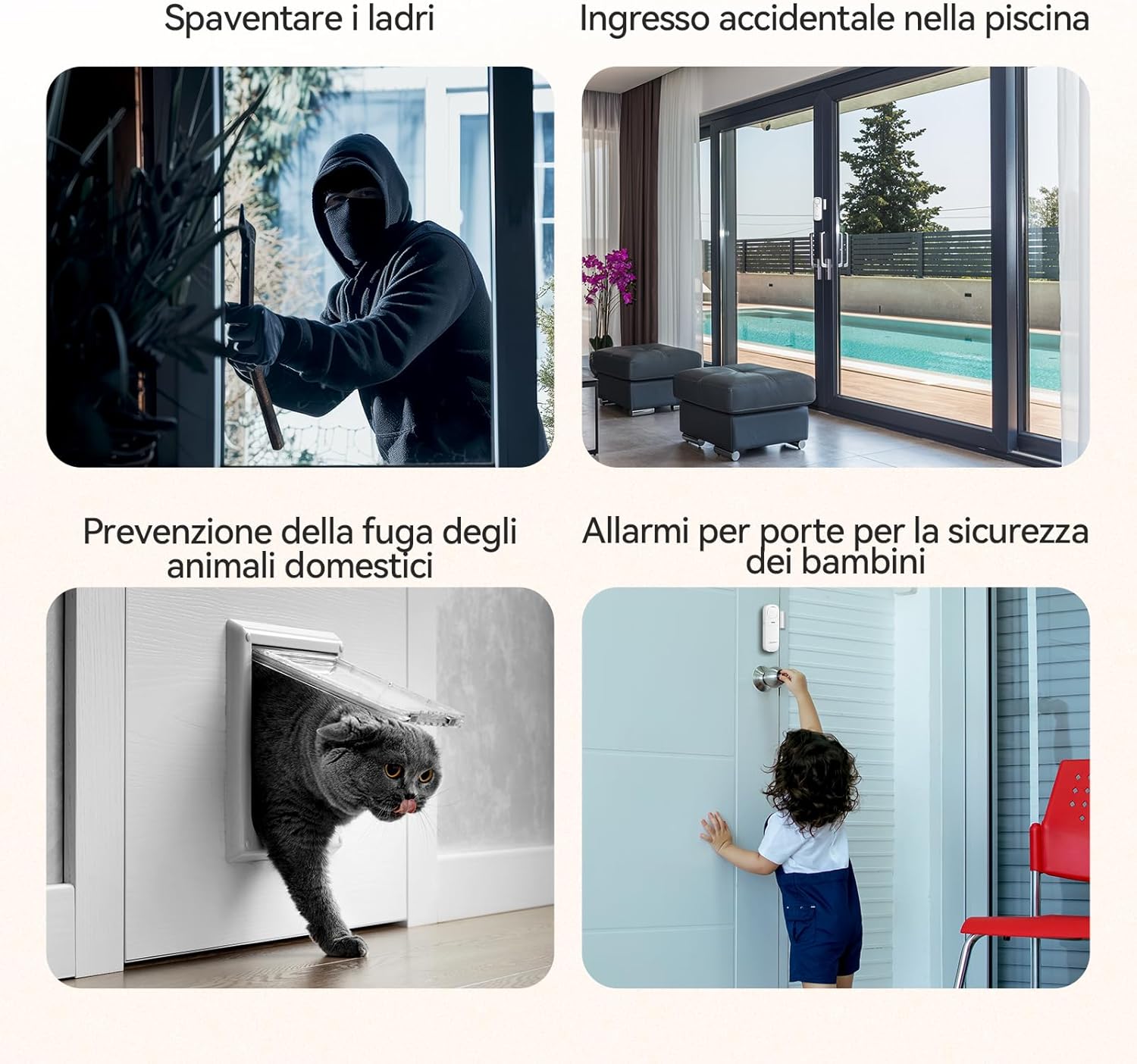
Image: Installation guide showing four steps: 1. Clean the surface, 2. Apply double-sided adhesive, 3. Attach with arrow alignment, 4. Alarm triggers if gap is >1.5cm.

Image: An installed TECKNET alarm unit on a door frame, illustrating that the alarm triggers with a 100dB sound if the gap between the main unit and the magnetic sensor exceeds 1.5 cm.
പ്രവർത്തന നിർദ്ദേശങ്ങൾ
The TECKNET TK-WA151 offers multiple function modes and is controlled via the included remote control.
Alarm Unit Volume Settings
On the side of the main alarm unit, there is a switch to adjust the alarm volume:
- എച്ച്ഐ: High volume, over 100dB.
- LO: Low volume, over 85dB.
- ഓഫാണ്: Turns the alarm unit off.
വിദൂര നിയന്ത്രണ പ്രവർത്തനങ്ങൾ
The remote control allows you to manage the alarm system wirelessly within a range of up to 50 meters.

Image: A hand holding the TECKNET remote control, illustrating a 50m wireless control range and indicating alarm sound levels of HI (>100dB) and LO (>85dB).
- Arm Button (Lock Icon): Activates the alarm system.
- Disarm Button (Unlock Icon): Deactivates the alarm system.
- Alarm/Chime Button (Bell Icon): Toggles between Doorbell mode and Alarm modes.
- SOS Button (SOS Icon): Triggers a continuous alarm immediately.
ഫംഗ്ഷൻ മോഡുകൾ
The TECKNET TK-WA151 offers four distinct operating modes:
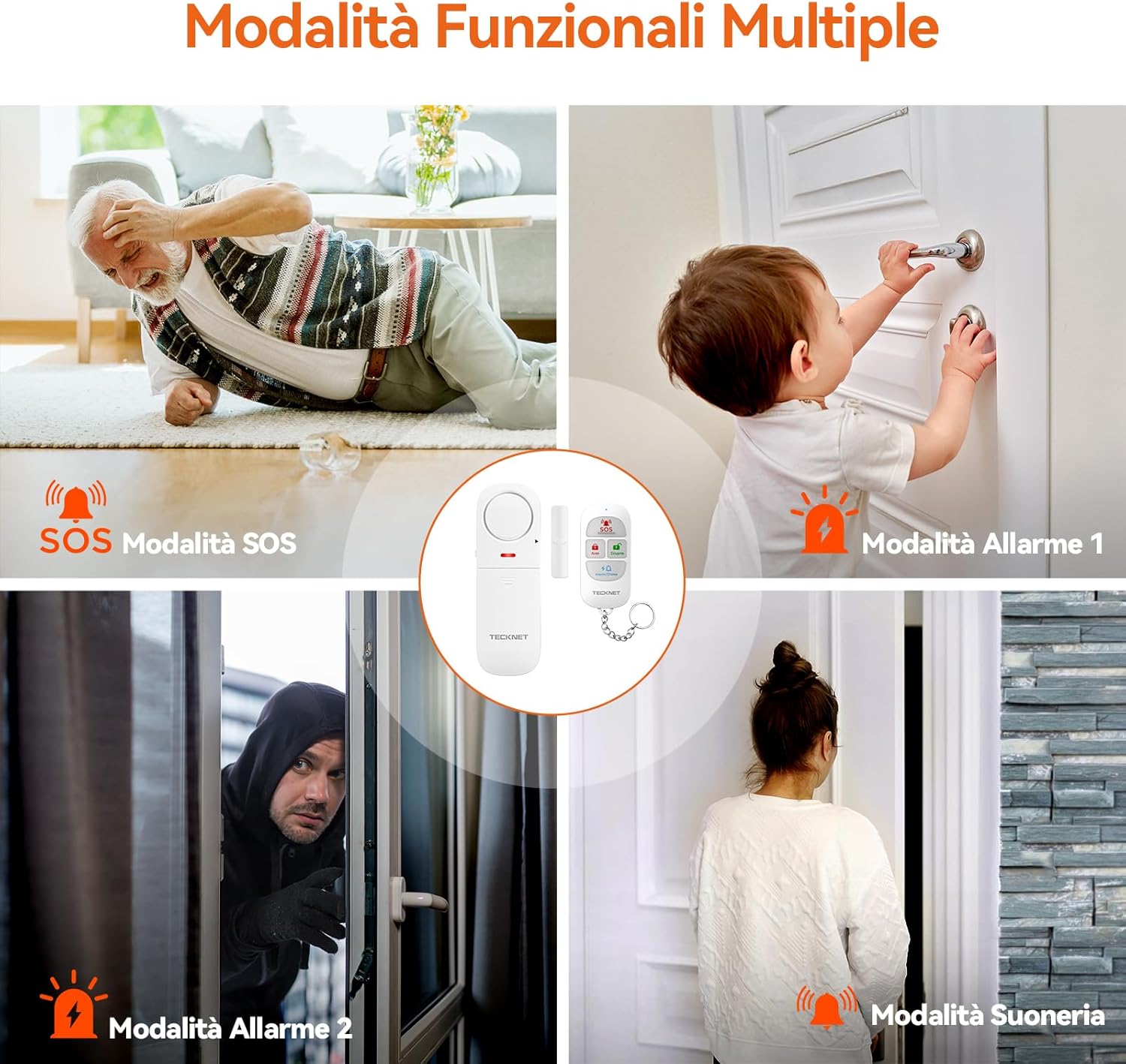
Image: Visual representation of the four functional modes: SOS Mode (elderly fall), Alarm 1 (child opening door), Alarm 2 (intruder attempting entry), and Doorbell Mode (visitor arrival).
- Alarm 1 (Reminder Mode):
When armed in this mode, the alarm will sound immediately if the door or window is opened. The alarm will automatically stop when the door or window is closed again. This mode is suitable for reminding you of open entries or for child safety.
- Alarm 2 (Burglary Protection Mode):
When armed in this mode, if the door or window is opened, the alarm will sound continuously for 30 seconds, even if the door or window is closed during this period. This mode is designed to deter intruders.
- ഡോർബെൽ മോഡ്:
In this mode, when the door or window is opened, the unit will emit a "Ding-dong" sound, similar to a doorbell. This is useful for knowing when someone enters or exits, without triggering a full alarm.
- SOS മോഡ്:
Pressing the SOS button on the remote control will trigger a continuous, loud alarm until it is manually disarmed using the remote control. This mode is for emergency situations.
All modes can be activated or deactivated via the remote control.
മൾട്ടി-സീനാരിയോ ആപ്ലിക്കേഷനുകൾ
The versatility of the TECKNET TK-WA151 allows for various applications:
ചിത്രം: ഉദാamples of multi-scenario applications: deterring thieves from breaking in, preventing accidental entry into a pool area, preventing pets from escaping, and ensuring child safety by alerting to door openings.
- ഹോം സെക്യൂരിറ്റി: Protect doors and windows from unauthorized entry.
- കുട്ടികളുടെ സുരക്ഷ: Monitor doors to prevent children from accessing dangerous areas or leaving the house unsupervised.
- വളർത്തുമൃഗങ്ങളുടെ നിയന്ത്രണം: Use on pet doors or gates to be alerted if pets attempt to escape.
- Pool Safety: Install on gates leading to pool areas to prevent accidental entry.
- Shop/Office Security: Secure entry points during off-hours.
- RV Security: Protect your recreational vehicle while parked or unattended.
മെയിൻ്റനൻസ്
To ensure optimal performance and longevity of your TECKNET TK-WA151 alarm system, consider the following maintenance tips:
- ബാറ്ററി മാറ്റിസ്ഥാപിക്കൽ: The alarm unit's LED will flash every 3 seconds when the batteries are low. Replace the 2 AAA batteries promptly to maintain continuous protection.
- വൃത്തിയാക്കൽ: Periodically wipe the alarm unit and magnetic sensor with a soft, dry cloth to remove dust and debris. Do not use abrasive cleaners or solvents.
- പശ പരിശോധന: Regularly check the adhesive tape to ensure the units are securely attached. Reapply if necessary.
ട്രബിൾഷൂട്ടിംഗ്
If you encounter issues with your TECKNET TK-WA151 alarm system, refer to the following common problems and solutions:
- അലാറം പ്രവർത്തിക്കുന്നില്ല:
- Ensure the alarm unit is not in "OFF" mode. Check the HI/LO/OFF switch on the side.
- Verify that the system is "Armed" using the remote control.
- Check the battery level. If the LED is flashing every 3 seconds, replace the AAA batteries.
- Confirm that the main alarm unit and magnetic sensor are aligned correctly and the gap between them does not exceed 1.5 cm when the door/window is closed.
- റിമോട്ട് കൺട്രോൾ പ്രതികരിക്കുന്നില്ല:
- Ensure you are within the 50-meter operating range of the alarm unit.
- Check the battery in the remote control (if applicable, typically button cell batteries).
- Ensure there are no significant obstructions between the remote and the alarm unit.
- തെറ്റായ അലാറങ്ങൾ:
- Ensure the alarm unit and magnetic sensor are securely attached and do not shift.
- Verify that the gap between the units is consistently less than 1.5 cm when the door/window is closed.
If problems persist, please contact TECKNET customer service for further assistance.
സ്പെസിഫിക്കേഷനുകൾ
| ഫീച്ചർ | വിശദാംശങ്ങൾ |
|---|---|
| മോഡൽ നമ്പർ | TK-WA151 |
| അലാറം വോളിയം | LO > 85dB, HI > 100dB |
| വയർലെസ് ശ്രേണി | Up to 50 meters (remote control) |
| Activation Gap | Triggers when gap exceeds 1.5 cm |
| Power Source (Alarm Unit) | 2 x AAA ബാറ്ററികൾ (ഉൾപ്പെടുത്തിയിട്ടില്ല) |
| Dimensions (Alarm Unit) | Approximately 0.5 x 3.5 x 1.7 cm (for magnetic sensor or single component) |
| ഇനത്തിൻ്റെ ഭാരം | 160 ഗ്രാം (ആകെ പാക്കേജ് ഭാരം) |
| നിറം | വെള്ള |
വാറൻ്റിയും പിന്തുണയും
ടെക്നെറ്റ് വാഗ്ദാനം ചെയ്യുന്നത് 36 മാസ വാറൻ്റി for registered users of the TK-WA151 Wireless Window and Door Alarm System. Please register your product to avail of this extended warranty.
For any questions, technical support, or warranty claims, please contact TECKNET's professional customer service team. Contact details can typically be found on the TECKNET official webസൈറ്റ് അല്ലെങ്കിൽ ഉൽപ്പന്ന പാക്കേജിംഗ്.


