1. ആമുഖം
This manual provides essential information for the safe and efficient use of your XIAOMI Vacuum Cleaner G20 Max. Please read it thoroughly before first use and retain it for future reference. The G20 Max features 180AW strong suction power, an LED display, a specialized pet hair brush, and a 60-minute run time for comprehensive cleaning.

Image: The main unit of the XIAOMI Vacuum Cleaner G20 Max, showcasing അതിന്റെ മിനുസമാർന്ന ഡിസൈൻ.
2. പ്രധാന സുരക്ഷാ നിർദ്ദേശങ്ങൾ
തീപിടുത്തം, വൈദ്യുതാഘാതം അല്ലെങ്കിൽ പരിക്ക് എന്നിവ കുറയ്ക്കുന്നതിന്, ഒരു വൈദ്യുത ഉപകരണം ഉപയോഗിക്കുമ്പോൾ എല്ലായ്പ്പോഴും അടിസ്ഥാന സുരക്ഷാ മുൻകരുതലുകൾ പാലിക്കുക, അതിൽ ഇനിപ്പറയുന്നവ ഉൾപ്പെടുന്നു:
- ഉപകരണം ഉപയോഗിക്കുന്നതിന് മുമ്പ് എല്ലാ നിർദ്ദേശങ്ങളും വായിക്കുക.
- പ്ലഗ് ഇൻ ചെയ്യുമ്പോൾ ഉപകരണം ഉപേക്ഷിക്കരുത്. ഉപയോഗത്തിലില്ലാത്തപ്പോഴും സർവീസ് ചെയ്യുന്നതിന് മുമ്പും ഔട്ട്ലെറ്റിൽ നിന്ന് അൺപ്ലഗ് ചെയ്യുക.
- പുറത്തോ നനഞ്ഞ പ്രതലങ്ങളിലോ ഉപയോഗിക്കരുത്.
- കളിപ്പാട്ടമായി ഉപയോഗിക്കാൻ അനുവദിക്കരുത്. കുട്ടികൾ അല്ലെങ്കിൽ അടുത്ത് ഉപയോഗിക്കുമ്പോൾ വളരെ ശ്രദ്ധ ആവശ്യമാണ്.
- ഈ മാനുവലിൽ വിവരിച്ചിരിക്കുന്നതുപോലെ മാത്രം ഉപയോഗിക്കുക. നിർമ്മാതാവ് ശുപാർശ ചെയ്യുന്ന അറ്റാച്ച്മെൻ്റുകൾ മാത്രം ഉപയോഗിക്കുക.
- കേടായ ചരട് അല്ലെങ്കിൽ പ്ലഗ് ഉപയോഗിച്ച് ഉപയോഗിക്കരുത്. ഉപകരണം പ്രവർത്തിക്കുന്നില്ലെങ്കിൽ, വീഴുകയോ കേടുപാടുകൾ സംഭവിക്കുകയോ വെളിയിൽ ഉപേക്ഷിക്കുകയോ വെള്ളത്തിൽ വീഴുകയോ ചെയ്താൽ, അത് ഒരു സേവന കേന്ദ്രത്തിലേക്ക് തിരികെ കൊണ്ടുവരിക.
- ചരട് ഉപയോഗിച്ച് വലിക്കുകയോ കൊണ്ടുപോകുകയോ ചെയ്യരുത്, ചരട് ഒരു ഹാൻഡിലായി ഉപയോഗിക്കുക, ചരടിൽ ഒരു വാതിൽ അടയ്ക്കുക, അല്ലെങ്കിൽ മൂർച്ചയുള്ള അരികുകളിലോ മൂലകളിലോ ചരട് വലിക്കുക. ചരടിന് മുകളിലൂടെ ഉപകരണം പ്രവർത്തിപ്പിക്കരുത്. ചൂടായ പ്രതലങ്ങളിൽ നിന്ന് ചരട് സൂക്ഷിക്കുക.
- ചരട് വലിച്ചുകൊണ്ട് അൺപ്ലഗ് ചെയ്യരുത്. അൺപ്ലഗ് ചെയ്യാൻ, പ്ലഗ് പിടിക്കുക, ചരടല്ല.
- നനഞ്ഞ കൈകളാൽ പ്ലഗ്ഗോ ഉപകരണമോ കൈകാര്യം ചെയ്യരുത്.
- ഒരു വസ്തുവും തുറസ്സുകളിൽ ഇടരുത്. ഒരു ഓപ്പണിംഗും തടഞ്ഞിരിക്കുമ്പോൾ ഉപയോഗിക്കരുത്; പൊടി, ലിൻ്റ്, മുടി, വായുപ്രവാഹം കുറയ്ക്കുന്ന എന്തും എന്നിവ ഒഴിവാക്കുക.
- മുടി, അയഞ്ഞ വസ്ത്രങ്ങൾ, വിരലുകൾ, ശരീരത്തിൻ്റെ എല്ലാ ഭാഗങ്ങളും തുറസ്സുകളിൽ നിന്നും ചലിക്കുന്ന ഭാഗങ്ങളിൽ നിന്നും അകറ്റി നിർത്തുക.
- കത്തുന്നതോ പുകവലിക്കുന്നതോ ആയ സിഗരറ്റ്, തീപ്പെട്ടി, ചൂടുള്ള ചാരം എന്നിവയൊന്നും എടുക്കരുത്.
- ഗ്യാസോലിൻ പോലുള്ള കത്തുന്നതോ കത്തുന്നതോ ആയ ദ്രാവകങ്ങൾ എടുക്കാനോ അവ ഉള്ള സ്ഥലങ്ങളിൽ ഉപയോഗിക്കാനോ ഉപയോഗിക്കരുത്.
- വിഷവസ്തുക്കൾ (ഉദാ: ക്ലോറിൻ ബ്ലീച്ച്, അമോണിയ ക്ലീനർ, ഡ്രെയിൻ ക്ലീനർ) എടുക്കരുത്.
- ഡസ്റ്റ് ബാഗ് കൂടാതെ/അല്ലെങ്കിൽ ഫിൽട്ടറുകൾ ഇല്ലാതെ ഉപയോഗിക്കരുത്.
- അൺപ്ലഗ് ചെയ്യുന്നതിനുമുമ്പ് എല്ലാ നിയന്ത്രണങ്ങളും ഓഫാക്കുക.
- കോണിപ്പടികളിൽ വൃത്തിയാക്കുമ്പോൾ കൂടുതൽ ശ്രദ്ധിക്കണം.
- ഗ്ലാസ്, നഖങ്ങൾ, സ്ക്രൂകൾ, നാണയങ്ങൾ തുടങ്ങിയ കടുപ്പമുള്ളതോ മൂർച്ചയുള്ളതോ ആയ വസ്തുക്കൾ എടുക്കാൻ ഉപയോഗിക്കരുത്.
3. ഉൽപ്പന്ന ഘടകങ്ങളും ആക്സസറികളും
The XIAOMI Vacuum Cleaner G20 Max comes with a comprehensive set of accessories designed for versatile cleaning tasks. Familiarize yourself with each component:
- പ്രധാന വാക്വം യൂണിറ്റ്: The core device housing the motor, dustbin, and controls.
- Motorised Brush with LED Lights: For general floor cleaning, illuminating hidden dust.
- തുണിയും മെത്തയും നിർമ്മിക്കാനുള്ള ഉപകരണം: Designed for upholstery and bedding.
- Combination Crevice Tool: A versatile tool for narrow spaces and dusting.
- വിപുലീകരണ ഹോസ്: Provides extended reach for cleaning high or awkward areas.
- Pet Groom Tool: Specifically designed for grooming pets and collecting loose hair.
- Wall Dock with Charging Station: സൗകര്യപ്രദമായ സംഭരണത്തിനും ചാർജിംഗിനും.
- ആക്സസറി കിറ്റ്: Additional small parts and brushes.
- അഡാപ്റ്റർ: Power supply for charging.

Image: A comparison table highlighting features and accessories across different Xiaomi vacuum models, including the G20 Max.

Image: The 2-in-1 nozzle attachment, useful for cleaning crevices and surfaces.
4. സജ്ജീകരണവും പ്രാരംഭ ഉപയോഗവും
4.1 അസംബ്ലി
- എല്ലാ ഘടകങ്ങളും അൺപാക്ക് ചെയ്ത് എല്ലാ ഭാഗങ്ങളും ഉണ്ടെന്ന് ഉറപ്പാക്കുക.
- Connect the main vacuum unit to the extension wand until it clicks into place.
- Attach the desired cleaning head (e.g., motorised brush) to the end of the extension wand.
- ഹാൻഡ്ഹെൽഡ് ഉപയോഗത്തിന്, പ്രധാന യൂണിറ്റിലേക്ക് നേരിട്ട് ആക്സസറികൾ ഘടിപ്പിക്കുക.
4.2 ബാറ്ററി ചാർജ് ചെയ്യുന്നു
Before first use, fully charge the vacuum cleaner. The battery provides up to 60 minutes of runtime in Eco mode.
- Mount the wall dock in a suitable location near a power outlet.
- Connect the adapter to the charging station and plug it into a power outlet.
- Place the vacuum cleaner onto the charging station. The LED display will indicate charging status.
- ഒരു പൂർണ്ണ ചാർജ് സാധാരണയായി ഏകദേശം 3.5 മണിക്കൂർ എടുക്കും.

Image: The wall-mounted charging dock, providing a convenient storage and charging solution for the vacuum.
5. വാക്വം ക്ലീനർ പ്രവർത്തിപ്പിക്കുക
5.1 പവർ ഓൺ/ഓഫ്, മോഡ് തിരഞ്ഞെടുക്കൽ
Press the power button on the handle to turn the vacuum on or off. Use the mode selection button to cycle through the three power modes: Eco, Standard, and High Power.
- ഇക്കോ മോഡ്: നേരിയ വൃത്തിയാക്കലിനും ബാറ്ററി ലൈഫ് വർദ്ധിപ്പിക്കുന്നതിനും (60 മിനിറ്റ് വരെ).
- സ്റ്റാൻഡേർഡ് മോഡ്: For daily cleaning of small particles and general floor surfaces.
- ഉയർന്ന പവർ മോഡ്: For stubborn dirt and large debris, providing maximum suction.

Image: The LED display on the vacuum cleaner, indicating battery level and current operating mode.
5.2 അറ്റാച്ചുമെന്റുകൾ ഉപയോഗിക്കുന്നത്
നിങ്ങളുടെ ക്ലീനിംഗ് ജോലിക്ക് അനുയോജ്യമായ അറ്റാച്ച്മെന്റ് തിരഞ്ഞെടുക്കുക:
- Motorised Brush with LED Lights: Ideal for all floor types. The built-in LED lamp reveals hidden dust for a more thorough clean.
- Pet Groom Tool: Use this tool to gently groom your pet and simultaneously vacuum loose hair. Ensure your pet is comfortable with the tool before use.
- Combination Crevice Tool: Perfect for reaching into tight corners, between sofa cushions, or for dusting delicate surfaces.
- വിപുലീകരണ ഹോസ്: Connect this to the main unit or extension wand with an accessory for increased flexibility and reach, useful for cleaning high shelves or inside vehicles.
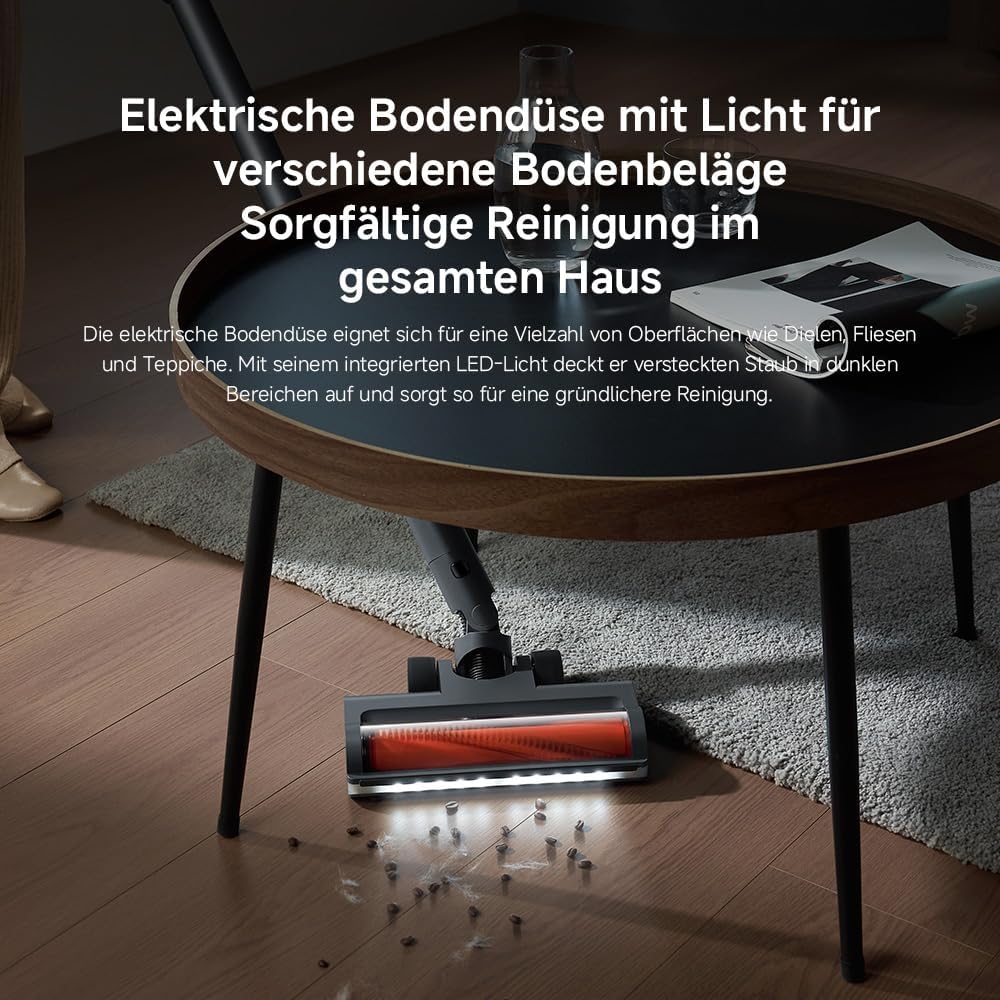
Image: The motorised floor nozzle with LED lights, highlighting its ability to reveal dust on a hard floor surface.
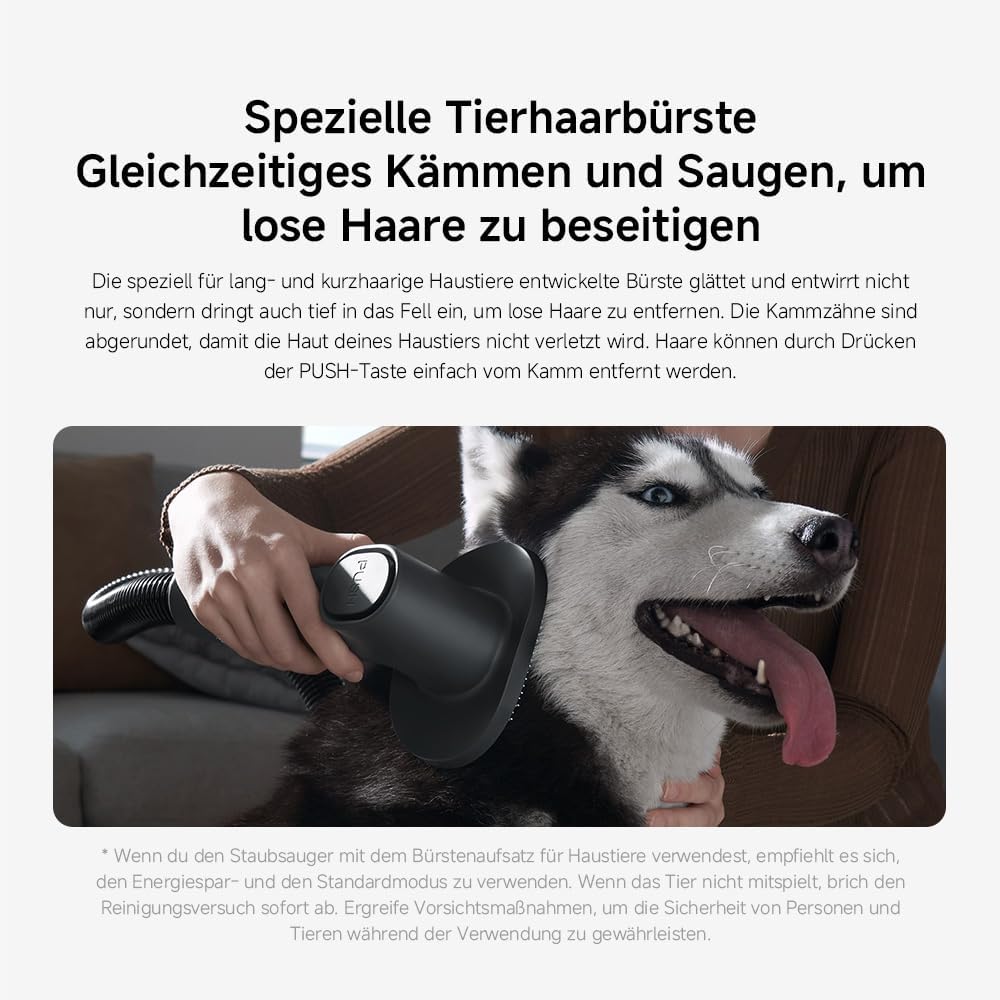
Image: The specialized pet hair brush attachment in use, demonstrating its function for grooming and vacuuming pet fur.

Image: The vacuum cleaner equipped with the extension hose and a crevice tool, reaching a high surface for cleaning.
6. പരിപാലനവും പരിചരണവും
പതിവ് അറ്റകുറ്റപ്പണികൾ മികച്ച പ്രകടനം ഉറപ്പാക്കുകയും നിങ്ങളുടെ വാക്വം ക്ലീനറിന്റെ ആയുസ്സ് വർദ്ധിപ്പിക്കുകയും ചെയ്യുന്നു.
6.1 ഡസ്റ്റ്ബിൻ ശൂന്യമാക്കൽ
The 0.6-liter dustbin should be emptied regularly, especially when the MAX line is reached.
- വാക്വം ഓഫാക്കിയിട്ടുണ്ടെന്നും ചാർജറിൽ നിന്ന് വിച്ഛേദിക്കപ്പെട്ടിട്ടുണ്ടെന്നും ഉറപ്പാക്കുക.
- പ്രധാന യൂണിറ്റിൽ നിന്ന് വേർപെടുത്താൻ ഡസ്റ്റ്ബിൻ റിലീസ് ബട്ടൺ അമർത്തുക.
- Position the dustbin over a waste bin and press the bottom release button to open the flap and empty the contents.
- Close the flap and reattach the dustbin to the main unit until it clicks securely.

Image: A hand demonstrating the process of emptying the vacuum cleaner's dustbin.
6.2 ക്ലീനിംഗ് ഫിൽട്ടറുകൾ
The G20 Max features a 5-stage precision filtration system with washable components, including a HEPA filter. Clean filters regularly to maintain suction power.
- മുകളിൽ വിവരിച്ചതുപോലെ മാലിന്യക്കൂമ്പാരം നീക്കം ചെയ്യുക.
- ഫിൽറ്റർ അസംബ്ലി വളച്ചൊടിച്ച് ഡസ്റ്റ്ബിന്നിൽ നിന്ന് പുറത്തെടുക്കുക.
- Separate the individual filter components.
- Rinse all washable filter parts under running water until clean. Do not use detergents.
- Allow all filter components to air dry completely for at least 24 hours before reassembling and placing back into the vacuum. Ensure they are completely dry to prevent mold or damage.

Image: Various washable filter components being cleaned under running water, illustrating the ease of maintenance.
6.3 ബ്രഷ് റോൾ വൃത്തിയാക്കൽ
Periodically check the brush roll for tangled hair or debris. Use scissors to cut away any tangled hair and remove it. The brush roll can often be removed for easier cleaning.
7. പ്രശ്നപരിഹാരം
If you encounter issues with your XIAOMI Vacuum Cleaner G20 Max, refer to the following common problems and solutions:
| പ്രശ്നം | സാധ്യമായ കാരണം | പരിഹാരം |
|---|---|---|
| വാക്വം ഓണാക്കുന്നില്ല | ബാറ്ററി തീർന്നു പവർ ബട്ടൺ ശരിയായി അമർത്തിയില്ല | ബാറ്ററി പൂർണ്ണമായും ചാർജ് ചെയ്യുക പവർ ബട്ടൺ ദൃഡമായി അമർത്തിയെന്ന് ഉറപ്പാക്കുക |
| സക്ഷൻ പവർ നഷ്ടപ്പെടുന്നു | ഡസ്റ്റ്ബിൻ നിറഞ്ഞിരിക്കുന്നു ഫിൽട്ടറുകൾ അടഞ്ഞുപോയിരിക്കുന്നു Hose or brush head is blocked | ഡസ്റ്റ്ബിൻ ശൂന്യമാക്കുക ഫിൽട്ടറുകൾ വൃത്തിയാക്കുക അല്ലെങ്കിൽ മാറ്റിസ്ഥാപിക്കുക എന്തെങ്കിലും തടസ്സങ്ങൾ പരിശോധിച്ച് മായ്ക്കുക |
| ബാറ്ററി ചാർജ് ചെയ്യുന്നില്ല | ചാർജർ ശരിയായി ബന്ധിപ്പിച്ചിട്ടില്ല Faulty adapter or charging dock | Ensure adapter is securely plugged into both the dock and power outlet പ്രശ്നങ്ങൾ നിലനിൽക്കുകയാണെങ്കിൽ ഉപഭോക്തൃ പിന്തുണയുമായി ബന്ധപ്പെടുക |
| ബ്രഷ് റോൾ കറങ്ങുന്നില്ല | Hair or debris tangled in brush Brush head attachment not properly connected | Clean the brush roll, removing any obstructions ബ്രഷ് ഹെഡ് സുരക്ഷിതമായി വീണ്ടും ഘടിപ്പിക്കുക |
If the problem persists after attempting these solutions, please contact XIAOMI customer support for further assistance.
8. ഉൽപ്പന്ന സവിശേഷതകൾ
| ഫീച്ചർ | വിശദാംശങ്ങൾ |
|---|---|
| ബ്രാൻഡ് | XIAOMI |
| മോഡൽ നമ്പർ | Xiaomi Vacuum Cleaner G20 Max EU 57805 |
| നിറം | ടൈറ്റാനിയം ഗ്രേ |
| ഉൽപ്പന്ന അളവുകൾ | 12.4 x 22.6 x 34 സെ.മീ |
| ഇനത്തിൻ്റെ ഭാരം | 3.7 കി.ഗ്രാം |
| ശേഷി | 0.6 ലിറ്റർ |
| പവർ / വാട്ട്tage | 450 വാട്ട്സ് |
| വേഗതകളുടെ എണ്ണം | 3 |
| ശബ്ദ നില | 72 ഡെസിബെൽ |
| പ്രവർത്തനസമയം | Up to 1 hour (in Eco mode) |
| പ്രത്യേക സവിശേഷതകൾ | Bagless, Cordless, HEPA, Lightweight, Spotless Cleaning |
| ഫിൽട്ടർ തരം | HEPA ഫിൽട്ടർ |
| ഉൾപ്പെടുത്തിയ ഘടകങ്ങൾ | Accessory Kit, Adapter, Charging Dock, Crevice Tool, Dusting Brush |
| കോർഡ്ലെസ് ആണോ? | അതെ |
9. വാറണ്ടിയും ഉപഭോക്തൃ പിന്തുണയും
Your XIAOMI Vacuum Cleaner G20 Max is covered by a manufacturer's warranty. Please refer to the warranty card included in your product packaging for specific terms and conditions, including the warranty period and coverage details.
For technical support, service, or warranty claims, please contact XIAOMI customer service through their official website or the contact information provided in your product documentation. When contacting support, please have your model number (BHR8828EU) and purchase date ready.
You can find more information and support resources on the official XIAOMI webസൈറ്റ്: www.mi.com/global/support


