1. ആമുഖവും അനുയോജ്യതയും
This manual provides essential information for the installation, operation, and maintenance of your BAFANG SW102/T eBike Display. Please read it thoroughly before use to ensure proper function and safety.
1.1 അനുയോജ്യത
The BAFANG SW102/T eBike Display is designed for use with Bafang BBS01B, BBS02B, and BBS-HD mid-drive motors. It utilizes the UART protocol with a 5-pin female round connector. This display is not compatible with other motor types, including Bafang hub motors or other Bafang mid-drive motors that use a CAN protocol (5-pin male triangular connector).

ചിത്രം 1.1: Compatibility chart for BAFANG SW102/T eBike Display. Ensure your motor uses the UART protocol with a 5-pin female round connector.
2 പ്രധാന സവിശേഷതകൾ
- HD LCD ഡിസ്പ്ലേ: Provides clear and easy-to-read data while riding.
- ഒതുക്കമുള്ള വലിപ്പം: Designed for minimal handlebar footprint.
- IPX5 വാട്ടർപ്രൂഫ് റേറ്റിംഗ്: Ensures reliable operation in various weather conditions, from light sprinkles to moderate rain.
- Adjustable Pedal Assist Levels: Supports 0-5 pedal assist levels.
- യാന്ത്രിക ബാക്ക്ലൈറ്റ്: Adjusts display brightness based on ambient light.
- Metric/Imperial Switch: Allows selection between kilometers and miles.
- Walking Assistance Mode: Provides low-speed assistance for walking alongside the eBike.
- Adjustable Wheel Diameter: Customizable setting for accurate speed and distance readings.

ചിത്രം 2.1: Visual representation of the display's main features.

ചിത്രം 2.2: The display's IPX5 waterproof rating ensures durability in wet conditions.
3. സജ്ജീകരണവും ഇൻസ്റ്റാളേഷനും
Proper installation is crucial for the display's functionality. Follow these steps carefully.
3.1 ഡിസ്പ്ലേ മൌണ്ട് ചെയ്യൽ
- Position the display on your eBike's handlebar in a location that is easily visible and accessible.
- Secure the display bracket to the handlebar using the provided screws and tools. Ensure it is tightened firmly but do not overtighten to avoid damage.
3.2 കേബിളുകൾ ബന്ധിപ്പിക്കുന്നു
- Locate the 5-pin female round connector on the display cable.
- Connect this cable to the corresponding male connector from your Bafang mid-drive motor system. Ensure the connection is secure and fully seated.
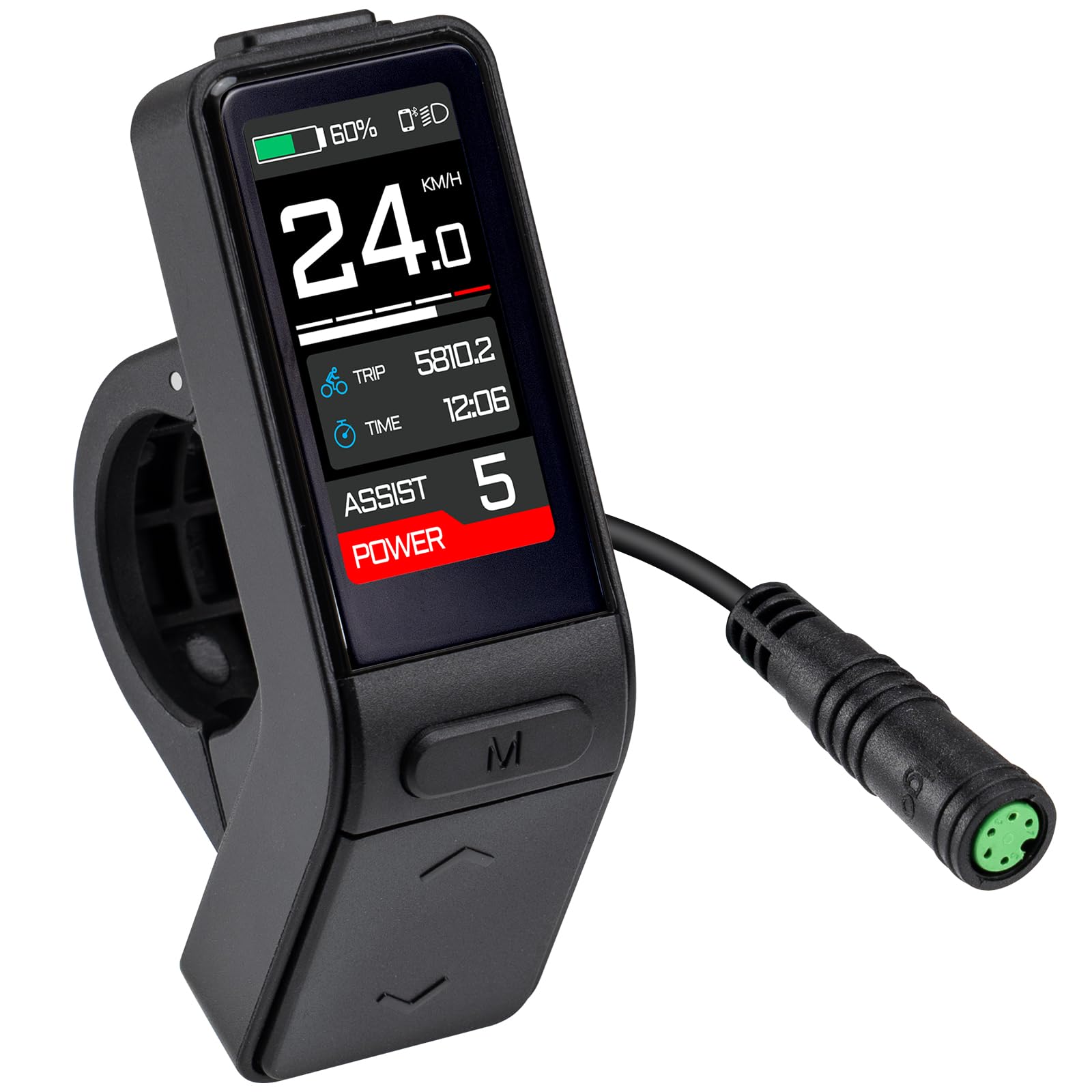
ചിത്രം 3.1: BAFANG SW102/T eBike Display mounted on a handlebar.

ചിത്രം 3.2: Display dimensions and cable length for installation planning.
3.3 ഇൻസ്റ്റലേഷൻ വീഡിയോ ഗൈഡ്
വീഡിയോ 3.1: Detailed installation guide for the SW102 eBike LCD Display. This video demonstrates the physical mounting and connection process.
4. പ്രവർത്തന നിർദ്ദേശങ്ങൾ
4.1 പവർ ഓൺ/ഓഫ്
To power on the display, press and hold the power button (usually marked with an 'M' or power symbol) for a few seconds. To power off, repeat the same action.
4.2 Changing Pedal Assist Levels (PAS)
Use the '+' and '-' buttons on the control pad to cycle through the available pedal assist levels (0-5). Level 0 provides no motor assistance, while Level 5 provides maximum assistance.

ചിത്രം 4.1: Pedal Assist Levels (0-5) on the BAFANG SW102/T display.
4.3 Toggling Display Parameters
Briefly press the power button (M) to cycle through different display parameters such as speed, trip distance, odometer, battery voltage, time, and more.
4.4 Accessing Settings Menu
To enter the main settings menu, press and hold the '+' and '-' buttons simultaneously for a few seconds. From this menu, you can adjust various parameters including:
- യൂണിറ്റ്: Switch between Kilometers (km) and Miles (mi).
- തെളിച്ചം: Adjust the display backlight intensity.
- യാന്ത്രിക ഓഫാണ്: Set the time after which the display automatically turns off due to inactivity.
- ചക്രത്തിൻ്റെ വലിപ്പം: Configure the wheel diameter for accurate speed and distance.
- നിശ്ചയിക്കപ്പെട്ട പരമാവധി വേഗത: Adjust the maximum assisted speed (may require a password).
- ക്ലോക്ക് ക്രമീകരണം: നിലവിലെ സമയം സജ്ജമാക്കുക.
4.5 Video Guides for Operation and Settings
വീഡിയോ 4.1: കഴിഞ്ഞുview of the Bafang Display UART Protocol, demonstrating general features and basic operation for BBS01B, BBS02B, and BBS-HD motors.
വീഡിയോ 4.2: BAFANG C18 Display Settings. While this video features the C18 model, many settings and operational principles, such as adjusting PAS levels, are similar across Bafang displays.
വീഡിയോ 4.3: Bafang Display C010 Setting. This video demonstrates various settings adjustments, including power on/off, mode switching, parameter toggling, and accessing advanced settings like unit, auto-off, wheel size, and speed limit. Note that specific menu layouts may vary slightly by model.
5 സ്പെസിഫിക്കേഷനുകൾ
| ഫീച്ചർ | സ്പെസിഫിക്കേഷൻ |
|---|---|
| ബ്രാൻഡ് | BAFANG |
| മോഡലിൻ്റെ പേര് | SW102/T |
| ഡിസ്പ്ലേ തരം | എൽസിഡി |
| കണക്റ്റിവിറ്റി ടെക്നോളജി | Wired (UART Protocol) |
| ഇനത്തിൻ്റെ ഭാരം | 50 ഗ്രാം |
| മെറ്റീരിയൽ | പ്ലാസ്റ്റിക് |
| നിറം | കറുപ്പ് |
| അന്താരാഷ്ട്ര സംരക്ഷണ റേറ്റിംഗ് | IPX5 |
| മൗണ്ടിംഗ് തരം | ഹാൻഡിൽബാർ മൗണ്ട് |
| ഹ്യൂമൻ ഇന്റർഫേസ് ഇൻപുട്ട് | ബട്ടണുകൾ |
| ഇനം പാക്കേജ് അളവുകൾ L x W x H | 3.94 x 1.97 x 1.97 ഇഞ്ച് |
ചിത്രം 5.1: Detailed dimensions of the BAFANG SW102/T display.
6. പരിപാലനം
To ensure the longevity and optimal performance of your BAFANG SW102/T display, follow these maintenance guidelines:
- വൃത്തിയാക്കൽ: ഡിസ്പ്ലേ സ്ക്രീനും ബോഡിയും ഒരു സോഫ്റ്റ്, ഡി ക്ലീനർ ഉപയോഗിച്ച് തുടയ്ക്കുക.amp തുണി. അബ്രാസീവ് ക്ലീനറുകൾ, ലായകങ്ങൾ, അല്ലെങ്കിൽ കഠിനമായ രാസവസ്തുക്കൾ എന്നിവ ഉപയോഗിക്കുന്നത് ഒഴിവാക്കുക, കാരണം ഇവ സ്ക്രീനിനോ സി.asing.
- കണക്ഷനുകൾ: Periodically check all cable connections to ensure they are secure and free from corrosion or damage. Loose connections can lead to intermittent functionality.
- സംഭരണം: When not in use for extended periods, store the eBike in a dry, cool place away from direct sunlight and extreme temperatures.
- വാട്ടർ എക്സ്പോഷർ: While the display is IPX5 waterproof, avoid submerging it in water or exposing it to high-pressure water jets.
7. പ്രശ്നപരിഹാരം
If you encounter issues with your BAFANG SW102/T display, refer to the following common troubleshooting steps:
- ഡിസ്പ്ലേ ഓണാക്കുന്നില്ല:
- Ensure the eBike battery is charged and properly connected.
- Check all cable connections between the display and the motor system for looseness or damage.
- Confirm the power button is being pressed and held for the required duration (typically a few seconds).
- Incorrect Speed/Distance Readings:
- Verify that the correct wheel diameter is set in the display's settings menu (refer to Section 4.4).
- Check the speed sensor and magnet for proper alignment and cleanliness.
- ഇടയ്ക്കിടെയുള്ള പ്രവർത്തനം:
- Inspect all wiring for any signs of damage, pinching, or corrosion.
- Ensure the display is securely mounted and not vibrating excessively.
- ബട്ടണുകൾ പ്രതികരിക്കുന്നില്ല:
- Check for any debris or foreign objects obstructing the buttons.
- If the display has been exposed to water, allow it to dry completely.
If these steps do not resolve the issue, please contact BAFANG customer support or a qualified eBike technician.
8. വാറൻ്റിയും പിന്തുണയും
8.1 വാറൻ്റി വിവരങ്ങൾ
The BAFANG SW102/T eBike Display comes with a 1 വർഷത്തെ വാറൻ്റി from the date of purchase. This warranty covers manufacturing defects under normal use. It does not cover damage resulting from misuse, accidents, unauthorized modifications, or improper installation.
8.2 ഉപഭോക്തൃ പിന്തുണ
For technical assistance, warranty claims, or further inquiries, please refer to the contact information provided by your retailer or visit the official BAFANG webസൈറ്റ്.


