1. ആമുഖം
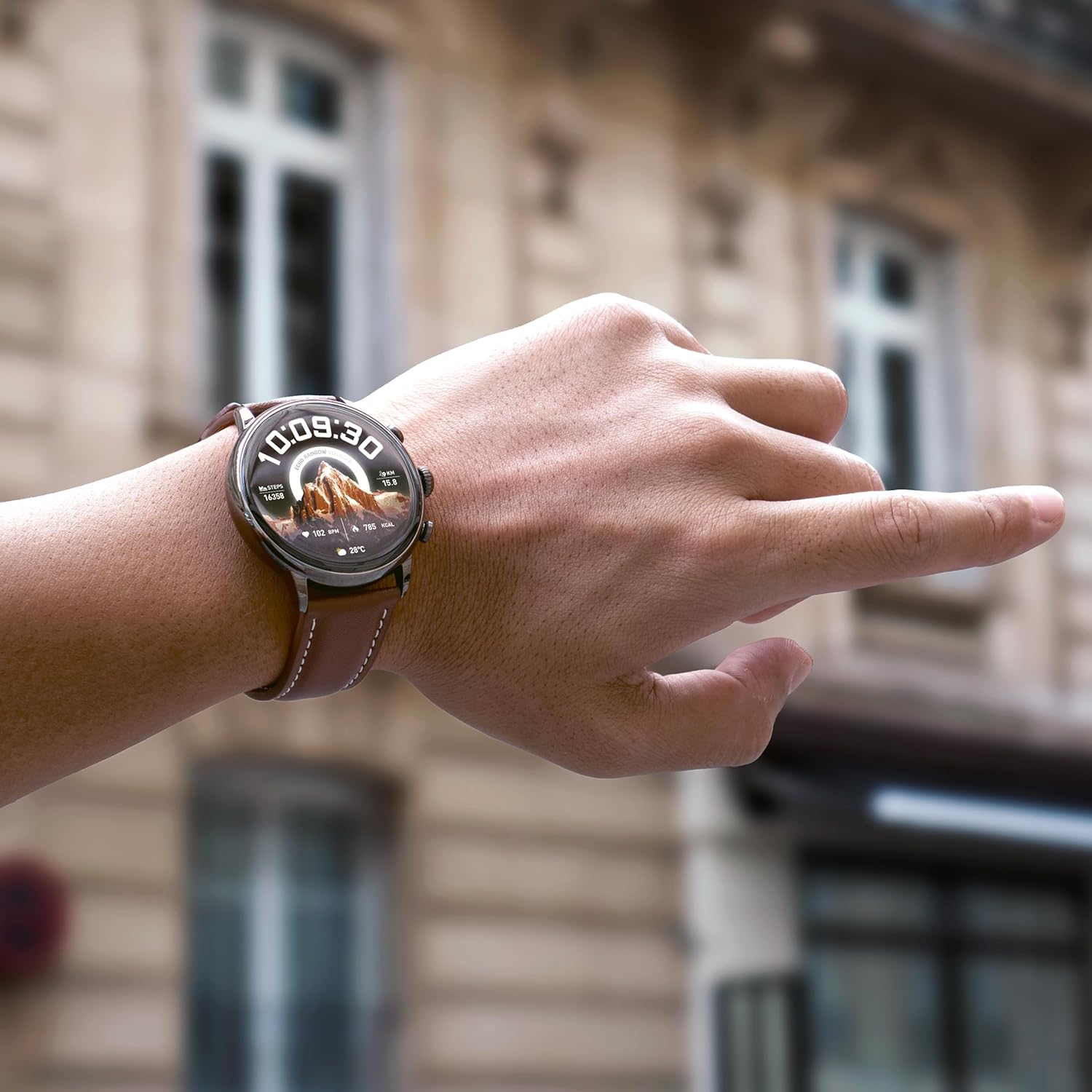
Welcome to the user manual for your ECHO Rainbow Voyager Smartwatch. This guide provides detailed instructions on how to set up, operate, and maintain your device. The ECHO Rainbow Voyager combines elegant design with advanced functionality, featuring a 1.43-inch AMOLED display, Bluetooth calling, comprehensive health monitoring, and various sport modes. It is designed for daily wear with IP67 water resistance and comes with two interchangeable straps for versatility.
Please read this manual carefully to ensure proper use and to fully utilize all the features of your smartwatch.

ചിത്രം 1.1: The ECHO Rainbow Voyager Smartwatch displayed with both the black silicone strap and the brown leather strap. This image highlights the watch's circular AMOLED display and its two distinct strap options.
2. സജ്ജീകരണം
2.1. പാക്കേജ് ഉള്ളടക്കം
ആരംഭിക്കുന്നതിന് മുമ്പ്, എല്ലാ ഇനങ്ങളും ഉണ്ടെന്ന് ഉറപ്പാക്കാൻ പാക്കേജ് ഉള്ളടക്കങ്ങൾ പരിശോധിക്കുക:
- ECHO Rainbow Voyager Smartwatch
- Microfiber Leather Strap (Brown)
- Silicone Strap (Black)
- മാഗ്നറ്റിക് യുഎസ്ബി ചാർജിംഗ് കേബിൾ
- ഉപയോക്തൃ മാനുവൽ (ഈ പ്രമാണം)

ചിത്രം 2.1: The complete package contents, including the ECHO Rainbow Voyager Smartwatch, both the brown leather and black silicone straps, and the magnetic USB charging cable.
2.2. സ്മാർട്ട് വാച്ച് ചാർജ് ചെയ്യുന്നു
For first-time use, fully charge your smartwatch.
- Connect the magnetic end of the USB charging cable to the charging contacts on the back of the smartwatch.
- Ensure the pins align correctly and the cable snaps securely into place.
- Plug the USB-A end of the cable into a standard USB power adapter (DC 5V/1A recommended) or a computer's USB port.
- വാച്ച് ഡിസ്പ്ലേ ഒരു ചാർജിംഗ് ഇൻഡിക്കേറ്റർ കാണിക്കും.
- A full charge takes approximately 2.5 hours. The battery provides up to 7 days of typical usage.
2.3. Installing the Da Fit Application
The ECHO Rainbow Voyager Smartwatch requires the Da Fit application for full functionality and data synchronization.
- Scan the QR code provided in the quick start guide or search for "Da Fit" in your smartphone's app store (App Store for iOS, Google Play Store for Android).
- Download and install the Da Fit application.
- Open the Da Fit app and follow the on-screen instructions to create an account or log in.
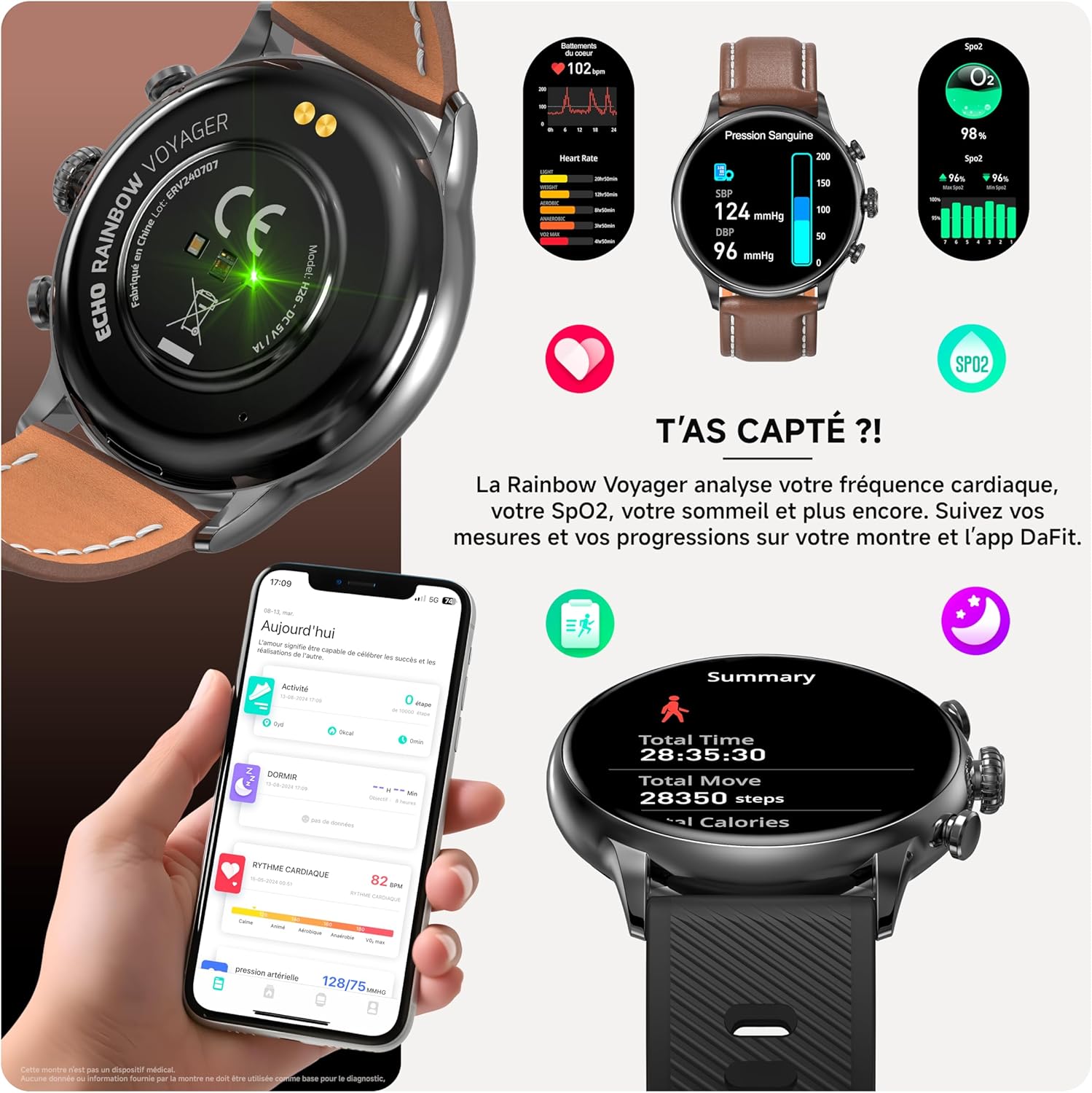
ചിത്രം 2.2: A smartphone screen displaying the Da Fit application interface, showing various health and activity tracking features.
2.4. നിങ്ങളുടെ സ്മാർട്ട്ഫോണുമായി ജോടിയാക്കൽ
To connect your smartwatch to your smartphone:
- നിങ്ങളുടെ സ്മാർട്ട്ഫോണിൽ ബ്ലൂടൂത്ത് പ്രവർത്തനക്ഷമമാക്കിയിട്ടുണ്ടെന്ന് ഉറപ്പാക്കുക.
- Da Fit ആപ്പ് തുറക്കുക.
- Navigate to the "Device" tab (usually represented by a watch icon).
- Tap "Add Device" or "Bind Device".
- The app will scan for available devices. Select "ECHO Rainbow Voyager" from the list.
- ആവശ്യപ്പെടുകയാണെങ്കിൽ, നിങ്ങളുടെ സ്മാർട്ട്ഫോണിലും സ്മാർട്ട് വാച്ചിലും പെയറിംഗ് അഭ്യർത്ഥന സ്ഥിരീകരിക്കുക.
- Once paired, the app will display "Connected," and the watch's time and date will synchronize with your phone.
3. പ്രവർത്തന നിർദ്ദേശങ്ങൾ
3.1. അടിസ്ഥാന നാവിഗേഷൻ
The ECHO Rainbow Voyager features a full-touch AMOLED display and two physical buttons for navigation.
- ടച്ച്സ്ക്രീൻ ആംഗ്യങ്ങൾ:
- താഴേക്ക് സ്വൈപ്പ് ചെയ്യുക: Access quick settings (brightness, DND, battery saver, etc.).
- മുകളിലേക്ക് നീക്കുക: View അറിയിപ്പുകൾ.
- ഇടത്തേക്ക്/വലത്തേക്ക് സ്വൈപ്പ് ചെയ്യുക: Cycle through widgets (activity, heart rate, weather, music control, etc.).
- ടാപ്പ് ചെയ്യുക: ഒരു ഇനം തിരഞ്ഞെടുക്കുക അല്ലെങ്കിൽ ഒരു മെനു നൽകുക.
- ടാപ്പുചെയ്ത് പിടിക്കുക: Change watch faces on the home screen.
- ഫിസിക്കൽ ബട്ടണുകൾ:
- മുകളിലെ ബട്ടൺ (കിരീടം): Press to wake the screen, return to the home screen, or enter the main menu. Rotate to scroll through lists or adjust settings (if supported by the current interface).
- താഴെയുള്ള ബട്ടൺ: Typically acts as a shortcut to sport modes or a customizable function.
3.2. ബ്ലൂടൂത്ത് കോളിംഗ്
Once paired with your smartphone, you can make and receive calls directly from your smartwatch.
- ഒരു കോൾ ചെയ്യുന്നു: Access the dialer or contact list on your watch, then tap to initiate a call.
- ഒരു കോൾ സ്വീകരിക്കുന്നു: ഒരു കോൾ വരുമ്പോൾ, വാച്ച് കോളർ ഐഡി പ്രദർശിപ്പിക്കും. മറുപടി നൽകാൻ പച്ച ഐക്കണിൽ ടാപ്പ് ചെയ്യുക അല്ലെങ്കിൽ നിരസിക്കാൻ ചുവപ്പ് ഐക്കണിൽ ടാപ്പ് ചെയ്യുക.
- Ensure your watch is within Bluetooth range of your phone for call functionality.
ചിത്രം 3.1: A visual representation of the smartwatch receiving an incoming call and displaying message notifications, demonstrating its communication features.
3.3. ആരോഗ്യ നിരീക്ഷണം
The smartwatch is equipped with sensors to monitor various health metrics.
- ഹൃദയമിടിപ്പ്: Access the heart rate monitor from the main menu or a dedicated widget. The watch will measure your heart rate automatically or on demand.
- രക്ത ഓക്സിജൻ (SpO2): Initiate an SpO2 measurement from the watch menu. Keep your arm still during the measurement.
- രക്തസമ്മർദ്ദം: The watch provides an indication of blood pressure. For accurate medical readings, consult a professional medical device.
- ഉറക്ക ട്രാക്കിംഗ്: Wear the watch to bed, and it will automatically track your sleep patterns, including deep sleep, light sleep, and wake times.
- എല്ലാ ആരോഗ്യ ഡാറ്റയും ആകാം viewed in detail within the Da Fit app.
പ്രധാന കുറിപ്പ്: This device is not a medical device. The health data provided is for reference only and should not be used for medical diagnosis or treatment.

ചിത്രം 3.2: A composite image showing the smartwatch displaying heart rate, SpO2, and blood pressure readings, alongside a smartphone screen illustrating the detailed health data available in the Da Fit app.
3.4. Sport Modes and Coaching
The ECHO Rainbow Voyager supports over 100 sport modes to track your physical activities.
- Selecting a Sport Mode: Access the "Sport" menu on your watch, then select your desired activity (e.g., running, cycling, walking).
- ട്രാക്കിംഗ്: The watch will record duration, distance, calories burned, and heart rate during your workout.
- ജിപിഎസ് ട്രാക്കിംഗ്: For outdoor activities, the watch can utilize your phone's GPS via the Da Fit app to map your route.
- Coaching: The Da Fit app offers various training programs and exercises to guide your fitness journey.

ചിത്രം 3.3: A collage demonstrating the smartwatch's sport modes and the Da Fit app's workout tracking and coaching features, including various exercise types and performance summaries.
3.5. അറിയിപ്പുകൾ
നിങ്ങളുടെ സ്മാർട്ട്ഫോണിൽ നിന്നുള്ള അറിയിപ്പുകൾ നിങ്ങളുടെ വാച്ചിൽ നേരിട്ട് സ്വീകരിക്കുക.
- Ensure notification permissions are enabled for the Da Fit app in your phone's settings.
- Configure which app notifications you wish to receive through the Da Fit app.
- Swipe up on the watch face to view your notification history.
3.6. വാച്ച് ഫെയ്സുകൾ ഇഷ്ടാനുസൃതമാക്കൽ
Personalize your smartwatch with over 100 available watch faces.
- വാച്ചിൽ: Tap and hold the current watch face, then swipe left or right to browse pre-installed faces. Tap to select.
- Via Da Fit App: Open the Da Fit app, go to the "Device" section, and select "Watch Faces" or "Dial Settings" to explore and download additional watch faces.
3.7. Changing Straps
The ECHO Rainbow Voyager comes with two interchangeable straps (leather and silicone).
- Locate the quick-release pins on the underside of the watch strap where it connects to the watch body.
- Slide the pin inwards to detach the strap from the watch.
- Align the new strap with the watch lugs.
- Insert one end of the quick-release pin into the lug hole, then slide the other end inwards and release it into the opposite lug hole.
- Gently pull on the strap to ensure it is securely attached.
4. പരിപാലനം
4.1. നിങ്ങളുടെ സ്മാർട്ട് വാച്ച് വൃത്തിയാക്കൽ
- Wipe the watch screen and body with a soft, lint-free cloth. If necessary, slightly dampവെള്ളം കൊണ്ട് തുണി.
- For the silicone strap, you can wash it with mild soap and water, then rinse thoroughly and dry.
- For the leather strap, avoid excessive moisture. Wipe with a dry cloth and use a leather cleaner if needed.
- Do not use harsh chemicals, abrasive cleaners, or solvents, as these can damage the watch's finish and seals.
4.2. ജല പ്രതിരോധം (IP67)
The ECHO Rainbow Voyager Smartwatch is rated IP67, meaning it is dust-tight and protected against the effects of immersion in fresh water up to 1 meter for 30 minutes.
- It is suitable for daily use, such as hand washing, rain, or accidental splashes.
- Do not use it for swimming, showering with hot water, diving, or exposure to high-pressure water.
- Avoid exposing the watch to saltwater, chemicals, or detergents, as these can compromise the water resistance.
- If the watch gets wet, dry it thoroughly before charging or using the physical buttons.
4.3. സംഭരണം
ദീർഘനേരം ഉപയോഗിക്കാത്തപ്പോൾ, സ്മാർട്ട് വാച്ച് നേരിട്ട് സൂര്യപ്രകാശം ഏൽക്കാത്തതും ഉയർന്ന താപനില ഏൽക്കാത്തതുമായ തണുത്തതും വരണ്ടതുമായ സ്ഥലത്ത് സൂക്ഷിക്കുക.
5. പ്രശ്നപരിഹാരം
5.1. Watch Does Not Turn On
- വാച്ച് പൂർണ്ണമായും ചാർജ് ചെയ്തിട്ടുണ്ടെന്ന് ഉറപ്പാക്കുക. കുറഞ്ഞത് 30 മിനിറ്റെങ്കിലും ചാർജറുമായി ബന്ധിപ്പിക്കുക.
- Press and hold the top physical button (crown) for 10-15 seconds to perform a forced restart.
5.2. സ്മാർട്ട്ഫോണുമായി ജോടിയാക്കാൻ കഴിയില്ല.
- നിങ്ങളുടെ സ്മാർട്ട്ഫോണിൽ ബ്ലൂടൂത്ത് പ്രവർത്തനക്ഷമമാക്കിയിട്ടുണ്ടെന്ന് ഉറപ്പാക്കുക.
- വാച്ച് ആവശ്യത്തിന് ചാർജ് ചെയ്തിട്ടുണ്ടെന്ന് ഉറപ്പാക്കുക.
- നിങ്ങളുടെ സ്മാർട്ട്ഫോണും സ്മാർട്ട് വാച്ചും പുനരാരംഭിക്കുക.
- Ensure the Da Fit app has location permissions enabled (required for Bluetooth scanning on some Android devices).
- If the watch was previously paired with another device, unpair it from that device first.
- Try resetting the watch to factory settings (if accessible via settings menu).
5.3. കൃത്യമല്ലാത്ത ആരോഗ്യ ഡാറ്റ
- വാച്ച് നിങ്ങളുടെ കൈത്തണ്ടയിൽ നന്നായി ധരിക്കുന്നുണ്ടെന്ന് ഉറപ്പാക്കുക, കൈത്തണ്ട അസ്ഥിക്ക് മുകളിൽ ഏകദേശം ഒരു വിരലിന്റെ വീതിയിൽ.
- അളക്കുമ്പോൾ അമിതമായ ചലനം ഒഴിവാക്കുക.
- വാച്ചിന്റെ പിൻഭാഗത്തുള്ള സെൻസർ വൃത്തിയാക്കുക.
- Remember that this is not a medical device; readings are for reference.
5.4. അറിയിപ്പുകൾ ദൃശ്യമാകുന്നില്ല.
- Check if the watch is properly connected to the Da Fit app.
- Verify that notification permissions are granted to the Da Fit app in your phone's settings.
- Ensure that specific app notifications are enabled within the Da Fit app settings.
- Check if "Do Not Disturb" mode is active on either your phone or watch.
6 സ്പെസിഫിക്കേഷനുകൾ
| ഫീച്ചർ | സ്പെസിഫിക്കേഷൻ |
|---|---|
| മോഡൽ നമ്പർ | 3662515063832 |
| പ്രദർശിപ്പിക്കുക | 1.43-ഇഞ്ച് AMOLED |
| കണക്റ്റിവിറ്റി | Bluetooth (for calls and data sync) |
| ജല പ്രതിരോധം | IP67 (Dust-tight, protected against immersion up to 1m for 30 min in fresh water) |
| ബാറ്ററി ശേഷി | 280 mAh |
| ചാർജിംഗ് സമയം | ഏകദേശം 2.5 മണിക്കൂർ |
| ബാറ്ററി ലൈഫ് | 7 ദിവസം വരെ (സാധാരണ ഉപയോഗം) |
| ഇൻപുട്ട് പവർ | DC 5V/1A |
| അനുയോജ്യത | Android / iOS (via Da Fit app) |
| അളവുകൾ (പാക്കേജ്) | 19.3 x 12.3 x 5.9 സെ.മീ |
| ഭാരം (പാക്കേജ്) | 150 ഗ്രാം |
| നിർമ്മാതാവ് | ECHO |
7. വാറൻ്റിയും പിന്തുണയും
For information regarding warranty coverage, please refer to the warranty card included with your product or contact your point of purchase.
For technical support or further assistance, please visit the official ECHO webസൈറ്റിൽ ബന്ധപ്പെടുകയോ അവരുടെ ഉപഭോക്തൃ സേവന വിഭാഗവുമായി ബന്ധപ്പെടുകയോ ചെയ്യുക. കോൺടാക്റ്റ് വിശദാംശങ്ങൾ സാധാരണയായി ഉൽപ്പന്ന പാക്കേജിംഗിലോ ബ്രാൻഡിന്റെ ഔദ്യോഗിക ഓൺലൈൻ സാന്നിധ്യത്തിലോ ലഭ്യമാണ്.


