ആമുഖം
This manual provides comprehensive instructions for the setup, operation, maintenance, and troubleshooting of your Keychron Q3 HE QMK Wireless Custom Mechanical Keyboard. The Keychron Q3 HE is an 80% layout wireless QMK custom keyboard featuring Hall Effect Gateron 2.0 magnetic switches, designed for enhanced gaming and typing experiences with adjustable actuation points and rapid triggering.
Crafted from durable 6063 aluminum, this keyboard offers robust construction and a premium feel. It supports multiple connectivity options including 2.4 GHz wireless, Bluetooth 5.1, and wired USB-C.
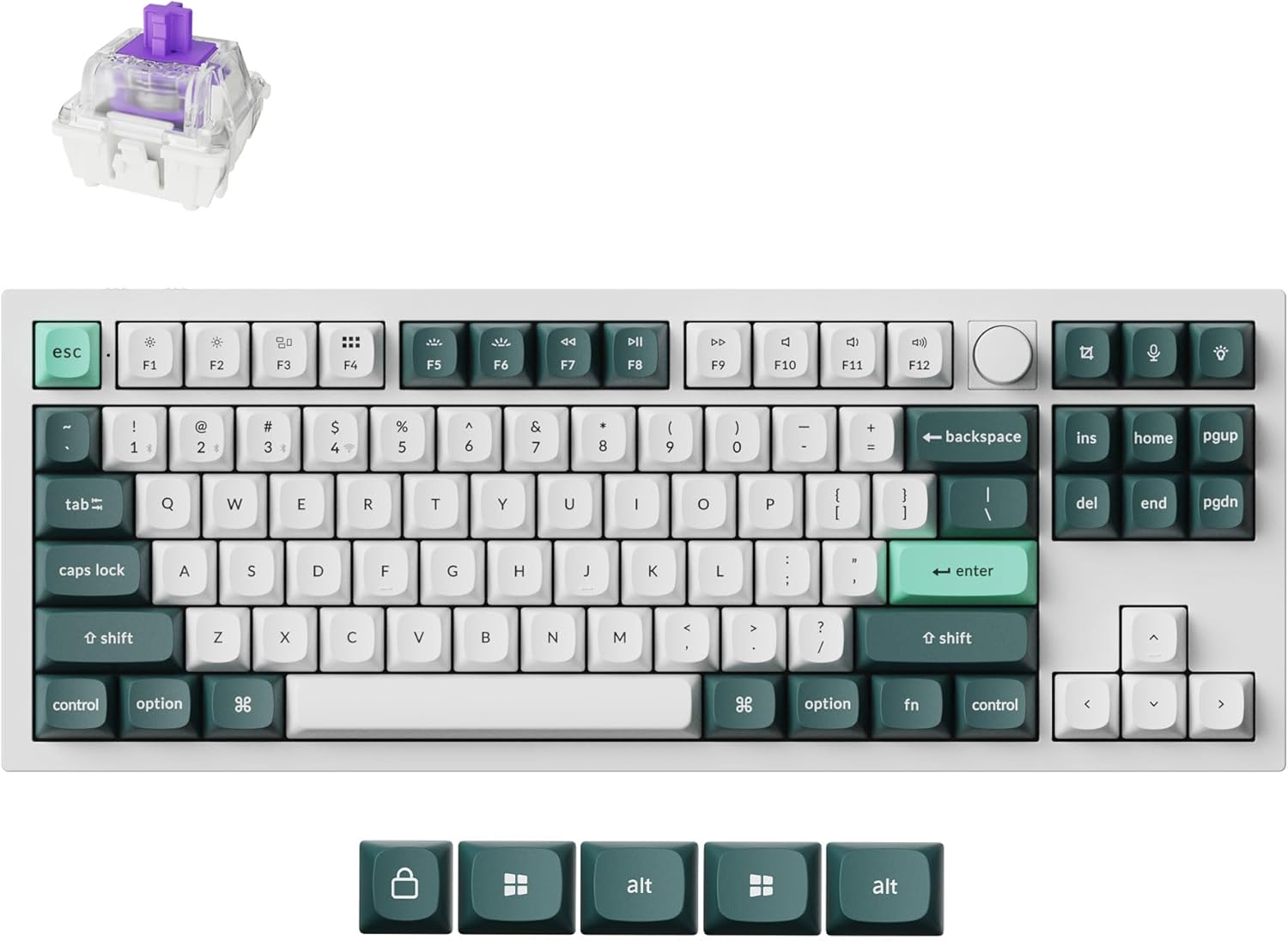
Image: The Keychron Q3 HE keyboard in Shell White, showcasing its 80% layout with a knob, and the distinct keycap colors.
പാക്കേജ് ഉള്ളടക്കം
നിങ്ങളുടെ പാക്കേജിൽ എല്ലാ ഇനങ്ങളും ഉണ്ടെന്ന് ദയവായി പരിശോധിക്കുക:
- കീക്രോൺ Q3 HE കീബോർഡ്
- USB-C മുതൽ USB-C കേബിൾ വരെ
- USB-A മുതൽ USB-C അഡാപ്റ്റർ വരെ
- കീക്യാപ് പുള്ളർ
- സ്വിച്ച് പുള്ളർ
- ഉപയോക്തൃ മാനുവൽ (ഈ പ്രമാണം)
- Additional Keycaps (for Windows/Mac compatibility)
സജ്ജീകരണ ഗൈഡ്
1. പ്രാരംഭ ചാർജിംഗ്
Before first use, connect the keyboard to a power source using the provided USB-C cable. The keyboard features a 4000 mAh battery. A full charge is recommended for optimal wireless performance.
2. കണക്റ്റിവിറ്റി ഓപ്ഷനുകൾ
The Keychron Q3 HE supports three connection modes: 2.4 GHz wireless, Bluetooth 5.1, and wired USB-C.
2.1. 2.4 GHz വയർലെസ് കണക്ഷൻ
For high-performance gaming, the 2.4 GHz wireless connection offers a rapid 1000 Hz polling rate.
- Locate the 2.4 GHz receiver (dongle) typically stored in the keyboard's compartment or included separately.
- നിങ്ങളുടെ കമ്പ്യൂട്ടറിൽ ലഭ്യമായ ഒരു USB പോർട്ടിലേക്ക് 2.4 GHz റിസീവർ പ്ലഗ് ചെയ്യുക.
- Toggle the keyboard's mode switch to the "2.4G" position.
- The keyboard should automatically connect. If not, refer to the troubleshooting section.
2.2. ബ്ലൂടൂത്ത് 5.1 കണക്ഷൻ
The Bluetooth 5.1 connection allows seamless multitasking across up to three devices (computer, phone, tablet).
- Toggle the keyboard's mode switch to the "BT" (Bluetooth) position.
- അമർത്തിപ്പിടിക്കുക Fn + 1 (അല്ലെങ്കിൽ Fn + 2 / Fn + 3) key combination for 4 seconds until the indicator light flashes rapidly, indicating pairing mode.
- On your device (computer, phone, tablet), open Bluetooth settings and search for "Keychron Q3 HE".
- ജോടിയാക്കാൻ കീബോർഡ് തിരഞ്ഞെടുക്കുക. കണക്റ്റ് ചെയ്തുകഴിഞ്ഞാൽ ഇൻഡിക്കേറ്റർ ലൈറ്റ് മിന്നുന്നത് നിർത്തും.
- ജോടിയാക്കിയ ഉപകരണങ്ങൾക്കിടയിൽ മാറാൻ, അമർത്തുക Fn + 1, Fn + 2, അല്ലെങ്കിൽ Fn + 3.

Image: The Keychron Q3 HE keyboard connected wirelessly to a laptop, smartphone, and tablet, demonstrating its multi-device capability.
2.3. വയർഡ് കണക്ഷൻ
For a stable, direct connection, use the provided USB-C cable.
- Connect one end of the USB-C cable to the keyboard's USB-C port.
- Connect the other end to a USB-C port on your computer. If your computer only has USB-A ports, use the provided USB-A to USB-C adapter.
- Toggle the keyboard's mode switch to the "Cable" position.
- The keyboard will be recognized as a standard USB HID device.
3. ഓപ്പറേറ്റിംഗ് സിസ്റ്റം സ്വിച്ച്
The keyboard has a switch to select between Windows and Mac layouts. Ensure this switch is set correctly for your operating system to ensure proper key mapping.
Image: The Keychron Q3 HE keyboard, showing the included alternative keycaps for Windows and Mac operating systems.
നിങ്ങളുടെ കീബോർഡ് പ്രവർത്തിപ്പിക്കുന്നു
1. Gateron Double-Rail Magnetic Hall Effect Switches
The Q3 HE features Gateron Double-Rail Magnetic Hall Effect Switches, offering precise and customizable performance. These switches have a sensitivity of 0.1 mm and an adjustable actuation range from 0.2 mm to 3.8 mm. They are designed for unparalleled stability and smoothness, with a lifespan of 150 million clicks.
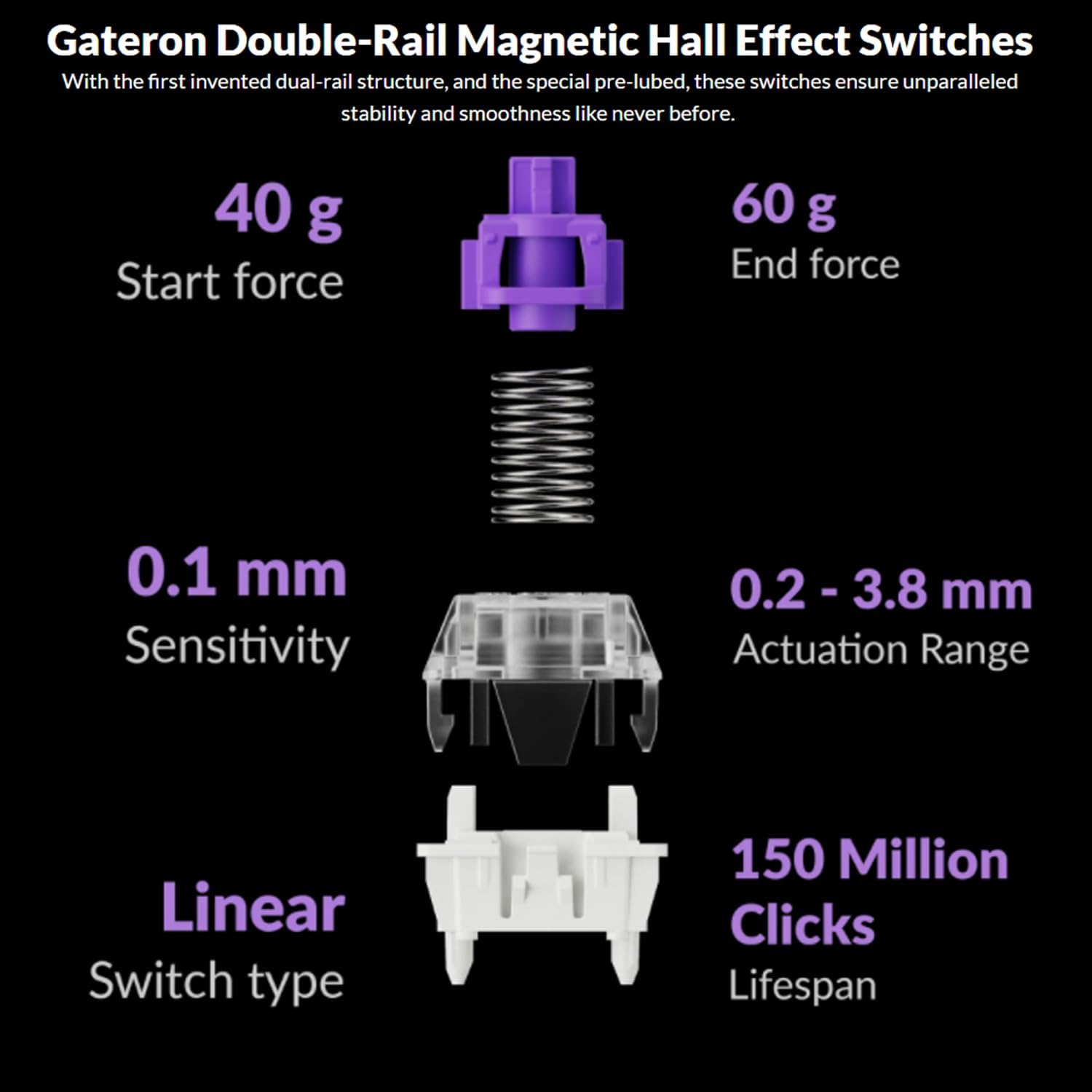
Image: Diagram illustrating the specifications of Gateron Double-Rail Magnetic Hall Effect Switches, including start force, end force, sensitivity, actuation range, switch type, and lifespan.
2. Programmable Knob and Keys
The integrated knob and all keys on the Q3 HE are fully programmable via the Keychron Launcher web app. This allows you to:
- വ്യത്യസ്ത ഫംഗ്ഷനുകളിലേക്ക് കീകൾ റീമാപ്പ് ചെയ്യുക.
- Adjust the actuation points of the magnetic switches.
- Create personalized macro commands.
- Set custom shortcuts and key combinations.
കീക്രോൺ ലോഞ്ചർ ആക്സസ് ചെയ്യുക web app through your web browser to customize your keyboard settings.
3. RGB ബാക്ക്ലൈറ്റിംഗ്
The Q3 HE features south-facing RGB LED lights, designed to provide optimal illumination from the typist's perspective. This orientation also prevents interference when using Cherry-profile കീകാപ്പുകൾ.
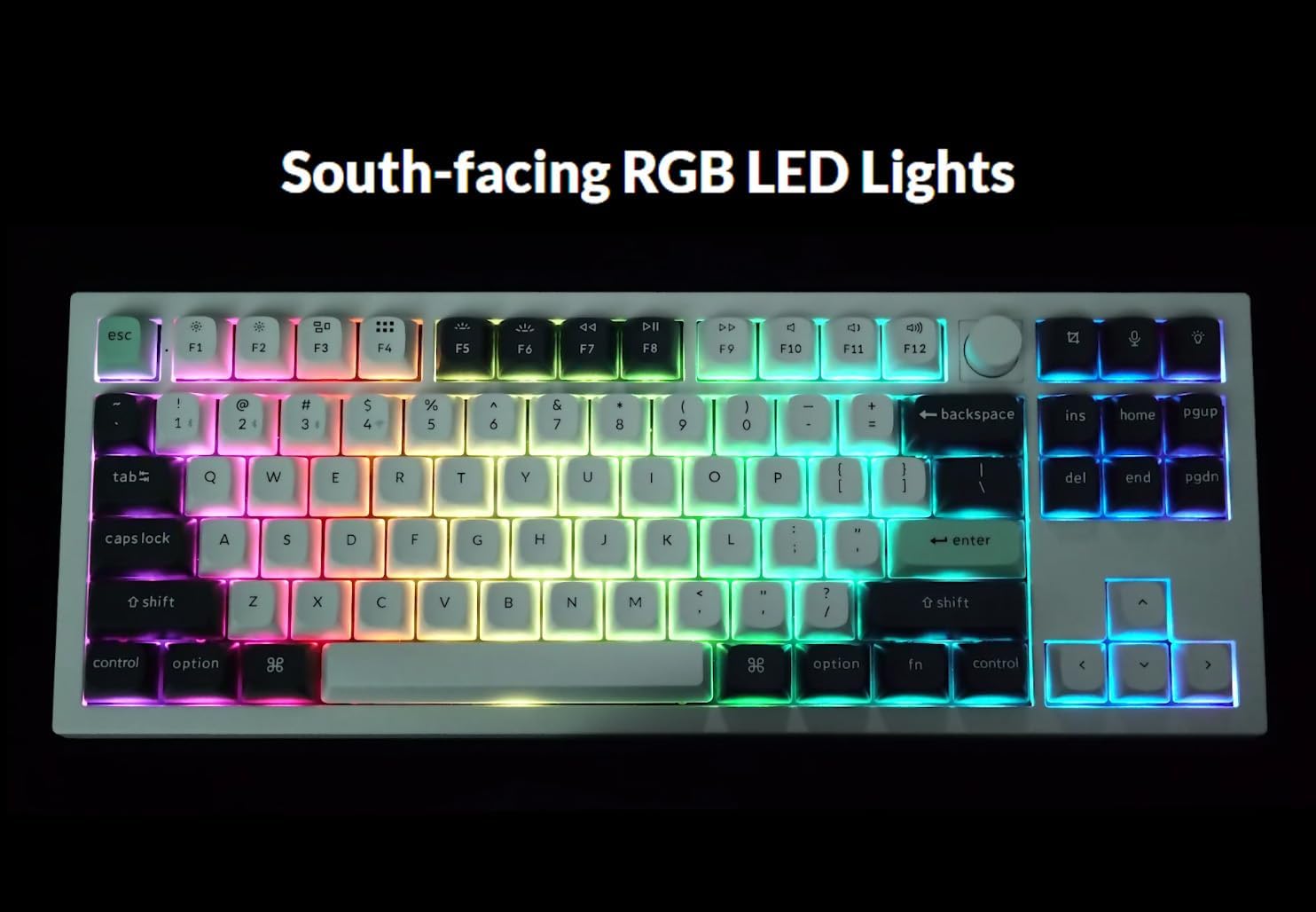
Image: The Keychron Q3 HE keyboard displaying its vibrant, south-facing RGB backlighting, illuminating the keycaps.
Use the designated function keys (e.g., എഫ്എൻ + ലൈറ്റ് കീ or Fn + F5/F6) to cycle through different lighting effects and adjust brightness. Refer to the keyboard's quick start guide for specific key combinations.
4. OSA Double-Shot PBT Keycaps
The keyboard comes equipped with durable OSA Double-Shot PBT Keycaps. These keycaps are known for their resistance to shine and wear over time, ensuring longevity and a consistent typing feel.

ചിത്രം: ഒരു ക്ലോസ്-അപ്പ് view of the OSA Double-Shot PBT Keycaps, showing their construction and texture.
മെയിൻ്റനൻസ്
1. നിങ്ങളുടെ കീബോർഡ് വൃത്തിയാക്കൽ
- കീബോർഡ് വൃത്തിയാക്കുന്നതിന് മുമ്പ് എല്ലാ വൈദ്യുതി സ്രോതസ്സുകളിൽ നിന്നും ഉപകരണങ്ങളിൽ നിന്നും വിച്ഛേദിക്കുക.
- കീക്യാപ്പുകൾക്കിടയിൽ നിന്ന് പൊടിയും അവശിഷ്ടങ്ങളും നീക്കം ചെയ്യാൻ ഒരു കംപ്രസ് ചെയ്ത വായു ക്യാൻ ഉപയോഗിക്കുക.
- For surface cleaning, gently wipe the keycaps and frame with a soft, lint-free cloth dampened with a small amount of water or a mild, non-abrasive cleaning solution. Avoid excessive moisture.
- ക്ലീനിംഗ് ലായനികൾ നേരിട്ട് കീബോർഡിൽ തളിക്കരുത്.
2. ബാറ്ററി പരിചരണം
- The keyboard is powered by a 4000 mAh Lithium Ion battery.
- ബാറ്ററി ലൈഫ് വർദ്ധിപ്പിക്കാൻ, ബാറ്ററി ഇടയ്ക്കിടെ പൂർണ്ണമായും ഡിസ്ചാർജ് ചെയ്യുന്നത് ഒഴിവാക്കുക.
- ദീർഘനേരം ഉപയോഗിക്കാത്തപ്പോൾ കീബോർഡ് തണുത്തതും വരണ്ടതുമായ സ്ഥലത്ത് സൂക്ഷിക്കുക.
- If the keyboard will not be used for a long time, charge it to about 50% before storing.
ട്രബിൾഷൂട്ടിംഗ്
| പ്രശ്നം | സാധ്യമായ കാരണം | പരിഹാരം |
|---|---|---|
| കീബോർഡ് പ്രതികരിക്കുന്നില്ല (വയർ മുഖേന) | Loose cable connection, incorrect mode switch, driver issue. |
|
| Keyboard not connecting (2.4 GHz) | Receiver not plugged in, incorrect mode switch, interference. |
|
| കീബോർഡ് കണക്റ്റ് ചെയ്യുന്നില്ല (ബ്ലൂടൂത്ത്) | Not in pairing mode, device Bluetooth off, already connected to max devices. |
|
| Keys randomly stop responding / Incorrect key output | Software glitch, incorrect actuation point setting, physical debris. |
|
| RGB lights not working or inconsistent | Low battery, software setting, light effect disabled. |
|
സ്പെസിഫിക്കേഷനുകൾ
| ഫീച്ചർ | വിശദാംശങ്ങൾ |
|---|---|
| മോഡലിൻ്റെ പേര് | കീക്രോൺ Q3 HE |
| ലേഔട്ട് | 80% (TKL) |
| സ്വിച്ചുകൾ | Gateron Double-Rail Magnetic Hall Effect Switches |
| പ്രവർത്തന ശ്രേണി | 0.2 mm - 3.8 mm (adjustable) |
| കണക്റ്റിവിറ്റി | 2.4 GHz വയർലെസ്, ബ്ലൂടൂത്ത് 5.1, USB-C വയേർഡ് |
| Polling Rate (2.4 GHz) | 1000 Hz |
| ബോഡി മെറ്റീരിയൽ | 6063 അലുമിനിയം |
| കീകാപ്പുകൾ | OSA Double-Shot PBT |
| ബാക്ക്ലൈറ്റിംഗ് | South-facing RGB LED |
| ബാറ്ററി ശേഷി | 4000 mAh ലിഥിയം അയോൺ |
| ബാറ്ററി ലൈഫ് | 100 മണിക്കൂർ വരെ (ഏറ്റവും കുറഞ്ഞ തെളിച്ചത്തിൽ) |
| ഇനത്തിൻ്റെ ഭാരം | 5.5 പൗണ്ട് (ഏകദേശം 2.5 കിലോഗ്രാം) |
| അളവുകൾ (പാക്കേജ്) | 15.79 x 8.03 x 2.8 ഇഞ്ച് |
| ഓപ്പറേറ്റിംഗ് സിസ്റ്റം അനുയോജ്യത | മാക്, വിൻഡോസ് |
വാറൻ്റിയും പിന്തുണയും
Keychron products are designed and manufactured to high quality standards. For detailed warranty information, including coverage period and terms, please refer to the official Keychron webസൈറ്റ് അല്ലെങ്കിൽ നിങ്ങളുടെ ഉൽപ്പന്നത്തിൽ ഉൾപ്പെടുത്തിയിരിക്കുന്ന വാറന്റി കാർഡ്.
For technical support, frequently asked questions (FAQs), and driver/software downloads (including Keychron Launcher), please visit the official Keychron support page:
When contacting support, please have your product model (Q3 HE) and serial number (if applicable) ready.


