ആമുഖം
This manual provides detailed instructions for the installation, operation, maintenance, and troubleshooting of your Thermalright Aqua Elite 360 ARGB Liquid CPU Cooler. Please read this manual thoroughly before installation and retain it for future reference.
സജ്ജീകരണവും ഇൻസ്റ്റാളേഷനും
Proper installation is crucial for optimal performance. Follow these steps carefully. Ensure your system is powered off and unplugged before beginning installation.
ഘടകങ്ങൾ പൂർത്തിയായിview
The Thermalright Aqua Elite 360 ARGB Liquid CPU Cooler includes a water block with an integrated pump, a 360mm radiator, three 120mm ARGB PWM fans, and mounting hardware for various Intel and AMD sockets.
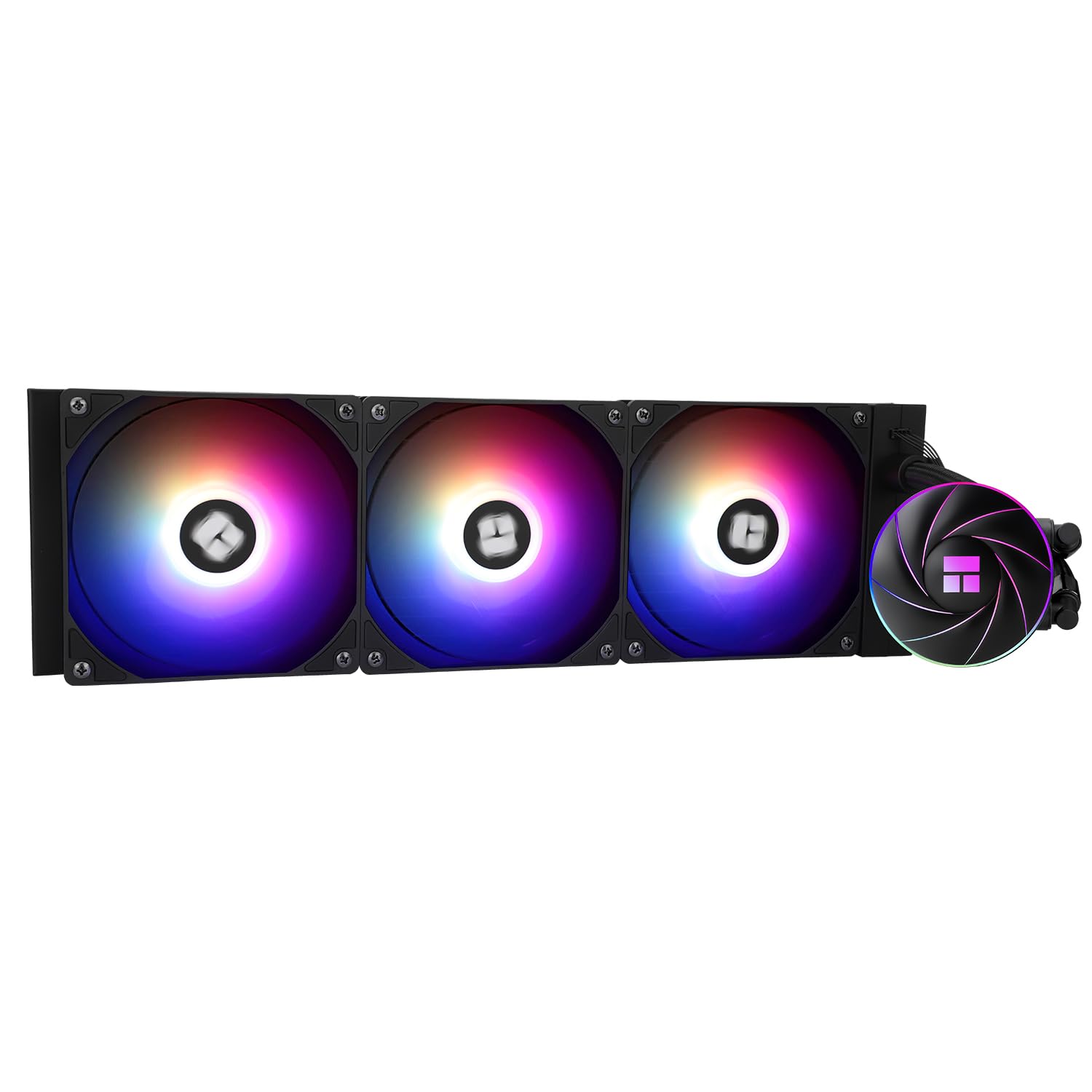
Image: Thermalright Aqua Elite 360 ARGB Liquid CPU Cooler, showcasing the radiator, fans, and water block.
ഇൻസ്റ്റലേഷൻ വീഡിയോ ഗൈഡ്
For a visual step-by-step guide, please refer to the official installation tutorial video:
Video: Official installation tutorial for the Thermalright Aqua Elite 360 ARGB Liquid CPU Cooler, demonstrating steps for various CPU sockets.
പൊതു ഇൻസ്റ്റാളേഷൻ ഘട്ടങ്ങൾ
- മദർബോർഡ് തയ്യാറാക്കുക: Install the appropriate backplate and standoffs for your CPU socket (Intel LGA1851/1700/115x/1200/2011 or AMD AM4/AM5).
- തെർമൽ കോമ്പൗണ്ട് പ്രയോഗിക്കുക: Apply a small amount of thermal compound to the center of your CPU's Integrated Heat Spreader (IHS).
- Mount Water Block: Secure the water block onto the CPU, ensuring even pressure.
- റേഡിയേറ്ററും ഫാനുകളും ഇൻസ്റ്റാൾ ചെയ്യുക: Mount the radiator and pre-installed fans to an available fan mount in your PC case. Ensure proper airflow direction.
- കേബിളുകൾ ബന്ധിപ്പിക്കുക:
- Connect the pump power cable to the CPU_OPT or AIO_PUMP header on your motherboard.
- Connect the fan PWM cables to the fan splitter cable, then connect the splitter to a CPU_FAN header on your motherboard.
- Connect the ARGB lighting cables from the fans and water block to the motherboard's 3-pin +5V ARGB header for lighting synchronization.
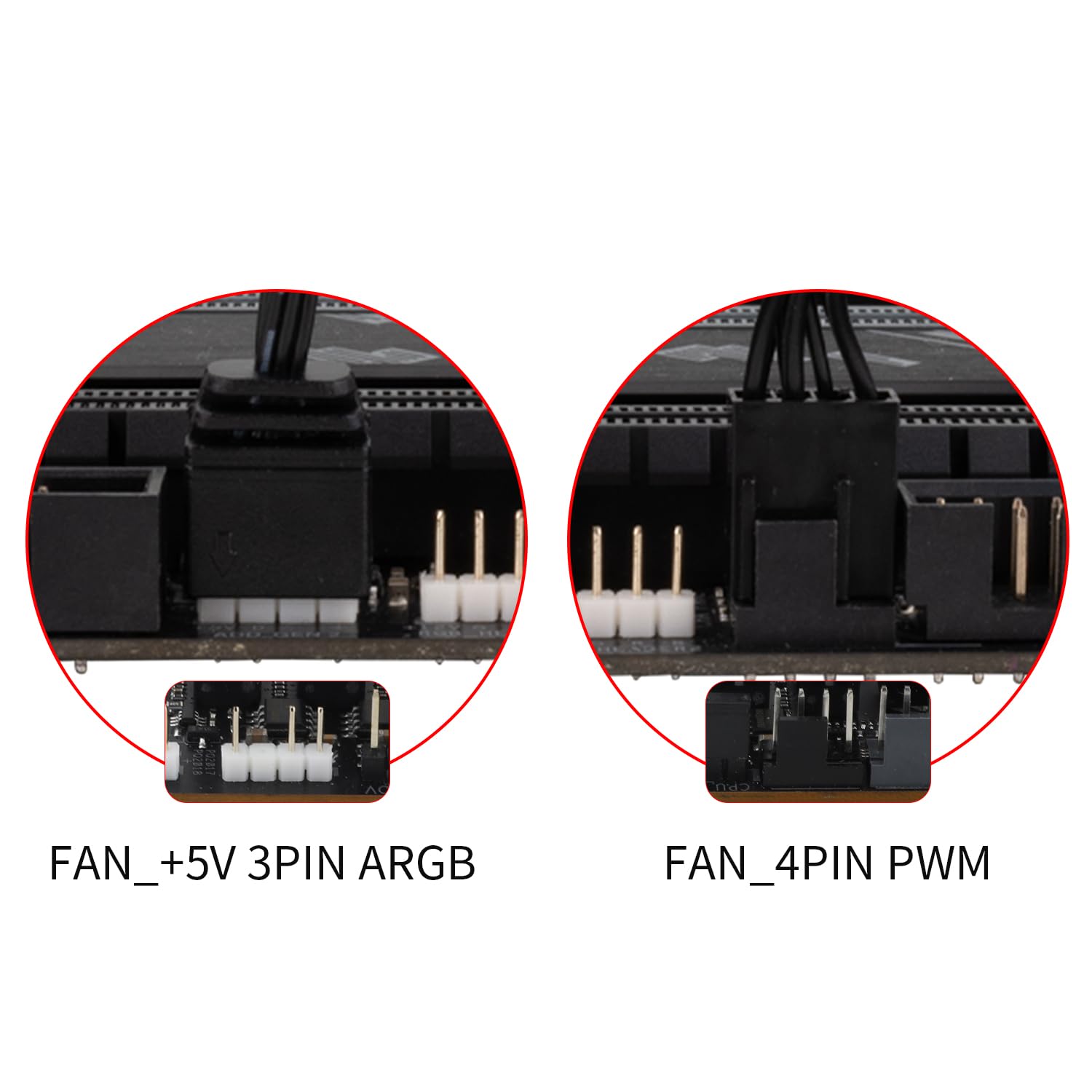
ചിത്രം: ക്ലോസ്-അപ്പ് view of the fan PWM and ARGB connectors, illustrating how to connect them for power and lighting synchronization.
ഓപ്പറേഷൻ
The Thermalright Aqua Elite 360 ARGB Liquid CPU Cooler is designed for efficient and quiet operation.
PWM Fan Control
The included TL-C12C-S ARGB fans feature Pulse Width Modulation (PWM) control. This allows your motherboard to automatically adjust fan speed based on CPU temperature, providing optimal cooling performance while minimizing noise levels. You can configure fan curves in your motherboard's BIOS/UEFI settings or through compatible software.

Image: Diagram illustrating the features of the 120mm ARGB PWM fans, including high air volume, S-FDB bearing, quiet operation, and 4-pin PWM connector.
ARGB Lighting Synchronization
The Addressable RGB (ARGB) lighting on both the CPU fans and the water block can be synchronized with your motherboard's 5V 3-pin ARGB header. This enables control over 16 million colors and various lighting effects through your motherboard's ARGB software (e.g., ASUS Aura Sync, MSI Mystic Light Sync, Gigabyte RGB Fusion, ASRock Polychrome Sync). Ensure your motherboard supports 5V 3-pin ARGB for full functionality.

Image: Close-up of the water block with illuminated ARGB logo and swirl design, highlighting the 2600 RPM pump speed and 12V DC power input.
മെയിൻ്റനൻസ്
നിങ്ങളുടെ ലിക്വിഡ് സിപിയു കൂളറിന്റെ ദീർഘായുസ്സും ഒപ്റ്റിമൽ പ്രകടനവും ഉറപ്പാക്കാൻ പതിവ് അറ്റകുറ്റപ്പണി സഹായിക്കുന്നു.
- പൊടി നീക്കം: Periodically clean the radiator fins and fan blades to prevent dust buildup, which can impede airflow and cooling efficiency. Use compressed air or a soft brush.
- ട്യൂബിംഗ് പരിശോധിക്കുക: Occasionally check the water tubes for any signs of wear, kinks, or leaks.
- താപ സംയുക്തം: While not frequently required, if you ever remove the water block, it is recommended to clean off old thermal compound and apply new compound before reinstallation.
ട്രബിൾഷൂട്ടിംഗ്
If you encounter issues with your Thermalright Aqua Elite 360 ARGB Liquid CPU Cooler, consider the following common solutions:
- No Power/Fans Not Spinning:
- Check all power connections to the pump and fans. Ensure they are securely plugged into the correct motherboard headers (CPU_OPT/AIO_PUMP for pump, CPU_FAN for fans).
- Verify that the fan splitter cable is correctly connected.
- മോശം കൂളിംഗ് പ്രകടനം:
- Ensure the water block is securely mounted to the CPU with adequate pressure.
- Confirm that thermal compound was applied correctly and evenly.
- Check for dust buildup on the radiator fins and clean if necessary.
- Verify that fans are spinning and oriented correctly for optimal airflow (pushing air through the radiator).
- ARGB Lighting Not Working/Incorrect Colors:
- Ensure all ARGB cables are securely connected to the motherboard's 3-pin +5V ARGB header.
- Check your motherboard's ARGB software settings to ensure lighting is enabled and configured as desired.
- Confirm your motherboard has a 3-pin +5V ARGB header, not a 4-pin +12V RGB header, as these are incompatible.
- അസാധാരണമായ ശബ്ദം:
- Check for loose fan screws or cables interfering with fan blades.
- Ensure the pump is not running dry (though unlikely with AIOs, check for unusual gurgling sounds).
സ്പെസിഫിക്കേഷനുകൾ
| ഫീച്ചർ | വിശദാംശങ്ങൾ |
|---|---|
| ഉൽപ്പന്ന അളവുകൾ | 14.76"L x 14.76"W x 14.76"H (റേഡിയേറ്റർ) |
| ഇനം മോഡൽ നമ്പർ | AQUA ELITE 360 ARGB V4 |
| ബ്രാൻഡ് | തെർമൽറൈറ്റ് |
| പവർ കണക്റ്റർ തരം | 4- പിൻ (PWM) |
| വാല്യംtage | 12 വോൾട്ട് (DC) |
| തണുപ്പിക്കൽ രീതി | വെള്ളം |
| അനുയോജ്യമായ ഉപകരണങ്ങൾ | Desktop (Intel LGA 1851/1700/1150/1151/1155/1156/1200/2011/2066; AMD AM4/AM5) |
| ശബ്ദ നില | ≤25.6 Decibels (Fans) |
| മെറ്റീരിയൽ | Aluminum (Radiator), Copper (Cold Plate) |
| പരമാവധി റൊട്ടേഷണൽ സ്പീഡ് | 1550 RPM (Fans), 2600 RPM (Pump) |
| എയർ ഫ്ലോ കപ്പാസിറ്റി | 66.17 Cubic Feet Per Minute (Fans) |
വാറൻ്റി വിവരങ്ങൾ
Thermalright products are designed for reliability and performance. For specific warranty terms and conditions, please refer to the documentation included with your product or visit the official Thermalright website. Extended protection plans may be available for purchase separately.
- 3-Year Protection Plan: Available for purchase.
- 4-Year Protection Plan: Available for purchase.
- Complete Protect: Monthly plan covering eligible purchases.
ഉപഭോക്തൃ പിന്തുണ
If you require further assistance or have questions not covered in this manual, please contact Thermalright customer support. You can typically find contact information on the official Thermalright website or through your product's purchase platform.
For the latest drivers, software, and FAQs, please visit the Thermalright Official Webസൈറ്റ്.


