1. ആമുഖം
This manual provides detailed instructions for the installation, operation, and maintenance of your Ctronics 4G LTE Dual Lens Solar Security Camera (Model 800C). This wireless security camera is designed for surveillance in locations without Wi-Fi access, utilizing 4G LTE cellular connectivity. It features advanced dual-lens technology, solar power, and a robust battery for continuous operation. Please read this manual thoroughly before using the product to ensure proper setup and functionality.

ചിത്രം 1.1: Ctronics 4G LTE Dual Lens Solar Security Camera. This image displays the complete camera unit with its integrated solar panel, showcasing its design and primary components.
2. ഉൽപ്പന്നം കഴിഞ്ഞുview
The Ctronics 800C camera is a fully wireless, solar-powered security solution. Key features include:
- 4G LTE കണക്റ്റിവിറ്റി: Operates independently of Wi-Fi, ideal for remote areas. Includes a pre-installed SIM card with 300MB test data.
- ഡ്യുവൽ ലെൻസ് സിസ്റ്റം: Features a fixed 90° upper lens and a rotatable lower lens (355° pan, 90° tilt) for comprehensive coverage and reduced blind spots.
- Solar Power & Battery: Equipped with an 8W solar panel and a 15600mAh rechargeable battery for continuous, eco-friendly power.
- കളർ നൈറ്റ് വിഷൻ: Provides clear, full-color night vision up to 30 meters, delivering FHD images day and night.
- ഡ്യുവൽ പിഐആർ ഹ്യൂമൻ ഡിറ്റക്ഷൻ: Accurately detects human motion within a 10-meter radius, triggering instant alerts and alarms.
- ടു-വേ ഓഡിയോ: ക്യാമറയിലൂടെ തത്സമയ ആശയവിനിമയം സാധ്യമാക്കുന്നു.
- ഫ്ലെക്സിബിൾ സ്റ്റോറേജ്: Supports cloud storage and local storage via a TF card up to 128GB.
- മൾട്ടി-പ്ലാറ്റ്ഫോം അനുയോജ്യത: Accessible via "HIP2P" and "Ctronics Pro" apps on iOS, Android, Mac, and Windows devices.

ചിത്രം 2.1: Autonomous Power. This image illustrates the camera mounted outdoors, powered by its 8W solar panel and internal 15600mAh battery, highlighting its self-sufficient operation.
3. സജ്ജീകരണം
3.1 പാക്കേജ് ഉള്ളടക്കം
പാക്കേജിൽ എല്ലാ ഘടകങ്ങളും ഉണ്ടെന്ന് ഉറപ്പാക്കുക:
- സിട്രോണിക്സ് 4G LTE ഡ്യുവൽ ലെൻസ് സോളാർ സെക്യൂരിറ്റി ക്യാമറ (മോഡൽ 800C)
- 8W Solar Panel (integrated or separate, depending on model variant)
- മൗണ്ടിംഗ് ബ്രാക്കറ്റും സ്ക്രൂകളും
- SIM Card (pre-installed with 300MB test data)
- ഉപയോക്തൃ മാനുവൽ (ഈ പ്രമാണം)
3.2 SIM Card Activation (if not pre-activated)
The camera comes with a pre-installed SIM card and 300MB of test data. If you are using your own SIM card, ensure the PIN request is deactivated before inserting it into the camera.

ചിത്രം 3.1: Stable 4G Mobile Connection. This image highlights the camera's 4G LTE connectivity, showing the SIM card slot and indicating the included 300MB of test data for immediate use.
3.3 ബാറ്ററി ചാർജ് ചെയ്യുന്നു
Before initial use, it is recommended to fully charge the camera's 15600mAh battery using the solar panel or a compatible USB power adapter (not included). Ensure the solar panel is positioned to receive maximum sunlight.
3.4 അപ്ലിക്കേഷൻ ഇൻസ്റ്റാളേഷൻ
Download and install one of the compatible applications on your smartphone or computer:
- "HIP2P" (for iOS, Android, Windows, Mac)
- "ക്ട്രോണിക്സ് പ്രോ" (for iOS, Android, Windows, Mac)
ഇതിനായി തിരയുക these apps in your device's app store (Apple App Store, Google Play Store) or on the Ctronics website for desktop versions.

ചിത്രം 3.2: Multi-Platform Compatibility. This image displays the camera's compatibility with various operating systems (iOS, Android, Windows, Mac OS) and the recommended applications ("Ctronics Pro", "HIP2P Client") for remote access and control.
3.5 ക്യാമറ മൗണ്ടിംഗ്
The camera supports both wall and ceiling mounting. Choose a location that provides optimal coverage and ensures the solar panel receives sufficient sunlight.
- അനുയോജ്യമായ ഒരു മൗണ്ടിംഗ് ഉപരിതലം തിരഞ്ഞെടുക്കുക.
- Use the provided mounting bracket as a template to mark drill holes.
- ആവശ്യമെങ്കിൽ ദ്വാരങ്ങൾ തുരന്ന് വാൾ പ്ലഗുകൾ തിരുകുക.
- Secure the mounting bracket to the surface with screws.
- മൗണ്ടിംഗ് ബ്രാക്കറ്റിൽ ക്യാമറ ഘടിപ്പിക്കുക.
- Adjust the camera's angle using the adjustable bracket (up to 108°) for the desired field of view.
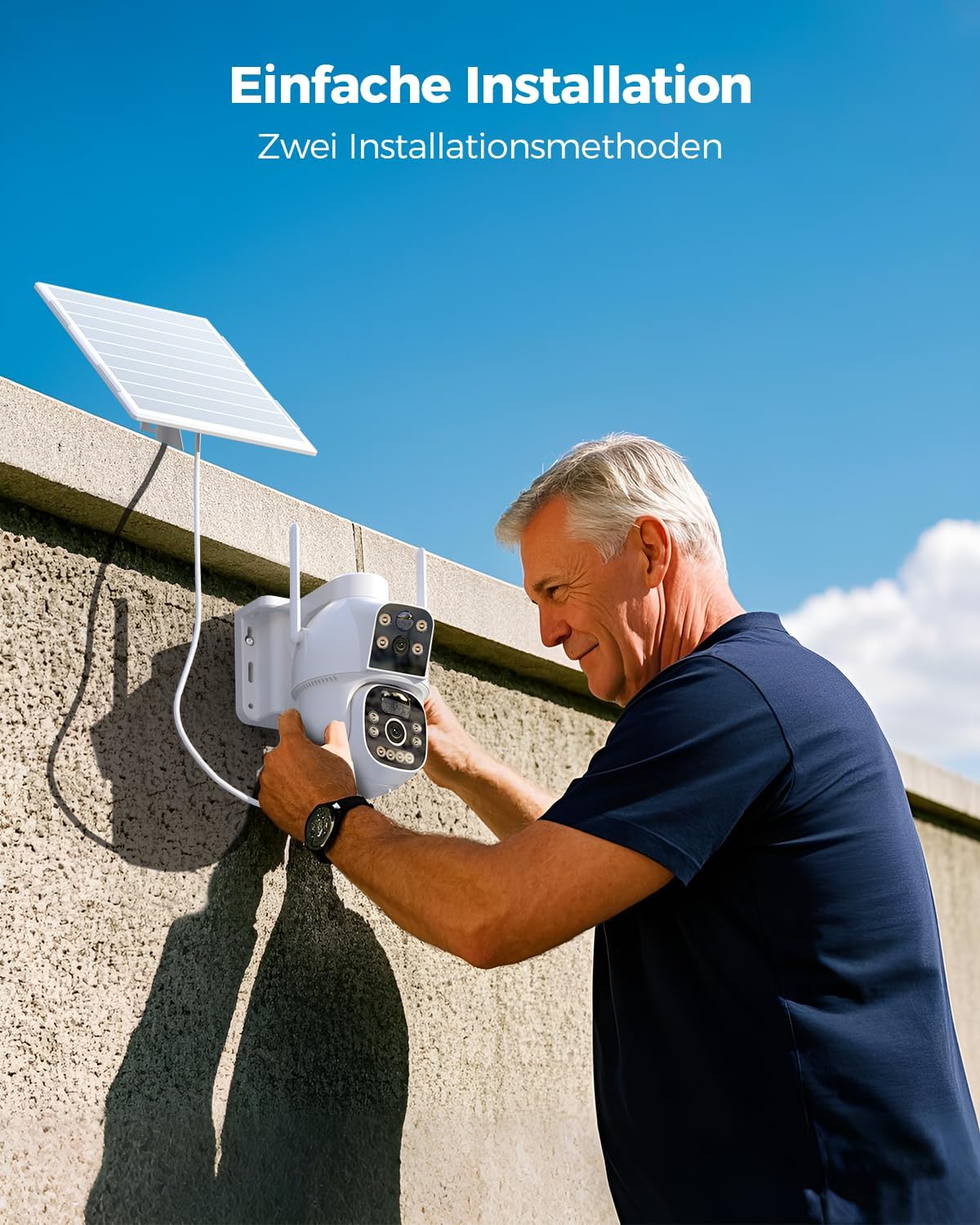
ചിത്രം 3.3: Easy Installation. This image shows a person installing the Ctronics camera on an outdoor wall, demonstrating the straightforward mounting process.
4. പ്രവർത്തന നിർദ്ദേശങ്ങൾ
4.1 പ്രാരംഭ കണക്ഷൻ
- Open the "HIP2P" or "Ctronics Pro" app on your device.
- നിങ്ങളുടെ ക്യാമറ ചേർക്കാൻ ആപ്പിലെ നിർദ്ദേശങ്ങൾ പാലിക്കുക. ഇതിൽ സാധാരണയായി ക്യാമറയിലെ ഒരു QR കോഡ് സ്കാൻ ചെയ്യുകയോ അതിന്റെ ഐഡി നേരിട്ട് നൽകുകയോ ചെയ്യാറുണ്ട്.
- Once connected, you should see the live feed from the camera.
4.2 Dual Lens Control
The camera features two lenses:
- മുകളിലെ ലെൻസ്: Fixed 90° wide-angle view.
- താഴ്ന്ന ലെൻസ്: Rotatable with 355° pan and 90° tilt capabilities.
Use the app's controls to pan and tilt the lower lens to adjust its viewing ആംഗിൾ.

ചിത്രം 4.1: Dual Lens for Wider Coverage. This image illustrates the camera's dual-lens system, showing how the fixed upper lens and the rotatable lower lens combine to provide extensive surveillance coverage.
4.3 മോഷൻ ഡിറ്റക്ഷനും അലേർട്ടുകളും
The camera uses dual PIR sensors for accurate human motion detection up to 10 meters.
- പ്രവർത്തനക്ഷമമാക്കുക/പ്രവർത്തനരഹിതമാക്കുക: Configure motion detection settings within the app.
- അലേർട്ടുകൾ: ചലനം കണ്ടെത്തുമ്പോൾ നിങ്ങളുടെ സ്മാർട്ട്ഫോണിൽ തൽക്ഷണ അറിയിപ്പുകൾ സ്വീകരിക്കുക.
- അലാറങ്ങൾ: The camera can trigger an audible alarm to deter intruders.

ചിത്രം 4.2: Dual-PIR Human Detection. This image demonstrates the camera's ability to detect human figures, triggering alerts as shown in the notification overlay.
4.4 ടു-വേ ഓഡിയോ
Use the two-way audio feature to communicate with individuals near the camera.
- ലൈവിൽ view interface of the app, tap the microphone icon to speak.
- ക്യാമറയുടെ സ്ഥാനത്ത് നിന്ന് ഓഡിയോ കേൾക്കാൻ സ്പീക്കർ ഐക്കണിൽ ടാപ്പ് ചെയ്യുക.

ചിത്രം 4.3: Two-Way Audio. This image shows a smartphone screen displaying the camera's live feed with controls for two-way audio, allowing real-time communication.
4.5 നൈറ്റ് വിഷൻ
The camera automatically switches to night vision mode in low-light conditions. It supports full-color night vision up to 30 meters.

ചിത്രം 4.4: Color Night Vision. This image demonstrates the camera's color night vision capability, showing a clear, illuminated scene at night compared to a standard black and white view.
4.6 റെക്കോർഡിംഗും സംഭരണവും
റെക്കോർഡിംഗുകൾ രണ്ട് തരത്തിൽ സൂക്ഷിക്കാം:
- TF കാർഡ്: Insert a TF (microSD) card (up to 128GB) into the designated slot on the camera for local storage.
- ക്ലൗഡ് സംഭരണം: Subscribe to cloud storage services through the app for remote backup of your recordings.
റെക്കോർഡ് ചെയ്ത foo ആക്സസ് ചെയ്യുകtage through the "HIP2P" or "Ctronics Pro" app.
5. പരിപാലനം
5.1 വൃത്തിയാക്കൽ
- Regularly clean the camera lenses and solar panel with a soft, damp ഒപ്റ്റിമൽ പ്രകടനം ഉറപ്പാക്കാൻ തുണി.
- പ്രതലങ്ങൾക്ക് കേടുവരുത്തുന്ന കഠിനമായ രാസവസ്തുക്കളോ ഉരച്ചിലുകളുള്ള വസ്തുക്കളോ ഉപയോഗിക്കുന്നത് ഒഴിവാക്കുക.
5.2 ബാറ്ററി മാനേജ്മെൻ്റ്
- Ensure the solar panel is free from obstructions (e.g., leaves, dirt) to maximize charging efficiency.
- In prolonged periods of low sunlight, the camera's battery may deplete. Monitor battery status via the app and consider temporary manual charging if needed.
5.3 ഫേംവെയർ അപ്ഡേറ്റുകൾ
Check the "HIP2P" or "Ctronics Pro" app periodically for available firmware updates. Keeping your camera's firmware up-to-date ensures optimal performance, security, and access to new features.
6. പ്രശ്നപരിഹാരം
- Camera not connecting to 4G:
- സിം കാർഡ് ശരിയായി ചേർത്തിട്ടുണ്ടെന്നും സജീവമായ ഒരു ഡാറ്റ പ്ലാൻ ഉണ്ടെന്നും ഉറപ്പാക്കുക.
- Verify that the SIM card's PIN request has been deactivated.
- Check cellular signal strength in the camera's location via the app.
- ബാറ്ററി ചാർജ്ജുചെയ്യുന്നില്ല:
- Ensure the solar panel is clean and exposed to direct sunlight for several hours daily.
- സോളാർ പാനലും ക്യാമറയും തമ്മിലുള്ള കണക്ഷൻ പരിശോധിക്കുക.
- Verify the battery status in the app.
- ചലന കണ്ടെത്തൽ പ്രവർത്തിക്കുന്നില്ല:
- Confirm that motion detection is enabled in the app settings.
- Adjust the sensitivity of the PIR sensors.
- സെൻസറിന്റെ ഫീൽഡിനെ തടയുന്ന തടസ്സങ്ങളൊന്നുമില്ലെന്ന് ഉറപ്പാക്കുക. view.
- മോശം ചിത്ര നിലവാരം:
- ക്യാമറ ലെൻസുകൾ വൃത്തിയാക്കുക.
- Ensure adequate lighting, especially during night vision operation.
- Check your network connection speed if streaming live video.
- ആപ്പ് പ്രശ്നങ്ങൾ:
- നിങ്ങളുടെ ആപ്പ് ഏറ്റവും പുതിയ പതിപ്പിലേക്ക് അപ്ഡേറ്റ് ചെയ്തിട്ടുണ്ടെന്ന് ഉറപ്പാക്കുക.
- ആപ്പ് അല്ലെങ്കിൽ നിങ്ങളുടെ സ്മാർട്ട്ഫോൺ പുനരാരംഭിക്കുക.
- പ്രശ്നങ്ങൾ നിലനിൽക്കുകയാണെങ്കിൽ, ആപ്പ് വീണ്ടും ഇൻസ്റ്റാൾ ചെയ്യാൻ ശ്രമിക്കുക.
7 സ്പെസിഫിക്കേഷനുകൾ
| ഫീച്ചർ | സ്പെസിഫിക്കേഷൻ |
|---|---|
| മോഡലിൻ്റെ പേര് | 800C |
| ബ്രാൻഡ് | സിട്രോണിക്സ് |
| വീഡിയോ റെക്കോർഡിംഗ് റെസല്യൂഷൻ | 1080p |
| കണക്റ്റിവിറ്റി ടെക്നോളജി | 4G LTE Cellular (No Wi-Fi) |
| ബാറ്ററി ശേഷി | 15600mAh ലിഥിയം-അയൺ (ഉൾപ്പെടുത്തിയത്) |
| സോളാർ പാനൽ പവർ | 8W |
| നൈറ്റ് വിഷൻ റേഞ്ച് | 30 മീറ്റർ വരെ (കളർ നൈറ്റ് വിഷൻ) |
| മോഷൻ ഡിറ്റക്ഷൻ | Dual PIR Sensors, 10m detection range |
| ലെൻസ് കോൺഫിഗറേഷൻ | Fixed 90° upper lens, Rotatable 355° pan / 90° tilt lower lens |
| ഓഡിയോ | ടു-വേ ഓഡിയോ |
| സ്റ്റോറേജ് ഓപ്ഷനുകൾ | TF കാർഡ് (128GB വരെ), ക്ലൗഡ് സ്റ്റോറേജ് |
| അനുയോജ്യമായ ഓപ്പറേറ്റിംഗ് സിസ്റ്റങ്ങൾ | iOS, Android, Mac, Windows |
| മെറ്റീരിയൽ | അക്രിലോണിട്രൈൽ ബ്യൂട്ടാഡീൻ സ്റ്റൈറൈൻ (എബിഎസ്) |
| നിറം | വെള്ള |
| അളവുകൾ (L x W x H) | 30 x 25 x 30 സെ.മീ |
| ഭാരം | 1 കിലോഗ്രാം |
| ഇൻസ്റ്റലേഷൻ തരം | Screw-in (Wall/Ceiling Mount) |
| ശുപാർശ ചെയ്യുന്ന ഉപയോഗം | Outdoor Surveillance |
8. വാറൻ്റിയും പിന്തുണയും
For warranty information, please refer to the documentation provided with your purchase or visit the official Ctronics webസൈറ്റ്.
For technical support, please utilize the "HIP2P" or "Ctronics Pro" applications. Note that email support is not provided for this product.


