ആമുഖം
This manual provides essential information for setting up, operating, maintaining, and troubleshooting your Alphawolf APad2 8-inch Android tablet. Please read this manual thoroughly to ensure proper use and to maximize your device's performance and longevity.

Image: Alphawolf APad2 Tablet, showcasing അതിന്റെ മിനുസമാർന്ന രൂപകൽപ്പനയും പ്രധാന സവിശേഷതകളും.
സജ്ജമാക്കുക
പാക്കേജ് ഉള്ളടക്കം
ആരംഭിക്കുന്നതിന് മുമ്പ്, പാക്കേജിൽ എല്ലാ ഇനങ്ങളും ഉണ്ടെന്ന് ഉറപ്പാക്കുക:
- Alphawolf APad2 Tablet
- Dedicated Screen Protector Film (pre-applied or included separately)
- യുഎസ്ബി ടൈപ്പ്-സി കേബിൾ
- ചാർജിംഗ് അഡാപ്റ്റർ (5V/2A)
- സിം കാർഡ് പിൻ
- ഉപയോക്തൃ മാനുവൽ (ഈ പ്രമാണം)

Image: Diagram illustrating the tablet's ports (card slot, volume buttons, reset, power button, Type-C charging port, headphone jack, front camera, back camera) and the included package contents.
ടാബ്ലെറ്റ് ചാർജ് ചെയ്യുന്നു
Before first use, fully charge the tablet. Connect the provided USB Type-C cable to the tablet's charging port and the charging adapter to a power outlet. The charging port is located on the side of the device.
Inserting SIM and MicroSD Cards
- ടാബ്ലെറ്റിന്റെ വശത്ത് സിം/മൈക്രോ എസ്ഡി കാർഡ് ട്രേ കണ്ടെത്തുക.
- Insert the SIM card pin into the small hole next to the tray to eject it.
- Carefully place your Nano SIM card(s) and/or MicroSD card (up to 2TB, sold separately) into the designated slots on the tray. Ensure correct orientation.
- ട്രേ അതിന്റെ സ്ഥാനത്ത് ക്ലിക്കു ചെയ്യുന്നത് വരെ ടാബ്ലെറ്റിലേക്ക് പതുക്കെ തിരികെ തള്ളുക.

Image: Close-up of the Alphawolf APad2 tablet showing the SIM card tray with two Nano SIM cards and a MicroSD card inserted, indicating 4G LTE support.
പ്രാരംഭ പവർ ഓൺ
Press and hold the power button until the Alphawolf logo appears. Follow the on-screen instructions to complete the initial setup, including language selection, Wi-Fi connection, and Google account setup.
പ്രവർത്തന നിർദ്ദേശങ്ങൾ
പ്രദർശന, ദൃശ്യാനുഭവം
The APad2 features an 8.4-inch 2.5K FHD IPS display with a resolution of 2560x1600 pixels. This provides a clear and vibrant visual experience for various content, including videos, games, and e-books. The tablet supports Widevine L1, enabling high-definition streaming from platforms like Netflix, Amazon Prime Video, and Disney+.

Image: The Alphawolf APad2 display showing high-resolution content, highlighting 2.5K IPS and Widevine L1 support for streaming services.
പ്രകടനവും സംഭരണവും
Powered by the MediaTek Helio G99 octa-core processor, the APad2 delivers efficient performance for multitasking and demanding applications. It comes with 16GB of RAM (8GB physical + 8GB virtual expansion) and 256GB of internal storage, expandable up to 2TB via a MicroSD card (sold separately).

Image: Visual representation of the Alphawolf APad2's 16GB RAM (8GB+8GB virtual) and 256GB internal storage, with an arrow indicating 2TB MicroSD expansion capability.
കണക്റ്റിവിറ്റി
- 4G LTE Communication: The tablet supports 4G LTE, allowing you to make calls and send SMS messages with a compatible SIM card.
- വൈഫൈ: Enjoy stable and fast internet with 2.4G and 5G Wi-Fi support.
- ബ്ലൂടൂത്ത് 5.2: Connect wireless accessories such as headphones, speakers, and keyboards.
Camera and Face Recognition
The APad2 is equipped with an 8MP front camera and a 16MP rear camera, suitable for capturing photos, video calls, and online meetings. For enhanced security and convenience, the tablet includes face recognition unlock functionality.
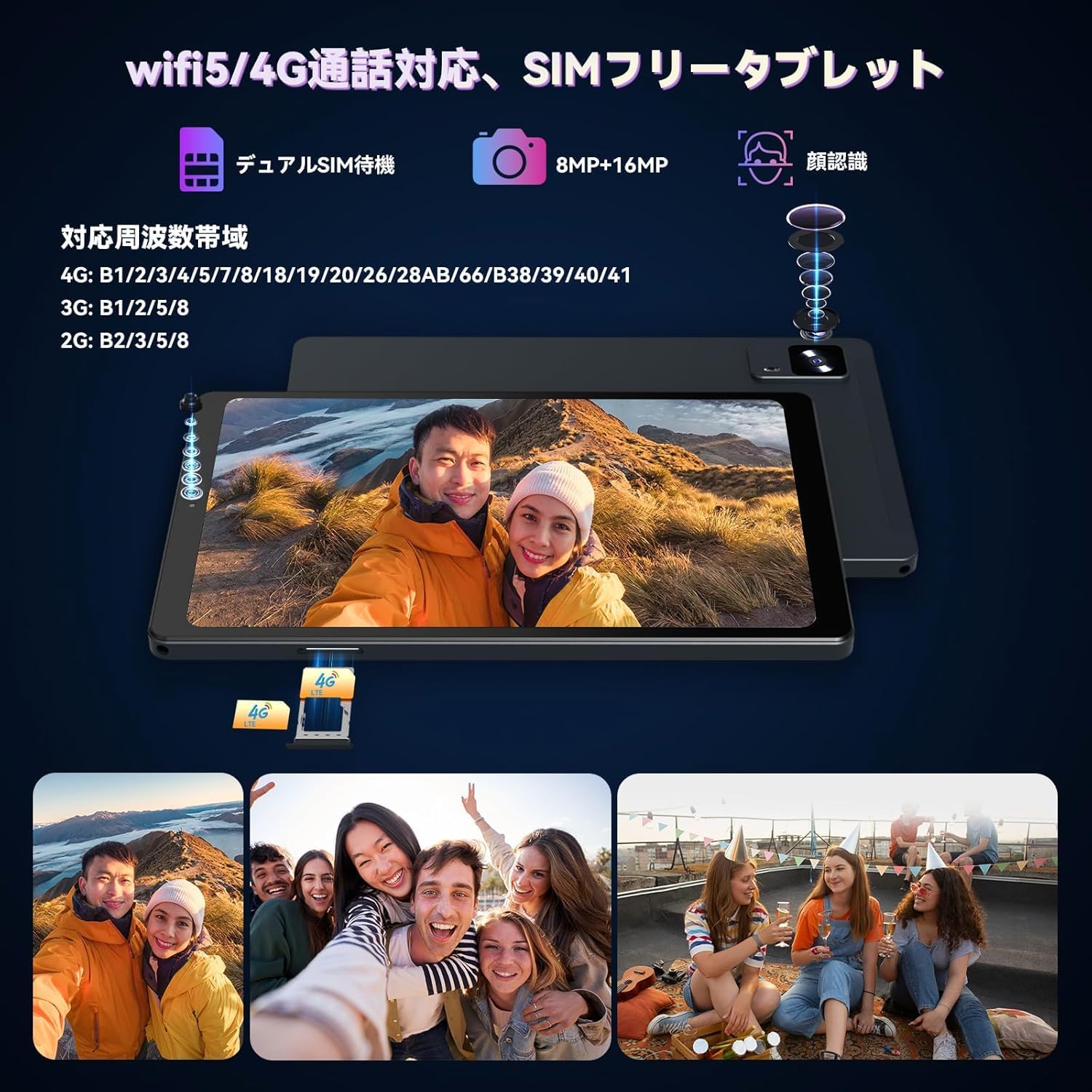
Image: The Alphawolf APad2 tablet showcasing its 8MP front camera and 16MP rear camera, along with an illustration of the face recognition feature in use.
Sensors and Navigation
The tablet integrates a high-precision 6-axis gyroscope (3-axis accelerometer and 3-axis gyroscope) for accurate motion sensing, enhancing gaming and navigation experiences. It also features GPS and an electronic compass for precise location services.

Image: A user playing a racing game on the Alphawolf APad2, illustrating the 6-axis gyroscope for enhanced control and haptic feedback.
Android 15 Features
Running on the latest Android 15 OS, the APad2 offers an optimized user experience with enhanced privacy protection, improved performance, an upgraded user interface, and advanced AI features. It also includes features like screen split for multitasking and wireless projection.

Image: The Alphawolf APad2 displaying various Android 15 features, including screen split, one-handed hold, and three-finger screenshot gesture.
മെയിൻ്റനൻസ്
ബാറ്ററി പരിചരണവും ചാർജിംഗും
The tablet is equipped with a 6500mAh lithium-ion battery, providing approximately 10 hours of usage. To ensure optimal battery life:
- Always use the Alphawolf original charging adapter (5V/2A) and USB Type-C cable.
- Avoid using the tablet for extended periods while it is charging, as this can generate excessive heat and potentially affect performance or battery health.
- ടാബ്ലെറ്റ് കടുത്ത താപനിലയിൽ തുറന്നുകാട്ടരുത്.

Image: The Alphawolf APad2 tablet connected to a Type-C charger, illustrating the 6500mAh battery and charging process.
ജനറൽ കെയർ
- Keep the tablet clean using a soft, dry cloth.
- ഉപകരണം താഴെയിടുകയോ ശക്തമായ ആഘാതങ്ങൾക്ക് വിധേയമാക്കുകയോ ചെയ്യുന്നത് ഒഴിവാക്കുക.
- Protect the screen with the included screen protector or a compatible case.
ട്രബിൾഷൂട്ടിംഗ്
If you encounter any issues with your Alphawolf APad2 tablet, please refer to the following common solutions or contact customer support.
പൊതുവായ പ്രശ്നങ്ങളും പരിഹാരങ്ങളും
- ഉപകരണം ഓണാക്കുന്നില്ല: ബാറ്ററി ചാർജ്ജ് ചെയ്തിട്ടുണ്ടെന്ന് ഉറപ്പാക്കുക. ചാർജർ കണക്റ്റ് ചെയ്ത് വീണ്ടും പവർ ചെയ്യാൻ ശ്രമിക്കുന്നതിന് മുമ്പ് കുറച്ച് മിനിറ്റ് കാത്തിരിക്കുക.
- സ്ക്രീൻ പ്രതികരിക്കുന്നില്ല: Try restarting the tablet by holding the power button. If unresponsive, use the reset pinhole (refer to the package contents diagram for location) with the provided SIM card pin.
- ജിപിഎസ് കൃത്യത: Some users have reported varying GPS accuracy. Ensure you are in an open area with clear sky view for optimal satellite reception. If issues persist, verify GPS settings and consider contacting support.
- സ്പീക്കർ വോളിയം: The speaker volume may be perceived as loud even at low settings. Adjust the volume to a comfortable level using the physical volume buttons.
- സ്ലോ ചാർജിംഗ്: The Alphawolf APad2 does not support fast charging. Charging times may vary. Ensure you are using the provided 5V/2A charger and cable.
- Connectivity Issues (Wi-Fi/4G LTE): Check if Wi-Fi is enabled and you are connected to the correct network. For 4G LTE, ensure your SIM card is properly inserted, activated, and your APN settings are correct.
For issues not listed here or if the problem persists, please contact Alphawolf customer support.
സ്പെസിഫിക്കേഷനുകൾ
| ഫീച്ചർ | വിശദാംശങ്ങൾ |
|---|---|
| ബ്രാൻഡ് | Alphawolf |
| മോഡൽ | APad2 |
| ഡിസ്പ്ലേ വലിപ്പം | 8.4 ഇഞ്ച് |
| ഡിസ്പ്ലേ റെസല്യൂഷൻ | 2560x1600 pixels (2.5K FHD IPS) |
| പ്രോസസ്സർ | MediaTek Helio G99 Octa-core (2.0, 2.2 GHz) |
| ജിപിയു | മാലി-ജി57 |
| റാം | 16GB (8GB ഫിസിക്കൽ + 8GB വെർച്വൽ) |
| ആന്തരിക സംഭരണം | 256 ജിബി |
| വികസിപ്പിക്കാവുന്ന സംഭരണം | മൈക്രോ എസ്ഡി കാർഡ് വഴി 2TB വരെ (പ്രത്യേകം വിൽക്കുന്നു) |
| ഓപ്പറേറ്റിംഗ് സിസ്റ്റം | ആൻഡ്രോയിഡ് 15 |
| ബാറ്ററി ശേഷി | 6500mAh ലിഥിയം അയൺ |
| ബാറ്ററി ലൈഫ് | ഏകദേശം 10 മണിക്കൂർ |
| മുൻ ക്യാമറ | 8എംപി |
| പിൻ ക്യാമറ | 16എംപി |
| കണക്റ്റിവിറ്റി | 4G LTE, Wi-Fi (802.11a/b/g/n/ac), Bluetooth 5.2 |
| സെൻസറുകൾ | 6-axis Gyroscope, GPS, Electronic Compass |
| തുറമുഖങ്ങൾ | യുഎസ്ബി ടൈപ്പ്-സി, 3.5 എംഎം ഹെഡ്ഫോൺ ജാക്ക് |
| അളവുകൾ | 21.8 x 13.8 x 4.9 സെ.മീ |
| ഭാരം | 680 ഗ്രാം |
| മറ്റ് സവിശേഷതകൾ | Widevine L1, GMS Certified, Face Recognition |
വാറൻ്റിയും പിന്തുണയും
Alphawolf is committed to providing excellent customer service. Your Alphawolf APad2 tablet comes with a 1-year quality guarantee from the date of purchase.
വാറൻ്റി കവറേജ്
In the event of initial defects or any product malfunctions during normal use within the warranty period, Alphawolf offers free repair or exchange services.
ഉപഭോക്തൃ പിന്തുണയും ബന്ധപ്പെടാനുള്ള വിവരങ്ങളും
If you have any questions, concerns, or require assistance, please do not hesitate to contact us. We have a dedicated repair center in Tokyo to provide prompt after-sales service.
ബന്ധപ്പെടാനുള്ള രീതികൾ:
- ആമസോൺ വഴി: Go to "Your Account" → "Order History" → Select the relevant order → "Order Details" → "Seller" → "Ask a Question".
- Alphawolf Official LINE ID: @915qjdmf
- ഇമെയിൽ: service@alphawolf.cc

Image: An illustration depicting customer support services, including contact methods and warranty information.
