ആമുഖം
This manual provides detailed instructions for the installation, operation, and maintenance of your MONTECH GF120 ARGB PWM 120mm Fan 3-in-1 pack. Please read this manual thoroughly before installation and use to ensure proper function and longevity of your product.
The MONTECH GF120 ARGB PWM fan is designed to deliver efficient cooling and vibrant ARGB lighting for your computer system. It features a hydraulic bearing for quiet operation and extended durability.
പാക്കേജ് ഉള്ളടക്കം
- 3 x MONTECH GF120 ARGB PWM 120mm Fans
- 1 x 6x6 Fan Hub
- Mounting Screws (for case and radiator mounting)
- ഉപയോക്തൃ മാനുവൽ (ഈ പ്രമാണം)
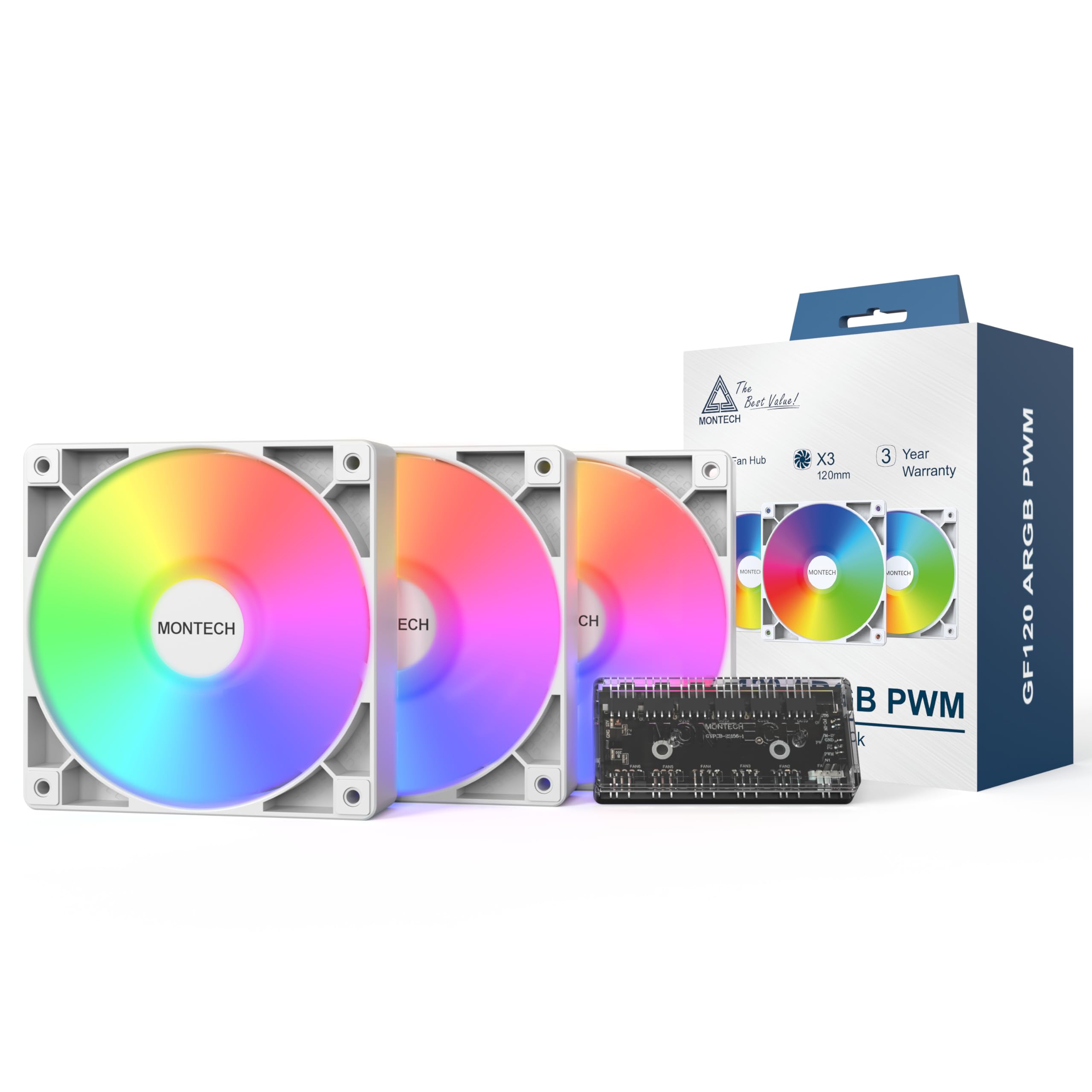
Image: Contents of the MONTECH GF120 ARGB PWM 120mm Fan 3-in-1 pack, showing three fans and the fan hub.
സുരക്ഷാ വിവരങ്ങൾ
- ഇൻസ്റ്റാൾ ചെയ്യുന്നതിനുമുമ്പ് നിങ്ങളുടെ കമ്പ്യൂട്ടർ സിസ്റ്റം പവർ ഓഫ് ചെയ്തിട്ടുണ്ടെന്നും വാൾ ഔട്ട്ലെറ്റിൽ നിന്ന് അൺപ്ലഗ് ചെയ്തിട്ടുണ്ടെന്നും ഉറപ്പാക്കുക.
- ഘടകങ്ങൾക്ക് കേടുപാടുകൾ സംഭവിക്കാതിരിക്കാൻ ശ്രദ്ധയോടെ കൈകാര്യം ചെയ്യുക.
- Refer to your motherboard manual for specific fan header locations and ARGB controller compatibility.
- Do not force connectors. Ensure correct orientation before plugging in.
- കുട്ടികൾക്ക് ലഭ്യമാകാതെ സൂക്ഷിക്കുക.
സജ്ജീകരണവും ഇൻസ്റ്റാളേഷനും
1. നിങ്ങളുടെ സിസ്റ്റം തയ്യാറാക്കുക
Before beginning installation, power off your computer and disconnect it from the power source. Open your computer case to access the fan mounting locations.
2. Mount the Fans
Identify the desired mounting locations for your fans (e.g., front, top, rear, bottom of the case, or on a radiator). Use the provided mounting screws to secure each fan. Ensure the fan's airflow direction (indicated by arrows on the fan frame) is appropriate for your system's cooling strategy.

Image: Diagram illustrating the airflow direction of the fan, typically indicated by arrows on the fan frame.

Image: Multiple GF120 fans installed within a computer case, showcasing their ARGB lighting effects.
3. Connect the Fans to the Hub
Connect each GF120 fan's 4-pin PWM cable and 3-pin ARGB cable to the corresponding ports on the included 6x6 Fan Hub. The hub allows for centralized control of fan speed and lighting.
4. Connect the Hub to the Motherboard
- പിഡബ്ല്യുഎം കണക്ഷൻ: Connect the 4-pin PWM cable from the fan hub to an available 4-pin fan header on your motherboard (e.g., "CPU_FAN", "SYS_FAN"). This allows your motherboard to control the fan speed.
- ARGB കണക്ഷൻ: Connect the 3-pin ARGB cable from the fan hub to an available 5V 3-pin ARGB header on your motherboard (e.g., "D_LED", "ARGB_HEADER"). Do not connect to a 12V 4-pin RGB header, as this will damage the LEDs.
- പവർ കണക്ഷൻ: Connect the SATA power cable from the fan hub to an available SATA power connector from your power supply unit (PSU).
Refer to your motherboard manual for the exact location of these headers.
5. കേബിൾ മാനേജ്മെന്റ്
Route all cables neatly to ensure proper airflow within your case and for a clean aesthetic. Close your computer case and reconnect the power.
പ്രവർത്തന നിർദ്ദേശങ്ങൾ
Fan Speed Control (PWM)
The GF120 fans utilize Pulse Width Modulation (PWM) technology, allowing your motherboard to precisely control their rotational speed between 800 and 1600 RPM. This enables dynamic adjustment of cooling performance based on system temperature, optimizing for either maximum airflow or quiet operation.
- Access your motherboard's BIOS/UEFI settings or use compatible software provided by your motherboard manufacturer to configure fan curves.
- Set fan speeds to increase with CPU or GPU temperature for effective cooling during heavy loads, and decrease for quieter operation during light tasks.
Image: Performance specifications including 66.3 CFM airflow, 1.55 mm H2O static pressure, 25.5 dBA noise level, and 800-1600 RPM fan speed.
ARGB ലൈറ്റിംഗ് നിയന്ത്രണം
The GF120 fans feature Addressable RGB (ARGB) lighting with 8 vibrant LEDs. The lighting effects are controlled via your motherboard's ARGB software (e.g., ASUS Aura Sync, MSI Mystic Light Sync, GIGABYTE RGB Fusion, ASRock Polychrome Sync) or a dedicated ARGB controller connected to the hub.
- നിങ്ങളുടെ മദർബോർഡിന് അനുയോജ്യമായ ARGB നിയന്ത്രണ സോഫ്റ്റ്വെയർ ഇൻസ്റ്റാൾ ചെയ്യുക.
- Use the software to customize lighting colors, patterns, and synchronization with other ARGB components in your system.
മെയിൻ്റനൻസ്
വൃത്തിയാക്കൽ
Regular cleaning helps maintain optimal performance and extends the lifespan of your fans.
- ആവൃത്തി: Clean fans every 3-6 months, or more frequently in dusty environments.
- നടപടിക്രമം:
- Power off your computer and unplug it from the wall.
- കമ്പ്യൂട്ടർ കേസ് തുറക്കുക.
- Use compressed air to blow dust off the fan blades and frame. Hold the fan blades gently to prevent them from spinning rapidly during cleaning, which can damage the bearings.
- For stubborn dust, use a soft, dry cloth or a cotton swab.
- Ensure all dust is removed from the fan and surrounding areas before closing the case.
ഹൈഡ്രോളിക് ബെയറിംഗുകൾ
The GF120 fans feature durable hydraulic bearings designed for long-term reliability and quiet operation. These bearings are pre-lubricated and generally do not require user maintenance or re-lubrication.

ചിത്രം: പൊട്ടിത്തെറിച്ചു view of the fan showing the hydraulic bearing components, highlighting its durable design for quiet operation and extended lifespan.
ട്രബിൾഷൂട്ടിംഗ്
| പ്രശ്നം | സാധ്യമായ കാരണം | പരിഹാരം |
|---|---|---|
| ഫാനുകൾ കറങ്ങുന്നില്ല |
|
|
| ARGB ലൈറ്റിംഗ് പ്രവർത്തിക്കുന്നില്ല. |
|
|
| അമിതമായ ശബ്ദം |
|
|
സ്പെസിഫിക്കേഷനുകൾ
| ഫീച്ചർ | സ്പെസിഫിക്കേഷൻ |
|---|---|
| ഉൽപ്പന്ന അളവുകൾ | 4.73"L x 0.99"W x 4.73"H (120mm x 25mm x 120mm) |
| ബ്രാൻഡ് | Montech |
| പവർ കണക്റ്റർ തരം | 4-Pin PWM |
| വാല്യംtage | 12 വോൾട്ട് (DC) |
| തണുപ്പിക്കൽ രീതി | വായു |
| അനുയോജ്യമായ ഉപകരണങ്ങൾ | Desktop, Graphic Cards |
| ശബ്ദ നില | 25.5 Decibels (max) |
| മെറ്റീരിയൽ | Acrylonitrile Butadiene Styrene, Plastic, Rubber |
| പരമാവധി റൊട്ടേഷണൽ സ്പീഡ് | 1600 ആർപിഎം |
| എയർ ഫ്ലോ കപ്പാസിറ്റി | മിനിറ്റിന് 66.3 ക്യുബിക് അടി (CFM) |
| സ്റ്റാറ്റിക് പ്രഷർ | 1.55 mm H2O |
| ഇനം മോഡൽ നമ്പർ | GF120W3IN1 |
| ഇനങ്ങളുടെ എണ്ണം | 3 (fans) + 1 (hub) |
വാറൻ്റിയും പിന്തുണയും
വാറൻ്റി വിവരങ്ങൾ
The MONTECH GF120 ARGB PWM 120mm Fan 3-in-1 pack is backed by a 3 വർഷത്തെ വാറൻ്റി വാങ്ങിയ തീയതി മുതൽ. സാധാരണ ഉപയോഗത്തിലുള്ള മെറ്റീരിയലുകളിലെയും ജോലികളിലെയും വൈകല്യങ്ങൾ ഈ വാറന്റി ഉൾക്കൊള്ളുന്നു. വാറന്റി ക്ലെയിമുകൾക്കായി നിങ്ങളുടെ വാങ്ങിയതിന്റെ തെളിവ് സൂക്ഷിക്കുക.
For detailed warranty terms and conditions, please refer to the official Montech webസൈറ്റ് അല്ലെങ്കിൽ ഉപഭോക്തൃ പിന്തുണയുമായി ബന്ധപ്പെടുക.
ഉപഭോക്തൃ പിന്തുണ
If you encounter any issues or have questions regarding your MONTECH GF120 ARGB PWM fans, please visit the official Montech webപിന്തുണാ ഉറവിടങ്ങൾ, പതിവുചോദ്യങ്ങൾ, ബന്ധപ്പെടാനുള്ള വിവരങ്ങൾ എന്നിവയ്ക്കുള്ള സൈറ്റ്.
Montech Official Webസൈറ്റ്: www.montechpc.com


