1. ആമുഖം
The OneOdio Focus A10 headphones offer a premium audio experience with advanced Hybrid Active Noise Cancelling (ANC) technology. Designed for comfort and versatility, these headphones provide Hi-Res Audio, extended battery life, and seamless connectivity for various uses, including travel, work, and daily listening.
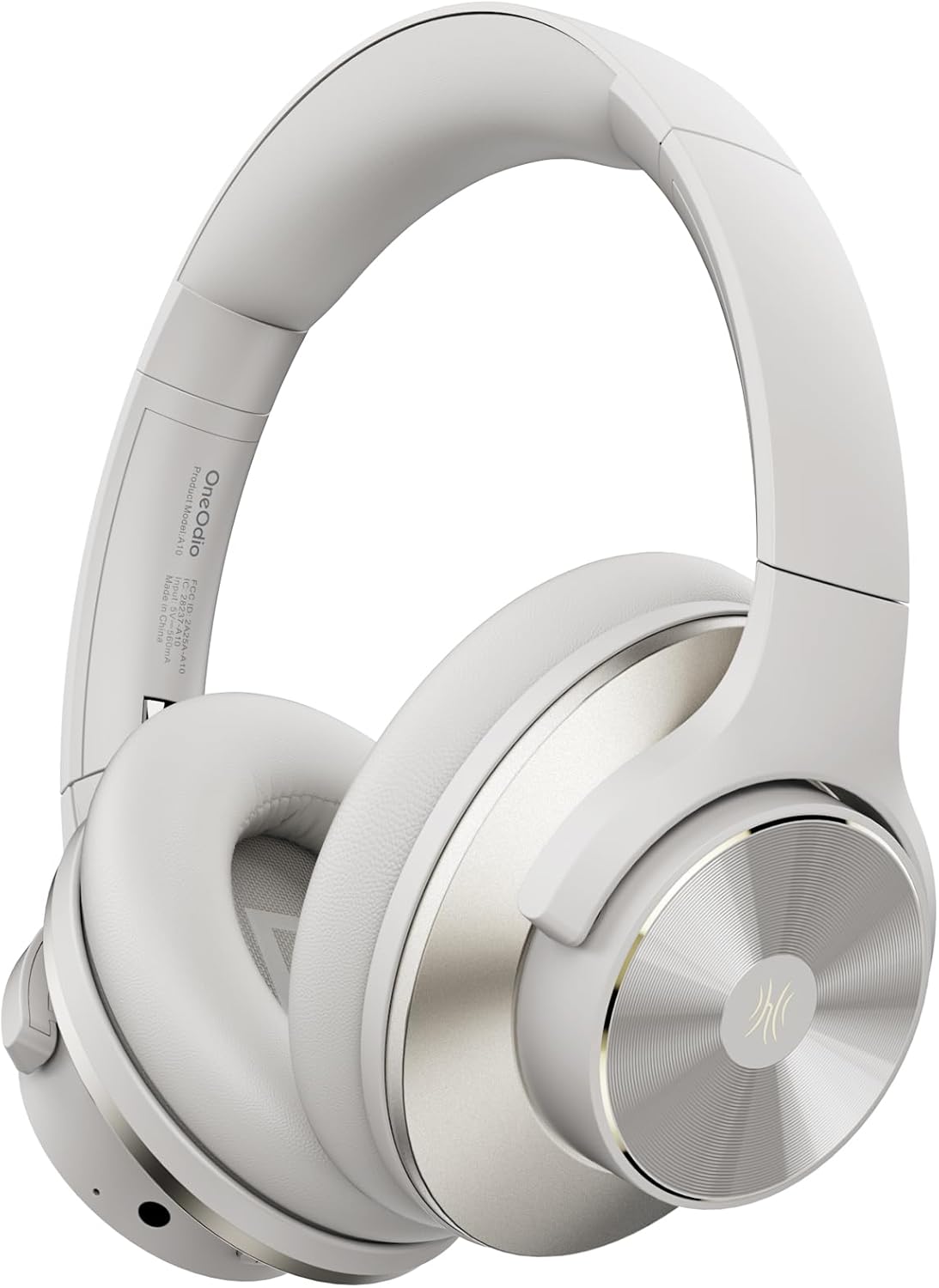
Figure 1: OneOdio Focus A10 Wireless Bluetooth Noise Cancelling Headphones.
2. ബോക്സിൽ എന്താണുള്ളത്?
Your OneOdio Focus A10 package includes the following items:
- 1 x OneOdio A10 Noise Cancelling Headphones
- 1 x Carrying Travel Case
- 1 x AUX 3.5mm Cable
- 1 x യുഎസ്ബി-സി ചാർജിംഗ് കേബിൾ
- 1 x ഉപയോക്തൃ മാനുവൽ

Figure 2: Included components with the OneOdio Focus A10 headphones.
3. ഉൽപ്പന്നം കഴിഞ്ഞുview
The Focus A10 headphones feature a sleek design with intuitive controls and comfortable materials.
3.1. Design and Comfort
The headphones are constructed with ultra-soft protein ear cushions and an adjustable headband for extended comfort. The ear shells feature a gold-colored metal finish with a classic CD pattern, enhancing both aesthetics and durability. The foldable design allows for easy storage and portability.

Figure 3: Comfortable fit and Hi-Res Audio experience.
3.2. നിയന്ത്രണങ്ങളും പോർട്ടുകളും
All controls are conveniently located on the earcups:
- പവർ ബട്ടൺ: Used to power the headphones on/off and initiate Bluetooth pairing.
- വോളിയം ബട്ടണുകൾ (+/-): ഓഡിയോ വോളിയം ക്രമീകരിക്കുന്നു.
- ANC ബട്ടൺ: Toggles between Hybrid Active Noise Cancelling, Transparency Mode, and Normal Mode.
- യുഎസ്ബി-സി പോർട്ട്: ഹെഡ്ഫോണുകൾ ചാർജ് ചെയ്യുന്നതിനായി.
- 3.5mm AUX ജാക്ക്: വയർഡ് ഓഡിയോ കണക്ഷന്.

ചിത്രം 4: വിശദമായി view ഹെഡ്ഫോൺ നിയന്ത്രണങ്ങളുടെയും പോർട്ടുകളുടെയും.
4. സജ്ജീകരണം
4.1. ഹെഡ്ഫോണുകൾ ചാർജ് ചെയ്യുന്നു
Connect the provided USB-C charging cable to the USB-C port on the headphone earcup and the other end to a compatible USB power source. A full charge takes approximately 2 hours.
4.2. ബ്ലൂടൂത്ത് ജോടിയാക്കൽ
- ഹെഡ്ഫോണുകൾ ഓഫാണെന്ന് ഉറപ്പാക്കുക.
- Press and hold the Power Button until the LED indicator flashes, indicating pairing mode.
- On your device (smartphone, tablet, computer), enable Bluetooth and search for "OneOdio Focus A10".
- Select the headphones from the list to connect. The LED indicator will turn solid blue once connected.
4.3. വയർഡ് കണക്ഷൻ
For a wired connection, plug the 3.5mm AUX cable into the headphone jack on the earcup and the other end into your audio source. This allows for lossless audio transmission and continued use even if the battery is depleted.

Figure 5: Bluetooth Dual Device Connection capability.
5. പ്രവർത്തന നിർദ്ദേശങ്ങൾ
5.1. പവർ ഓൺ/ഓഫ്
Press and hold the Power Button for approximately 3 seconds to power the headphones on or off.
5.2. വോളിയം നിയന്ത്രണം
Use the '+' and '-' buttons on the earcup to increase or decrease the volume.
5.3. ശബ്ദ നിയന്ത്രണ മോഡുകൾ
The ANC button allows you to cycle through three noise control modes:
- Hybrid Active Noise Cancelling (ANC): Reduces up to 95% of low-frequency ambient noise, ideal for immersive listening.
- സുതാര്യത മോഡ്: Amplifies ambient sounds, allowing you to hear your surroundings without removing the headphones.
- സാധാരണ മോഡ്: Disables ANC and Transparency Mode, providing standard audio playback.

Figure 6: Hybrid Active Noise Cancelling in action.
5.4. സംഗീത പ്ലേബാക്കും കോളുകളും
The headphones support standard music playback controls (play/pause, skip track) and call management (answer/end call) via the multi-function button (often the power button or a dedicated button, refer to the included manual for specific button functions). The built-in microphone ensures clear communication during calls.
Video 1: Demonstrates the ultra-soft ear and head padding, and active noise cancelling features of the OneOdio Focus A10 headphones.
6. സുഖവും ഫിറ്റും
The OneOdio Focus A10 headphones are designed for prolonged wear. The adjustable headband allows for a customized fit for various head sizes, while the soft ear cushions provide a comfortable seal around the ears, contributing to both sound isolation and overall comfort.

Figure 7: Foldable design for enhanced portability and storage.
7. പരിപാലനം
നിങ്ങളുടെ ഹെഡ്ഫോണുകളുടെ ദീർഘായുസ്സും ഒപ്റ്റിമൽ പ്രകടനവും ഉറപ്പാക്കാൻ:
- Clean the ear cushions and headband regularly with a soft, dry cloth.
- ഹെഡ്ഫോണുകൾ തീവ്രമായ താപനിലയിലോ, ഈർപ്പംയിലോ, നേരിട്ടുള്ള സൂര്യപ്രകാശത്തിലോ തുറന്നുകാട്ടുന്നത് ഒഴിവാക്കുക.
- Store the headphones in their provided carrying case when not in use to protect them from dust and damage.
- Do not attempt to disassemble or repair the headphones yourself, as this may void the warranty.
8. പ്രശ്നപരിഹാരം
If you encounter issues with your OneOdio Focus A10 headphones, try the following:
- ശക്തിയില്ല: ഹെഡ്ഫോണുകൾ പൂർണ്ണമായും ചാർജ്ജ് ചെയ്തിട്ടുണ്ടെന്ന് ഉറപ്പാക്കുക.
- No Sound (Bluetooth): Check if the headphones are properly paired with your device. Ensure the volume is not muted on either the headphones or your device.
- No Sound (Wired): Verify that the 3.5mm AUX cable is securely connected to both the headphones and the audio source.
- മോശം ശബ്ദ നിലവാരം: Ensure the audio source is playing high-quality audio. Try re-pairing the Bluetooth connection or using the wired connection.
- ANC പ്രവർത്തിക്കുന്നില്ല: Ensure the ANC mode is activated using the ANC button.
9 സ്പെസിഫിക്കേഷനുകൾ
| ഫീച്ചർ | സ്പെസിഫിക്കേഷൻ |
|---|---|
| മോഡലിൻ്റെ പേര് | ഫോക്കസ് A10 |
| ശബ്ദ നിയന്ത്രണം | Hybrid Noise Cancellation, Sound Isolation |
| ഫ്രീക്വൻസി പ്രതികരണം | 40000 Hz |
| സംവേദനക്ഷമത | 42 ഡി.ബി |
| ഹെഡ്ഫോണുകൾ ജാക്ക് | 3.5 mm ജാക്ക് |
| കണക്റ്റിവിറ്റി ടെക്നോളജി | വയർഡ്, വയർലെസ് |
| വയർലെസ് കമ്മ്യൂണിക്കേഷൻ ടെക്നോളജി | ബ്ലൂടൂത്ത് |
| ചാർജിംഗ് സമയം | 2 മണിക്കൂർ |
| ബാറ്ററി ലൈഫ് (ANC ഓഫാണ്) | 62 മണിക്കൂർ |
| Battery Life (Bluetooth 70% volume) | 50 മണിക്കൂർ |
| ബ്ലൂടൂത്ത് ശ്രേണി | 10 മില്ലിമീറ്റർ |
| ബ്ലൂടൂത്ത് പതിപ്പ് | 5.2 |
| ഓഡിയോ ഡ്രൈവർ വലിപ്പം | 40 മില്ലിമീറ്റർ |
| ഇനത്തിൻ്റെ ഭാരം | 280 ഗ്രാം (9.9 ഔൺസ്) |
| ഉൽപ്പന്ന അളവുകൾ | 7.72 x 6.65 x 3.35 ഇഞ്ച് |

Figure 8: Battery life details for various usage scenarios.
10. വാറൻ്റിയും പിന്തുണയും
For warranty information and customer support, please refer to the official OneOdio webസൈറ്റിൽ ബന്ധപ്പെടുകയോ അവരുടെ ഉപഭോക്തൃ സേവനവുമായി നേരിട്ട് ബന്ധപ്പെടുകയോ ചെയ്യുക. ഏതെങ്കിലും വാറന്റി ക്ലെയിമുകൾക്കായി നിങ്ങളുടെ വാങ്ങൽ രസീത് സൂക്ഷിക്കുക.


