Zyxel XGS1935-52HP 48-പോർട്ട് ഗിഗാബിറ്റ് ഇഥർനെറ്റ് സ്മാർട്ട് മാനേജ്ഡ് PoE+ സ്വിച്ച് യൂസർ മാനുവൽ
Model: XGS1935-52HP
1. ആമുഖം
This manual provides detailed instructions for the installation, operation, and maintenance of your Zyxel XGS1935-52HP 48-Port Gigabit Ethernet Smart Managed PoE+ Switch. This device is designed to provide reliable and high-performance network connectivity for various environments, supporting advanced features such as Power over Ethernet Plus (PoE+), 10 Gigabit SFP+ uplinks, and flexible management options including Zyxel Nebula Cloud.
പ്രധാന സവിശേഷതകൾ:
- 48 Gigabit Ethernet ports with PoE+ support.
- 375W total PoE+ power budget.
- 4 10 Gigabit SFP+ uplink slots for high-bandwidth applications.
- Smart management capabilities with an intuitive web ഇൻ്റർഫേസ്.
- Hybrid Cloud mode for unified network experience via Zyxel Nebula.
- Compact and quiet design suitable for various work environments.

Image: Multiple Zyxel XGS1935-52HP switches stacked, highlighting the silent and stable operation design.
2. ശാരീരിക വിവരണം
2.1 ഫ്രണ്ട് പാനൽ
The front panel of the XGS1935-52HP switch features 48 Gigabit Ethernet ports, each with LED indicators for link/activity and PoE status. Additionally, there are four 10 Gigabit SFP+ uplink ports for high-speed connections to other network devices or servers. System status LEDs provide information on power, system health, and cloud connectivity.

ചിത്രം: മുൻഭാഗം view of the Zyxel XGS1935-52HP switch, displaying all 48 Gigabit Ethernet ports and 4 SFP+ uplink ports, along with status LEDs.
2.2 പിൻ പാനൽ
The rear panel includes the AC power input connector, a grounding screw, and a Kensington lock slot for security. Ensure proper grounding for stable operation.

ചിത്രം: പിൻഭാഗം view of the Zyxel XGS1935-52HP switch, highlighting the AC power input, retainer holder, and grounding point.
3. സജ്ജീകരണം
3.1 അൺപാക്കിംഗും പരിശോധനയും
Carefully unpack the switch and all accessories. Verify that all items listed in the package contents are present and undamaged. If any item is missing or damaged, contact your vendor immediately.
3.2 ഇൻസ്റ്റലേഷൻ
The XGS1935-52HP switch can be installed on a desktop or mounted in a standard 19-inch equipment rack. Ensure adequate ventilation around the device to prevent overheating.
- ഡെസ്ക്ടോപ്പ് ഇൻസ്റ്റാളേഷൻ: Place the switch on a flat, stable surface. Attach the rubber feet (if provided) to the bottom of the switch.
- റാക്ക് മൗണ്ടിംഗ്: Use the provided rack-mount brackets and screws to secure the switch into a standard 19-inch equipment rack.
3.3 പവർ കണക്ഷൻ
- സ്വിച്ചിന്റെ പിൻ പാനലിലുള്ള പവർ ഇൻപുട്ടിലേക്ക് എസി പവർ കോർഡ് ബന്ധിപ്പിക്കുക.
- പവർ കോർഡിന്റെ മറ്റേ അറ്റം അനുയോജ്യമായ പവർ ഔട്ട്ലെറ്റിലേക്ക് പ്ലഗ് ചെയ്യുക.
- പവർ സ്രോതസ്സ് വോള്യം പാലിക്കുന്നുണ്ടെന്ന് ഉറപ്പാക്കുകtage requirements (100-240VAC, 50/60Hz).
3.4 നെറ്റ്വർക്ക് കണക്ഷൻ
- Connect network devices (computers, servers, access points) to the Gigabit Ethernet ports using standard RJ-45 cables.
- For high-speed uplinks, insert compatible SFP+ transceivers into the 10G SFP+ slots and connect fiber optic cables to other 10G devices.
3.5 പ്രാരംഭ കോൺഫിഗറേഷൻ
The switch can be configured via its web-based management interface or through the Zyxel Nebula Cloud platform. The intuitive setup wizard simplifies initial configuration tasks.

Image: A laptop and tablet displaying the Zyxel switch's intuitive web-based setup wizard, showing VLAN configuration steps.
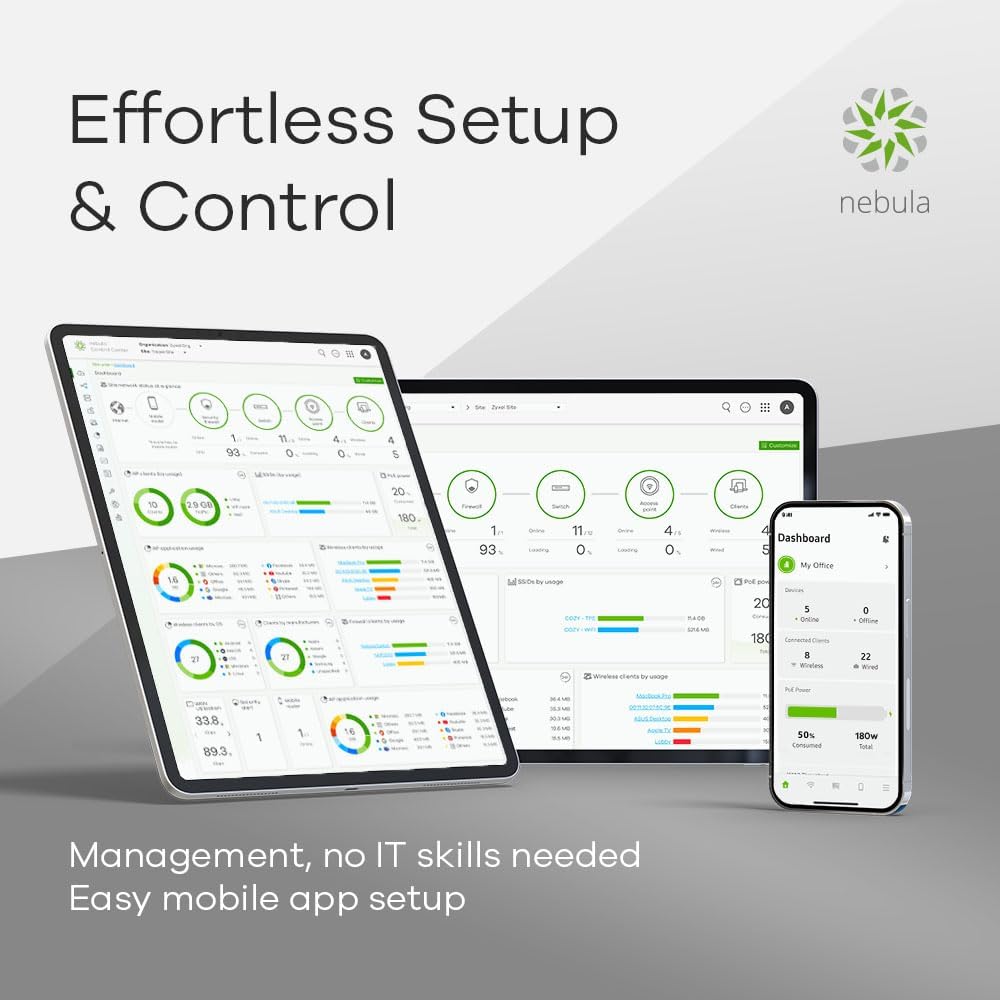
Image: Various devices (tablet, laptop, smartphone) displaying the Zyxel Nebula dashboard, illustrating effortless setup and control through the cloud.
4. സ്വിച്ച് പ്രവർത്തിപ്പിക്കൽ
4.1 Management Modes
The XGS1935-52HP supports two primary management modes:
- ഒറ്റപ്പെട്ട മോഡ്: Manage the switch directly via its local web interface. This mode provides full control over all switch features.
- Hybrid Cloud Mode (Zyxel Nebula): Integrate the switch into the Zyxel Nebula cloud platform for centralized management of wired, wireless, and security devices. This offers remote management and simplified deployment.
4.2 അടിസ്ഥാന നെറ്റ്വർക്ക് കോൺഫിഗറേഷൻ
ഉപയോഗിക്കുക web interface or Nebula dashboard to configure essential network settings:
- VLAN (വെർച്വൽ ലോക്കൽ ഏരിയ നെറ്റ്വർക്ക്): മെച്ചപ്പെട്ട സുരക്ഷയ്ക്കും പ്രകടനത്തിനുമായി നിങ്ങളുടെ നെറ്റ്വർക്കിനെ വിഭാഗീകരിക്കുക.
- QoS (സേവന നിലവാരം): Prioritize critical network traffic (e.g., voice, video) to ensure smooth operation.
- ലിങ്ക് സമാഹരണം: ബാൻഡ്വിഡ്ത്തും ആവർത്തനവും വർദ്ധിപ്പിക്കുന്നതിന് ഒന്നിലധികം ഫിസിക്കൽ ലിങ്കുകൾ ഒരൊറ്റ ലോജിക്കൽ ലിങ്കിലേക്ക് സംയോജിപ്പിക്കുക.
4.3 Power over Ethernet Plus (PoE+)
The switch provides PoE+ (802.3at) on its Gigabit Ethernet ports, delivering up to 30W per port with a total power budget of 375W. This allows you to power compatible devices such as IP cameras, wireless access points, and VoIP phones directly through the network cable.

Image: The Zyxel XGS1935-52HP switch positioned in a modern office setting, emphasizing its 375W PoE+ power budget and 802.3at support.
4.4 10 ഗിഗാബിറ്റ് SFP+ അപ്ലിങ്കുകൾ
The four 10 Gigabit SFP+ slots enable high-speed connectivity for demanding applications, providing a robust backbone for your network. These uplinks are essential for connecting to servers, network storage, or other core network devices where high throughput is critical.

Image: A stack of Zyxel switches, demonstrating flexible 10 Gigabit Ethernet support through the integrated SFP+ uplink ports.
5. പരിപാലനം
5.1 ഫേംവെയർ അപ്ഡേറ്റുകൾ
Zyxel പിന്തുണ പതിവായി പരിശോധിക്കുക. website for the latest firmware versions. Updating the firmware ensures optimal performance, security, and access to new features. Follow the instructions provided with the firmware update package carefully.
5.2 വൃത്തിയാക്കൽ
Keep the switch clean and free from dust. Use a soft, dry cloth to wipe the exterior. Do not use liquid or aerosol cleaners. Ensure ventilation openings are clear of obstructions.
5.3 പരിസ്ഥിതി പരിഗണനകൾ
Operate the switch within the specified temperature and humidity ranges. Avoid exposing the device to direct sunlight, excessive heat, or moisture. Ensure proper airflow around the unit.
6. പ്രശ്നപരിഹാരം
6.1 വൈദ്യുതി പ്രശ്നങ്ങൾ
- ശക്തിയില്ല: Verify the power cord is securely connected to both the switch and the power outlet. Check the power outlet with another device.
- സിസ്റ്റം LED ഓഫ്: If the system LED is off, ensure the power supply is functioning correctly.
6.2 നെറ്റ്വർക്ക് കണക്റ്റിവിറ്റി പ്രശ്നങ്ങൾ
- ലിങ്ക്/പ്രവർത്തനം ഇല്ല: Check the Ethernet cable connections. Ensure the connected device is powered on and functioning. Verify the link/activity LED on the switch port.
- മന്ദഗതിയിലുള്ള പ്രകടനം: Check for network congestion. Verify duplex settings on connected devices. Ensure cable quality.
6.3 PoE പ്രശ്നങ്ങൾ
- PoE ഉപകരണം ഓണാക്കുന്നില്ല: Ensure the connected device is PoE compatible (802.3af/at). Check the PoE status LED for the port. Verify the total PoE budget is not exceeded.
6.4 ആക്സസ് ചെയ്യുന്നു Web ഇൻ്റർഫേസ്
- Cannot Access: Ensure your computer is on the same subnet as the switch. Verify the switch's IP address. Check firewall settings on your computer.
7 സ്പെസിഫിക്കേഷനുകൾ
| ഫീച്ചർ | സ്പെസിഫിക്കേഷൻ |
|---|---|
| മോഡൽ നമ്പർ | എക്സ്ജിഎസ് 1935-52എച്ച്പി |
| ബ്രാൻഡ് | CYXEL |
| തുറമുഖങ്ങളുടെ എണ്ണം | 48 Gigabit Ethernet, 4 10G SFP+ |
| ഇൻ്റർഫേസ് തരം | SFP+, PoE+ |
| ഡാറ്റ കൈമാറ്റ നിരക്ക് | 1000 Megabits Per Second (Gigabit Ethernet) |
| PoE+ ബജറ്റ് | 375W |
| കേസ് മെറ്റീരിയൽ | ലോഹം |
| ഉൽപ്പന്ന അളവുകൾ | 6 x 7 x 5 ഇഞ്ച് |
| ഇനത്തിൻ്റെ ഭാരം | 12.19 പൗണ്ട് (5.54 കിലോഗ്രാം) |
| അനുയോജ്യമായ ഉപകരണങ്ങൾ | Computer, Desktop, Printer, Server |
| നിറം | കറുപ്പ് |
8. വാറൻ്റിയും പിന്തുണയും
Zyxel products are backed by a manufacturer's warranty. For specific warranty terms and conditions, please refer to the warranty card included with your product or visit the official Zyxel website. For technical support, firmware downloads, and additional resources, please visit the Zyxel support portal:
https://www.zyxel.com/us/en/support
When contacting support, please have your product model number (XGS1935-52HP) and serial number ready.


