ആമുഖം
Thank you for choosing the Spigen SA-TW P20 True Wireless Earbuds. This manual provides essential information for setting up, operating, maintaining, and troubleshooting your new earbuds. Please read it carefully to ensure optimal performance and longevity of your device.
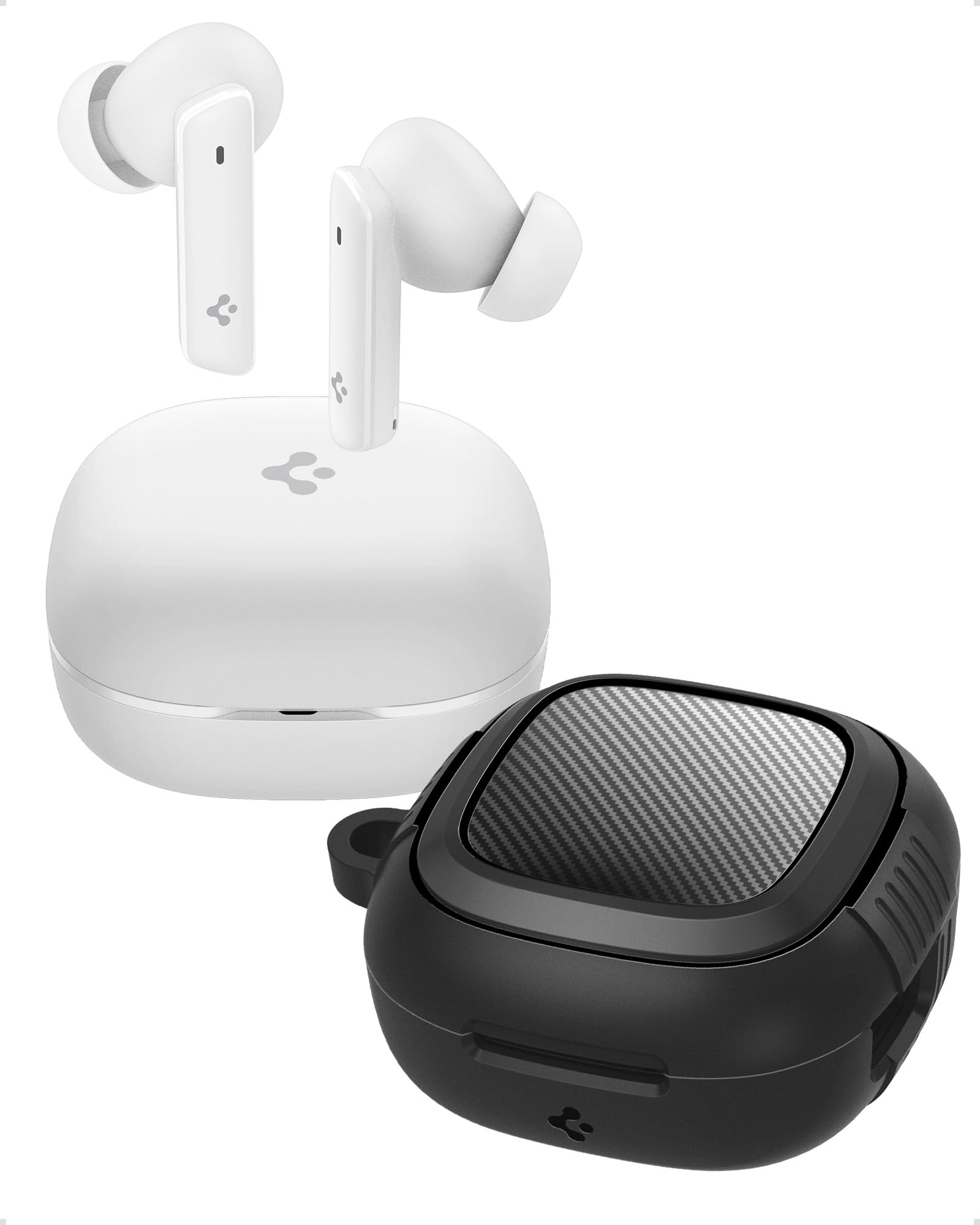
Image: Spigen SA-TW P20 True Wireless Earbuds in white, shown with their charging case.
ബോക്സിൽ എന്താണുള്ളത്
The Spigen SA-TW P20 package includes the following items:
- 1 SA-TW P20 True Wireless Earbuds (White)
- 1 Charging Case for SA-TW P20
- 1 Rugged Armor Case for SA-TW P20
- 1 യുഎസ്ബി ചാർജിംഗ് കേബിൾ
- 1 Set of Eartips (S/M - installed/L)

Image: The Spigen SA-TW P20 earbuds, their white charging case, and the included black Rugged Armor protective case.
ഉൽപ്പന്നം കഴിഞ്ഞുview
The SA-TW P20 earbuds are designed for high-fidelity audio and clear communication. They feature 10mm LCP Graphene Dynamic Drivers for precise sound reproduction and 6 high-sensitivity microphones for clear calls. The included Rugged Armor case provides enhanced protection for your charging case.
Rugged Armor Case
The Rugged Armor case is designed to safeguard your charging case from daily drops and scratches. It incorporates Air-Cushion Technology, an advanced corner system that absorbs impacts, turning drops into harmless bumps. The case also features a carbon fiber accent and includes a strap for easy portability.

ചിത്രം: വിശദമായ ഒരു ചിത്രം view of the Spigen Rugged Armor case, highlighting its Air-Cushion Technology for impact protection.

Image: An illustration showing the internal components of the 10mm LCP Graphene drivers, the touch control area on an earbud, and the Bluetooth v5.2 logo.
സജ്ജമാക്കുക
1. പ്രാരംഭ ചാർജിംഗ്
- രണ്ട് ഇയർബഡുകളും ചാർജിംഗ് കേസിൽ വയ്ക്കുക.
- യുഎസ്ബി ചാർജിംഗ് കേബിൾ കേസിലെ ചാർജിംഗ് പോർട്ടിലേക്കും ഒരു പവർ സ്രോതസ്സിലേക്കും ബന്ധിപ്പിക്കുക.
- Allow the earbuds and case to fully charge before first use. The LED indicator on the case will show charging status.
2. ബ്ലൂടൂത്ത് ജോടിയാക്കൽ
- ചാർജിംഗ് കേസ് തുറക്കുക. ഇയർബഡുകൾ സ്വയമേവ ജോടിയാക്കൽ മോഡിലേക്ക് പ്രവേശിക്കും.
- നിങ്ങളുടെ ഉപകരണത്തിൽ (സ്മാർട്ട്ഫോൺ, ടാബ്ലെറ്റ്, ലാപ്ടോപ്പ്), ബ്ലൂടൂത്ത് പ്രവർത്തനക്ഷമമാക്കുക.
- ഇതിനായി തിരയുക "Spigen SA-TW P20" in the list of available devices.
- Select "Spigen SA-TW P20" to connect. A voice prompt will confirm successful pairing.
3. Spigen Audio App Installation
- Download the "Spigen Audio" app from your device's app store (Google Play Store for Android, Apple App Store for iOS).
- ആപ്പ് ഇൻസ്റ്റാൾ ചെയ്ത് തുറക്കുക.
- Ensure your SA-TW P20 earbuds are connected via Bluetooth. The app will automatically detect and connect to your earbuds, allowing for customization.

Image: Screenshot of the Spigen Audio App interface, showing options for sound effects, noise change modes (Indoor, Commuting, Noisy), and channel balance.
പ്രവർത്തന നിർദ്ദേശങ്ങൾ
1. ടച്ച് നിയന്ത്രണങ്ങൾ
The SA-TW P20 earbuds feature intuitive touch controls. Specific functions can be customized via the Spigen Audio App.
- ഒറ്റ ടാപ്പ്: സംഗീതം പ്ലേ ചെയ്യുക/താൽക്കാലികമായി നിർത്തുക, കോൾ സ്വീകരിക്കുക/അവസാനിപ്പിക്കുക.
- രണ്ടുതവണ ടാപ്പ് ചെയ്യുക (ഇടത് ഇയർബഡ്): മുമ്പത്തെ ട്രാക്ക്.
- രണ്ടുതവണ ടാപ്പ് ചെയ്യുക (വലത് ഇയർബഡ്): അടുത്ത ട്രാക്ക്.
- ട്രിപ്പിൾ ടാപ്പ്: വോയിസ് അസിസ്റ്റന്റ് സജീവമാക്കുക.
- ലോംഗ് പ്രസ്സ്: Switch between ANC modes (ANC On, Transparency, Normal).
2. ആക്ടീവ് നോയ്സ് റദ്ദാക്കൽ (ANC) മോഡുകൾ
The earbuds offer up to 40dB of active noise cancellation with 3 Multi-Mode Hybrid Adaptive ANC settings.
- ANC Pro: ആഴത്തിലുള്ള ശ്രവണ അനുഭവത്തിനായി ആംബിയന്റ് നോയ്സ് 40dB വരെ കുറയ്ക്കുന്നു.
- സുതാര്യത മോഡ്: Allows you to hear your surroundings while listening to audio, enhancing awareness.
- സാധാരണ മോഡ്: Disables ANC and Transparency for standard audio playback.

Image: Black Spigen SA-TW P20 earbuds illustrating 40dB ANC Pro, Transparency Mode, 3 Multi-Mode Hybrid Adaptive ANC, and Clear Calls with 6 MICs.
3. ഗെയിമിംഗ് മോഡ് (കുറഞ്ഞ ലേറ്റൻസി)
Activate Gaming Mode for crystal-clear, low-latency audio transmission, ensuring an uninterrupted and synchronized gaming experience. This mode minimizes audio delay between your device and the earbuds.

Image: Spigen SA-TW P20 earbuds positioned near a smartphone displaying a game, emphasizing low latency for gaming.
4. കോൾ പ്രവർത്തനങ്ങൾ
Equipped with 6 high-sensitivity microphones, the SA-TW P20 ensures crystal-clear calls. Advanced noise-cancellation technology helps remove ambient noise, allowing your voice to be heard clearly in various environments.

Image: A close-up diagram of the Spigen SA-TW P20 earbuds, indicating the locations of the three microphones on each earbud (MIC 1, MIC 2, MIC 3).
5. Sound Customization (Spigen Audio App)
The Spigen Audio App allows you to personalize your listening experience. You can choose from 5 preset sound profiles or use the customizable equalizer to adjust audio settings to your preferences. The app also provides control over ANC modes and touch functions.
6 ബാറ്ററി ലൈഫ്
Enjoy up to 7.5 hours of playtime on a single charge. The charging case extends the total playtime to a generous 30 hours, allowing for multiple recharges on the go.

Image: White Spigen SA-TW P20 earbuds and their open charging case, with a prominent display of "30 HRS" indicating total battery life.
മെയിൻ്റനൻസ്
1. വൃത്തിയാക്കൽ
- മൃദുവായതും ഉണങ്ങിയതും ലിന്റ് രഹിതവുമായ ഒരു തുണി ഉപയോഗിച്ച് ഇയർബഡുകളും ചാർജിംഗ് കെയ്സും സൌമ്യമായി തുടയ്ക്കുക.
- കഠിനമായ രാസവസ്തുക്കൾ, ക്ലീനിംഗ് ലായകങ്ങൾ അല്ലെങ്കിൽ ശക്തമായ ഡിറ്റർജന്റുകൾ ഉപയോഗിക്കരുത്.
- ചെവിക്കുപ്പികൾ നീക്കം ചെയ്ത് ആവശ്യമെങ്കിൽ വെള്ളവും നേരിയ സോപ്പും ഉപയോഗിച്ച് പ്രത്യേകം വൃത്തിയാക്കുക, വീണ്ടും ഘടിപ്പിക്കുന്നതിന് മുമ്പ് അവ പൂർണ്ണമായും ഉണങ്ങിയെന്ന് ഉറപ്പാക്കുക.
- ശരിയായ ചാർജിംഗ് ഉറപ്പാക്കാൻ ഇയർബഡുകളിലെയും കേസിലെയും ചാർജിംഗ് കോൺടാക്റ്റുകൾ ഉണങ്ങിയ കോട്ടൺ സ്വാബ് ഉപയോഗിച്ച് പതിവായി വൃത്തിയാക്കുക.
2. ജല പ്രതിരോധം (IPX5)
The SA-TW P20 earbuds are IPX5 water-resistant, meaning they are protected against low-pressure water jets from any direction. This makes them suitable for workouts and light rain. However, they are not designed for submersion in water or exposure to heavy rain. Do not wear them while swimming or showering.
3. ബാറ്ററി പരിചരണം
- ബാറ്ററി ഇടയ്ക്കിടെ പൂർണ്ണമായും ഡിസ്ചാർജ് ചെയ്യുന്നത് ഒഴിവാക്കുക.
- ഉപയോഗത്തിലില്ലാത്തപ്പോൾ ഇയർബഡുകളും കെയ്സും തണുത്തതും വരണ്ടതുമായ സ്ഥലത്ത് സൂക്ഷിക്കുക.
- ബാറ്ററിയുടെ ആരോഗ്യം നിലനിർത്താൻ, ദീർഘനേരം ഉപയോഗിച്ചില്ലെങ്കിലും, ഉപകരണം പതിവായി ചാർജ് ചെയ്യുക.
ട്രബിൾഷൂട്ടിംഗ്
1. Earbuds Not Pairing
- രണ്ട് ഇയർബഡുകളും പൂർണ്ണമായും ചാർജ് ചെയ്തിട്ടുണ്ടെന്ന് ഉറപ്പാക്കുക.
- Place earbuds back into the charging case, close the lid, wait a few seconds, then open it again to re-enter pairing mode.
- നിങ്ങളുടെ ഉപകരണത്തിൽ ബ്ലൂടൂത്ത് ഓഫാക്കി ഓണാക്കുക.
- Forget "Spigen SA-TW P20" from your device's Bluetooth list and attempt to pair again.
2. ശബ്ദമില്ല അല്ലെങ്കിൽ കുറഞ്ഞ ശബ്ദം
- നിങ്ങളുടെ ഉപകരണത്തിലെയും ഇയർബഡുകളിലെയും വോളിയം ലെവൽ പരിശോധിക്കുക.
- നിങ്ങളുടെ ചെവിയിൽ ഇയർബഡുകൾ ശരിയായി ഘടിപ്പിച്ചിട്ടുണ്ടെന്ന് ഉറപ്പാക്കുക.
- ഇയർബഡ് നോസിലുകളിലും ഇയർടിപ്പുകളിലും അവശിഷ്ടങ്ങൾ ഉണ്ടെങ്കിൽ അവ വൃത്തിയാക്കുക.
- Try resetting the earbuds (refer to the Spigen Audio App or manufacturer's webനിർദ്ദിഷ്ട പുനഃസജ്ജീകരണ നിർദ്ദേശങ്ങൾക്കുള്ള സൈറ്റ്).
3. ചാർജിംഗ് പ്രശ്നങ്ങൾ
- ചാർജിംഗ് കേബിൾ കേസിലേക്കും പവർ സ്രോതസ്സിലേക്കും സുരക്ഷിതമായി ബന്ധിപ്പിച്ചിട്ടുണ്ടെന്ന് ഉറപ്പാക്കുക.
- വ്യത്യസ്തമായ ഒരു USB ചാർജിംഗ് കേബിളും പവർ അഡാപ്റ്ററും പരീക്ഷിച്ചുനോക്കൂ.
- ഇയർബഡുകളിലെയും കേസിനുള്ളിലെയും ചാർജിംഗ് കോൺടാക്റ്റുകൾ വൃത്തിയാക്കുക.
- ചാർജിംഗ് കേസിന് തന്നെ മതിയായ പവർ ഉണ്ടെന്ന് ഉറപ്പാക്കുക.
സ്പെസിഫിക്കേഷനുകൾ
| മോഡലിൻ്റെ പേര് | എസ്എ-ടിഡബ്ല്യു പി20 |
| ശബ്ദ നിയന്ത്രണം | ആക്ടീവ് നോയ്സ് റദ്ദാക്കൽ (40dB വരെ) |
| കണക്റ്റിവിറ്റി ടെക്നോളജി | വയർലെസ്സ് (ബ്ലൂടൂത്ത് 5.2) |
| ഓഡിയോ ഡ്രൈവർ തരം | 10mm LCP Graphene Dynamic Driver |
| മൈക്രോഫോണുകൾ | 6 (വ്യക്തമായ കോളുകൾക്ക്) |
| ബാറ്ററി ലൈഫ് (ഇയർബഡുകൾ) | 7.5 മണിക്കൂർ വരെ |
| ആകെ പ്ലേടൈം (കേസിനൊപ്പം) | 30 മണിക്കൂർ വരെ |
| ജല പ്രതിരോധം | IPX5 (Sweatproof, Water Resistant) |
| നിയന്ത്രണ രീതി | സ്പർശിക്കുക |
| അനുയോജ്യമായ ഉപകരണങ്ങൾ | Cellphones, Tablets, Laptops, Gaming Consoles |
| മെറ്റീരിയൽ | പ്ലാസ്റ്റിക്, സിലിക്കൺ |
| ഉൽപ്പന്ന അളവുകൾ | 5.5 x 5.51 x 2.9 സെ.മീ |
| ഇനത്തിൻ്റെ ഭാരം | 91.1 ഗ്രാം |
| മാതൃരാജ്യം | ചൈന |
സുരക്ഷാ വിവരങ്ങൾ
- ഇയർബഡുകളോ ചാർജിംഗ് കേസോ ഉയർന്ന താപനിലയിൽ തുറന്നുകാട്ടരുത്.
- ഉപകരണത്തിൽ വീഴ്ത്തുകയോ അമിതമായ ബലം പ്രയോഗിക്കുകയോ ചെയ്യുന്നത് ഒഴിവാക്കുക.
- കുട്ടികൾക്കും വളർത്തുമൃഗങ്ങൾക്കും ലഭ്യമാകാതെ സൂക്ഷിക്കുക.
- ഉൽപ്പന്നം ഡിസ്അസംബ്ലിംഗ് ചെയ്യാനോ പരിഷ്ക്കരിക്കാനോ ശ്രമിക്കരുത്. ഇത് വാറന്റി അസാധുവാക്കും.
- നൽകിയിരിക്കുന്ന ചാർജിംഗ് കേബിളോ സാക്ഷ്യപ്പെടുത്തിയ തത്തുല്യമായതോ മാത്രം ഉപയോഗിക്കുക.
- ഉച്ചത്തിലുള്ള ശബ്ദങ്ങൾ ദീർഘനേരം കേൾക്കുന്നത് കേൾവിക്ക് കേടുപാടുകൾ വരുത്തിയേക്കാം. സുരക്ഷിതമായ തലത്തിലേക്ക് ശബ്ദം ക്രമീകരിക്കുക.
വാറൻ്റിയും പിന്തുണയും
വാറൻ്റി നയം
Refunds or exchanges are not allowed after shrink wrap removal. For products with shrink wrapping already removed upon receipt, please request an immediate exchange.
ഉപഭോക്തൃ പിന്തുണ
For further assistance, technical support, or warranty inquiries, please contact Spigen customer support:
- ഇമെയിൽ: spigen.support@spigen.com
- നിർമ്മാതാവ്: Spigen Korea Co.,Ltd.
- ഇറക്കുമതിക്കാരൻ/പാക്കർ (ഇന്ത്യ): Spigen India Pvt. Ltd., No.295-296, Ecotech-1, Extension, Greater Noida, UP


