1. ഉൽപ്പന്നം കഴിഞ്ഞുview
The ARENTI Baby Monitor D3 Kit provides comprehensive monitoring for your baby, combining a 2K/3MP WiFi 6 camera with a 5-inch wireless LCD screen and smartphone app access. It features advanced functionalities such as super night vision, crying detection, auto tracking, and environmental sensors for temperature and humidity.

Image: The ARENTI Baby Monitor D3 Kit, showing the camera, the 5-inch LCD monitor, and a smartphone screen displaying the live feed from the camera.
പാക്കേജ് ഉള്ളടക്കം
- ARENTI Baby Camera (1 unit)
- 5-inch Wireless LCD Monitor (1 unit)
- Power Adapters (for camera and monitor)
- മൗണ്ടിംഗ് സ്ക്രൂ കിറ്റ്
- നിർദ്ദേശ മാനുവൽ (ഈ പ്രമാണം)
2. സജ്ജീകരണ ഗൈഡ്
2.1 ക്യാമറ പ്ലെയ്സ്മെന്റും മൗണ്ടിംഗും
Position the camera in a location that provides a clear view of your baby. Ensure it is out of reach of children and pets. The camera can be placed on a flat surface or wall-mounted using the included screw kit.
- പരന്ന ഉപരിതല സ്ഥാനം: Place the camera on a stable surface such as a dresser or shelf, ensuring it has a clear line of sight to the crib.
- മതിൽ മൗണ്ടിംഗ്: Use the provided mounting screws to securely attach the camera to a wall. Ensure the camera is positioned at an optimal height and distance for monitoring.

ചിത്രം: ഉദാamples of camera placement, including tabletop and wall-mounted options, and a parent viewമോണിറ്റർ ഓണാക്കുന്നു.
2.2 പവർ കണക്ഷൻ
Connect the camera and the monitor to their respective power adapters and plug them into a standard electrical outlet. The camera requires a continuous power supply for operation.
2.3 Initial Pairing and Network Connection
The camera and monitor are typically pre-paired. If re-pairing is needed, refer to the monitor's menu for pairing options. For smartphone app access, ensure your home Wi-Fi network is 2.4GHz. The monitor and camera utilize Wi-Fi connectivity for advanced features and remote access.
- Download the ARENTI app from your smartphone's app store.
- Follow the in-app instructions to add your camera and connect it to your Wi-Fi network.

Image: Illustration of how the baby monitor can be accessed via a mobile phone app (2.4G Wi-Fi), the dedicated monitor (FHSS), and PC access for office use.
3. പ്രവർത്തന നിർദ്ദേശങ്ങൾ
3.1 Monitor and App Interface
The 5-inch LCD monitor provides a direct view of your baby. The smartphone app offers additional control and remote viewing capabilities. Both interfaces allow access to various settings and features.

Image: The monitor's menu and multi-function buttons, showing options for playback, volume, brightness, and settings.
3.2 Remote Pan-Tilt-Zoom (PTZ)
ക്യാമറ നിയന്ത്രിക്കുക viewing angle remotely using the monitor or the smartphone app. The camera supports 355° pan, 60° tilt, and 4X digital zoom to cover every angle of the room.
3.3 ടു-വേ ഓഡിയോ
Utilize the two-way audio feature to communicate with your baby or other individuals in the room. Press and hold the microphone button on the monitor or use the talk function in the app.

Image: A baby crying in a crib with a speech bubble saying "Mommy. I am hungry." and a parent in a kitchen speaking into the monitor with a speech bubble saying "Hi honey, I am coming soon.", illustrating the two-way audio feature.
3.4 നൈറ്റ് വിഷൻ
The camera automatically switches to infrared night vision in low-light conditions, providing clear video up to 33 feet. This ensures continuous monitoring even in a dark room.

Image: A child sleeping peacefully in a dimly lit room, demonstrating the clarity of the infrared night vision feature.
3.5 സ്മാർട്ട് ഡിറ്റക്ഷൻ സവിശേഷതകൾ
- Crying & Sound Detection: Receive alerts when your baby cries or other significant sounds are detected.
- Motion & Danger Zone Detection: Get notifications for movement within the camera's view or if your baby enters a predefined danger zone. The camera also supports auto-tracking of detected motion.
- താപനിലയും ഈർപ്പവും കണ്ടെത്തൽ: Monitor the nursery's environment with built-in sensors, receiving alerts if conditions fall outside a comfortable range.
- Feeding Reminders: Set up reminders to help maintain your baby's feeding schedule.

Image: A baby crawling on the floor with a small dog, illustrating the motion detection and auto-tracking features with a smartphone displaying an alarm message.
3.6 Storage and Privacy
The monitor supports both Cloud Storage (subscription may apply) and local Micro SD card storage (up to 256GB, sold separately) for recording video. Videos can be played back and exported in MP4 format.
The system employs bank-level encryption for data security. You can also control external network access to the camera from the monitor, ensuring privacy.

Image: The monitor's 'Safety Protection' screen, demonstrating the ability to toggle external network access and view a log of network visits to the camera.
4. പരിപാലനം
4.1 വൃത്തിയാക്കൽ
- Wipe the camera lens and monitor screen with a soft, dry, lint-free cloth.
- ലിക്വിഡ് ക്ലീനറുകളോ എയറോസോൾ സ്പ്രേകളോ ഉപകരണത്തിൽ നേരിട്ട് ഉപയോഗിക്കരുത്.
4.2 SD കാർഡ് മാനേജ്മെന്റ്
- Regularly check the storage capacity of your Micro SD card.
- Format the SD card periodically through the monitor or app settings to maintain optimal performance.
- Replace the SD card if it becomes corrupted or fails to record.
5. പ്രശ്നപരിഹാരം
If you encounter issues with your ARENTI Baby Monitor, refer to the following common solutions:
- വൈദ്യുതിയില്ല/ഉപകരണമില്ല ഓണാകുന്നില്ല: Ensure both the camera and monitor are securely connected to their power adapters and plugged into working electrical outlets.
- No Signal/Disconnected: If the monitor loses signal, try unplugging and re-plugging the camera to reset the connection. Ensure the camera is within range of the monitor and your Wi-Fi router.
- മോശം വീഡിയോ നിലവാരം: നിങ്ങളുടെ വൈഫൈ സിഗ്നൽ ശക്തി പരിശോധിക്കുക. ക്യാമറ ലെൻസ് വൃത്തിയുള്ളതാണെന്നും തടസ്സങ്ങളില്ലെന്നും ഉറപ്പാക്കുക.
- Poor Audio Quality/Two-Way Talk Issues: Ensure there are no obstructions near the microphone or speaker on both the camera and monitor. Adjust volume settings on the monitor and app.
- PTZ Control Unresponsive: If the pan-tilt-zoom controls are not responding smoothly, ensure you are pressing and holding the directional arrows firmly on the monitor, or try controlling via the smartphone app.
- SD കാർഡ് തിരിച്ചറിഞ്ഞിട്ടില്ല: Ensure the Micro SD card is inserted correctly. Try formatting the card through the device settings. If the issue persists, try a different compatible Micro SD card (up to 256GB).
- ആപ്പ് കണക്റ്റിവിറ്റി പ്രശ്നങ്ങൾ: Verify your smartphone is connected to a stable internet connection. Ensure the camera is connected to a 2.4GHz Wi-Fi network. Restart the app and the camera.
6 സ്പെസിഫിക്കേഷനുകൾ
| ഫീച്ചർ | വിശദാംശങ്ങൾ |
|---|---|
| ബ്രാൻഡ് | ആരന്റി |
| മോഡൽ | D3 Kit |
| വീഡിയോ ക്യാപ്ചർ റെസല്യൂഷൻ | 1296p (2K/3MP) |
| പരമാവധി Webക്യാമറ ഇമേജ് റെസല്യൂഷൻ | 3 എം.പി |
| ഡിസ്പ്ലേ സ്ക്രീൻ വലിപ്പം | 5-ഇഞ്ച് എൽസിഡി |
| കണക്റ്റിവിറ്റി ടെക്നോളജി | Wireless (Wi-Fi 6) |
| കണക്റ്റിവിറ്റി പ്രോട്ടോക്കോൾ | വൈഫൈ |
| പവർ ഉറവിടം | കോർഡഡ് ഇലക്ട്രിക് |
| ഇൻഡോർ/ഔട്ട്ഡോർ ഉപയോഗം | ഇൻഡോർ |
| മൗണ്ടിംഗ് തരം | Wall Mount, Flat Surface |
| Viewing ആംഗിൾ | 100 ഡിഗ്രി |
| നൈറ്റ് വിഷൻ റേഞ്ച് | 33 അടി |
| ലോ ലൈറ്റ് ടെക്നോളജി | രാത്രി നിറം |
| സൂം തരം | Digital Zoom (4X) |
| അലേർട്ട് തരം | ഓഡിയോയും ചലനവും |
| ഫ്ലാഷ് മെമ്മറി തരം | മൈക്രോ എസ്.ഡി |
| ഫ്ലാഷ് മെമ്മറി പിന്തുണയ്ക്കുന്ന പരമാവധി വലുപ്പം | 256 ജിബി |
| അനുയോജ്യമായ ഉപകരണങ്ങൾ | Google അസിസ്റ്റന്റ്, ആമസോൺ അലക്സ |
| നിയന്ത്രണ രീതി | App, Monitor |
7. വാറൻ്റിയും പിന്തുണയും
7.1 ഉൽപ്പന്ന വാറന്റി
The ARENTI Baby Monitor D3 Kit typically includes a 1-year manufacturer's warranty. For specific terms and conditions, please refer to the warranty card included in your package or contact ARENTI customer support.
Extended protection plans (2-Year or 3-Year) may be available for purchase separately.
7.2 റിട്ടേൺ പോളിസി
This product is eligible for a 90-day return or replacement policy from the date of purchase. Please consult your retailer's return policy for detailed instructions.
7.3 ഉപഭോക്തൃ പിന്തുണ
For technical assistance, troubleshooting, or general inquiries, please contact ARENTI's professional support team.
- പ്രവർത്തന സമയം: തിങ്കൾ - വെള്ളി, രാവിലെ 9 മുതൽ വൈകുന്നേരം 5 വരെ (പസഫിക് സമയം)
- പ്രതികരണ സമയം: Replies typically within 24 hours.
- ഓൺലൈൻ ഉറവിടങ്ങൾ: Visit the official ARENTI store for FAQs and additional support information: ARENTI Store
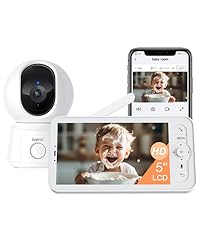
Image: Visual representation of the professional support team, highlighting their availability and response time.


