1. ആമുഖം
This manual provides detailed instructions for the operation and maintenance of your SEMIER Digital AM FM SW Movie Video Radio with Bluetooth. This versatile device offers a wide range of entertainment options, including AM, FM, and SW radio reception, video playback, MP3 music, picture browsing, e-book reading, and Bluetooth speaker functionality. Please read this manual thoroughly to ensure proper use and to maximize your enjoyment of the product.
2. ബോക്സിൽ എന്താണുള്ളത്?
- AM FM SW Video Radio (1 unit)
- 1200 mAh Rechargeable Battery (3 units)
- യുഎസ്ബി ചാർജിംഗ് കേബിൾ (1 യൂണിറ്റ്)
- ഉപയോക്തൃ മാനുവൽ (1 യൂണിറ്റ്)
3. ഉൽപ്പന്നം കഴിഞ്ഞുview
The SEMIER Digital AM FM SW Movie Video Radio is designed for portable entertainment, featuring a compact size and a clear 4.3-inch screen. Below are key features and components of the device.
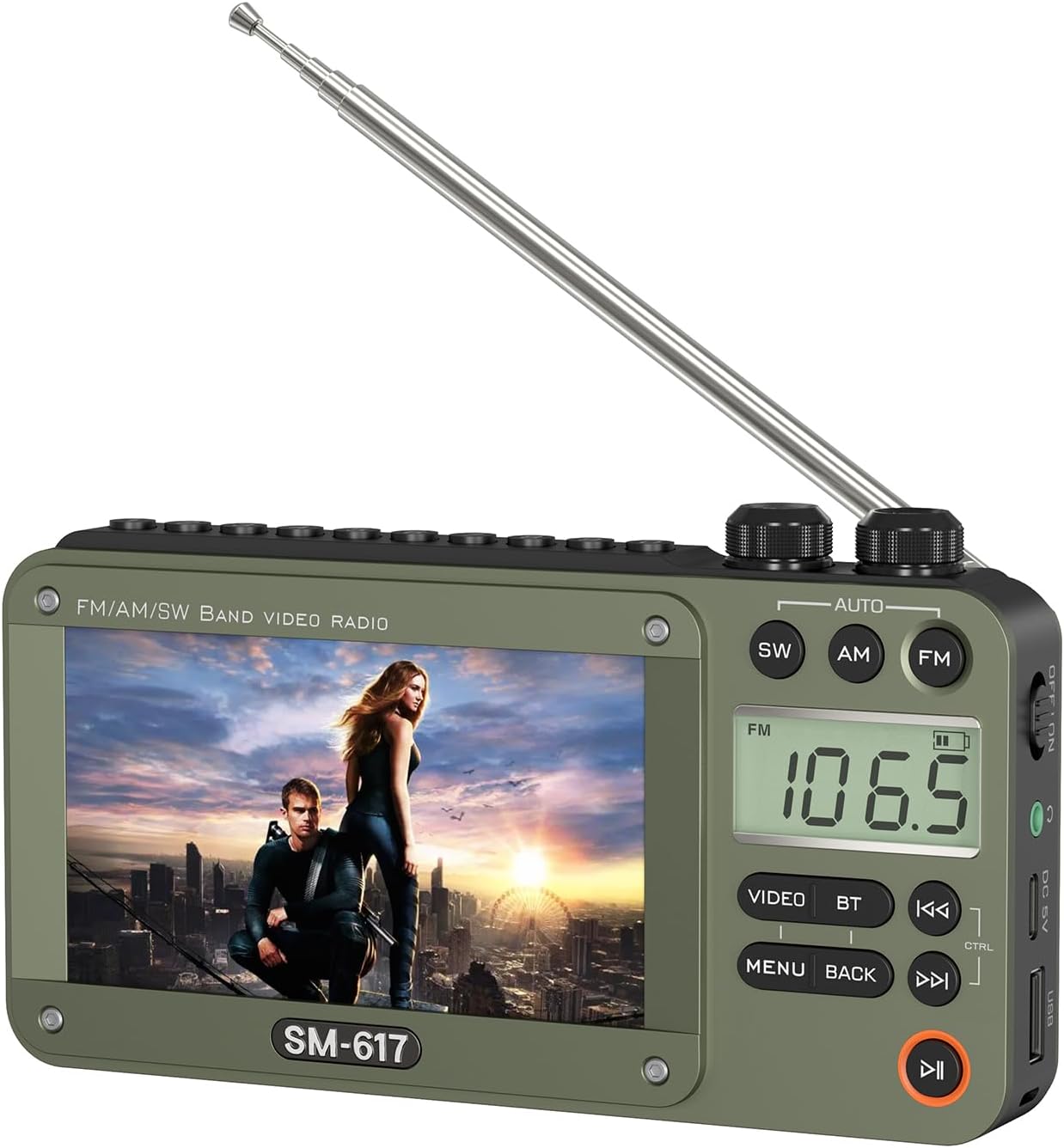
ഫ്രണ്ട് view of the SEMIER Digital AM FM SW Movie Video Radio, showcasing its 4.3-inch screen and control buttons.
എ വിശദമായി view of the 4.3-inch display, which supports 720p and 1080p high-definition video playback.

വശം view showing the USB port, DC 5V charging port, 3.5mm headphone jack, and power switch.

മുകളിൽ view highlighting the tuning and volume control knobs for easy adjustment.

വിശദമായി view of the control buttons including Video, BT (Bluetooth), Menu, Back, and playback controls.
4. സജ്ജീകരണം
4.1 ബാറ്ററി ഇൻസ്റ്റാളേഷൻ
The device requires three 1200mAh lithium batteries (included). To install, open the battery compartment cover on the back of the radio. Insert the batteries according to the polarity indicators (+/-) inside the compartment. Close the cover securely.

Illustration of inserting the rechargeable batteries into the dedicated compartment.
4.2 ആന്റിന എക്സ്റ്റൻഷൻ
For optimal radio reception, extend the telescopic antenna fully. The antenna can be rotated and angled to improve signal strength.
4.3 പവർ ഓൺ/ഓഫ്
Locate the power switch on the side of the device. Slide the switch to the 'ON' position to power on the radio. To power off, slide the switch to the 'OFF' position.
5. പ്രവർത്തന നിർദ്ദേശങ്ങൾ
This section details the various functions of your SEMIER radio. For a visual guide, please refer to the official product video below.
Official product video demonstrating key features including radio reception, media playback, and Bluetooth functionality.
5.1 Radio Functions (AM/FM/SW)
To select a radio band, press the corresponding `SW`, `AM`, or `FM` button on the device. Use the `TUN` (Tuning) knob to manually adjust the frequency. For automatic station scanning, press the `AUTO` button. The radio will scan and save available stations.

The radio features excellent reception capabilities across AM, FM, and SW bands, enhanced by a long antenna and advanced DSP chip.
5.2 Media Playback (Video, MP3, Photo)
Insert a USB drive or Micro SD card into the designated slot. The device supports various video formats (RM, AVI, MKV, FLV, MPG, MP4, DAT, MOV, 3GP), MP3 audio, and common image formats. Navigate through the on-screen menu using the `MENU` and `BACK` buttons, and the playback controls (`PLAY/PAUSE`, `PREVIOUS`, `NEXT`) to select and play your desired media.

The device supports playback from USB drives and TF (Micro SD) cards for videos, MP3 music, pictures, and e-books.
5.3 ബ്ലൂടൂത്ത് സ്പീക്കർ പ്രവർത്തനം
To use the device as a Bluetooth speaker, press the `BT` button. The screen will display "BLUE" indicating Bluetooth mode. On your smartphone or computer, search for available Bluetooth devices and select "SM-617" (or similar model name) to pair. Once connected, you can stream audio wirelessly to the radio.

Effortlessly stream music from your phone or computer using Bluetooth 5.0 connectivity.
5.4 ഹെഡ്ഫോൺ ഉപയോഗം
For private listening, plug any standard 3.5mm headphones into the headphone jack located on the side of the device. The internal speaker will automatically mute when headphones are connected.

The 3.5mm earphone jack allows for personal audio enjoyment.
6. പരിപാലനം
To ensure the longevity and optimal performance of your SEMIER radio, follow these maintenance guidelines:
- വൃത്തിയാക്കൽ: Use a soft, dry cloth to clean the exterior of the device. Avoid using abrasive cleaners or solvents, which may damage the surface.
- ബാറ്ററി കെയർ: Recharge the batteries regularly, especially if the device will not be used for an extended period. Use only the provided USB charging cable or a compatible 5V DC power source.
- സംഭരണം: നേരിട്ടുള്ള സൂര്യപ്രകാശം, തീവ്രമായ താപനില, ഉയർന്ന ഈർപ്പം എന്നിവയിൽ നിന്ന് മാറി തണുത്തതും വരണ്ടതുമായ സ്ഥലത്ത് റേഡിയോ സൂക്ഷിക്കുക.
- കൈകാര്യം ചെയ്യൽ: ഉപകരണം താഴെയിടുകയോ ശക്തമായ ആഘാതങ്ങൾക്ക് വിധേയമാക്കുകയോ ചെയ്യുന്നത് ഒഴിവാക്കുക, കാരണം ഇത് ആന്തരിക ഘടകങ്ങളെ തകരാറിലാക്കാം.
7. പ്രശ്നപരിഹാരം
If you encounter issues with your SEMIER radio, please refer to the following common troubleshooting steps:
- ഉപകരണം പവർ ഓൺ ചെയ്യുന്നില്ല: Ensure the batteries are correctly installed and fully charged. Connect the device to a power source using the USB charging cable to check if it powers on while charging.
- മോശം റേഡിയോ സ്വീകരണം: Fully extend the telescopic antenna. Try repositioning the radio or the antenna to find a stronger signal. Ensure you are within range of broadcast signals.
- മാധ്യമങ്ങൾ fileകളിക്കുന്നില്ല: Verify that the USB drive or Micro SD card is properly inserted. Check if the media files are in a supported format (e.g., RM, AVI, MKV, FLV, MPG, MP4, DAT, MOV, 3GP for video; MP3 for audio). Ensure the storage device is not corrupted.
- ബ്ലൂടൂത്ത് ബന്ധിപ്പിക്കുന്നില്ല: Ensure the radio is in Bluetooth pairing mode (displaying "BLUE"). On your external device, turn Bluetooth off and on again, then rescan for devices. Make sure the radio is within the effective Bluetooth range (typically 10 meters).
- ശബ്ദമില്ല: Check the volume level using the `VOL` knob. If headphones are connected, ensure they are fully plugged in and functioning correctly.
8 സ്പെസിഫിക്കേഷനുകൾ
| ഫീച്ചർ | വിശദാംശങ്ങൾ |
|---|---|
| ഉൽപ്പന്ന അളവുകൾ | 6.4 x 1.3 x 3.5 ഇഞ്ച് (6.4"L x 1.3"W x 3.5"H) |
| ഇനത്തിൻ്റെ ഭാരം | 12.3 ഔൺസ് |
| ഇനം മോഡൽ നമ്പർ | 667763782798 |
| ബാറ്ററികൾ | 3 ലിഥിയം അയോൺ ബാറ്ററികൾ ആവശ്യമാണ് (ഉൾപ്പെടുത്തിയിരിക്കുന്നു) |
| പ്രത്യേക ഫീച്ചർ | 4.3 inch Screen, Built-In AM Antenna, Rechargeable |
| കണക്റ്റിവിറ്റി ടെക്നോളജി | ബ്ലൂടൂത്ത് |
| ട്യൂണർ ടെക്നോളജി | AM |
| പവർ ഉറവിടം | ബാറ്ററി പവർ |
| റേഡിയോ ബാൻഡുകൾ പിന്തുണയ്ക്കുന്നു | 3-Band (AM, FM, SW) |
| ജല പ്രതിരോധ നില | വാട്ടർ റെസിസ്റ്റൻ്റ് അല്ല |
9. വാറൻ്റിയും പിന്തുണയും
For information regarding product warranty, please refer to the warranty card or documentation included with your purchase. If you require further assistance, technical support, or have questions not covered in this manual, please visit the official SEMIER website or contact their customer service department through the contact information provided with your product packaging.