ആമുഖം
This manual provides detailed instructions for the assembly, operation, maintenance, and troubleshooting of your Thomasville Alderbrook 60"W L-Shaped Corner Desk. Please read this manual thoroughly before beginning assembly or use to ensure proper function and safety.
The Thomasville Alderbrook L-Shaped Corner Desk is designed to modernize your home office with its durable engineered wood construction, integrated power outlet, and efficient cord management system. It offers ampലെ സംഭരണം file drawers, a storage drawer, and a cabinet with an adjustable shelf, all featuring soft-close mechanisms.
സുരക്ഷാ വിവരങ്ങൾ
പ്രധാന സുരക്ഷാ മുൻകരുതലുകൾ:
- Always assemble this desk with at least two people.
- Use appropriate tools and follow the instructions carefully.
- Ensure the desk is properly anchored to the wall or floor to prevent tipping, especially with L-shaped desks.
- മേശയുടെ ഭാരം പരിധി കവിയരുത്.
ഉൽപ്പന്നം കഴിഞ്ഞുview
Desk Features

This diagram highlights key features of the Alderbrook L-Desk, including its integrated power center with two outlets and a USB-C port, backside wire management, gunmetal hardware, two soft-close file drawers, and an adjustable interior shelf. The desk features a combination of walnut and matte black finishes.
- Integrated Power Outlet with USB Charging Port
- കോർഡ് മാനേജ്മെന്റ് സിസ്റ്റം
- സോഫ്റ്റ്-ക്ലോസ് File Drawers and Storage Drawer
- ക്രമീകരിക്കാവുന്ന ഷെൽഫുള്ള സ്റ്റോറേജ് കാബിനറ്റ്
- Durable Engineered Wood Construction
- Walnut and Matte Black Finish
ഉൽപ്പന്ന അളവുകൾ

ഈ ചിത്രം വിശദമായ ഒരു വിവരണം നൽകുന്നു view of the desk's dimensions, crucial for planning your space. The L-shaped design offers a generous work surface while fitting efficiently into a corner.
- Overall Width: 60 inches (approx. 59.75" + 36" L-shape)
- Overall Depth: 48 inches (approx. 24.17" + 20.43" L-shape)
- Height: 30 inches (approx. 31.25" including floor levelers)
സജ്ജീകരണവും അസംബ്ലിയും
Assembly of the Thomasville Alderbrook L-Shaped Corner Desk is required. Due to its size and weight (approximately 198 pounds), it is strongly recommended that two or more people participate in the assembly process.
നിങ്ങൾ ആരംഭിക്കുന്നതിന് മുമ്പ്:
- Unpack all components and verify against the parts list provided in the assembly instructions (not included in this manual, refer to packaging).
- Clear a large, open area for assembly to prevent damage to the desk or your flooring.
- Gather necessary tools (e.g., screwdriver, hammer, Allen wrench if not provided).
അസംബ്ലി ഘട്ടങ്ങൾ:
Refer to the detailed assembly instructions included in your product packaging for step-by-step guidance. Key assembly areas include:
- Attaching the main desk sections.
- Installing the support legs and frame.
- Assembling and inserting drawers and cabinet doors.
- Connecting the integrated power outlet and routing cables through the cord management system.
- Adjusting floor levelers for stability.
Note: This product is heavy and/or oversized and may need more than one person to handle during assembly and relocation.
പ്രവർത്തന നിർദ്ദേശങ്ങൾ
Using the Integrated Power Outlet:
The desk features a built-in power outlet with USB charging ports. To use:
- Ensure the desk's power cord is securely plugged into a grounded wall outlet.
- Plug your devices into the available AC outlets or USB ports.
Caution: Do not overload the power outlet. Refer to the power outlet's specifications for maximum wattage.
സംഭരണ സവിശേഷതകൾ ഉപയോഗിക്കുന്നു:
- സോഫ്റ്റ്-ക്ലോസ് ഡ്രോയറുകൾ: ദി file drawers and storage drawer are equipped with soft-close mechanisms. Gently push the drawer to close, and it will slowly pull itself shut.
- ക്രമീകരിക്കാവുന്ന ഷെൽഫ്: The interior shelf within the storage cabinet can be adjusted to different heights to accommodate various items. Refer to assembly instructions for how to reposition the shelf.
- Cord Management System: Use the integrated cord management grommets and channels to keep your cables organized and out of sight, maintaining a clean workspace.
സോഫ്റ്റ്-ക്ലോസ് File ഡ്രോയർ
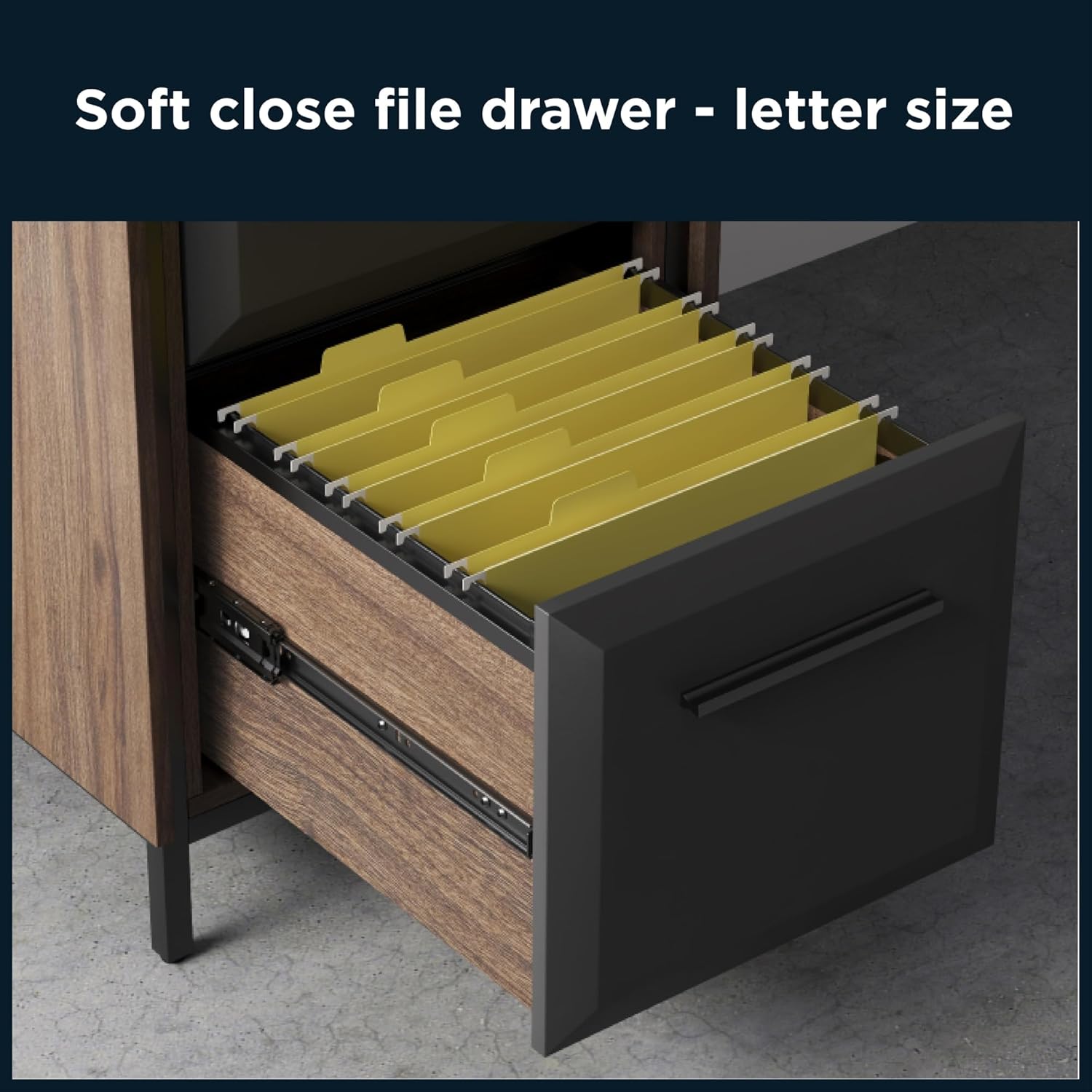
This image demonstrates the soft-close file drawer, designed to hold letter-sized hanging files, ensuring quiet and smooth operation.
പരിപാലനവും പരിചരണവും
Proper care will extend the life and appearance of your Thomasville Alderbrook desk.
- വൃത്തിയാക്കൽ: മൃദുവായ, ഡി ഉപയോഗിച്ച് ഉപരിതലങ്ങൾ തുടയ്ക്കുകamp തുണി. ഫിനിഷിന് കേടുവരുത്തുന്ന കഠിനമായ രാസവസ്തുക്കൾ, ഉരച്ചിലുകൾ ഉള്ള ക്ലീനറുകൾ, അല്ലെങ്കിൽ പോളിഷുകൾ എന്നിവ ഒഴിവാക്കുക.
- ചോർച്ച: എഞ്ചിനീയറിംഗ് ചെയ്ത തടിയിൽ കറയോ കേടുപാടുകളോ ഉണ്ടാകാതിരിക്കാൻ ചോർച്ച ഉടനടി തുടച്ചുമാറ്റുക.
- ചൂടും ഈർപ്പവും: Avoid placing hot items directly on the desk surface. Use coasters for drinks to prevent moisture rings.
- സൂര്യപ്രകാശം: നേരിട്ടുള്ള സൂര്യപ്രകാശം ദീർഘനേരം എക്സ്പോഷർ ചെയ്യുന്നത് മങ്ങലിനോ നിറവ്യത്യാസത്തിനോ കാരണമായേക്കാം.
- ഹാർഡ്വെയർ: സ്ഥിരത ഉറപ്പാക്കാൻ എല്ലാ സ്ക്രൂകളും ഫാസ്റ്റനറുകളും ഇടയ്ക്കിടെ പരിശോധിച്ച് ശക്തമാക്കുക.
ട്രബിൾഷൂട്ടിംഗ്
| പ്രശ്നം | സാധ്യമായ കാരണം | പരിഹാരം |
|---|---|---|
| മേശ ഇളകുകയോ അസ്ഥിരമാവുകയോ ചെയ്യുന്നു. | തറ അസമമാണ്; അയഞ്ഞ ഫാസ്റ്റനറുകൾ; അനുചിതമായ അസംബ്ലി. | Adjust floor levelers on the desk legs. Check and tighten all assembly screws. Review എല്ലാ ഭാഗങ്ങളും ശരിയായി ഇൻസ്റ്റാൾ ചെയ്തിട്ടുണ്ടെന്ന് ഉറപ്പാക്കാൻ അസംബ്ലി നിർദ്ദേശങ്ങൾ. |
| Drawers do not close smoothly or soft-close feature isn't working. | Obstruction in drawer slide; misaligned drawer; damaged soft-close mechanism. | Check for any objects blocking the drawer slides. Ensure the drawer is properly seated on its runners. If issues persist, contact customer support. |
| ഇന്റഗ്രേറ്റഡ് പവർ ഔട്ട്ലെറ്റ് പ്രവർത്തിക്കുന്നില്ല. | Desk power cord not plugged in; tripped circuit breaker; faulty outlet. | Verify the desk's power cord is securely plugged into a functional wall outlet. Check your home's circuit breaker. Test the wall outlet with another device. Do not attempt to repair the integrated outlet yourself. |
| പോറലുകൾ അല്ലെങ്കിൽ ചെറിയ ഉപരിതല കേടുപാടുകൾ. | Impact; abrasive cleaning; general wear. | For minor scratches, a furniture repair pen or wax crayon matching the walnut finish may be used. Always test in an inconspicuous area first. |
സ്പെസിഫിക്കേഷനുകൾ
| ആട്രിബ്യൂട്ട് | വിശദാംശങ്ങൾ |
|---|---|
| ബ്രാൻഡ് | തോമസ്വില്ലെ |
| മോഡലിൻ്റെ പേര് | Alderbrook 60"W L-Shaped Corner Desk |
| നിറം | Walnut/Matte Black |
| മെറ്റീരിയൽ | എഞ്ചിനീയറിംഗ് വുഡ് |
| ഫിനിഷ് തരം | Wood Grain (Walnut), Matte Black |
| പ്രത്യേക ഫീച്ചർ | Built-In USB Outlet, Cord Management System |
| മൗണ്ടിംഗ് തരം | ഫ്ലോർ മൗണ്ട് |
| ഇനത്തിൻ്റെ ഭാരം | 198 പൗണ്ട് |
| അളവുകൾ (W x D x H) | 60"W x 48"D x 30"H (approximate, based on L-shape) |
| ഡ്രോയറുകളുടെ എണ്ണം | 3 (Multi-drawer: File and Regular) |
| ഷെൽഫുകളുടെ എണ്ണം | 2 (1 adjustable enclosed shelf) |
| അസംബ്ലി ആവശ്യമാണ് | അതെ |
| യു.പി.സി | 764053566981 |
വാറൻ്റി വിവരങ്ങൾ
The Thomasville Alderbrook 60"W L-Shaped Corner Desk is backed by the manufacturer's 5 വർഷത്തെ പരിമിത വാറൻ്റി.
This warranty covers defects in materials and workmanship under normal use. Please retain your proof of purchase for warranty claims. For specific terms and conditions of the limited warranty, refer to the documentation included with your product or contact Thomasville customer support.
ഉപഭോക്തൃ പിന്തുണ
For assistance with assembly, missing parts, or any other inquiries regarding your Thomasville Alderbrook desk, please contact Thomasville customer support.
Visit the official Thomasville website for contact information or refer to the support details provided in your product packaging.
ഓൺലൈൻ പിന്തുണ: Visit the Thomasville Store on Amazon


