1. ആമുഖം
Thank you for choosing the GGSTOPWATER XG99 Open Ear Wireless Bluetooth 5.4 Headphones. These headphones are designed to provide a comfortable and stable audio experience with an open-ear design, making them suitable for various activities while maintaining environmental awareness. This manual provides detailed instructions for setup, operation, and maintenance to ensure optimal performance.
2. ഉൽപ്പന്നം കഴിഞ്ഞുview
2.1 പാക്കേജ് ഉള്ളടക്കം
- GGSTOPWATER XG99 Open Ear Wireless Headphones (Left and Right)
- വയർലെസ് ചാർജിംഗ് കേസ്
- യുഎസ്ബി ചാർജിംഗ് കേബിൾ
- ഉപയോക്തൃ മാനുവൽ
2.2 പ്രധാന സവിശേഷതകൾ
- തുറന്ന ചെവി ഡിസൈൻ: Allows for environmental awareness while listening.
- ബ്ലൂടൂത്ത് 5.4: Stable and fast wireless connection up to 30 feet.
- IPX5 ജല പ്രതിരോധം: Resistant to sweat and splashes, suitable for sports.
- വിപുലീകരിച്ച കളിസമയം: Up to 8 hours per earbud, with a total of 64 hours using the charging case.
- ഡിജിറ്റൽ ബാറ്ററി ഡിസ്പ്ലേ: Real-time battery status for the charging case and earbuds.
- ടച്ച് നിയന്ത്രണങ്ങൾ: Intuitive control for music playback, calls, and volume.
- Ergonomic Earhooks: Secure and comfortable fit for extended wear.
2.3 ഉൽപ്പന്ന ഡയഗ്രം
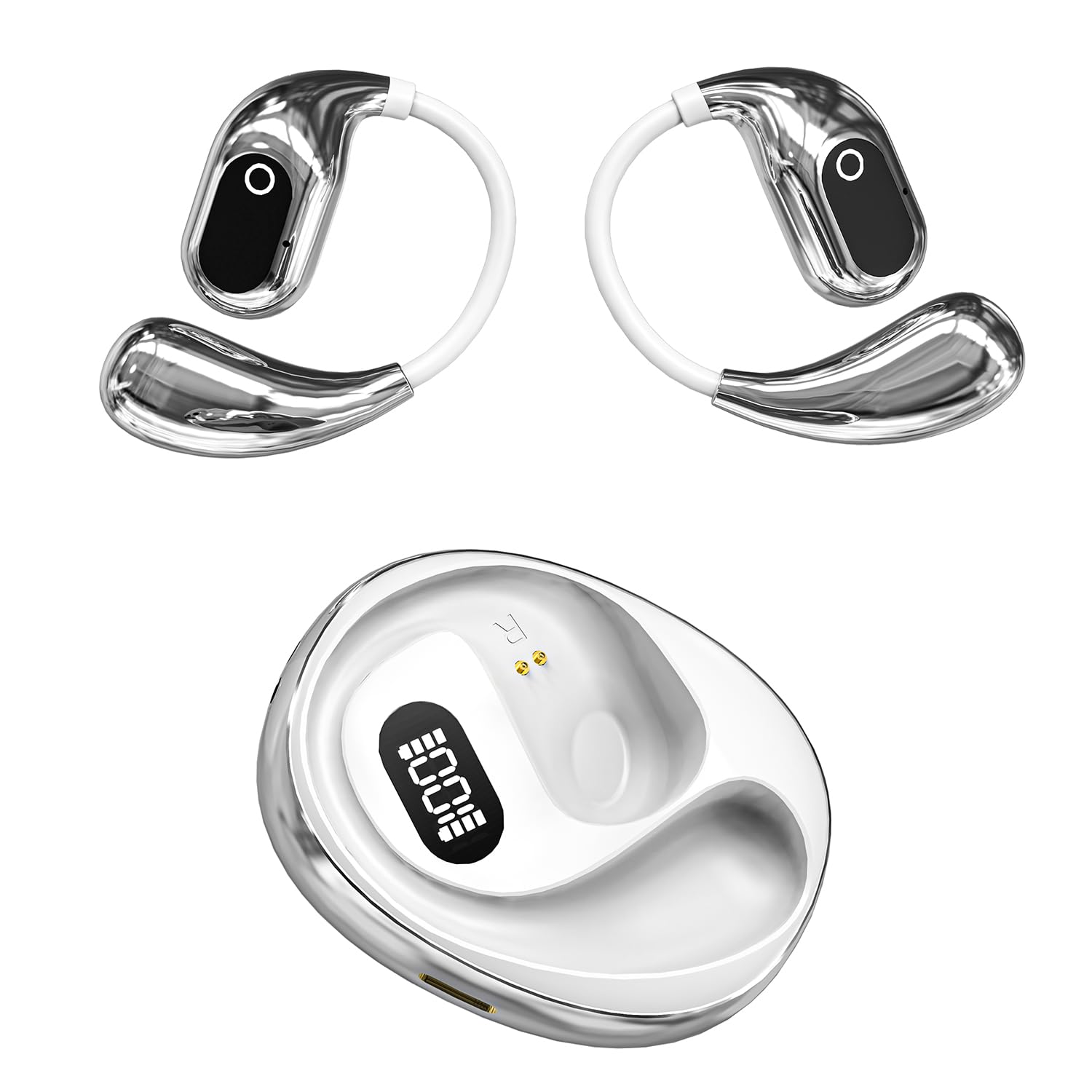
ചിത്രം 1: GGSTOPWATER XG99 Open Ear Headphones and Charging Case. The image displays both earbuds with their earhook design and the compact charging case featuring a digital battery display.

ചിത്രം 2: Close-up of a single GGSTOPWATER XG99 earbud highlighting its compact size and key audio technologies: Hi-Fi quality sound, 360-degree surround sound, and New Bluetooth 5.4 connectivity.

ചിത്രം 3: പൊട്ടിത്തെറിച്ചു view illustrating the internal components of the GGSTOPWATER XG99 earbud, emphasizing the dynamic driver and other elements contributing to high sensitivity, low distortion, and rich sound quality.
3. സജ്ജീകരണം
3.1 പ്രാരംഭ ചാർജിംഗ്
- ആദ്യ ഉപയോഗത്തിന് മുമ്പ്, രണ്ട് ഇയർബഡുകളും ചാർജിംഗ് കേസിൽ വയ്ക്കുക.
- നൽകിയിരിക്കുന്ന USB കേബിൾ ഉപയോഗിച്ച് ചാർജിംഗ് കേസ് ഒരു USB പവർ സ്രോതസ്സുമായി ബന്ധിപ്പിക്കുക.
- The digital display on the charging case will show the battery level. Allow the case and earbuds to fully charge.
- സാധാരണയായി ഒരു പൂർണ്ണ ചാർജ് ഏകദേശം 1.5-2 മണിക്കൂർ എടുക്കും.
3.2 ആദ്യ തവണ ജോടിയാക്കൽ
- ഇയർബഡുകൾ ചാർജ്ജ് ചെയ്തിട്ടുണ്ടെന്ന് ഉറപ്പാക്കുക.
- ചാർജിംഗ് കേസ് തുറക്കുക. ഇയർബഡുകൾ സ്വയമേവ ഓണാകുകയും ജോടിയാക്കൽ മോഡിലേക്ക് പ്രവേശിക്കുകയും ചെയ്യും.
- നിങ്ങളുടെ ഉപകരണത്തിൽ (സ്മാർട്ട്ഫോൺ, ടാബ്ലെറ്റ്, കമ്പ്യൂട്ടർ), ബ്ലൂടൂത്ത് പ്രവർത്തനക്ഷമമാക്കുക.
- ഇതിനായി തിരയുക available Bluetooth devices and select "XG99" from the list.
- കണക്റ്റ് ചെയ്തുകഴിഞ്ഞാൽ, നിങ്ങൾക്ക് ഒരു ഓഡിയോ പ്രോംപ്റ്റ് കേൾക്കാൻ കഴിയും, ഇയർബഡുകൾ ഉപയോഗത്തിന് തയ്യാറാകും.
കുറിപ്പ്: After the initial pairing, the earbuds will automatically connect to the last paired device when removed from the charging case, provided Bluetooth is enabled on the device.
4. പ്രവർത്തന നിർദ്ദേശങ്ങൾ
4.1 പവർ ഓൺ/ഓഫ്
- പവർ ഓൺ: ചാർജിംഗ് കേസ് തുറക്കുക, അല്ലെങ്കിൽ രണ്ട് ഇയർബഡുകളിലെയും ടച്ച് ഏരിയ 3 സെക്കൻഡ് അമർത്തിപ്പിടിക്കുക.
- പവർ ഓഫ്: ഇയർബഡുകൾ ചാർജിംഗ് കെയ്സിലേക്ക് തിരികെ വയ്ക്കുക, ലിഡ് അടയ്ക്കുക, അല്ലെങ്കിൽ രണ്ട് ഇയർബഡുകളിലെയും ടച്ച് ഏരിയ 5 സെക്കൻഡ് അമർത്തിപ്പിടിക്കുക.
4.2 ടച്ച് നിയന്ത്രണങ്ങൾ
The GGSTOPWATER XG99 headphones feature intuitive touch controls on each earbud.
| ഫംഗ്ഷൻ | ആക്ഷൻ |
|---|---|
| സംഗീതം പ്ലേ ചെയ്യുക/താൽക്കാലികമായി നിർത്തുക | ഏതെങ്കിലും ഇയർബഡിൽ ഒറ്റ ടാപ്പ് ചെയ്യുക |
| അടുത്ത ഗാനം | വലതുവശത്തെ ഇയർബഡിൽ രണ്ടുതവണ ടാപ്പ് ചെയ്യുക |
| മുൻ ഗാനം | ഇടതുവശത്തെ ഇയർബഡിൽ രണ്ടുതവണ ടാപ്പ് ചെയ്യുക |
| വോളിയം കൂട്ടുക | വലതുവശത്തെ ഇയർബഡിൽ മൂന്ന് തവണ ടാപ്പ് ചെയ്യുക |
| വോളിയം ഡൗൺ | ഇടതുവശത്തെ ഇയർബഡിൽ മൂന്ന് തവണ ടാപ്പ് ചെയ്യുക |
| ഉത്തരം / കോൾ അവസാനിപ്പിക്കുക | ഏതെങ്കിലും ഇയർബഡിൽ ഒറ്റ ടാപ്പ് ചെയ്യുക |
| കോൾ നിരസിക്കുക | ഇയർബഡുകളിൽ ഏതെങ്കിലുമൊന്നിൽ 2 സെക്കൻഡ് അമർത്തിപ്പിടിക്കുക. |
| വോയ്സ് അസിസ്റ്റൻ്റ് സജീവമാക്കുക | Press and hold on either earbud for 3 seconds (when not on a call) |
4.3 ഇയർബഡുകളും കേസും ചാർജ് ചെയ്യുന്നു
- ഇയർബഡുകൾ ചാർജ് ചെയ്യുന്നു: Place the earbuds into the charging case. They will automatically begin charging. The digital display on the case will show the charging status.
- ചാർജിംഗ് കേസ്: Connect the charging case to a USB power adapter (5V/1A recommended) using the provided USB cable. The digital display will indicate the case's battery level during charging.
- ബാറ്ററി ലൈഫ്: The earbuds provide up to 8 hours of playback on a single charge. The charging case provides an additional 5 full charges, extending total listening time to approximately 64 hours.

ചിത്രം 4: The GGSTOPWATER XG99 charging case displaying its digital battery indicator, illustrating the extended battery life capabilities.
5. പരിപാലനം
5.1 വൃത്തിയാക്കൽ
- ഇയർബഡുകളും ചാർജിംഗ് കെയ്സും മൃദുവായതും ഉണങ്ങിയതും ലിന്റ് രഹിതവുമായ തുണി ഉപയോഗിച്ച് പതിവായി വൃത്തിയാക്കുക.
- അബ്രാസീവ് ക്ലീനറുകൾ, ആൽക്കഹോൾ, കെമിക്കൽ ലായകങ്ങൾ എന്നിവ ഉപയോഗിക്കരുത്.
- Ensure charging contacts on both earbuds and the case are clean and dry to prevent charging issues.
5.2 സംഭരണം
- ഹെഡ്ഫോണുകൾ ഉപയോഗിക്കാത്തപ്പോൾ ചാർജിംഗ് കേസിൽ സൂക്ഷിക്കുക, അതുവഴി അവയെ സംരക്ഷിക്കാനും ചാർജ്ജ് ആയി നിലനിർത്താനും കഴിയും.
- ഉയർന്ന താപനിലയിൽ (ചൂട് അല്ലെങ്കിൽ തണുപ്പ്) അല്ലെങ്കിൽ ഉയർന്ന ആർദ്രതയുള്ള സ്ഥലങ്ങളിൽ സൂക്ഷിക്കുന്നത് ഒഴിവാക്കുക.
6. പ്രശ്നപരിഹാരം
6.1 പൊതുവായ പ്രശ്നങ്ങളും പരിഹാരങ്ങളും
- ഉപകരണവുമായി ഇയർബഡുകൾ ജോടിയാക്കുന്നില്ല:
- ഇയർബഡുകൾ ചാർജ് ചെയ്തിട്ടുണ്ടെന്നും കെയ്സിന് പുറത്താണെന്നും ഉറപ്പാക്കുക.
- നിങ്ങളുടെ ഉപകരണത്തിൽ ബ്ലൂടൂത്ത് ഓഫാക്കി ഓണാക്കുക.
- Forget "XG99" from your device's Bluetooth list and try pairing again.
- നിങ്ങളുടെ ഉപകരണം പുനരാരംഭിക്കുക.
- ഒരു ഇയർബഡ് മാത്രമേ പ്രവർത്തിക്കുന്നുള്ളൂ:
- രണ്ട് ഇയർബഡുകളും ചാർജിംഗ് കെയ്സിലേക്ക് തിരികെ വയ്ക്കുക, ലിഡ് അടയ്ക്കുക, കുറച്ച് നിമിഷങ്ങൾ കാത്തിരിക്കുക, തുടർന്ന് ലിഡ് തുറന്ന് വീണ്ടും ശ്രമിക്കുക.
- രണ്ട് ഇയർബഡുകളും ചാർജ്ജ് ചെയ്തിട്ടുണ്ടെന്ന് ഉറപ്പാക്കുക.
- ഇയർബഡുകൾ ചാർജ് ചെയ്യുന്നില്ല:
- ചാർജിംഗ് കേസ് ചാർജ് ചെയ്തിട്ടുണ്ടെന്ന് ഉറപ്പാക്കുക.
- Check that the earbuds are correctly seated in the charging case and the charging contacts are clean.
- മറ്റൊരു USB കേബിളും പവർ അഡാപ്റ്ററും പരീക്ഷിക്കുക.
- കുറഞ്ഞ ശബ്ദം അല്ലെങ്കിൽ മോശം ശബ്ദ നിലവാരം:
- നിങ്ങളുടെ ഉപകരണത്തിലും ഇയർബഡുകളിലും വോളിയം ക്രമീകരിക്കുക.
- ഇയർബഡുകൾ വൃത്തിയുള്ളതും അവശിഷ്ടങ്ങളിൽ നിന്ന് മുക്തവുമാണെന്ന് ഉറപ്പാക്കുക.
- Try moving closer to your connected device to avoid interference.
7 സ്പെസിഫിക്കേഷനുകൾ
| ഫീച്ചർ | വിശദാംശങ്ങൾ |
|---|---|
| മോഡലിൻ്റെ പേര് | XG99 |
| ബ്രാൻഡ് | ജിജിഎസ്ടോപ് വാട്ടർ |
| കണക്റ്റിവിറ്റി ടെക്നോളജി | വയർലെസ്സ് (ബ്ലൂടൂത്ത് 5.4) |
| ബ്ലൂടൂത്ത് ശ്രേണി | 30 അടി വരെ (ഏകദേശം 9 മീറ്റർ) |
| ഇയർപീസ് ആകൃതി | തുറന്ന ചെവി |
| ജല പ്രതിരോധ നില | IPX5 (Water Resistant, Sweatproof) |
| ബാറ്ററി ലൈഫ് (ഇയർബഡുകൾ) | ഓരോ ചാർജിനും 8 മണിക്കൂർ വരെ |
| ആകെ പ്ലേടൈം (കേസിനൊപ്പം) | 64 മണിക്കൂർ വരെ |
| ചാർജിംഗ് സമയം (കേസ്) | Approx. 1.5 - 2 hours |
| നിയന്ത്രണ രീതി | സ്പർശിക്കുക |
| ഓഡിയോ ഡ്രൈവർ തരം | ഡൈനാമിക് ഡ്രൈവർ |
| അനുയോജ്യമായ ഉപകരണങ്ങൾ | Smartphones, TV, Computers, Laptops |
| മെറ്റീരിയൽ | പ്ലാസ്റ്റിക് |
| ഇനത്തിൻ്റെ ഭാരം | 82 ഗ്രാം |
| ബാറ്ററികൾ | 1 ലിഥിയം പോളിമർ ബാറ്ററി (ഉൾപ്പെടുത്തിയിരിക്കുന്നു) |
| മാതൃരാജ്യം | ചൈന |
8. വാറൻ്റിയും പിന്തുണയും
For warranty information and customer support, please refer to the warranty card included in your product packaging or contact the retailer where the product was purchased. Please retain your proof of purchase for warranty claims.


