1. ആമുഖം
Thank you for choosing the iKF Solo Pro Wireless Bluetooth Headphones. This manual provides essential information for setting up, operating, and maintaining your headphones to ensure optimal performance and longevity. Please read this manual thoroughly before use and retain it for future reference.
2 സുരക്ഷാ വിവരങ്ങൾ
- ഹെഡ്ഫോണുകൾ തീവ്രമായ താപനില, ഈർപ്പം, അല്ലെങ്കിൽ നശിപ്പിക്കുന്ന വസ്തുക്കൾ എന്നിവയ്ക്ക് വിധേയമാക്കരുത്.
- ഹെഡ്ഫോണുകൾ താഴെയിടുകയോ ശക്തമായ ആഘാതങ്ങൾക്ക് വിധേയമാക്കുകയോ ചെയ്യുന്നത് ഒഴിവാക്കുക.
- ഹെഡ്ഫോണുകൾ സ്വയം വേർപെടുത്തുകയോ നന്നാക്കാൻ ശ്രമിക്കുകയോ ചെയ്യരുത്. ഇത് വാറന്റി അസാധുവാക്കുകയും കേടുപാടുകൾ വരുത്തുകയും ചെയ്തേക്കാം.
- മൃദുവായതും ഉണങ്ങിയതുമായ തുണി ഉപയോഗിച്ച് ഹെഡ്ഫോണുകൾ വൃത്തിയാക്കുക. ലിക്വിഡ് ക്ലീനറുകൾ ഉപയോഗിക്കരുത്.
- ഉയർന്ന ശബ്ദത്തിൽ ദീർഘനേരം കേൾക്കുന്നത് കേൾവിക്ക് കേടുപാടുകൾ വരുത്തിയേക്കാം. സുരക്ഷിതമായ തലത്തിലേക്ക് ശബ്ദം ക്രമീകരിക്കുക.
- കുട്ടികൾക്ക് ലഭ്യമാകാതെ സൂക്ഷിക്കുക.
3. പാക്കേജ് ഉള്ളടക്കം
പാക്കേജിൽ എല്ലാ ഇനങ്ങളും ഉണ്ടെന്ന് ഉറപ്പാക്കുക:
- iKF Solo Pro Wireless Bluetooth Headphones
- USB-C ചാർജിംഗ് കേബിൾ
- 3.5 എംഎം ഓഡിയോ കേബിൾ
- ഉപയോക്തൃ മാനുവൽ (ഈ പ്രമാണം)
4. ഉൽപ്പന്നം കഴിഞ്ഞുview
Familiarize yourself with the components and controls of your iKF Solo Pro headphones.

ഒരു ഫ്രണ്ട്-ആംഗിൾ view of the iKF Solo Pro wireless headphones in BlackRed, showcasinഇയർകപ്പുകളും ഹെഡ്ബാൻഡും g.
നിയന്ത്രണങ്ങളും തുറമുഖങ്ങളും:
- പവർ ബട്ടൺ: പവർ ഓൺ/ഓഫ് ചെയ്യാൻ അമർത്തിപ്പിടിക്കുക.
- വോളിയം കൂട്ടുക/അടുത്ത ട്രാക്ക് ബട്ടൺ: വോളിയം കൂട്ടാൻ ഷോർട്ട് പ്രസ്സ് ചെയ്യുക, അടുത്ത ട്രാക്കിനായി ദീർഘനേരം പ്രസ്സ് ചെയ്യുക.
- വോളിയം കുറയ്ക്കൽ/മുമ്പത്തെ ട്രാക്ക് ബട്ടൺ: വോളിയം കുറയ്ക്കാൻ ഷോർട്ട് പ്രസ്സ് ചെയ്യുക, മുമ്പത്തെ ട്രാക്കിനായി ദീർഘനേരം അമർത്തുക.
- മൾട്ടി-ഫംഗ്ഷൻ ബട്ടൺ (MFB): പ്ലേ ചെയ്യുക/താൽക്കാലികമായി നിർത്തുക, കോളുകൾക്ക് മറുപടി നൽകുക/അവസാനിപ്പിക്കുക, വോയ്സ് അസിസ്റ്റന്റ് സജീവമാക്കുക.
- ANC/Transparent Mode Button: Toggle between Active Noise Cancellation, Transparent Mode, and Normal Mode.
- USB-C ചാർജിംഗ് പോർട്ട്: ഹെഡ്ഫോണുകൾ ചാർജ് ചെയ്യുന്നതിനായി.
- 3.5mm ഓഡിയോ ജാക്ക്: വയർഡ് കണക്ഷനായി.
- LED സൂചകം: പവർ, ജോടിയാക്കൽ, ചാർജിംഗ് നില എന്നിവ പ്രദർശിപ്പിക്കുന്നു.
5. സജ്ജീകരണം
5.1 ഹെഡ്ഫോണുകൾ ചാർജ് ചെയ്യുന്നു
ആദ്യ ഉപയോഗത്തിന് മുമ്പ്, നിങ്ങളുടെ ഹെഡ്ഫോണുകൾ പൂർണ്ണമായും ചാർജ് ചെയ്യുക.
- ഹെഡ്ഫോണുകളിലെ USB-C പോർട്ടിലേക്ക് USB-C ചാർജിംഗ് കേബിൾ ബന്ധിപ്പിക്കുക.
- കേബിളിന്റെ മറ്റേ അറ്റം ഒരു USB പവർ അഡാപ്റ്ററുമായി (ഉൾപ്പെടുത്തിയിട്ടില്ല) അല്ലെങ്കിൽ ഒരു കമ്പ്യൂട്ടറിന്റെ USB പോർട്ടുമായി ബന്ധിപ്പിക്കുക.
- LED ഇൻഡിക്കേറ്റർ ചാർജിംഗ് സ്റ്റാറ്റസ് കാണിക്കും (ഉദാ: ചാർജ് ചെയ്യുന്നതിന് ചുവപ്പ്, പൂർണ്ണമായി ചാർജ് ചെയ്തതിന് നീല).
- ഒരു പൂർണ്ണ ചാർജ് സാധാരണയായി ഏകദേശം 2 മണിക്കൂർ എടുക്കും.
5.2 ബ്ലൂടൂത്ത് ജോടിയാക്കൽ
നിങ്ങളുടെ ഹെഡ്ഫോണുകൾ ഒരു ഉപകരണവുമായി ബന്ധിപ്പിക്കാൻ:
- ഹെഡ്ഫോണുകൾ ചാർജ് ചെയ്തിട്ടുണ്ടെന്നും പവർ ഓഫ് ചെയ്തിട്ടുണ്ടെന്നും ഉറപ്പാക്കുക.
- ജോടിയാക്കൽ മോഡ് സൂചിപ്പിക്കുന്ന LED ഇൻഡിക്കേറ്റർ നീലയും ചുവപ്പും മാറിമാറി മിന്നുന്നതുവരെ പവർ ബട്ടൺ അമർത്തിപ്പിടിക്കുക.
- നിങ്ങളുടെ ഉപകരണത്തിൽ (സ്മാർട്ട്ഫോൺ, ടാബ്ലെറ്റ്, ലാപ്ടോപ്പ്), ബ്ലൂടൂത്ത് പ്രവർത്തനക്ഷമമാക്കി പുതിയ ഉപകരണങ്ങൾക്കായി തിരയുക.
- Select "iKF Solo Pro" from the list of available devices.
- കണക്ട് ചെയ്തുകഴിഞ്ഞാൽ, LED ഇൻഡിക്കേറ്റർ സാവധാനം നീല നിറത്തിൽ മിന്നിമറയും അല്ലെങ്കിൽ കടും നീലയായി തുടരും.
5.3 iKF-APP Installation and Customization
Enhance your listening experience by downloading the iKF-APP.
- Scan the QR code in the quick start guide or search for "iKF" in your device's app store.
- Install the iKF-APP and open it.
- Ensure your headphones are paired via Bluetooth to your device. The app should automatically detect them.
- Within the app, you can adjust noise cancellation levels, EQ settings, sound modes (Pop, Rock, Classical), monitor battery, and customize button functions.
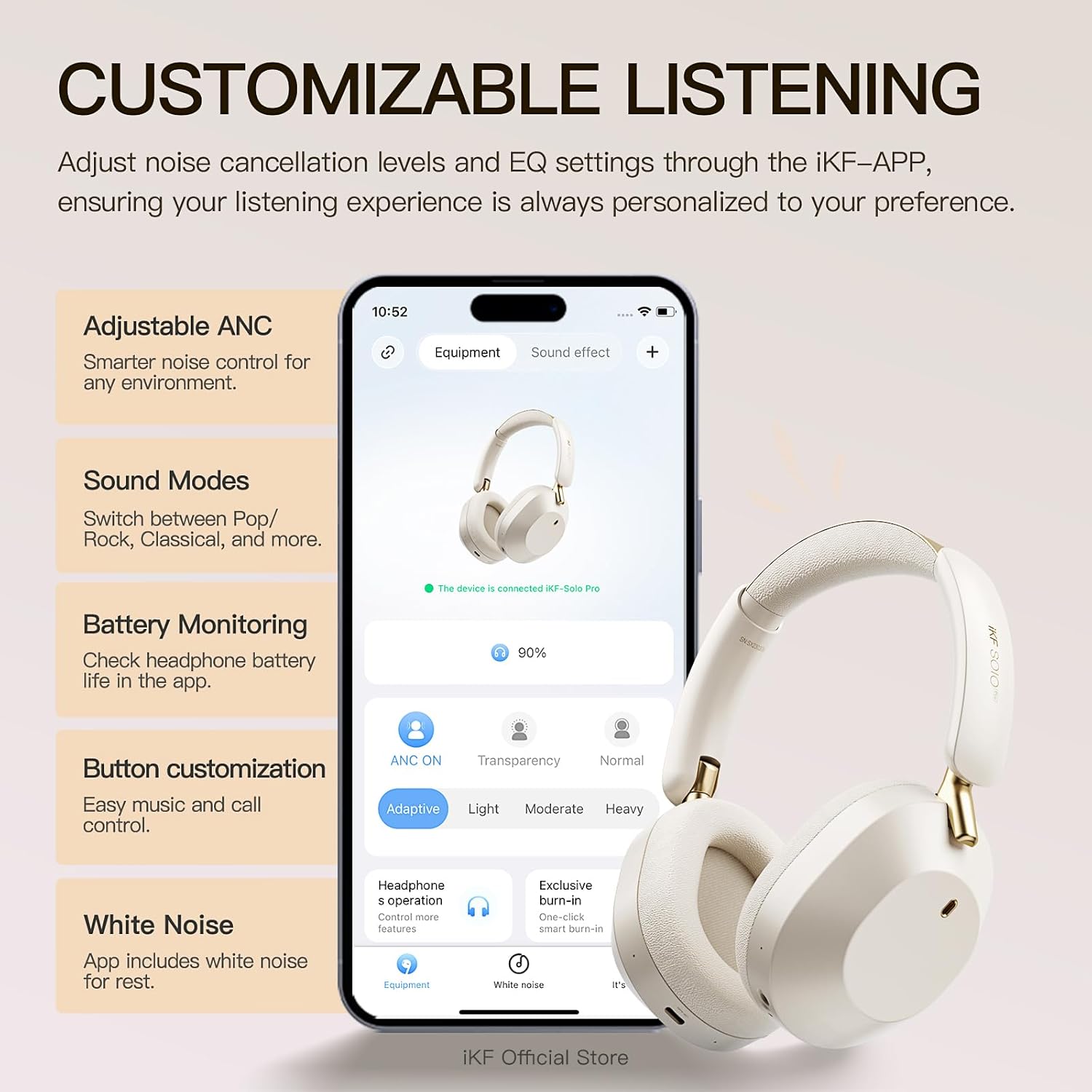
A visual showing the iKF Solo Pro headphones alongside a smartphone displaying the iKF-APP interface, illustrating options for adjusting ANC levels, sound modes, and button customization.
5.4 മൾട്ടിപോയിന്റ് കണക്ഷൻ
The iKF Solo Pro supports simultaneous connection to two devices.
- വിഭാഗം 5.2-ൽ വിവരിച്ചിരിക്കുന്നതുപോലെ ഹെഡ്ഫോണുകൾ ആദ്യ ഉപകരണവുമായി ജോടിയാക്കുക.
- ആദ്യത്തെ ഉപകരണത്തിൽ ബ്ലൂടൂത്ത് പ്രവർത്തനരഹിതമാക്കുക.
- Put the headphones back into pairing mode and pair them with the second device.
- ആദ്യത്തെ ഉപകരണത്തിൽ ബ്ലൂടൂത്ത് വീണ്ടും പ്രവർത്തനക്ഷമമാക്കുക. ഹെഡ്ഫോണുകൾ രണ്ട് ഉപകരണങ്ങളിലേക്കും യാന്ത്രികമായി കണക്റ്റ് ചെയ്യണം.
- Audio will switch between devices based on which one is actively playing content or receiving a call.

A composite image detailing the comfort fit with soft earcups, the Type-C port for wired connection, and the capability for simultaneous connection to two devices.
6. പ്രവർത്തന നിർദ്ദേശങ്ങൾ
6.1 പവർ ഓൺ/ഓഫ്
- പവർ ഓൺ: LED ഇൻഡിക്കേറ്റർ പ്രകാശിക്കുന്നത് വരെ ഏകദേശം 3 സെക്കൻഡ് നേരത്തേക്ക് പവർ ബട്ടൺ അമർത്തിപ്പിടിക്കുക.
- പവർ ഓഫ്: LED ഇൻഡിക്കേറ്റർ ഓഫാകുന്നതുവരെ ഏകദേശം 3 സെക്കൻഡ് നേരത്തേക്ക് പവർ ബട്ടൺ അമർത്തിപ്പിടിക്കുക.
6.2 മ്യൂസിക് പ്ലേബാക്ക്
- പ്ലേ/താൽക്കാലികമായി നിർത്തുക: MFB ചെറുതായി അമർത്തുക.
- വോളിയം കൂട്ടുക: വോളിയം അപ്പ് ബട്ടൺ ചുരുക്കി അമർത്തുക.
- വോളിയം താഴേക്ക്: വോളിയം ഡൗൺ ബട്ടൺ ചുരുക്കി അമർത്തുക.
- അടുത്ത ട്രാക്ക്: വോളിയം അപ്പ് ബട്ടൺ ദീർഘനേരം അമർത്തുക.
- മുമ്പത്തെ ട്രാക്ക്: വോളിയം ഡൗൺ ബട്ടൺ ദീർഘനേരം അമർത്തുക.
6.3 കോൾ മാനേജ്മെന്റ്
- ഉത്തരം/അവസാന കോൾ: MFB ചെറുതായി അമർത്തുക.
- കോൾ നിരസിക്കുക: MFB ദീർഘനേരം അമർത്തുക.
- വോയ്സ് അസിസ്റ്റന്റിനെ സജീവമാക്കുക: MFB രണ്ടുതവണ അമർത്തുക.
6.4 ശബ്ദ നിയന്ത്രണ മോഡുകൾ
The iKF Solo Pro features Adaptive Active Noise Cancellation (ANC) and Transparent Mode.

An image illustrating the iKF Solo Pro headphones with a visual representation of 54dB noise reduction, highlighting the Adaptive Noise Cancellation feature.
- ടോഗിൾ മോഡുകൾ: Short press the ANC/Transparent Mode button to cycle through: സജീവ ശബ്ദ റദ്ദാക്കൽ (ANC) → സുതാര്യമായ മോഡ് → സാധാരണ മോഡ്.
- സജീവമായ നോയിസ് റദ്ദാക്കൽ: ആഴത്തിലുള്ള ശ്രവണ അനുഭവത്തിനായി ബാഹ്യ ആംബിയന്റ് ശബ്ദങ്ങൾ കുറയ്ക്കുന്നു.
- സുതാര്യമായ മോഡ്: Allows you to hear your surroundings clearly without removing the headphones, facilitating conversations or awareness of your environment.

A person wearing iKF Solo Pro headphones, with sound waves indicating the transparent mode for easy conversations without removing the headphones.
6.5 Spatial Audio with Head Tracking
Experience immersive audio that adapts to your head movements.
- Spatial Audio provides a three-dimensional sound experience, ideal for movies, games, and music.
- Head tracking technology ensures the sound stage remains fixed relative to your device, creating a more realistic and engaging audio environment.
- This feature is typically enabled and managed through the iKF-APP or your connected device's audio settings.

A graphic depicting the iKF Solo Pro headphones on a head, with concentric circles indicating 360-degree head tracking technology for spatial audio.
6.6 വയർഡ് കണക്ഷൻ
ബാറ്ററി തീർന്നുപോയാലും വയർഡ് കണക്ഷൻ ഉപയോഗിച്ച് നിങ്ങൾക്ക് ഹെഡ്ഫോണുകൾ ഉപയോഗിക്കാം.
- 3.5mm ഓഡിയോ കേബിളിന്റെ ഒരറ്റം ഹെഡ്ഫോണുകളിലെ 3.5mm ഓഡിയോ ജാക്കുമായി ബന്ധിപ്പിക്കുക.
- മറ്റേ അറ്റം നിങ്ങളുടെ ഉപകരണത്തിന്റെ 3.5mm ഓഡിയോ ഔട്ട്പുട്ടിലേക്ക് ബന്ധിപ്പിക്കുക.
- Note that some advanced features like ANC or Spatial Audio may be limited or unavailable in wired mode without power.
7. പരിപാലനം
7.1 വൃത്തിയാക്കൽ
- മൃദുവായതും ഉണങ്ങിയതും ലിന്റ് രഹിതവുമായ തുണി ഉപയോഗിച്ച് ഹെഡ്ഫോണുകൾ തുടയ്ക്കുക.
- അബ്രാസീവ് ക്ലീനറുകൾ, ആൽക്കഹോൾ, കെമിക്കൽ ലായകങ്ങൾ എന്നിവ ഉപയോഗിക്കരുത്.
- ഏതെങ്കിലും ദ്വാരങ്ങളിൽ ഈർപ്പം കയറുന്നത് ഒഴിവാക്കുക.
7.2 സംഭരണം
- ഹെഡ്ഫോണുകൾ തണുത്തതും വരണ്ടതുമായ സ്ഥലത്ത് സൂക്ഷിക്കുക, നേരിട്ടുള്ള സൂര്യപ്രകാശത്തിൽ നിന്നും കടുത്ത താപനിലയിൽ നിന്നും അകറ്റി നിർത്തുക.
- If storing for an extended period, charge the headphones periodically to maintain battery health.
8. പ്രശ്നപരിഹാരം
If you encounter issues with your iKF Solo Pro headphones, refer to the following common problems and solutions:
| പ്രശ്നം | സാധ്യമായ പരിഹാരം |
|---|---|
| ഹെഡ്ഫോണുകൾ പവർ ഓൺ ചെയ്യുന്നില്ല. | ഹെഡ്ഫോണുകൾ പൂർണ്ണമായും ചാർജ് ചെയ്തിട്ടുണ്ടെന്ന് ഉറപ്പാക്കുക. ഒരു പവർ സ്രോതസ്സിലേക്ക് കണക്റ്റ് ചെയ്ത് വീണ്ടും ശ്രമിക്കുക. |
| ഉപകരണവുമായി ജോടിയാക്കാൻ കഴിയില്ല. | Ensure headphones are in pairing mode (flashing blue/red). Turn off and on Bluetooth on your device. Forget previous pairings and try again. Ensure headphones are within range. |
| ശബ്ദമില്ല അല്ലെങ്കിൽ കുറഞ്ഞ ശബ്ദമില്ല. | Check volume levels on both headphones and connected device. Ensure headphones are properly paired. Try another audio source. |
| ANC ഫലപ്രദമായി പ്രവർത്തിക്കുന്നില്ല. | Ensure ANC mode is activated. Adjust headphone fit to ensure a good seal around your ears. |
| ഇടവിട്ടുള്ള കണക്ഷൻ. | Ensure no obstructions between headphones and device. Move closer to the device. Avoid strong electromagnetic interference. |
| ഹെഡ്ഫോണുകൾ ചാർജ് ചെയ്യുന്നില്ല. | Check the USB-C cable and power adapter. Try a different cable or power source. Ensure the charging port is clean. |
ഈ പരിഹാരങ്ങൾ പരീക്ഷിച്ചതിനുശേഷവും പ്രശ്നം നിലനിൽക്കുകയാണെങ്കിൽ, ദയവായി ഉപഭോക്തൃ പിന്തുണയുമായി ബന്ധപ്പെടുക.
9 സ്പെസിഫിക്കേഷനുകൾ
Technical specifications for the iKF Solo Pro Wireless Bluetooth Headphones:
| ഫീച്ചർ | വിശദാംശങ്ങൾ |
|---|---|
| മോഡലിൻ്റെ പേര് | iKF Solo Pro |
| ശബ്ദ നിയന്ത്രണം | Adaptive Active Noise Cancellation (up to 54dB) |
| കണക്റ്റിവിറ്റി ടെക്നോളജി | ബ്ലൂടൂത്ത് 5.0, വയേർഡ് (3.5mm) |
| ഓഡിയോ ഡ്രൈവർ തരം | 40mm Silk Diaphragm Dynamic Driver |
| ഫ്രീക്വൻസി റേഞ്ച് | 20 Hz മുതൽ 20,000 Hz വരെ |
| പ്രതിരോധം | 16 ഓം |
| ബാറ്ററി ലൈഫ് (ANC ഓഫ്) | 140 മണിക്കൂർ വരെ |
| ബാറ്ററി ലൈഫ് (ANC ഓൺ) | 95 മണിക്കൂർ വരെ |
| ചാർജിംഗ് സമയം | ഏകദേശം 2 മണിക്കൂർ |
| ചാർജിംഗ് പോർട്ട് | USB-C |
| നിയന്ത്രണ രീതി | Button Control, Touch Control |
| അനുയോജ്യമായ ഉപകരണങ്ങൾ | Android devices, Laptops, Smart Watch, Tablets, iPhone/iPad/Macbook |
| മെറ്റീരിയൽ | മെറ്റൽ, പ്ലാസ്റ്റിക് |
| ഇനത്തിൻ്റെ ഭാരം | 1.6 പൗണ്ട് (ഏകദേശം 0.73 കിലോഗ്രാം) |

An image highlighting the extended battery life of the iKF Solo Pro headphones, indicating 140 hours of playback with ANC off and 95 hours with ANC on.
10. വാറൻ്റിയും പിന്തുണയും
10.1 വാറൻ്റി വിവരങ്ങൾ
Your iKF Solo Pro headphones are covered by a manufacturer's warranty against defects in materials and workmanship. The specific terms and duration of the warranty may vary by region and retailer. Please refer to the warranty card included with your product or contact your point of purchase for detailed information.
ഇനിപ്പറയുന്ന കാരണങ്ങളാൽ ഉണ്ടാകുന്ന നാശനഷ്ടങ്ങൾ വാറൻ്റി കവർ ചെയ്യുന്നില്ല:
- Accident, abuse, misuse, or improper operation.
- അനധികൃത അറ്റകുറ്റപ്പണി അല്ലെങ്കിൽ പരിഷ്കരണം.
- ഓപ്പറേറ്റിംഗ് നിർദ്ദേശങ്ങൾ പാലിക്കുന്നതിൽ പരാജയപ്പെടുന്നു.
- സാധാരണ തേയ്മാനം.
10.2 ഉപഭോക്തൃ പിന്തുണ
For technical assistance, warranty claims, or general inquiries, please contact iKF customer support through the following channels:
- Webസൈറ്റ്: Visit the official iKF webപിന്തുണാ ഉറവിടങ്ങൾക്കും കോൺടാക്റ്റ് ഫോമുകൾക്കുമുള്ള സൈറ്റ്.
- ഇമെയിൽ: Refer to your product packaging or the iKF webഉപഭോക്തൃ പിന്തുണ ഇമെയിൽ വിലാസത്തിനായുള്ള സൈറ്റ്.
- iKF-APP: The iKF-APP may include a direct support feature.
When contacting support, please have your product model (iKF Solo Pro) and proof of purchase readily available.


