1. ആമുഖം
This user manual provides essential information and instructions for the Xiaomi Redmi Note 14 Pro+ 5G smartphone. Please read this manual thoroughly before using your device to ensure proper operation and to maximize its performance. Keep this manual for future reference.
2. ഉൽപ്പന്നം കഴിഞ്ഞുview
The Xiaomi Redmi Note 14 Pro+ 5G is a high-performance smartphone designed for advanced mobile computing and communication. It features a 200MP pro-grade AI camera system, 120W HyperCharge technology with a 5110mAh battery, a 1.5K 120Hz eye-care display protected by Corning Gorilla Glass Victus 2, and is powered by a 4nm Snapdragon 7s Gen 3 5G processor. The device also boasts IP68 dust and water resistance and integrates various AI features to enhance user experience.

ചിത്രം 1: മുന്നിലും പിന്നിലും view of the Xiaomi Redmi Note 14 Pro+ 5G smartphone in purple.
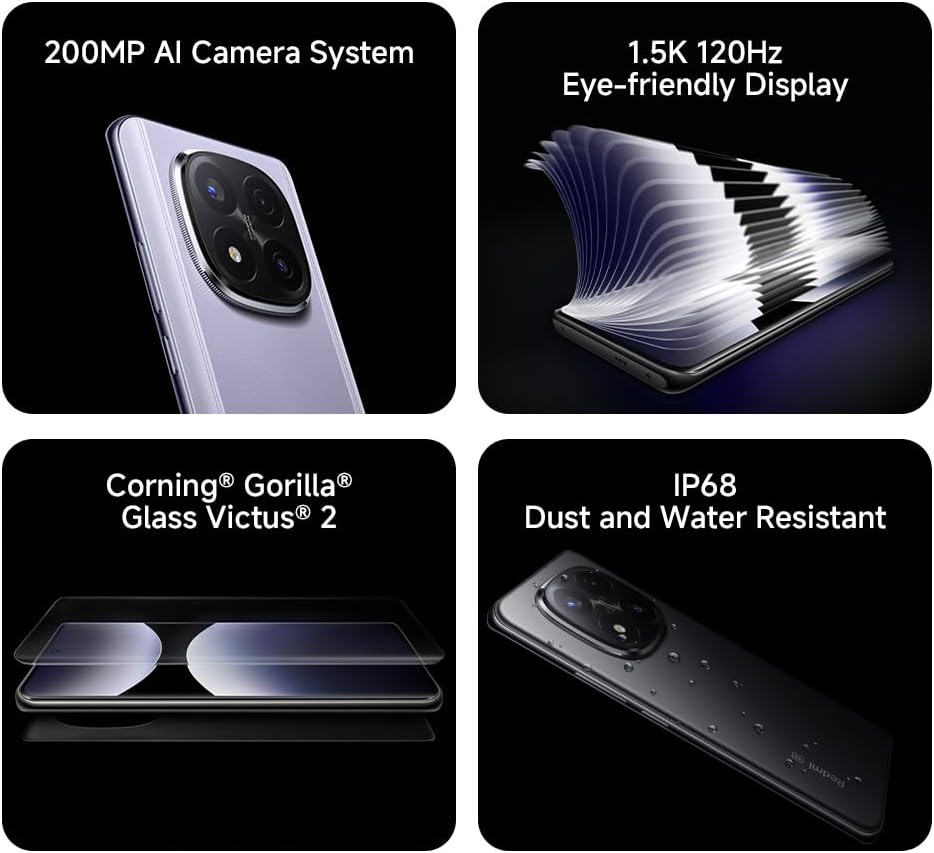
Image 2: Visual representation of key features including the 200MP AI Camera, 1.5K 120Hz Eye-friendly Display, Corning Gorilla Glass Victus 2, and IP68 Dust and Water Resistance.
3. സജ്ജീകരണം
3.1. അൺബോക്സിംഗും പാക്കേജ് ഉള്ളടക്കങ്ങളും
Upon opening the package, verify that all items are present. The standard package includes:
- Xiaomi Redmi Note 14 Pro+ 5G Smartphone
- USB-C ചാർജിംഗ് കേബിൾ
- Ring Holder (may vary by region)
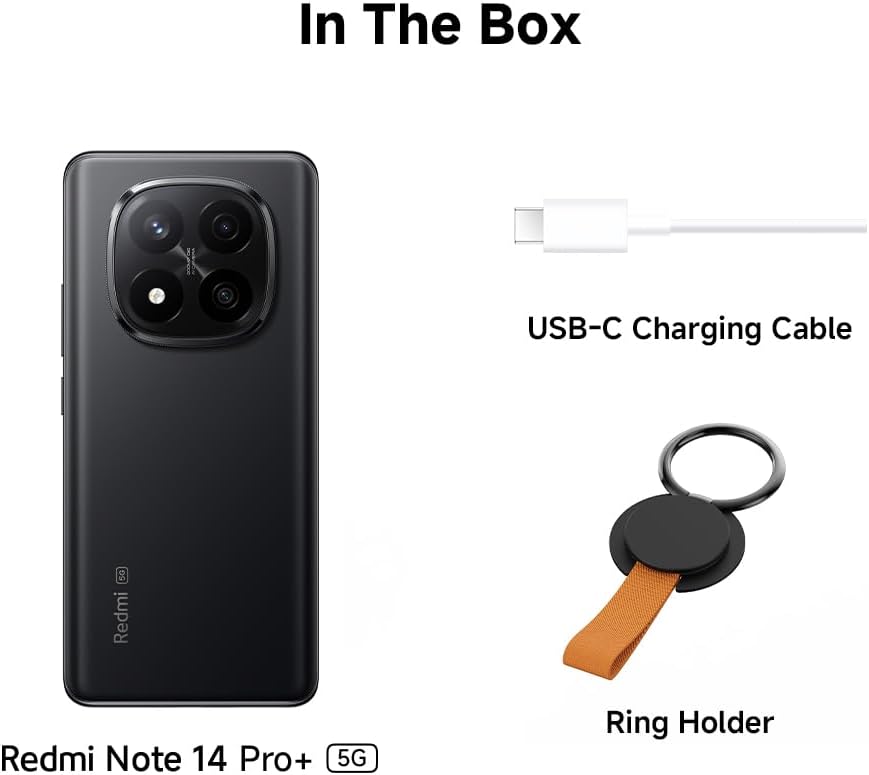
Image 3: Depiction of the items included in the product box.
3.2 സിം കാർഡ് ചേർക്കുന്നു
- ഉപകരണത്തിന്റെ വശത്ത് സിം കാർഡ് ട്രേ കണ്ടെത്തുക.
- ട്രേയുടെ അടുത്തുള്ള ചെറിയ ദ്വാരത്തിലേക്ക് സിം എജക്റ്റർ ഉപകരണം തിരുകുക, ട്രേ പുറത്തേക്ക് വരുന്നത് വരെ ദൃഢമായി അമർത്തുക.
- സ്വർണ്ണ കോൺടാക്റ്റുകൾ താഴേക്ക് അഭിമുഖീകരിക്കുന്ന തരത്തിൽ നിങ്ങളുടെ നാനോ-സിം കാർഡ്(കൾ) ട്രേയിൽ വയ്ക്കുക. ശരിയായ ഓറിയന്റേഷൻ ഉറപ്പാക്കുക.
- ഉപകരണവുമായി ഫ്ലഷ് ആകുന്നതുവരെ ട്രേ ശ്രദ്ധാപൂർവ്വം സ്ലോട്ടിലേക്ക് തിരികെ തള്ളുക.
3.3. പ്രാരംഭ പവർ ഓണും ചാർജിംഗും
- Xiaomi ലോഗോ ദൃശ്യമാകുന്നതുവരെ പവർ ബട്ടൺ (വശത്ത് സ്ഥിതിചെയ്യുന്നു) അമർത്തിപ്പിടിക്കുക.
- ഭാഷാ തിരഞ്ഞെടുപ്പ്, വൈ-ഫൈ കണക്ഷൻ, ഗൂഗിൾ അക്കൗണ്ട് സജ്ജീകരണം എന്നിവയുൾപ്പെടെയുള്ള പ്രാരംഭ സജ്ജീകരണം പൂർത്തിയാക്കാൻ ഓൺ-സ്ക്രീൻ നിർദ്ദേശങ്ങൾ പാലിക്കുക.
- To charge the device, connect the USB-C charging cable to the phone's charging port and the other end to a compatible 120W HyperCharge power adapter (not included) or a standard USB power source.
4. പ്രവർത്തന നിർദ്ദേശങ്ങൾ
4.1. അടിസ്ഥാന നാവിഗേഷൻ
The Redmi Note 14 Pro+ 5G features a responsive touchscreen. Use gestures such as tap, swipe, pinch-to-zoom, and long-press to interact with the interface. The device runs on Hyper OS, providing an intuitive user experience.
4.2. ക്യാമറ ഉപയോഗം
The smartphone is equipped with a 200MP pro-grade AI camera system. Open the Camera application to access various modes, including Photo, Portrait, Video, and Pro mode. AI features automatically optimize settings for different scenes and subjects.
4.3. 120W HyperCharge and Battery Management
The 5110mAh battery supports 120W HyperCharge for rapid charging. For optimal battery life, avoid extreme temperatures and fully discharge the battery only occasionally. Monitor battery usage in the device settings.
4.4. AI സവിശേഷതകൾ
The device includes several AI-powered functionalities:
- AI Erase Pro: Intelligently removes unwanted objects or people from photos.
- AI Image Expansion: Expands the boundaries of an image using AI to generate new content.
- AI Notes: Enhances note-taking with AI capabilities.
- AI സബ്ടൈറ്റിലുകൾ: Provides real-time subtitles for media content.
- AI റെക്കോർഡർ: Offers advanced recording features.
- AI ഇന്റർപ്രെറ്റർ: Facilitates real-time language translation.
- മിഥുനം: Integrates Google's AI assistant for various tasks.
- Circle to Search by Google: Allows users to circle objects on screen to initiate a Google search.
4.5. കണക്റ്റിവിറ്റി
The Redmi Note 14 Pro+ 5G supports 5G connectivity. Ensure your SIM card and mobile plan support 5G for access to high-speed networks. The device also supports Wi-Fi and Bluetooth for wireless connections.
4.6. IP68 Dust and Water Resistance
The device is rated IP68 for dust and water resistance, meaning it can withstand immersion in fresh water up to 1.5 meters for 30 minutes. This resistance is not permanent and may decrease over time with normal wear. Avoid exposing the device to saltwater, chlorinated water, or other liquids. Damage caused by liquid immersion is not covered under warranty.
5. പരിപാലനം
5.1. നിങ്ങളുടെ ഉപകരണം വൃത്തിയാക്കൽ
Use a soft, lint-free cloth to clean the screen and body of the phone. Avoid using abrasive cleaners, solvents, or aerosol sprays. If the device comes into contact with liquids other than fresh water, rinse it with fresh water and dry it thoroughly before use.
5.2. സോഫ്റ്റ്വെയർ അപ്ഡേറ്റുകൾ
Regularly check for and install software updates to ensure your device has the latest features, security patches, and performance improvements. Updates can be found in the device's settings menu under 'About phone' or 'System updates'.
5.3. സ്ക്രീൻ സംരക്ഷണം
The display is protected by Corning Gorilla Glass Victus 2, offering enhanced durability against drops and scratches. For additional protection, consider using a screen protector and a protective case.
6. പ്രശ്നപരിഹാരം
നിങ്ങളുടെ ഉപകരണത്തിൽ പ്രശ്നങ്ങൾ നേരിടുകയാണെങ്കിൽ, ഇനിപ്പറയുന്ന പൊതുവായ പരിഹാരങ്ങൾ പരിശോധിക്കുക:
- ഉപകരണം ഓണാക്കുന്നില്ല: ബാറ്ററി ചാർജ്ജ് ചെയ്തിട്ടുണ്ടെന്ന് ഉറപ്പാക്കുക. കുറഞ്ഞത് 10 മിനിറ്റെങ്കിലും ഉപകരണം ചാർജറുമായി ബന്ധിപ്പിക്കുക, തുടർന്ന് അത് വീണ്ടും ഓണാക്കാൻ ശ്രമിക്കുക.
- സ്ക്രീൻ പ്രതികരിക്കുന്നില്ല: Restart the device by pressing and holding the Power button for about 10 seconds.
- കണക്റ്റിവിറ്റി പ്രശ്നങ്ങൾ (വൈ-ഫൈ/5G): Toggle Wi-Fi or mobile data off and on. Restart your router for Wi-Fi issues. Check your SIM card insertion and mobile plan for 5G issues.
- ആപ്പുകൾ ക്രാഷാകുന്നു: ക്രമീകരണം > ആപ്പുകൾ എന്നതിൽ പ്രശ്നമുള്ള ആപ്പിന്റെ കാഷെയും ഡാറ്റയും മായ്ക്കുക. പ്രശ്നം നിലനിൽക്കുകയാണെങ്കിൽ, ആപ്പ് വീണ്ടും ഇൻസ്റ്റാൾ ചെയ്യുക.
- മന്ദഗതിയിലുള്ള പ്രകടനം: Close unnecessary background apps. Clear cached data. Consider a factory reset if performance issues are severe (back up your data first).
For more complex issues, consult the official Xiaomi support webസൈറ്റ് അല്ലെങ്കിൽ ഉപഭോക്തൃ സേവനവുമായി ബന്ധപ്പെടുക.
7 സ്പെസിഫിക്കേഷനുകൾ
| ഫീച്ചർ | സ്പെസിഫിക്കേഷൻ |
|---|---|
| മോഡലിൻ്റെ പേര് | Redmi Note 14 Pro+ 5G |
| ഓപ്പറേറ്റിംഗ് സിസ്റ്റം | ഹൈപ്പർ ഒ.എസ്. |
| സിപിയു മോഡൽ | സ്നാപ്ഡ്രാഗൺ 7s ജെൻ 3 |
| റാം മെമ്മറി | 8 ജിബി |
| സംഭരണ ശേഷി | 256 ജിബി |
| സ്ക്രീൻ വലിപ്പം | 6.67 ഇഞ്ച് |
| റെസലൂഷൻ | 1080 x 2340 |
| പുതുക്കിയ നിരക്ക് | 120 Hz |
| പ്രധാന ക്യാമറ | 200MP AI ക്യാമറ സിസ്റ്റം |
| ബാറ്ററി ശേഷി | 5110 mAh |
| ചാർജിംഗ് | 120W ഹൈപ്പർചാർജ് |
| വെള്ളം/പൊടി പ്രതിരോധം | IP68 |
| ഡിസ്പ്ലേ സംരക്ഷണം | Corning Gorilla Glass Victus 2 |
| കണക്റ്റിവിറ്റി | 5G |
| ഇനത്തിൻ്റെ ഭാരം | 400 ഗ്രാം |
| നിറം | പർപ്പിൾ |
| ഓഡിയോ പ്ലഗ് | ഹെഡ്ഫോൺ ജാക്ക് ഇല്ല |
| ബാറ്ററികൾ | 1 എ ബാറ്ററികൾ ആവശ്യമാണ് (ഉൾപ്പെടുന്നു) |
8. വാറൻ്റിയും പിന്തുണയും
Your Xiaomi Redmi Note 14 Pro+ 5G smartphone is covered by a limited warranty. For detailed warranty terms and conditions, please refer to the warranty card included with your product or visit the official Xiaomi website. For technical support, software updates, and service inquiries, please visit the Xiaomi support portal or contact their customer service department in your region.


