1 പ്രധാനപ്പെട്ട സുരക്ഷാ വിവരങ്ങൾ
Please read all safety instructions carefully before using the VSDISPLAY 24-inch Stretched Bar LCD Monitor. Keep this manual for future reference.
- മഴ, ഈർപ്പം അല്ലെങ്കിൽ തീവ്രമായ താപനിലകൾ മോണിറ്ററിനെ ഏൽപ്പിക്കരുത്.
- അമിതമായി ചൂടാകുന്നത് തടയാൻ മോണിറ്ററിന് ചുറ്റും ശരിയായ വായുസഞ്ചാരം ഉറപ്പാക്കുക.
- Use only the provided power adapter. Using an incorrect adapter may cause damage or fire.
- Avoid placing heavy objects on the power cord or the monitor itself.
- മോണിറ്റർ സ്വയം വേർപെടുത്താനോ നന്നാക്കാനോ ശ്രമിക്കരുത്. എല്ലാ സേവനങ്ങളും യോഗ്യതയുള്ള ഉദ്യോഗസ്ഥർക്ക് റഫർ ചെയ്യുക.
- മോണിറ്റർ ശക്തമായ കാന്തികക്ഷേത്രങ്ങളിൽ നിന്ന് അകറ്റി നിർത്തുക.
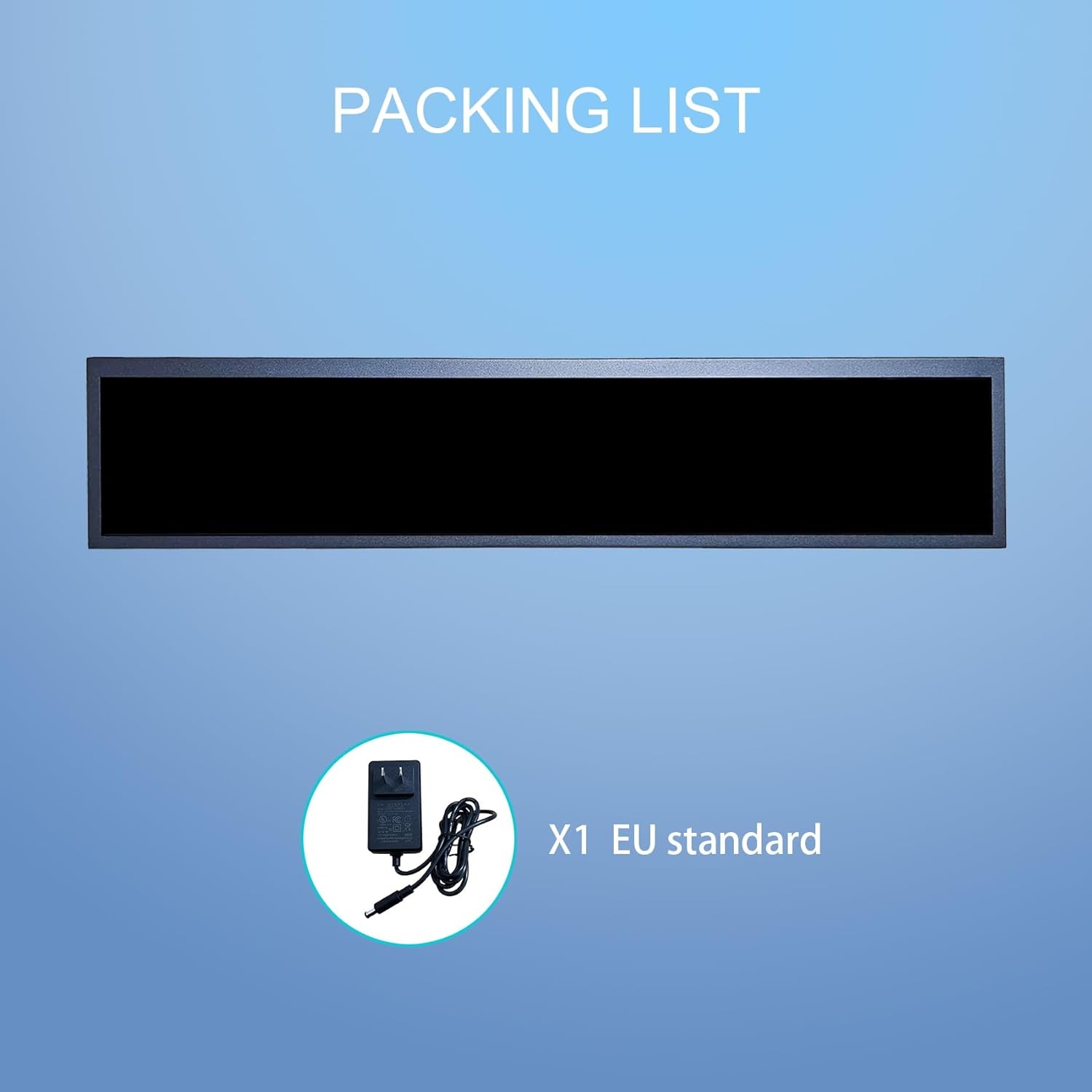
2. പാക്കേജ് ഉള്ളടക്കം
പാക്കേജിൽ എല്ലാ ഇനങ്ങളും ഉണ്ടെന്ന് ഉറപ്പാക്കുക:
- VSDISPLAY 24-inch Stretched Bar LCD Monitor (Model VS240AT01)
- Power Adapter (EU Standard)
- ഉപയോക്തൃ മാനുവൽ (ഈ പ്രമാണം)
3. സജ്ജീകരണവും ഇൻസ്റ്റാളേഷനും
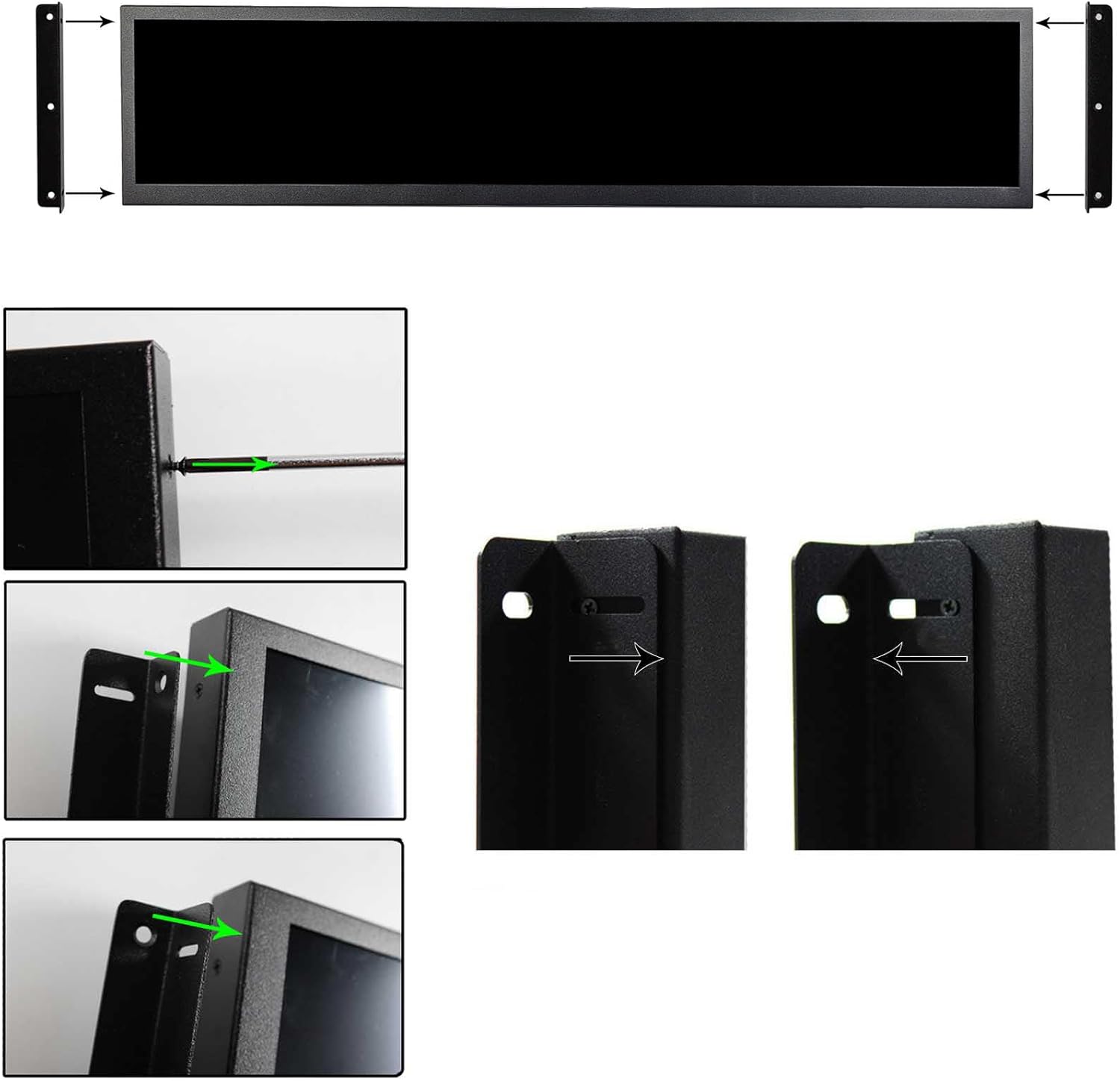
3.1 ഫിസിക്കൽ ഇൻസ്റ്റലേഷൻ
The monitor can be mounted using standard VESA-compatible brackets (not included) or placed on a flat surface. Ensure the mounting surface is sturdy enough to support the monitor's weight.

3.2 ബന്ധിപ്പിക്കുന്ന പവർ
- Connect the power adapter cable to the DC input port on the monitor.
- അനുയോജ്യമായ ഒരു ഇലക്ട്രിക്കൽ ഔട്ട്ലെറ്റിലേക്ക് പവർ അഡാപ്റ്റർ പ്ലഗ് ചെയ്യുക.
- The monitor will power on automatically or can be turned on using the power button (if available).
3.3 ഇൻപുട്ട് സ്രോതസ്സുകൾ ബന്ധിപ്പിക്കുന്നു
The monitor supports various input interfaces:
- USB: For media playback and connecting peripherals.
- എച്ച്ഡിഎംഐ: For video and audio input from external devices.
- യുഎസ്ബി തരം സി: For data and potentially video input (check device compatibility).
Connect the signal cable from your source device (e.g., computer, media player) to the corresponding input port on the monitor.
4. ഓപ്പറേഷൻ
4.1 പവർ ഓൺ/ഓഫ്
The monitor is designed for plug-and-play operation. Once connected to power, it will typically power on automatically. If a power button is present, press it to toggle the monitor's power state.
4.2 Android 11 System Features
This monitor is equipped with an Android 11 operating system, offering advanced functionalities:
- യാന്ത്രിക പ്ലേബാക്ക്: Configured to automatically play media fileആരംഭിക്കുമ്പോൾ എസ്.
- Automatic Looping: Media content can be set to loop continuously.
- Automatic Copying: Supports automatic copying of files from inserted USB drives.
- 360-degree Screen Rotation: The display content can automatically adjust its orientation.
- ആപ്ലിക്കേഷൻ ഇന്റഗ്രേഷൻ: Access to a wide range of Android applications and multimedia content.

4.3 USB വഴിയുള്ള മീഡിയ പ്ലേബാക്ക്
To play videos or display images from a USB drive:
- Insert a USB flash drive containing your media files into an available USB port on the monitor.
- The Android system will detect the USB drive and can be configured for automatic playback or manual selection of files.
4.4 ഓഡിയോ അനുഭവം
The monitor includes two integrated speakers, providing optimized sound for an immersive viewing experience. No external speakers are required for basic audio output.

5. പരിപാലനം
5.1 മോണിറ്റർ വൃത്തിയാക്കുന്നു
- വൃത്തിയാക്കുന്നതിന് മുമ്പ് എല്ലായ്പ്പോഴും മോണിറ്റർ ഓഫ് ചെയ്ത് അൺപ്ലഗ് ചെയ്യുക.
- മൃദുവായ, ലിൻ്റ് രഹിത തുണി ഉപയോഗിക്കുകampened with water or a non-abrasive screen cleaner to wipe the display surface.
- For the exterior casing, use a soft, dry cloth. Avoid using harsh chemicals, solvents, or abrasive materials.
5.2 സംഭരണം
If storing the monitor for an extended period, ensure it is kept in a cool, dry place, away from direct sunlight and extreme temperatures. Use original packaging if available to protect it from dust and physical damage.
6. പ്രശ്നപരിഹാരം
If you encounter issues with your VSDISPLAY monitor, refer to the following common problems and solutions:
| പ്രശ്നം | സാധ്യമായ കാരണം | പരിഹാരം |
|---|---|---|
| ശക്തിയില്ല | Power cable disconnected; faulty power adapter; power outlet issue. | Check power cable connections. Ensure the power adapter is securely plugged into both the monitor and a working electrical outlet. |
| ഡിസ്പ്ലേ ഇല്ല/കറുത്ത സ്ക്രീൻ | Input source not connected; incorrect input selected; source device off. | Verify the HDMI/USB cable is securely connected to both the monitor and the source device. Ensure the source device is powered on. |
| ശബ്ദമില്ല | Volume too low; audio settings incorrect; source device audio issue. | Increase the monitor's volume. Check audio settings on the source device. |
| USB മീഡിയ പ്ലേ ചെയ്യുന്നില്ല | പിന്തുണയ്ക്കുന്നില്ല file format; USB drive not detected; corrupted files. | മീഡിയ ഉറപ്പാക്കുക files are in supported formats. Reinsert the USB drive. Try a different USB drive or files. |
ഈ പരിഹാരങ്ങൾ പരീക്ഷിച്ചതിനുശേഷവും പ്രശ്നം നിലനിൽക്കുകയാണെങ്കിൽ, ദയവായി ഉപഭോക്തൃ പിന്തുണയുമായി ബന്ധപ്പെടുക.
7 സ്പെസിഫിക്കേഷനുകൾ
| ഫീച്ചർ | വിശദാംശങ്ങൾ |
|---|---|
| ബ്രാൻഡ് | വിഎസ് ഡിസ്പ്ലേ |
| മോഡൽ നമ്പർ | VS240AZ01 (Product variant: VS240AT01) |
| ഡിസ്പ്ലേ വലിപ്പം | 24 ഇഞ്ച് |
| റെസലൂഷൻ | 1920 x 360 |
| പാനൽ തരം | ഐ.പി.എസ് |
| തെളിച്ചം | 300 നിറ്റുകൾ (സാധാരണ) |
| കോൺട്രാസ്റ്റ് റേഷ്യോ | 1200:1 |
| പ്രതികരണ സമയം | 8 മില്ലിസെക്കൻഡ് |
| പുതുക്കിയ നിരക്ക് | 60 Hz |
| ഓപ്പറേറ്റിംഗ് സിസ്റ്റം | ആൻഡ്രോയിഡ് 11 |
| കണക്റ്റിവിറ്റി | HDMI, USB Type A (1x USB 3.0), USB Type C |
| ഓഡിയോ | ബിൽറ്റ്-ഇൻ സ്പീക്കറുകൾ |
| അളവുകൾ (L x W x H) | 30 x 21 x 8 centimeters (approx. 619x137x30 mm overall) |
| ഉൽപ്പന്ന ഭാരം | 2.8 കിലോഗ്രാം |
| പ്രത്യേക ഫീച്ചർ | പോർട്ടബിൾ |
8. വാറൻ്റിയും പിന്തുണയും
8.1 നിർമ്മാതാവിന്റെ വാറന്റി
This product comes with a 1-year manufacturer's warranty. Please retain your proof of purchase for warranty claims. The warranty covers defects in materials and workmanship under normal use. It does not cover damage caused by misuse, accidents, unauthorized modifications, or improper installation.
8.2 ഉപഭോക്തൃ പിന്തുണ
For technical assistance, troubleshooting, or warranty inquiries, please contact your retailer or the VSDISPLAY customer service department. Refer to the product packaging or the VSDISPLAY official webനിർദ്ദിഷ്ട ബന്ധപ്പെടാനുള്ള വിവരങ്ങൾക്കായി സൈറ്റ്.
