1. ആമുഖം
Thank you for choosing the Hiseeu 24-Hour Continuous Recording Solar Camera System. This system is designed to provide reliable and eco-friendly surveillance for your property. It features 400-megapixel cameras, a 12-inch IPS LCD monitor NVR, and a 1TB HDD for extensive video storage. With solar power capabilities, IP65 waterproofing, AI motion detection, and two-way audio, this system offers comprehensive security with minimal maintenance.
2. പാക്കേജ് ഉള്ളടക്കം
താഴെ ലിസ്റ്റ് ചെയ്തിരിക്കുന്ന എല്ലാ ഇനങ്ങളും നിങ്ങളുടെ പാക്കേജിൽ ഉൾപ്പെടുത്തിയിട്ടുണ്ടെന്ന് ദയവായി പരിശോധിക്കുക. ഏതെങ്കിലും ഇനങ്ങൾ നഷ്ടപ്പെട്ടിട്ടുണ്ടെങ്കിലോ കേടായിട്ടുണ്ടെങ്കിലോ, ദയവായി ഉപഭോക്തൃ പിന്തുണയുമായി ബന്ധപ്പെടുക.
- ക്യാമറ ബോഡി
- NVR Body (12-inch LCD Monitor Integrated)
- Parts (including mounting hardware, cables, etc.)

For a visual guide on unboxing and identifying package contents, please refer to the video below:
3. ഉൽപ്പന്നം കഴിഞ്ഞുview
3.1. NVR (Network Video Recorder) with Integrated 12-inch LCD Monitor
The NVR unit features a 12-inch IPS LCD display for clear, high-definition 1080P viewing. It comes with a built-in 1TB hard disk drive (HDD) for continuous 24-hour recording from multiple cameras. The NVR supports various input/output ports for connectivity.

3.2. Solar-Powered Security Camera
Each camera in the set boasts 400-megapixel resolution for crisp images. Equipped with an 8000mAh battery and a 16W solar panel, the cameras are designed for continuous operation without external power, making them environmentally friendly and cost-effective. The cameras are rated IP65 for dust and water resistance, suitable for both indoor and outdoor use. They also feature AI motion detection, two-way audio, and PTZ (Pan-Tilt-Zoom) functionality for comprehensive coverage.

4. സജ്ജീകരണ നിർദ്ദേശങ്ങൾ
4.1. Initial NVR Setup
Before installing the cameras, set up the NVR unit. Connect the NVR to a power source and a display (if not using the integrated LCD) using an HDMI or VGA cable. Follow the on-screen prompts to select your language, set the date and time, and configure a password for the system. The NVR will automatically detect and connect to the cameras once they are powered on.
4.2. Camera Power-On and Reset
Ensure the camera is fully charged or connected to its solar panel in sufficient sunlight. To power on the camera, press and hold the reset button for a few seconds until you hear a voice prompt. If you need to reset the camera to factory settings, press and hold the reset button for approximately 5-10 seconds until you hear a confirmation sound.
4.3. Mobile App Download and Wi-Fi Connection
Download the dedicated mobile application (e.g., EseeCloud) by scanning the QR code provided in the manual or on the NVR screen. Follow the app's instructions to add your device. Ensure your smartphone is connected to a 2.4GHz Wi-Fi network during the setup process, as 5GHz networks may not be supported by the camera.

4.4. ക്യാമറ ഇൻസ്റ്റാളേഷൻ
Choose a suitable location for your camera that receives ample sunlight for the solar panel and provides the desired surveillance coverage. Mount the camera securely using the provided hardware. Ensure the solar panel is positioned to maximize sun exposure throughout the day. The camera's PTZ function allows for flexible adjustment of the viewing angle after installation.
5. പ്രവർത്തന നിർദ്ദേശങ്ങൾ
5.1. തത്സമയം View ഒപ്പം പ്ലേബാക്ക്
Access live camera feeds directly from the NVR monitor or through the mobile application. The 1TB HDD allows for continuous 24-hour recording, and you can easily review രേഖപ്പെടുത്തി footage പ്ലേബാക്ക് ഇന്റർഫേസിൽ ആവശ്യമുള്ള തീയതിയും സമയവും തിരഞ്ഞെടുത്തുകൊണ്ട്.
5.2. AI മോഷൻ ഡിറ്റക്ഷനും അലേർട്ടുകളും
The system features advanced AI motion detection to accurately identify human movement and reduce false alarms. When motion is detected, the camera can trigger sound and light alarms to deter intruders, and send instant notifications to your mobile device.

5.3. ടു-വേ ഓഡിയോ
Utilize the built-in microphone and speaker for two-way communication. This allows you to speak to visitors or deter unwanted individuals directly through the camera from your mobile device.
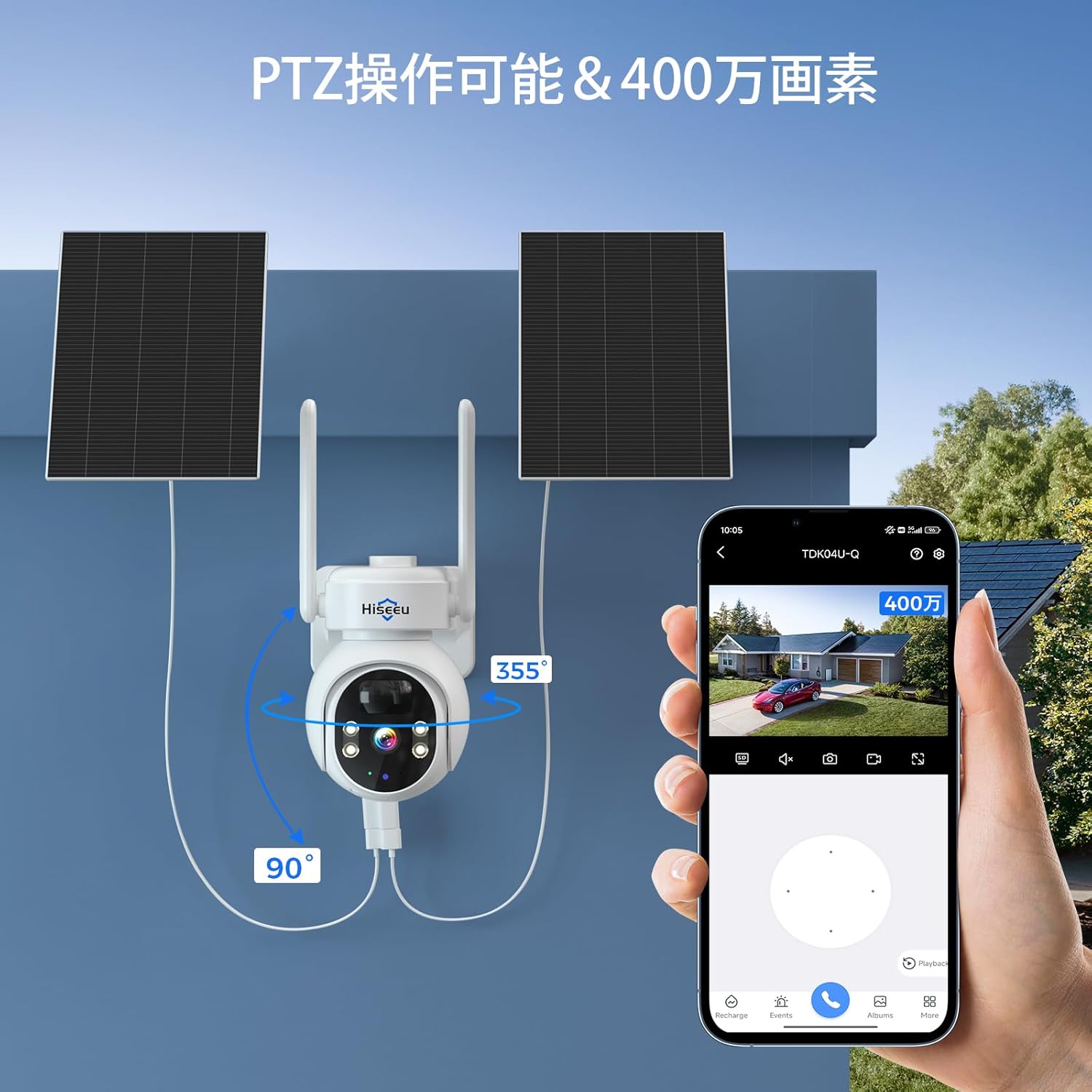
5.4. PTZ (Pan-Tilt-Zoom) Control
The cameras offer PTZ functionality, allowing you to remotely adjust the camera's viewing angle. Pan the camera 355 degrees horizontally and tilt it 90 degrees vertically to cover a wide area.
6. പരിപാലനം
To ensure optimal performance and longevity of your Hiseeu security system, regular maintenance is recommended:
- വൃത്തിയാക്കൽ: ക്യാമറ ലെൻസും സോളാർ പാനലും ഇടയ്ക്കിടെ മൃദുവായ, ഡി-ടച്ച് ഉപയോഗിച്ച് വൃത്തിയാക്കുക.amp പൊടിയും അവശിഷ്ടങ്ങളും നീക്കം ചെയ്യാൻ തുണി ഉപയോഗിക്കുക. ഉരച്ചിലുകൾ ഉള്ള ക്ലീനറുകൾ ഒഴിവാക്കുക.
- സോളാർ പാനലിന്റെ പ്രകടനം: Ensure the solar panel is free from obstructions (e.g., leaves, snow) that might block sunlight.
- ഫേംവെയർ അപ്ഡേറ്റുകൾ: Check the mobile application regularly for available firmware updates to ensure your system has the latest features and security enhancements.
- കേബിൾ കണക്ഷനുകൾ: Periodically inspect all cable connections for any signs of wear or damage, especially for outdoor installations.
7. പ്രശ്നപരിഹാരം
If you encounter any issues with your Hiseeu security system, please refer to the following common troubleshooting steps:
- No Image on NVR: Ensure all cameras are powered on and properly connected to the NVR. Check power adapters and network cables.
- റിമോട്ട് ആക്സസ് ഇല്ല: Verify that the NVR is connected to the internet and your mobile device has a stable internet connection. Check Wi-Fi settings and ensure the app is correctly configured.
- മോശം ചിത്രത്തിന്റെ ഗുണനിലവാരം: Clean the camera lens. Ensure the camera is within optimal range of the NVR or Wi-Fi router. Check for any physical obstructions.
- മോഷൻ ഡിറ്റക്ഷൻ പ്രശ്നങ്ങൾ: Adjust motion detection sensitivity settings in the app. Ensure the camera's field of view is clear of constant movement (e.g., tree branches in strong wind) that could trigger false alarms.
- സോളാർ ചാർജിംഗ് പ്രശ്നങ്ങൾ: Ensure the solar panel is receiving direct sunlight for several hours a day. Clean the solar panel surface.
If the problem persists after trying these steps, please contact Hiseeu customer support for further assistance.
8 സ്പെസിഫിക്കേഷനുകൾ
| ഫീച്ചർ | വിവരണം |
|---|---|
| ബ്രാൻഡ് | ഹിസ്യു |
| ഉൽപ്പന്ന മോഡൽ നമ്പർ | WK-12V-2TDK05-AT |
| എൻവിആർ ഡിസ്പ്ലേ | 12-inch IPS LCD, 1080P |
| സംഭരണം | 1TB HDD built-in |
| ക്യാമറ റെസല്യൂഷൻ | 400 മെഗാപിക്സലുകൾ |
| ക്യാമറ ബാറ്ററി | 8000mAh |
| സോളാർ പാനൽ പവർ | 16W |
| വാട്ടർപ്രൂഫ് റേറ്റിംഗ് | IP65 |
| PTZ Functionality | പാൻ 355°, ചരിവ് 90° |
| കണക്റ്റിവിറ്റി | 2.4G Wi-Fi compatible |
| ഉൽപ്പന്ന അളവുകൾ | 29.5 x 2 x 24.5 cm (NVR); 6.22 kg (total weight) |
9. വാറൻ്റിയും പിന്തുണയും
This Hiseeu product comes with a 1 വർഷത്തെ വാറൻ്റി from the date of purchase. We are committed to providing high-quality products and excellent customer service. If you have any questions, concerns, or require technical assistance, please do not hesitate to contact our support team. You can find contact information on our official website or through the mobile application.


