1. സജ്ജീകരണം
1.1. പാക്കേജ് ഉള്ളടക്കം
പാക്കേജിൽ എല്ലാ ഘടകങ്ങളും ഉണ്ടെന്ന് ഉറപ്പാക്കുക:
- AUSDOM 108-Key Wireless Keyboard
- AUSDOM Wireless Mouse
- USB Receiver (stored in the mouse)
- USB-C ചാർജിംഗ് കേബിൾ
- ഉപയോക്തൃ മാനുവൽ
1.2. Connecting the Combo
- യുഎസ്ബി റിസീവർ കണ്ടെത്തുക: The 2.4GHz USB receiver is conveniently stored in a compartment on the underside of the wireless mouse. Gently slide open the battery cover to access it.
- റിസീവർ ചേർക്കുക: Plug the USB receiver into an available USB port on your computer (PC, laptop, or tablet). The system will automatically detect and install the necessary drivers.
- പവർ ഓൺ ഉപകരണങ്ങൾ: Ensure both the keyboard and mouse are switched to the 'ON' position. The power switch for the keyboard is located on its top edge, and for the mouse, it is on the underside.

1.3. Charging the Combo
Both the keyboard and mouse are equipped with built-in rechargeable Lithium Polymer batteries. Use the provided USB-C cable to charge them.
- Connect the USB-C end of the cable to the charging port on the keyboard (located on the top edge) or the mouse (located on the front).
- Connect the USB-A end of the cable to a powered USB port on your computer or a USB wall adapter.
- A full charge takes approximately 2 hours and provides up to 300 hours of standby time.

2. പ്രവർത്തന നിർദ്ദേശങ്ങൾ
2.1. കീബോർഡ് സവിശേഷതകൾ
The AUSDOM KAM200X keyboard features a full-size 108-key layout, including a dedicated numeric keypad and various function keys for enhanced productivity.
- Mechanical-Feel Keys: Experience tactile feedback similar to mechanical keyboards, combined with quiet scissor-switch mechanisms and a short 3.8mm key travel for comfortable and precise typing.
- Multimedia and Shortcut Keys: Utilize dedicated media controls (volume, play/pause) and app-switching shortcuts for streamlined workflow. Refer to the user manual for a complete list of function key combinations.
- OS സ്വിച്ചിംഗ്: Easily switch between Windows and macOS layouts using specific function key combinations (e.g., Fn + P for Windows, Fn + O for Mac).


2.2. മൗസ് സവിശേഷതകൾ
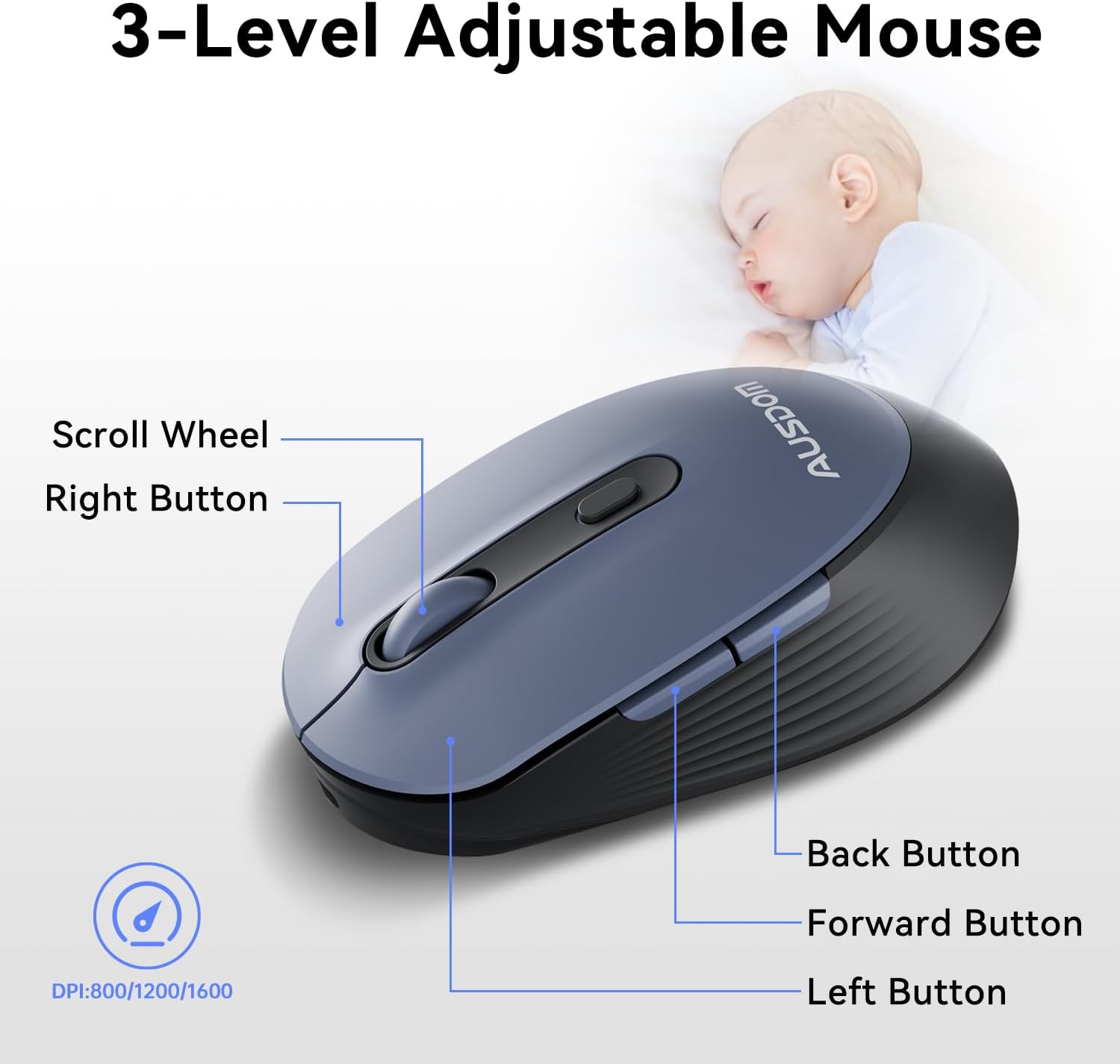
The ergonomic wireless mouse is designed for comfortable use and precise control.
- ക്രമീകരിക്കാവുന്ന DPI: Cycle through 3 DPI levels (800, 1200, 1600) using the dedicated DPI button to adjust cursor sensitivity for different tasks.
- ഫോർവേഡ്/ബാക്ക് ബട്ടണുകൾ: Utilize the side buttons for quick navigation in web browsers and applications.
- നിശബ്ദ ക്ലിക്കുകൾ: The mouse features silent click buttons to minimize noise in quiet environments.
2.3. വിശാലമായ അനുയോജ്യത
The AUSDOM wireless combo is compatible with a broad range of operating systems and devices, ensuring seamless integration into your existing setup.
- ഓപ്പറേറ്റിംഗ് സിസ്റ്റങ്ങൾ: Compatible with Windows XP/ME/Vista/7/8/10/11 and macOS.
- ഉപകരണങ്ങൾ: Works instantly with desktops, laptops, and other computers without requiring additional software or drivers.

3. പരിപാലനം
3.1. വൃത്തിയാക്കൽ
To ensure the longevity and optimal performance of your AUSDOM combo, regular cleaning is recommended.
- കീബോർഡിന്റെയും മൗസിന്റെയും പ്രതലങ്ങൾ തുടയ്ക്കാൻ മൃദുവായതും ഉണങ്ങിയതും ലിന്റ് രഹിതവുമായ ഒരു തുണി ഉപയോഗിക്കുക.
- കഠിനമായ അഴുക്കിന്, ചെറുതായി dampen the cloth with water or a mild cleaning solution, ensuring no liquid enters the device openings.
- കഠിനമായ രാസവസ്തുക്കൾ, അബ്രസീവ് ക്ലീനറുകൾ, അല്ലെങ്കിൽ ലായകങ്ങൾ എന്നിവ ഉപയോഗിക്കുന്നത് ഒഴിവാക്കുക.
3.2. സംഭരണം
When not in use for extended periods, store the keyboard and mouse in a cool, dry place away from direct sunlight and extreme temperatures. The USB receiver can be stored inside the mouse to prevent loss.
4. പ്രശ്നപരിഹാരം
4.1. കണക്ഷൻ പ്രശ്നങ്ങൾ
- ചെക്ക് റിസീവർ: Ensure the USB receiver is firmly plugged into a working USB port on your computer.
- പവർ ഓൺ: Verify that both the keyboard and mouse are switched to the 'ON' position.
- ബാറ്ററി നില: Confirm that both devices have sufficient battery charge. Recharge if necessary.
- വ്യത്യസ്ത പോർട്ട് പരീക്ഷിക്കുക: Plug the USB receiver into a different USB port on your computer.
4.2. Lag or Unresponsiveness
- ഇടപെടൽ കുറയ്ക്കുക: കീബോർഡും മൗസും യുഎസ്ബി റിസീവറിന് അടുത്തേക്ക് നീക്കുക. ഉപകരണങ്ങൾക്കും റിസീവറിനും ഇടയിൽ വലിയ ലോഹ വസ്തുക്കൾ വയ്ക്കുന്നത് ഒഴിവാക്കുക.
- Check for Other Devices: Other 2.4GHz wireless devices might cause interference. Try to minimize their use or move them further away.
- റീചാർജ്: Ensure both devices are fully charged.
4.3. Keyboard Specific Issues
- പ്രതികരിക്കാത്ത കീകൾ: ബാധിച്ച കീകളുടെ ചുറ്റും സൌമ്യമായി വൃത്തിയാക്കി അവശിഷ്ടങ്ങൾ നീക്കം ചെയ്യുക.
- തെറ്റായ കീ ഔട്ട്പുട്ട്: Check your computer's operating system settings to ensure the correct keyboard layout is selected.
4.4. Mouse Specific Issues
- Erratic Cursor: Clean the optical sensor on the underside of the mouse. Ensure you are using the mouse on a suitable, non-reflective surface.
- ഡിപിഐ ക്രമീകരിക്കുന്നു: Press the DPI button on the top of the mouse to cycle through the 800/1200/1600 DPI settings.
5. ഉൽപ്പന്ന സവിശേഷതകൾ
| ഫീച്ചർ | സ്പെസിഫിക്കേഷൻ |
|---|---|
| ബ്രാൻഡ് | ആസ്ഡോം |
| മോഡൽ നമ്പർ | KAM200X |
| ഉൽപ്പന്ന അളവുകൾ | 17.44 x 5.31 x 0.79 ഇഞ്ച് |
| ഇനത്തിൻ്റെ ഭാരം | 1.8 പൗണ്ട് |
| ബാറ്ററികൾ | 2 ലിഥിയം പോളിമർ ബാറ്ററികൾ ആവശ്യമാണ് (ഉൾപ്പെടുത്തിയിരിക്കുന്നു) |
| കണക്റ്റിവിറ്റി ടെക്നോളജി | 2.4Ghz വയർലെസ് |
| പ്രത്യേക സവിശേഷതകൾ | Lightweight, Rechargeable, Scissor Switch, Wireless |
| അനുയോജ്യമായ ഉപകരണങ്ങൾ | ലാപ്ടോപ്പ്, പേഴ്സണൽ കമ്പ്യൂട്ടർ, ടാബ്ലെറ്റ് |
6. വാറൻ്റി വിവരങ്ങൾ
For detailed warranty information regarding your AUSDOM KAM200X Wireless Keyboard and Mouse Combo, please refer to the official documentation included in your product packaging or visit the manufacturer's official webസൈറ്റ്. വാറന്റി നിബന്ധനകളും വ്യവസ്ഥകളും പ്രദേശത്തിനും ഉൽപ്പന്നത്തിനും അനുസരിച്ച് വ്യത്യാസപ്പെടാം.
7. ഉപഭോക്തൃ പിന്തുണ
If you encounter any issues or have questions about your AUSDOM KAM200X Wireless Keyboard and Mouse Combo, please contact AUSDOM customer support through their official channels. You can often find support contact information, FAQs, and additional resources on the AUSDOM Store Page അല്ലെങ്കിൽ അവരുടെ ഉദ്യോഗസ്ഥൻ webസൈറ്റ്.


