ആമുഖം
The Cornesty GM100 Digital Ultrasonic Thickness Gauge is a precision instrument designed for accurate measurement of material thickness using ultrasonic waves. It is ideal for various industrial applications, including steel testing, and is suitable for both fieldwork and elevated inspections. This manual provides detailed instructions for the proper setup, operation, and maintenance of your GM100 thickness gauge.
പ്രധാന സവിശേഷതകൾ:
- Sound Velocity Measurement: Allows for measuring sound velocity with a given thickness to improve accuracy.
- യാന്ത്രിക കാലിബ്രേഷൻ: Ensures precise and reliable measurements.
- ബഹുമുഖ ഉപയോഗം: Designed for use in various environments, including fieldwork and elevated inspections.
- ഓട്ടോ പവർ ഓഫ് പ്രവർത്തനം: ബാറ്ററി ലൈഫ് ലാഭിക്കാൻ സഹായിക്കുന്നു.
- വലിയ LCD ഡിസ്പ്ലേ: Provides clear and easy-to-read measurement results.
സുരക്ഷാ വിവരങ്ങൾ
Please read and understand all safety instructions before operating the device. Failure to do so may result in injury or damage to the instrument.
- ഉപകരണത്തെ തീവ്രമായ താപനില, ഈർപ്പം, അല്ലെങ്കിൽ നശിപ്പിക്കുന്ന അന്തരീക്ഷങ്ങൾ എന്നിവയിലേക്ക് തുറന്നുകാട്ടരുത്.
- ഉപകരണം താഴെയിടുകയോ ഗുരുതരമായ ആഘാതത്തിന് വിധേയമാക്കുകയോ ചെയ്യുന്നത് ഒഴിവാക്കുക.
- Use only the specified battery type (3 * 1.5V AAA Battery).
- ഉപകരണം ഡിസ്അസംബ്ലിംഗ് ചെയ്യാനോ പരിഷ്ക്കരിക്കാനോ ശ്രമിക്കരുത്. എല്ലാ സേവനങ്ങളും യോഗ്യതയുള്ള ഉദ്യോഗസ്ഥരെ ഏൽപ്പിക്കുക.
- ഉപകരണവും അതിന്റെ അനുബന്ധ ഉപകരണങ്ങളും കുട്ടികൾക്ക് ലഭ്യമാകാതെ സൂക്ഷിക്കുക.
പാക്കേജ് ഉള്ളടക്കം
താഴെ ലിസ്റ്റ് ചെയ്തിരിക്കുന്ന എല്ലാ ഇനങ്ങളും നിങ്ങളുടെ പാക്കേജിൽ ഉൾപ്പെടുത്തിയിട്ടുണ്ടെന്ന് ഉറപ്പാക്കുക:
- 1 x Ultrasonic Thickness Gauge (GM100)
- 1 x Dia.10 Transducer (5KHz)
- 1 x 4mm Sampലെ ബ്ലോക്ക്
- 1 x Operation Manual (This document)

ചിത്രം 1: Contents of the GM100 package. This image shows the orange and red GM100 thickness gauge, a black transducer probe with cables, and a small silver 4mm sample ബ്ലോക്ക്.
ഉൽപ്പന്നം കഴിഞ്ഞുview
Familiarize yourself with the components of the GM100 Digital Ultrasonic Thickness Gauge.

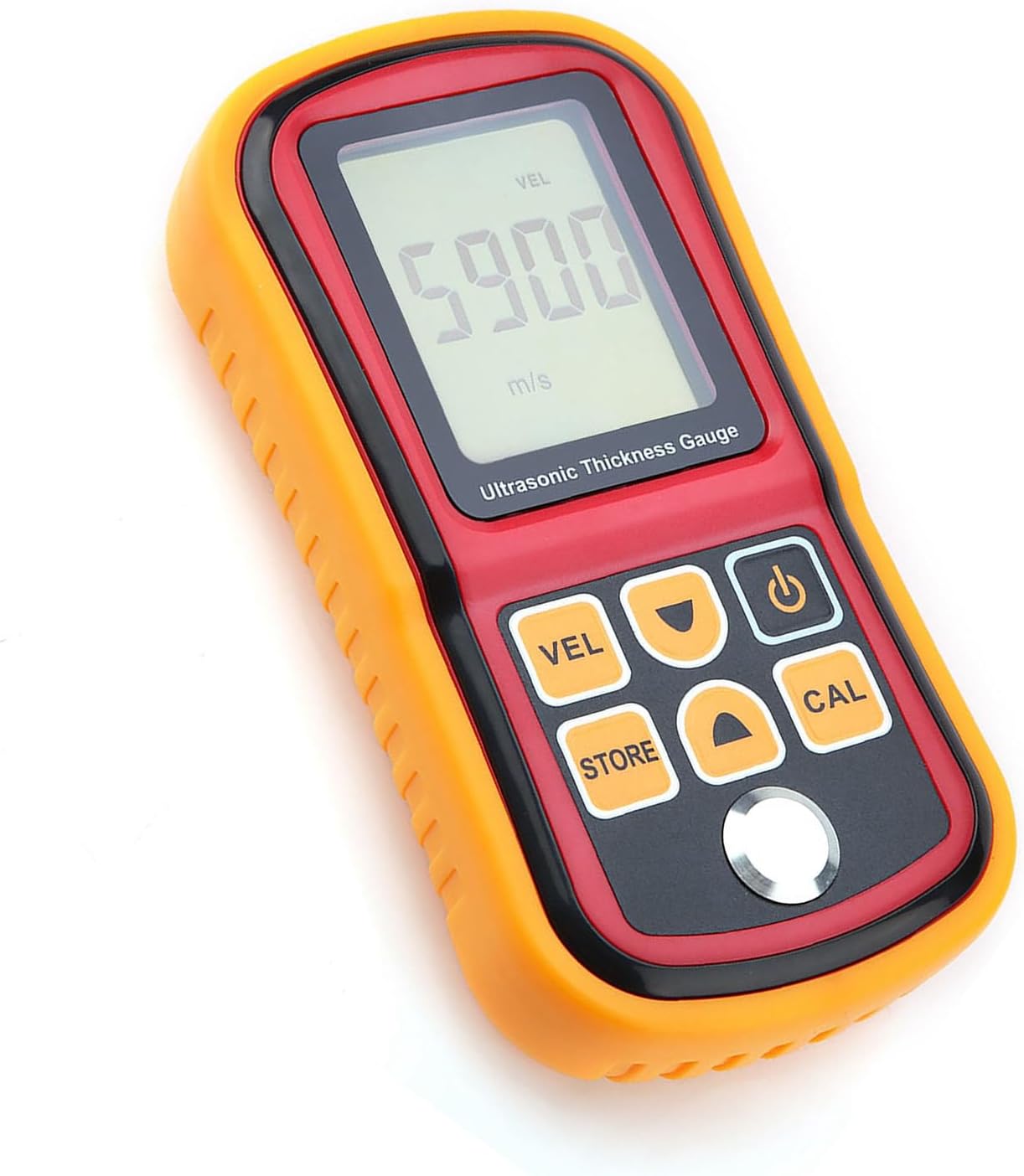
ചിത്രം 2: ഫ്രണ്ട് view of the GM100 Ultrasonic Thickness Gauge. The device is orange and red, featuring a large LCD screen at the top displaying "5900 m/s" and buttons below for VEL, STORE, CAL, Power, and navigation arrows.
ഘടകങ്ങൾ:
- LCD ഡിസ്പ്ലേ: Large screen for displaying measurements, units, and status indicators.
- ട്രാൻസ്ഡ്യൂസർ പോർട്ട്: Connects the ultrasonic probe to the main unit.
- നിയന്ത്രണ ബട്ടണുകൾ:
- VEL (വേഗത): Used for sound velocity measurement mode.
- സ്റ്റോർ: For saving measurement data.
- CAL (Calibration): Initiates the auto-calibration process.
- പവർ ബട്ടൺ: ഉപകരണം ഓൺ/ഓഫ് ചെയ്യുന്നു.
- മുകളിലേക്കും താഴേക്കുമുള്ള അമ്പടയാളങ്ങൾ: For navigation and adjusting values.
- ബാറ്ററി കമ്പാർട്ട്മെൻ്റ്: Located on the back for AAA batteries.

ചിത്രം 3: തിരികെ view of the GM100. This image shows the red back casing of the device with the battery compartment cover removed, revealing slots for three AAA batteries.
സജ്ജമാക്കുക
1. ബാറ്ററി ഇൻസ്റ്റാളേഷൻ
- Locate the battery compartment on the back of the GM100.
- ബാറ്ററി കവർ തുറക്കാൻ താഴേക്ക് സ്ലൈഡ് ചെയ്യുക.
- മൂന്ന് (3) 1.5V AAA ബാറ്ററികൾ ഇടുക, ശരിയായ പോളാരിറ്റി (+/-) ഉറപ്പാക്കുക.
- Replace the battery cover, sliding it upwards until it clicks into place.
2. Connecting the Transducer
- Identify the transducer cable with two connectors.
- Connect the two plugs from the transducer cable into the corresponding ports at the top of the GM100 unit. Ensure a secure connection.
- The transducer probe head should be clean and free of debris before use.
ചിത്രം 4: GM100 with transducer connected. This image shows the orange and red GM100 unit with the black transducer cable plugged into the top ports, leading to the silver transducer probe.
പ്രവർത്തന നിർദ്ദേശങ്ങൾ
1. പവർ ഓൺ/ഓഫ്
- അമർത്തുക ശക്തി button (often marked with a circle and vertical line symbol) to turn the device on. The LCD will illuminate.
- The device features an auto power-off function to save battery life. It will automatically shut down after a period of inactivity.
- To manually turn off the device, press and hold the ശക്തി ബട്ടൺ.
2. Auto Calibration
Before taking measurements, it is recommended to perform an auto-calibration for optimal accuracy.
- Ensure the transducer is connected.
- Apply a small amount of coupling gel (not included) to the 4mm sample ബ്ലോക്ക്.
- Place the transducer firmly and flatly on the 4mm sample ബ്ലോക്ക്.
- അമർത്തുക CAL button. The device will perform the calibration.
- Once calibrated, the display will show the calibrated value, typically 4.0mm.
3. കനം അളക്കൽ
- Ensure the device is calibrated.
- Apply coupling gel to the surface of the material to be measured.
- Place the transducer firmly and flatly on the prepared surface. Ensure good contact.
- The thickness reading will be displayed on the LCD screen.
- For continuous measurement, keep the transducer in contact with the surface.
4. Sound Velocity Measurement
This function allows you to measure the sound velocity of a material if its thickness is known.
- അമർത്തുക VEL button to enter sound velocity measurement mode.
- ഉപയോഗിക്കുക മുകളിലേക്ക് / താഴേക്ക് arrow buttons to input the known thickness of the material.
- Apply coupling gel and place the transducer firmly on the material.
- The device will display the calculated sound velocity for that material.
5. Data Storage (STORE)
The GM100 may have a data storage function. Refer to the on-screen prompts or the full manual for detailed instructions on saving and recalling measurements using the സ്റ്റോർ ബട്ടൺ.
മെയിൻ്റനൻസ്
വൃത്തിയാക്കൽ
- After each use, wipe the transducer and the device body with a soft, dry cloth.
- ഉരച്ചിലുകളുള്ള ക്ലീനറുകളോ ലായകങ്ങളോ ഉപയോഗിക്കരുത്.
- Ensure no coupling gel or other residues remain on the transducer face.
സംഭരണം
- Store the GM100 in a cool, dry place, away from direct sunlight and extreme temperatures.
- ദീർഘനേരം സൂക്ഷിക്കുകയാണെങ്കിൽ, ചോർച്ച തടയാൻ ബാറ്ററികൾ നീക്കം ചെയ്യുക.
ബാറ്ററി മാറ്റിസ്ഥാപിക്കൽ
- When the low battery indicator appears on the LCD, replace the batteries as described in the "Battery Installation" section.
- ഉപയോഗിച്ച ബാറ്ററികൾ പ്രാദേശിക ചട്ടങ്ങൾക്കനുസൃതമായി നീക്കം ചെയ്യുക.
ട്രബിൾഷൂട്ടിംഗ്
| പ്രശ്നം | സാധ്യമായ കാരണം | പരിഹാരം |
|---|---|---|
| ഉപകരണം പവർ ഓണാക്കുന്നില്ല. | ഡെഡ് അല്ലെങ്കിൽ തെറ്റായി ഇൻസ്റ്റാൾ ചെയ്ത ബാറ്ററികൾ. | ബാറ്ററി പോളാരിറ്റി പരിശോധിക്കുക; പുതിയ AAA ബാറ്ററികൾ ഉപയോഗിച്ച് മാറ്റിസ്ഥാപിക്കുക. |
| കൃത്യമല്ലാത്തതോ അസ്ഥിരമായതോ ആയ വായനകൾ. |
|
|
| "LOW BATT" indicator. | ബാറ്ററികൾ കുറവാണ്. | Replace all three AAA batteries. |
സ്പെസിഫിക്കേഷനുകൾ
| പരാമീറ്റർ | മൂല്യം |
|---|---|
| മോഡൽ | GM100 |
| പരിധി അളക്കുന്നു | 1.2-300mm (steel) |
| കൃത്യത | ±(1%H+0.1mm) H denotes the measured thickness |
| പ്രവർത്തന ആവൃത്തി | 5MHz |
| റെസലൂഷൻ | 0.1 മി.മീ |
| Minimum Limit for Tube Measuring (steel) | dia. 20*3.0mm (steel) |
| ശബ്ദ വേഗത ശ്രേണി | 1000-9999മി/സെ |
| വൈദ്യുതി വിതരണം | 3 * 1.5V AAA Battery (not included) |
| ഭാരം | ഏകദേശം 400g / 14.1oz |
| അളവുകൾ | ഏകദേശം 15 * 8 * 3.2 സെ.മീ / 5.9 * 3.2 * 1.3 ഇഞ്ച് |
| നിർമ്മാതാവ് | കോർണസ്റ്റി |
വാറൻ്റിയും പിന്തുണയും
Specific warranty details for the Cornesty GM100 Digital Ultrasonic Thickness Gauge are typically provided with your purchase documentation or can be obtained by contacting the manufacturer directly.
For technical support, troubleshooting assistance beyond what is covered in this manual, or warranty claims, please contact Cornesty customer service through their official website or the contact information provided at the point of purchase.
Please have your product model (GM100) and purchase details ready when contacting support.


