ആമുഖം
The LIORQUE 60 Minute Visual Timer is designed to help individuals, both children and adults, manage time effectively. Its clear visual display and quiet operation make it ideal for various settings, including classrooms, offices, and homes. This manual provides detailed instructions for setting up, operating, and maintaining your visual timer.

Image: The LIORQUE 60 Minute Visual Timer in dark blue, showing the white dial with black numbers and a blue visual disk indicating remaining time.
സുരക്ഷാ വിവരങ്ങൾ
- ചെറിയ ഭാഗങ്ങളിൽ നിന്നുള്ള ശ്വാസംമുട്ടൽ അപകടങ്ങൾ തടയാൻ ചെറിയ കുട്ടികൾക്ക് ലഭ്യമാകാതെ സൂക്ഷിക്കുക.
- Do not expose the timer to extreme temperatures or direct sunlight.
- Avoid dropping the timer or subjecting it to strong impacts.
- Do not attempt to disassemble or repair the timer yourself. Refer to qualified personnel for service.
- പ്രാദേശിക നിയന്ത്രണങ്ങൾ അനുസരിച്ച് ബാറ്ററികൾ നീക്കം ചെയ്യുക.
പാക്കേജ് ഉള്ളടക്കം
എല്ലാ ഇനങ്ങളും ഉണ്ടെന്ന് ഉറപ്പാക്കാൻ പാക്കേജ് പരിശോധിക്കുക:
- 1 x LIORQUE 60 Minute Visual Timer (Model TM027)
- 2 x AA ബാറ്ററികൾ (ഉൾപ്പെട്ടിരിക്കുന്നു)
- 1 x ഉപയോക്തൃ മാനുവൽ (ഈ പ്രമാണം)
സജ്ജമാക്കുക
ബാറ്ററി ഇൻസ്റ്റാളേഷൻ
- ടൈമറിന്റെ പിൻഭാഗത്ത് ബാറ്ററി കമ്പാർട്ട്മെന്റ് കണ്ടെത്തുക.
- ബാറ്ററി കമ്പാർട്ട്മെൻ്റ് കവർ തുറക്കുക.
- ശരിയായ പോളാരിറ്റി (+/-) ഉറപ്പാക്കിക്കൊണ്ട് രണ്ട് AA ബാറ്ററികൾ ഇടുക.
- ബാറ്ററി കമ്പാർട്ട്മെൻ്റ് കവർ സുരക്ഷിതമായി അടയ്ക്കുക.

Image: The LIORQUE visual timer on a table with two AA batteries next to it, illustrating that batteries are included and the timer is battery-operated.
പ്ലെയ്സ്മെന്റ് ഓപ്ഷനുകൾ
The LIORQUE visual timer offers flexible placement options:
- കാന്തിക പിന്തുണ: വൈറ്റ്ബോർഡ് അല്ലെങ്കിൽ റഫ്രിജറേറ്റർ പോലുള്ള ഏതെങ്കിലും കാന്തിക പ്രതലത്തിൽ ടൈമർ ഘടിപ്പിക്കുക.
- മടക്കാവുന്ന ബ്രാക്കറ്റ്: Use the integrated foldable stand to place the timer on a desk, table, or shelf.
- ചുമരിൽ കയറുന്നതിനുള്ള ദ്വാരം: Hang the timer on a wall using a suitable hook or nail.
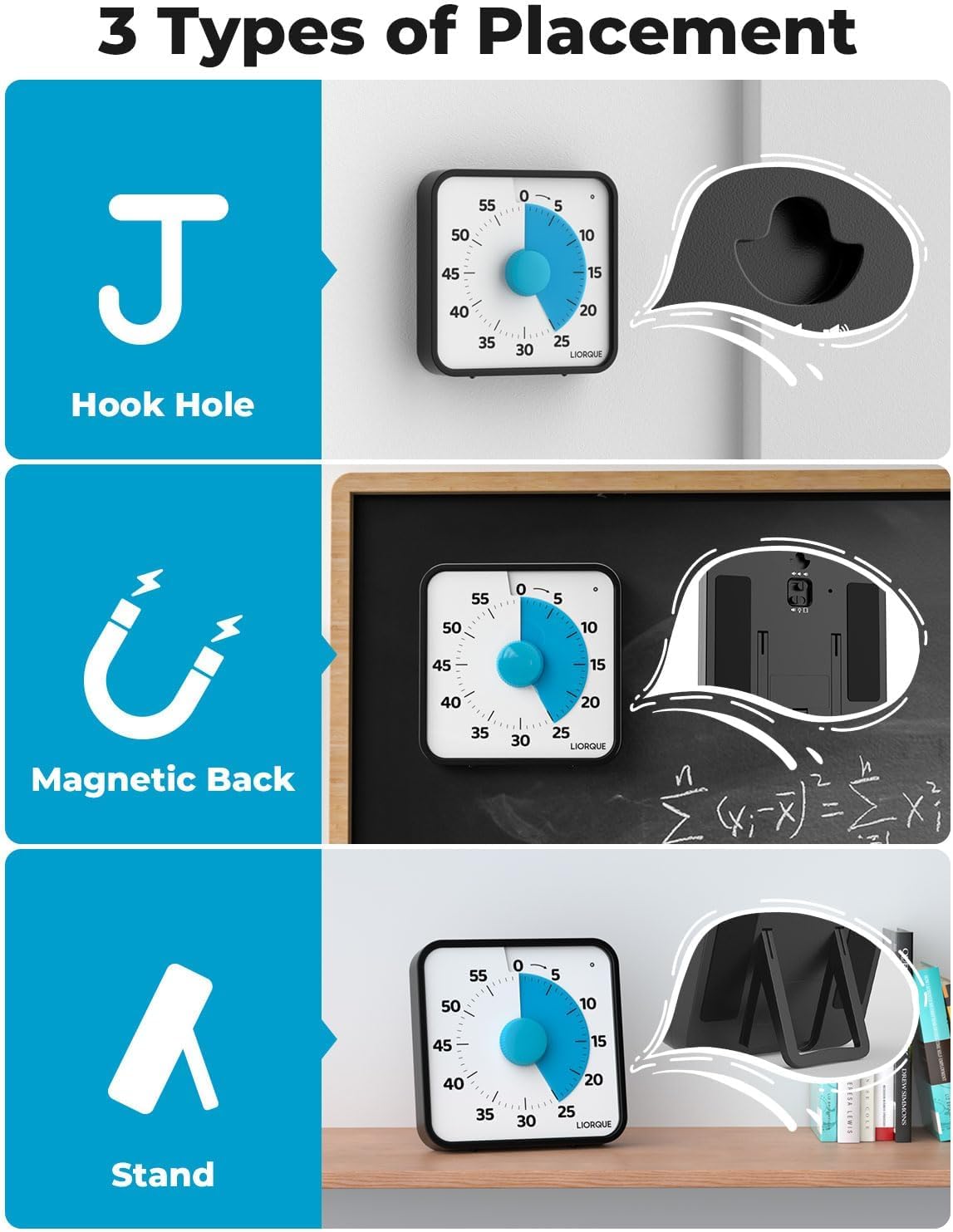
Image: A collage showing the three placement options: hanging via a hook hole, magnetic attachment to a blackboard, and standing on a tabletop using the foldable bracket.
പ്രവർത്തന നിർദ്ദേശങ്ങൾ
ടൈമർ സജ്ജീകരിക്കുന്നു
കൗണ്ട്ഡൗൺ സമയം സജ്ജമാക്കാൻ:
- Turn the central dial ഘടികാരദിശയിൽ to increase the time. The blue visual disk will expand to indicate the set duration.
- Turn the central dial എതിർ ഘടികാരദിശയിൽ സമയം കുറയ്ക്കാൻ.
- The timer will begin counting down immediately once the dial is set.
- കുറിപ്പ്: If the desired countdown time is less than 3 minutes, first turn the dial to 5 minutes, then turn it back to your desired shorter time.

Image: The visual timer with text overlay indicating to turn clockwise to increase time and counter-clockwise to decrease time. A child is visible in the background, suggesting its use for learning.
Adjusting Alarm Modes
The LIORQUE visual timer features three alarm modes: Sound, Light, and Vibration. You can select the mode that best suits your needs.
- ശബ്ദ മോഡ്: Offers three volume levels: Mute, Low, and High. Adjust the volume using the switch on the side/back of the timer.
- ലൈറ്റ് മോഡ്: The timer will flash a light when the time expires.
- വൈബ്രേഷൻ മോഡ്: The timer will vibrate when the time expires.
All alarm types will last for 1 minute. To end the alarm early, refer to the 'Turning Off the Alarm' section.

Image: A collage illustrating the three alarm modes: Light Alarm (red light flashing), Vibration Alarm (vibration icon), and Audible Alarm (sound icon with Mute-Low-High options).
അലാറം ഓഫ് ചെയ്യുന്നു
If you wish to stop the alarm before its 1-minute duration, gently rotate the dial clockwise a little, then reset it to zero. This action will disengage the alarm.
ഫീച്ചറുകൾ
- വളരെ വലിയ വിഷ്വൽ ഡിസ്പ്ലേ: The 7.5-inch screen provides a clear, at-a-glance view of remaining time, making it easy to understand for all ages.
- നോൺ-ടിക്കിംഗ് പ്രവർത്തനം: Battery-powered design ensures silent operation, preventing distractions during focused tasks.
- Multiple Alarm Options: Choose between sound, light, or vibration alerts to suit different environments and personal preferences.
- ഫ്ലെക്സിബിൾ പ്ലേസ്മെൻ്റ്: Equipped with magnetic backing, a foldable stand, and a wall-mounting hole for versatile use.

Image: A graphic summarizing key features: Time Visible, 7.5" Large Screen, Easy to Operate, Battery-powered, No Ticking Sound, and Multiple Alarm Modes.

Image: The LIORQUE visual timer displayed with its dimensions, highlighting the 7.5-inch screen size for clear visibility from a distance.
ഉപയോഗ സാഹചര്യങ്ങൾ
The LIORQUE visual timer is a versatile tool for various time management needs:
- ക്ലാസ് റൂം: Helps students understand time limits for assignments, tests, or group activities.
- അടുക്കള: Perfect for cooking, baking, or any timed kitchen tasks.
- മീറ്റിംഗുകൾ: Keeps discussions on track and ensures efficient use of time.
- Yoga/Meditation: Provides a visual cue for timed sessions without audible distractions.
- Homework/Study: Assists in focused work periods and breaks.
- Chores/Tasks: Motivates completion of household tasks within a set timeframe.

Image: A graphic showing the visual timer in different settings: cooking, classroom, meeting, and yoga, demonstrating its versatility.

Image: A comparison showing children with improved focus and time management skills, illustrating the positive impact of using the visual timer.
മെയിൻ്റനൻസ്
- Clean the timer with a soft, dry cloth. Do not use abrasive cleaners or solvents.
- Avoid exposing the timer to water or excessive moisture.
- ടൈമർ കൂടുതൽ നേരം ഉപയോഗിക്കുന്നില്ലെങ്കിൽ, ചോർച്ച തടയാൻ ബാറ്ററികൾ നീക്കം ചെയ്യുക.
ട്രബിൾഷൂട്ടിംഗ്
| പ്രശ്നം | സാധ്യമായ കാരണം | പരിഹാരം |
|---|---|---|
| Timer not starting/working | ബാറ്ററികൾ തീർന്നിരിക്കുന്നു അല്ലെങ്കിൽ തെറ്റായി ചേർത്തിരിക്കുന്നു. | ബാറ്ററികൾ പുതിയ AA ബാറ്ററികൾ ഉപയോഗിച്ച് മാറ്റിസ്ഥാപിക്കുക, ശരിയായ പോളാരിറ്റി ഉറപ്പാക്കുക. |
| Alarm not sounding/vibrating/lighting | Alarm mode is set to Mute or incorrect mode. | Check the alarm mode switch and volume settings. |
| Visual disk not moving smoothly | ആന്തരിക സംവിധാന തടസ്സം അല്ലെങ്കിൽ കേടുപാടുകൾ. | Ensure the timer is on a flat, stable surface. If problem persists, contact customer support. |
സ്പെസിഫിക്കേഷനുകൾ
- ബ്രാൻഡ്: ലിയോർക്ക്
- മോഡൽ നമ്പർ: TM027
- നിറം: കടും നീല
- ഉൽപ്പന്ന അളവുകൾ: 7.64"D x 7.8"W x 2"H
- സ്ക്രീൻ വലിപ്പം: 7.5 ഇഞ്ച്
- ഇനത്തിൻ്റെ ഭാരം: 1.23 പൗണ്ട്
- ബാറ്ററികൾ: 2 AA ബാറ്ററികൾ (ഉൾപ്പെട്ടിരിക്കുന്നു)
- പരമാവധി സമയ ക്രമീകരണം: 60 മിനിറ്റ്
വാറൻ്റിയും പിന്തുണയും
LIORQUE products are manufactured with high-quality standards. For any questions, technical support, or warranty claims, please refer to the contact information provided with your purchase or visit the official LIORQUE webസൈറ്റ്. വാറന്റി ആവശ്യങ്ങൾക്കായി നിങ്ങളുടെ വാങ്ങിയതിന്റെ തെളിവ് സൂക്ഷിക്കുക.


